-
9 Document Processing Trends Shaping How Businesses Transform Their Workflows in 2026
Learn document processing trends that will shape the future of IDP. The next wave of IDP will reduce document processing time by 90%.
Last updated:


TL;DR
Most IDP tools stop at extraction—so teams still juggle multiple apps to validate, route, store, and integrate document data.
The next step is ADP (Automated Document Processing): extraction + validation + workflows + integrations that make data actionable downstream.
Key trends pushing the shift include LLM support, templateless extraction, cloud-first platforms, and no-code workflow builders.
Modern systems balance automation with control using HITL reviews, confidence scoring, and strong security (encryption + GDPR/ISO compliance).
Multimodal processing and AI-powered document management are becoming table stakes as teams handle PDFs, images, handwriting, and scattered storage.
Even in 2026, we've seen that existing IDP platforms aren't catering to business needs. For instance, in a Statista survey, most respondents admitted to using multiple document processing software in combination with one another.
The main problem is that IDP is one part of the solution you actually need. It basically offers AI-powered data extraction. But beyond that, there's not much you can do with the extracted data.
The actual solution: Automated document processing (ADP). It goes beyond data extraction to mapping and integrating it with downstream systems.
In this article, we'll walk you through nine document processing trends that'll help businesses get a better (and complete) solution.
1. LLM support
IDPs have been relying heavily on traditional optical character recognition (OCR) systems. These systems were rigid. They'd work only on documents following a certain format. One small change in format can completely derail the output. For instance, if a vendor's invoice deviates from standardized formats, there's a risk of inaccurate field mapping.
Unfortunately, these deviations happen way more than you'd expect.
Case in point: 25% of documents at ETTE, an IT services organization, deviate from the standard templates.
Low reliability and versatility are the biggest challenges with IDP, says Docxster's Founder, Ramzy Syed. It continuously hinders IDP adoption.
Here's where things get interesting. Companies are now showing high interest in sophisticated LLMs. These LLMs move beyond rigid templates and understand documents like a human would. You get a smart data extraction system that can extract, translate, and even generate summaries.

Top use cases for LLM in document automation | Source: Forrester Research
Syed also sees benefits in this technology upgrade.
He adds, "With the advent of LLM, not only has IDP become faster, cheaper, and more versatile, but it also brings with it a host of new applications and uses."
2. Templateless extraction
Ninety percent of the organization's data is still unstructured. We're talking word documents, PDF files, contracts, reports—you name it.
According to Jayanti Katariya, CEO, Moon Invoice, businesses aren't happy with existing solutions anymore. They want systems that can handle unstructured documents and adapt content based on context.
Newer document automation solutions are using AI to process unstructured documents. There's a clear shift from static templates to AI-powered, dynamic document generation. It was one of the common requirements that the Docxster team heard in customer calls. It triggered us to build a solution that can intelligently identify fields across unstructured documents. No dependency on any templates.
Katariya adds that the templateless extraction feature is particularly crucial for industries like finance, legal, and healthcare. Here, you're dealing with documents in varied formats such as contracts, invoices, prescriptions, etc.
3. Cloud-based systems
Finance, operations, and IT leaders have been trusting on-premises solutions to have more control over data. But LLMs are tough to run on an on-prem solution. Self-hosting LLM requires high-end hardware/software configurations. The pricing of the setup may not make sense.
As more IDPs adopt LLMs, we're seeing a rise in cloud-based IDP platforms.

Rise in Cloud IDP | Source: Roots Analysis
Syed says that cloud-based IDP solutions now implement stringent data security and data protection measures. You don't have to stress about data handling if you're adopting a compliant document automation solution. For example, Docxster holds ISO and GDPR certificates, ensuring data protection as per industry standards.
4. Automated workflows
IDPs have offered mainly data extraction so far. That was only halfway through document processing. You have to ensure the extracted data reaches the right systems. For example, if it's purchase data, then it must be stored in Enterprise Resource Planning (ERP) systems. A warehouse receipt would need a signature from a supervisor. That means printing the document and taking a signature.
Now with document automation, IDPs are moving beyond basic document processing and creation. You have solutions that can run a complete workflow.
Austin Benton, Founder of Speaker Drive, says that document automation can handle 40% of tasks. The routine tasks were just opening, copying, pasting, and praying nothing breaks.
“Traditionally, automation focused on generating documents faster, but now businesses are integrating it with e-signature platforms, approval chains, and CRM systems to create an end-to-end automated process. This ensures documents aren't just created efficiently but are also tracked, stored, and updated without manual intervention, reducing bottlenecks.”
— Jayanti Katariya, CEO, Moon Invoice
5. Human in the loop (HITL) validation
Many companies, particularly those in manufacturing and logistics domains want to automate their workflows without compromising control over critical documents.
Eighty two percent of senior IT leaders are concerned that a complete lack of control may lead to digital chaos. It's something we've seen with document-intensive industries as well. Everybody wants automation, but with a touch of human oversight. Just to ensure the automation actually works right and doesn't cause more harm than good.
Case in point: Nikita Sherbina, Co-Founder & CEO, AIScreen, says she'd prefer complete automation only for higher-volume and lower-risk documents. For critical documents, she's comfortable with AI doing heavy lifting of extraction. But a quick human review is important for her.
ADP platforms are giving control back with Human in the Loop (HITL) features. Now, you can mandate human reviews. So, there's always a checkpoint where you verify what needs to be verified and let automation handle the rest.
Docxster is one example. You can add a step in your workflow where a human reviewer can come in and review the extracted data. The platform can also automatically trigger human verification of AI-extracted data if confidence thresholds (model accuracy) are low. In short: you can effortlessly balance automation with human expertise.
6. No-code automation capabilities
Eighty four percent of enterprises are adopting no-code platforms to ease the burden on IT. Business teams want to develop workflows themselves without getting on a requirement call with the IT team for every small change.
Document automation solutions aren't untouched by this change.
That's why we've also built a drag-and-drop workflow builder at Docxster. Docxster provides simple drag-and-drop features to create workflows. For example, invoice processing has three steps:
Parsing the invoice and extracting data
Storing invoice data in ERP
Approving and processing the invoice by the finance team
You can create a workflow to execute all these steps simply by dragging and dropping—no coding required.
“New age document processing platforms using LLM and ML models can now facilitate automation on the go and support citizen developers. It's no longer necessary to hire an implementation partner or in-house IT team to build automations. It just needs any person from any team to have a little bit of enthusiasm to get started AND also scale.”
— Ramzy Syed, Founder, Docxster
7. Multimodal document processing
There's an increasing demand for the processing of multimodal data. As a result, the global multimodal AI market is growing at a rate of 37.03% and is estimated to reach $42.38 billion by 2034.
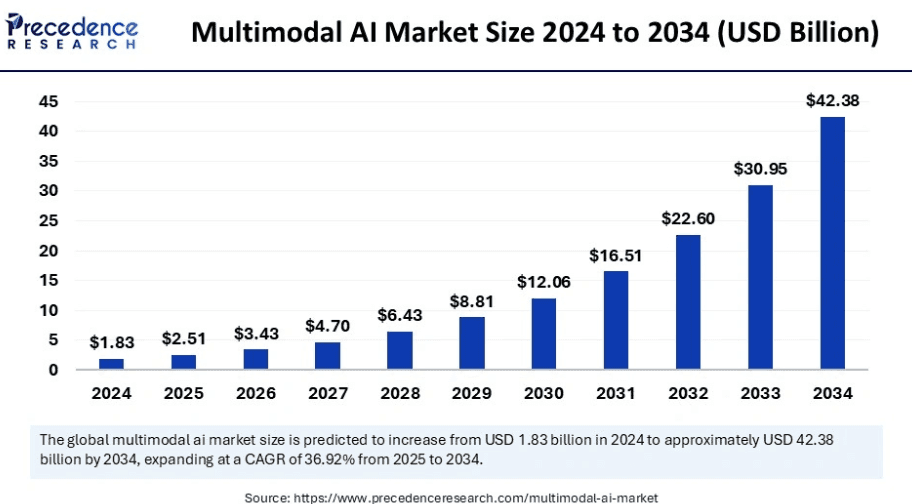
Multimodal AI market size | Source: Precedence research
But what's driving this high growth? Data diversity.
Data is becoming fluid, and so are documents. It's moving beyond PDFs/Word documents and including notes, images, and more. Companies don't want to lose out on any of this precious data.
Hemant Madaan, CEO, JumpGrowth, shares the key reason behind it. He says it transforms data processing by merging different types of information to provide a more nuanced understanding of complex situations.
For instance, Docxster can process both images and text. So, for a delivery confirmation in logistics, it can process both the image of the delivery parcel and the return slip. Combining both related text and image provides more context and reduces the chances of errors.
8. Document management support
While IDPs took care of document extraction/processing, they still missed the last-mile of automation: document management. Either it lacked storage completely or provided storage that was a chaotic collection of files. Organizing and searching documents becomes another task.
“Organizations needed systems that could not only find relevant information but also provide it in a format that LLMs could effectively use to generate accurate, contextual responses.” ~ Meghana Puvvadi, Director of AI/ML Enterprise, NVIDIA
AI-powered document management features are available in the next wave of solutions like Docxster. It can intelligently search documents not just based on their metadata but also their content. You can simply type a question and it goes through the document and gets you the answer. No need to scour through multiple folders to find the details.
9. Encrypted data security
India witnessed nearly 600 cases of cyberattacks during the first half of 2024 alone. No doubt, companies have privacy and security concerns with document processing/automation tools.
Greg Ives, Director of Product Marketing, Nutrient, says document data privacy is becoming an increasingly critical issue. It's particularly a concern in highly regulated industries such as finance, healthcare, legal, and government. You're dealing with sensitive data, and security is paramount.
Companies want solutions that can keep data encrypted both at rest (storage) and in transit (processing).
Document processing technologies, such as Docxster, offer cloud storage that's compliant with regulatory standards like GDPR and CCPA. You can stay assured that PII data is anonymized (transformed or removed). Documents are also encrypted during processing to prevent any breach attempts.
Checklist: "How ready is your organization for next-gen document processing?"
☑️ Are you using multiple tools for document processing? If yes, you're ready for consolidation.
☑️ Do your documents deviate from standard formats? Templateless extraction can handle the chaos.
☑️ Is your team spending hours on manual data entry? LLM-powered automation can cut that by 90%.
☑️ Are you avoiding cloud solutions due to security concerns? Look for GDPR and ISO certified platforms.
☑️ Does IT handle every workflow change? No-code builders put control back in business users' hands.
☑️ Do you process images, PDFs, and handwritten documents? Multimodal processing handles them all.
☑️ Are documents scattered across different systems? Integrated document management brings everything together.
☑️ Do you need human oversight for critical documents? HITL validation gives you the best of both worlds.
☑️ Are you concerned about data breaches? End-to-end encryption protects data at rest and in transit.
If you checked more than half these boxes, you're ready to move beyond traditional IDP to complete document automation.
Ride the next wave of document processing with Docxster
The next wave of IDP is actually ADP: Automated document processing. It combines high-accuracy OCR with workflows and LLM capabilities.
Docxster is an ADP platform that is in line with all the latest document processing trends maximizing efficiency.
Ready to see how Docxster can automate your document processing workflows?
FAQs: Document Processing Trends
What is the biggest trend in document processing?
The biggest trend is the shift from basic Intelligent Document Processing to fuller Automated Document Processing. Instead of only extracting data, newer platforms help map, validate, route, store, and integrate that data into downstream systems.
How are LLMs changing document processing?
LLMs help document processing systems move beyond rigid OCR and template-based extraction. They can understand context, extract fields from varied layouts, translate content, and summarize documents more flexibly than older tools.
What is templateless extraction?
Templateless extraction uses AI to identify and extract fields from documents without relying on fixed layouts. This is useful for unstructured or variable documents like invoices, contracts, prescriptions, reports, and PDFs that arrive in different formats.
Why are document processing platforms moving to the cloud?
Cloud-based platforms make it easier to run advanced AI and LLM-powered document processing without expensive on-premise infrastructure. They also help teams scale document workflows while relying on security controls like encryption, ISO compliance, and GDPR-ready processes.
Why are automated workflows important in document processing?
Data extraction is only one part of the process. Automated workflows make sure extracted data moves to the right systems, approvals happen on time, documents are stored correctly, and teams do not have to manually copy, paste, print, or chase updates.
What is human-in-the-loop validation?
Human-in-the-loop validation means a person reviews documents or fields when the system needs oversight. It is especially useful for critical documents, low-confidence extractions, or high-risk workflows where teams want automation without losing control.
How does no-code automation help document processing teams?
No-code automation lets business users build and update document workflows without waiting on IT. Teams can create steps for extraction, storage, approval, validation, and export through drag-and-drop workflow builders.
What is multimodal document processing?
Multimodal document processing means the system can understand different types of inputs, such as text, images, scans, handwritten notes, and supporting visuals. This is useful when a workflow depends on both document text and visual context, such as delivery confirmations or quality checks.
Why is document management becoming part of document automation?
Teams need more than extraction; they also need to store, organize, search, and retrieve documents easily. AI-powered document management helps users search by content, ask questions, and find information without digging through folders.
Why is data security important in document processing?
Document processing platforms often handle sensitive financial, legal, healthcare, customer, vendor, and operational data. Strong platforms should protect data with encryption at rest and in transit, access controls, audit trails, and compliance with relevant security standards.
Turn documents into decisions.
See how Docxster gets you from inbox to insight in minutes, not days. Bring your toughest workflow — we'll show you what it looks like solved.


