
Finance and operations teams have been manually processing documents for years. But they soon started feeling the heat of those processes.
Orders got stuck, payments were delayed, and ultimately, it eroded vendor and customer confidence in the long run. That’s one of the reasons why businesses adopted Optical Character Recognition (OCR)—but even that was automation half done.
A simple deviation in their document templates would cause the entire workflow to break. And then they were back to square one.
But in the past 10 years, technologies like artificial intelligence (AI) have taken the spotlight because it made our document workflows more “intelligent.”
In this article, we’ll cover how intelligent data extraction works, its benefits, and common use cases.
What is intelligent data extraction?
Intelligent data extraction is a process of extracting information from structured and multimodal data sources using AI.
The process takes advantage of natural language processing (NLP), deep learning (DL), and Visual Large Language Models (VLLMs).
The ‘intelligent’ part of it is that these models can understand the context of documents. So, it can read, interpret, and extract data from documents while understanding the context of it. As the extraction process is context-aware, the output’s accuracy is high.
What are the benefits of intelligent data extraction?
The shift from traditional OCR to advanced intelligent data extraction brings these benefits:
1. Fewer document processing delays or failures
Traditional OCR could only read documents to convert them into machine-readable text. To extract data from these documents, it depended heavily on templates. That means documents are boxed in formats, and if any party deviates from the format, then extraction fails. Deviations increase as businesses scale and more parties come into the picture. It becomes tough to enforce formats. We spoke to Nikita Sherbina, Co-Founder & CEO at AIScreen, who says that around 20-25% of documents deviate from formats at their organization.
The shift to intelligent data extraction becomes necessary with scale to prevent frequent document processing failures.
2. Lower operating expenses
Using traditional OCR for data extraction has a significant labor cost. You need to hire skilled engineers to build and maintain templates. Hiring even one ML engineer would cost close to $50,000 (USD) in India.
On the other hand, AI-powered data extraction tools offer subscriptions at an affordable rate.
For example, you can get a yearly subscription to Docxster, a no-code document processing platform, for $450. You won’t need engineering support for basic workflows as you can build them using a drag-and-drop interface.
3. Faster onboarding/changes with Anybody Can Do Automation
Onboarding any new vendor now needs a lot of prep work for companies. Think of creating new document templates in line with the new vendor’s document formats. This prep requires considerable back and forth with developers.
Intelligent data extraction platforms also come with a no-code interface, promoting ‘anybody can do automation’. That means you can get new document processing workflows out yourself without depending on any developers.
It speeds up onboarding new vendors or accommodating any document changes. Instead of following up with developers, you can make the change yourself.
4.Centralized data to support business decisions
Traditional OCR only worked better with structured documents that stuck to a rigid format. But 90% of the organization's data is still unstructured.
Intelligent data extraction can handle the previously impossible document types—handwritten, unstructured, and complex tables.
With the ability to process all types of documents, you get a centralized and complete dataset to draw better insights and make more accurate business decisions.
For example, you’ve purchase orders delivered as images, PDFs, scanned documents, word documents, handwritten notes, and free-form emails. Intelligent data extraction helps to process all these orders and bring them into a central ERP. You can use this ERP data to make business decisions, such as inventory or shipment planning.
You can also process the data and bring it into a centralized cloud database. For example, Docxster enables you to export all processed data to Docxster Drive.
5. Proactive compliance monitoring
Compliance documents are not always in structured formats. Think of inspection records, maintenance receipts, etc. Manually reviewing these unstructured documents is time-taking.
Processing these documents is also tough, as traditional OCR isn’t capable of handling them. The processing workflows often need human review to ensure the data captured is right.
Abid Salahi, Co-founder & CEO, FinlyWealth, says we rely on automation to streamline document processing, minimizing manual work and reducing errors.
“Currently, less than 10% of our team's time is spent on manual data extraction, thanks to AI-driven tools that handle document classification and data entry. The biggest sources of delays are invoices, bank statements, and compliance documents, which often require verification and reconciliation. Automating these processes has significantly improved efficiency, allowing our team to focus on higher-value tasks instead of repetitive paperwork.”
Extracting data from these documents needs an ‘intelligent’ approach. Intelligent data extraction can parse all types of documents and get into a centralized database for compliance and record-keeping.
6. More room for growth for businesses
Data extraction is a time-consuming task, blocking the bandwidth of skilled resources like operations team members, financial executives, and data engineers. The time they can use to do more business-critical work. Moving towards automation promotes company growth.
AI and automation soon won’t be a luxury for companies, says Docxster’s founder, Ramzy Syed.
"Imagine companies A and B doing a similar kind of business. Company A has already automated repetitive tasks, and Company B has not yet implemented any automation. Soon, it will hold company B back. When a new RFP is issued, their hands would be full even to apply. Because they didn't automate the busywork", he adds.
Leadership investing in AI and automation, like intelligent data extraction, is showing a growth mindset. The mindset that will help them scale the business.
7. Better utilization of high-cost talent
In a recent a16z podcast episode, Tristan Handy, Founder and CEO of dbt Labs, says that:
“If you create a list of tasks a data engineer does every day, and evaluate which one of these things that highly trained, highly paid human beings should be spending their time on? You’ll find a lot of things that they shouldn’t. Data engineering tasks have a lot of automation scope.”
Involving data engineers for building simple data extraction workflows isn’t a good use of high-cost talent. But traditional OCR would get skilled data engineers in the loop of building/maintaining templates.
Platforms with IDE help business teams to build/manage simple workflows and involve data engineers where their expertise is truly required.
How does intelligent data extraction work?
Let’s say you want to extract data from a purchase order. An intelligent data extraction tool completes the processing in these steps:
- Source data connection: At first, it connects with data sources. Most tools come with built-in connections, which means you don’t need to do any coding to connect with the source. For example, Docxster has an in-built connection with email and Google Drive, allowing you to easily purchase orders from these sources.
- Pre-processing: After connecting with the source and identifying documents, the tool does any pre-processing on the document, if required. The pre-processing would be cropping, straightening lines or text, or rotating images. If you have a poorly scanned image of a handwritten purchase order. Docxster can preprocess it to improve image clarity.
- Data ingestion: Once the pre-processing is done, the tool understands the document data using natural language processing and large language models. After it gets the context, it extracts the information you need.
- Basic transformations: The tool also handles any transformation you may need on the required data. For example, if the purchase invoices have dates in DD/MM/YY format and you want them in MM/DD/YYYY format, you can set these transformation rules in the tool.
- Validation: The tool also helps you handle any validation to ensure no wrong data enters the final database or triggers wrong processes. For example, if your purchase order has a product SKU but not the quantity, Docxster can trigger an alert while processing to check with the buyer.
- Export: The validated data is then exported to the target database for centralized storage or processing. For example, Docxster can automatically export processed purchase order data to ERP or Docxster Drive.
What are the use cases of intelligent data extraction?
Intelligent data extraction has use cases in many industries, particularly manufacturing and shipping. We’re listing some top use cases of it:
Purchase order and invoice management
Businesses continue to process purchase and invoice orders manually creating room for errors.
A few have moved to OCR to process invoice orders. But even that process is ineffective.
When your business grows, more vendors get involved, enforcing templates becomes increasingly challenging. One vendor changes ‘Purchase date’ to ‘Order date’, and the OCR extraction process fails.
Intelligent document processing platforms like Docxster integrate with Gmail, WhatsApp, or scanner hardware to read documents. It scans orders/invoices, pulls out necessary information, and automatically moves it to Enterprise Resource Planning (ERP) systems for processing.
Intelligent data extraction can handle both scale and variety of formats that new vendors share.
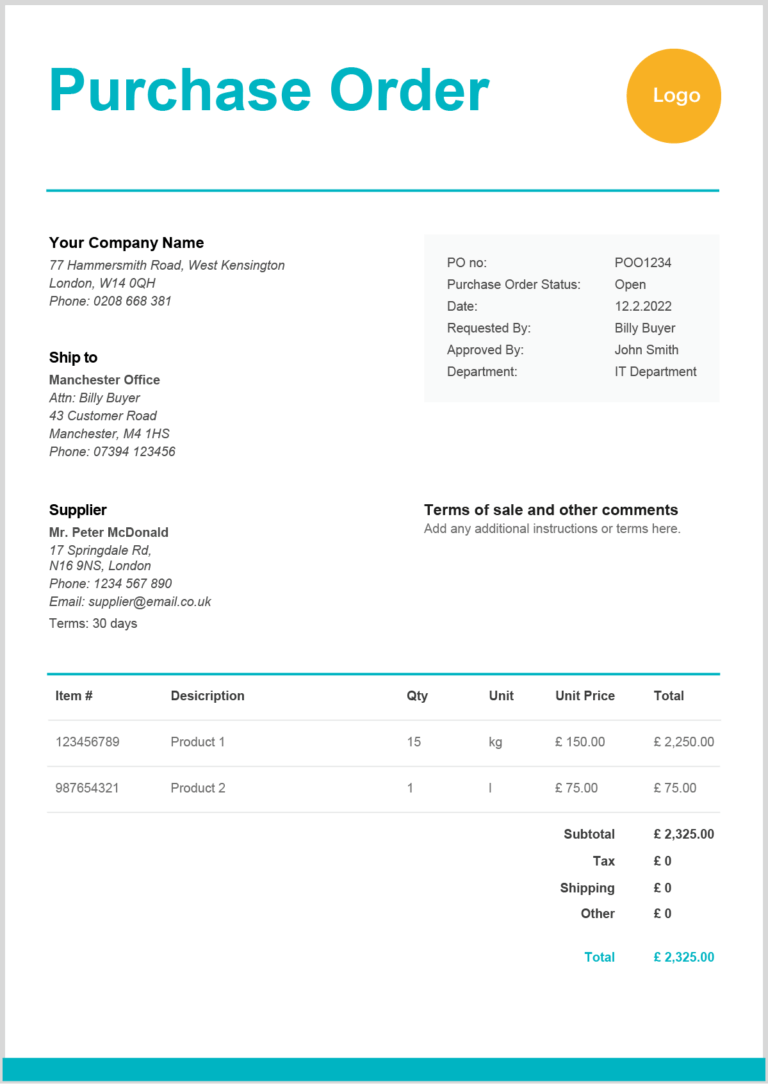
Sample purchase order | Source: Zervant
Shipping documents management
Based on purchase orders, you need to generate/review the next set of documents:
- Packing list
- Bills of lading
- Commercial invoice
- Proforma invoice
- Dangerous goods declaration
Currently, the process is often done manually, increasing the risk of errors and shipments getting stuck.
If at all the documents are generated using any form of document automation, the review part still remains manual. The potential of mistakes slipping through cracks remains.
Automated document processing platforms like Docxster not only automate the data extraction but also the review process. You can extract information from the right source documents to create supplementary shipping documents.
You can also add an automated review step to cross-check shipping documents, such as the packing list, commercial invoice, and proforma invoice data, with the purchase orders. This review will ensure shipments are correct and improve operations/end customer experience.
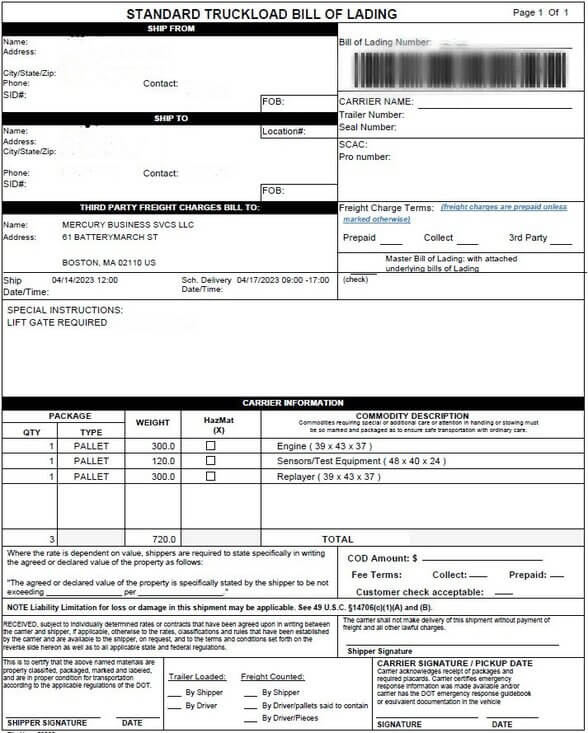
Sample bills of lading | Source: Mercury
Quality and compliance documentation
Quality and compliance documentation like inspection documents, maintenance come in varied forms—paper forms, handwritten notes, log books. Traditional OCR was never enough to handle these documents. Businesses had no option but to involve their team members for manual data entry.
Intelligent data extraction platforms like Docxster allow you to process documents of varying formats. This process helps you with record-keeping and prevents any loss due to non-compliance. This is a huge benefit considering 85% of companies in the global trade have faced some business loss due to non-compliance—and one of the reasons is that the data doesn’t match between documents.
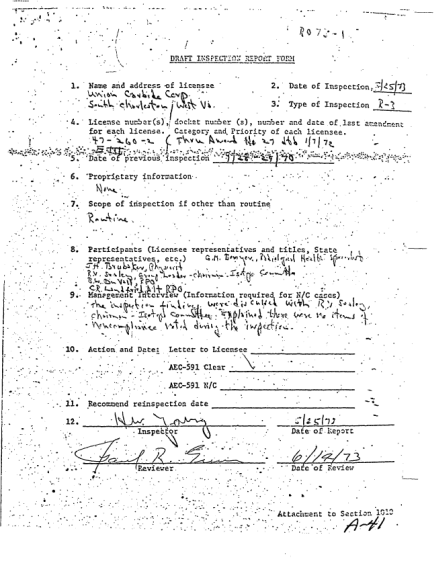
Sample inspection document | Source: Cocodoc
It’s time to use an intelligent data extraction platform—and make your data actionable
Traditional tools aren’t mature enough to handle scattered data across unstructured documents, images, PDFs, handwritten notes, and more. Missing out on this data means missing key insights.
Docxster is an automated document processing platform that doesn’t rely on brittle, rule-based extraction. Instead, it uses layout-aware LLM pipelines that intelligently understand the structure and context of each document—even scanned images or handwritten forms.
Business users can define what to extract, and the system figures out how—no training or templates required.
Book a demo to improve your data extraction workflows.


Get Document Intelligence in Your Inbox.
Actionable tips, automation trends, and exclusive product updates.