

-
13 min read
How Templateless Extraction Solves Today’s Document Processing Challenges
Are template-based document processing tools slowing your business down? Learn how templateless extraction fixes this issue.
Last updated:

TL;DR
Template-based extraction breaks the moment invoice formats change, forcing teams back into manual work and stalling workflows.
Templateless extraction uses AI to interpret documents by meaning and layout—so it keeps working across new vendors, complex tables, handwriting, and multi-page formats.
For manufacturing and logistics teams, templateless extraction reduces IT dependency, lowers total cost of ownership, and delivers faster time-to-value than template projects.
Modern “one-pass” extraction combines OCR + layout + AI in a single step, improving field accuracy and reducing processing and maintenance overhead.
Templateless extraction is the foundation for scalable automation: ingest → extract → validate → route → export, with humans reviewing only low-confidence exceptions.
You’re trying to process a new invoice, but the system doesn’t recognize it. The template doesn’t match. The workflow stalls. What should be routine now demands manual work.
I hear this often from finance and operations leaders. The problem isn’t a lack of automation. It’s that most tools still depend on templates, and those templates break the moment formats change.
When that happens, the impact is clear: invoices are delayed, purchase orders stall, and compliance documents start piling up.
This guide shows why templates no longer work, and how templateless extraction helps manufacturing and logistics teams scale.
What is templateless extraction?
Templateless extraction is the ability to capture and process information from any document format without creating predefined templates. It uses AI to recognize patterns, interpret content, and adapt instantly to new layouts, even when data is unstructured or presented in different ways.
If you’re managing a high document volume every month, this means you can process documents without worrying about creating new templates for new document formats. As a result, you don’t have to deal with unnecessary delays in the long run.
Information moves from document to workflow immediately, so teams can focus on resolving exceptions, meeting deadlines, and keeping operations running smoothly.
Here’s a glance at the difference between template-based extraction and templateless:
| Template-based extraction | Templateless extraction |
Setup | Requires manual template creation for each document type | No setup required, adapts to new formats automatically |
Flexibility | Stops working if layout changes | Continues working even if layout or format changes |
Scalability | Slow to expand to new document types | Scales instantly to any document source or format |
Maintenance | Requires ongoing updates | Learns and adapts with minimal intervention |
Speed to value | Weeks or months to implement changes | Immediate deployment and results |
Best for | Standard document formats with no variation | High-volume, varied, and evolving documents |
Why template-based extraction doesn’t work anymore
Before I go into how templateless extraction works, let’s see why template-based extraction is not the right move for businesses anymore:
Hardcoding templates slows you down and doesn't scale
You’ve probably been in the industry long enough to see how hardcoding was the norm. For many teams, the mix was predictable, so rule sets on top of OCR did the job with reliable extraction and low variance. That was the norm because it was clear, testable, and easy to govern.
As volumes and partners grew, the picture changed. The more document types you add, the harder it gets to maintain hardcoded rules. In manufacturing and logistics, where invoices, POs, delivery notes, and customs forms vary by vendor and region, the maintenance load compounds.
And what happens then? Well, the time that should go to exceptions and approvals gets pulled into template adjustment.
Uber’s invoice processing relied on rule-heavy workflows that were difficult to scale and limited efficiency. That is when they decided to move to a Gen-AI powered approach. This approach for invoices helped Uber double throughput, cut handling time by about 70 percent, and deliver 25 to 30 percent cost savings, while improving data accuracy using AI models like GPT‑4 and more.
Companies like Uber are making this shift because hardcoded templates slow teams down and do not scale when document variety is the default.
Template-based tools break with complex layouts and vendor document changes
Template-based tools expect documents to follow fixed, predictable layouts. But in reality, in finance or manufacturing, layouts vary by vendor, change often, and include tables or notes templates can’t handle.
In fact, Elmo Taddeo, CEO at Parachute has seen this play out across multiple industries. He says:
“A significant percentage of documents don’t fit standard templates. Forms with handwritten notes, unique customer requests, or industry-specific compliance documents often require manual processing. A rough estimate from speaking with business leaders suggests that anywhere from 20–40% of documents fall outside standard formats.”
— Elmo Taddeo, CEO at Parachute
When as much as 20–40% of your documents cannot run through the standard template, the system you set up stops delivering consistent results.
Instead of just passing through, your documents pile up and your team has to come in and go back to manual data entry processes. So, instead of seeing the “gains” that automation promised, they’re back to square one.
Template-based tools can’t adapt to seasonal spikes
Templates use pre-defined rules. Teams must test, validate, and deploy them before processing new documents. When demand suddenly surges, there is no quick way to adjust those rules without pulling in IT, making changes, and running the whole testing cycle again.
You have probably seen this play out. I’ve too. I’ve been with teams sized for regular volumes when a seasonal rush, a new vendor, or an unexpected backlog hit. What was once a manageable pace quickly tipped into something harder to control, and the tools in place simply couldn’t adjust fast enough.
The team size you have for regular volumes can’t handle a sudden spike—and it doesn’t make sense to hire people just for one month. The costs add up and hiring is a whole other challenge of its own.
Without automation that adapts in real time, the extra work lands on the same shoulders, and even the most efficient process starts to fray.
Cost-effective AI means templates are now obsolete
I came across a thread on Reddit that summed up one of the biggest challenges with document processing:
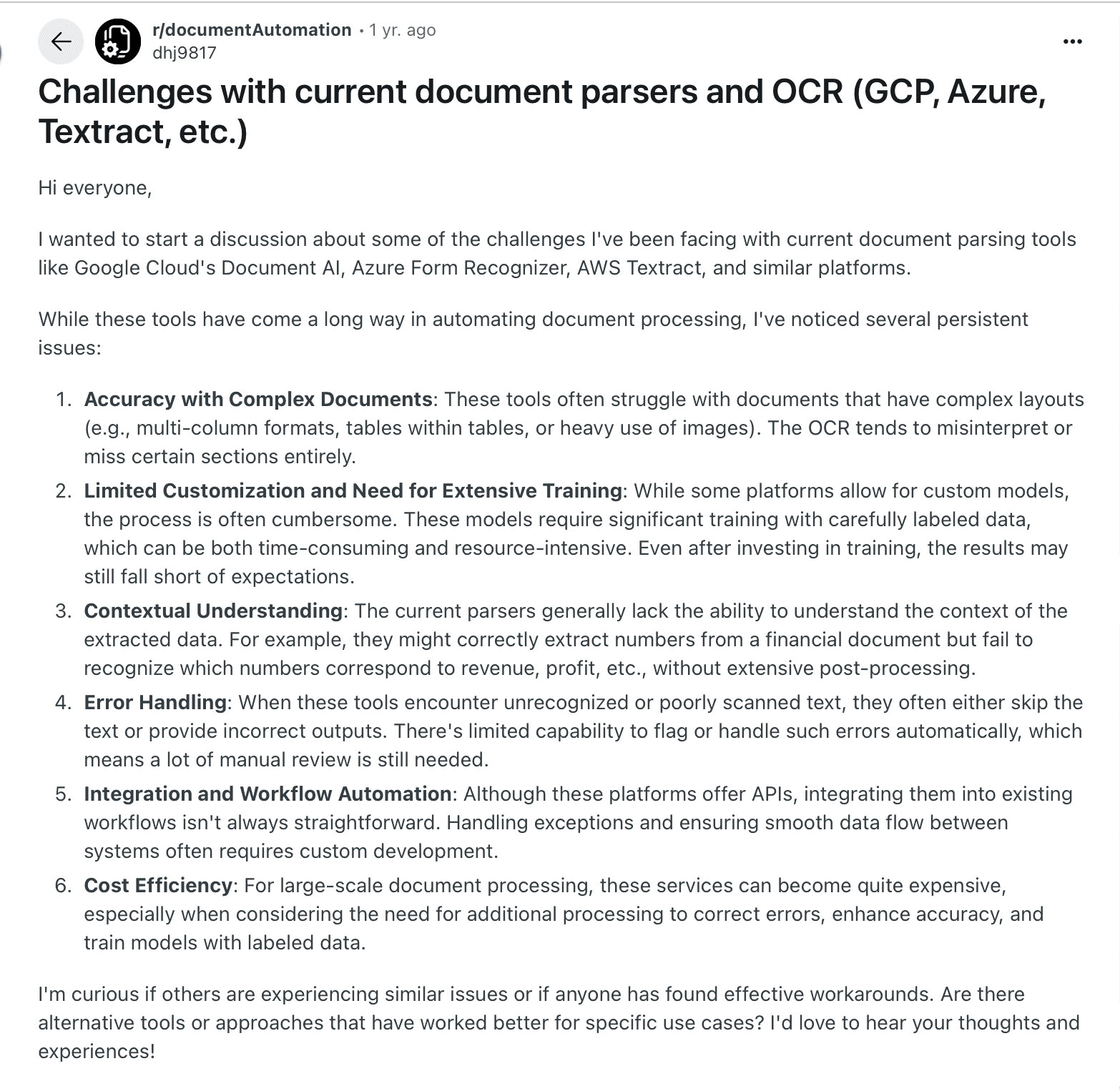
That used to be the reality. The good news is, the cost of extraction has dropped significantly, even in developing countries. I’ve seen AI-powered solutions become affordable enough that teams no longer have to weigh the price of automation against the cost of doing it manually.
This changes the equation completely. Template-less, AI-powered extraction is now not only faster and more accurate, but also cost-effective.
When you don't have to worry about the steep cost of extraction anymore, it doesn't make sense to invest in template-based tools anymore. The lower costs and higher flexibility brings your organization into the future.
How templateless extraction helps manufacturing and logistics companies
I’ve been talking to finance and manufacturing leaders over the past few months. Their top challenge is coping with changing document volumes.
At Docxster, that’s why we built templateless extraction into our platform. Here’s how it helps:
Reduces the need for IT intervention in daily operations
I’ve seen how frustrating it can be when your IT team has to step in for something as routine as processing a new vendor’s invoice.
In a template-based setup, any change to the format means someone needs to create or modify a template, write the code, and test it before the process can run again. If that vendor later upgrades their software, the format changes and you’re back to the same cycle.
This is where templateless extraction helps. It adjusts to new formats automatically, keeping your operations running without waiting for IT to reconfigure templates. Onboarding vendors is quicker, workflows stay uninterrupted, and your team can focus on approvals, payments, and production schedules.
That’s the kind of continuity most leaders expect when they first invest in digitization, and it’s exactly what templateless extraction delivers.
Reduces the total cost of ownership (TCO)
Variability in document formats doesn’t just slow things down—it quietly eats into your budget. Every time a new layout arrives, you’re effectively paying for time spent updating templates, re-testing tools, or even hiring data science help to fix the gaps.
I’ve heard it put bluntly before: “A normal IT team can’t handle that… we used to need data scientists for this—and they cost a lot.”
That cost disparity matters. Data scientists in India, for example, earn around ₹11 lakh per year, with top professionals making upwards of ₹21 lakh annually, while in the U.S., the average data scientist salary can approach $156,000 annually.
Now, think about what happens when you remove that need. Such drastic drops in manual effort mean lower staffing costs and fewer errors to reconcile.
Faster time to value
Traditional document extraction projects can drag on for weeks, sometimes months, because teams spend so much time creating and testing templates. Every new layout adds more rework before the system is even usable. With templateless extraction, that delay disappears.
Earlier, models had to be trained for three to four months before teams could see results. Now it’s just a simple workflow you need to build, which makes implementation much faster and far less resource-intensive.
At Docxster, we’ve seen how modern AI no longer runs OCR, layout, and interpretation as separate steps.
Previously, OCR would read documents line by line. Then layout would break the page into blocks so OCR could work section by section. Finally, intelligence would interpret what those blocks meant before giving you the output.
Now, all of that happens in one step—the extraction step. And because intelligence is built in, the platform not only pulls the data but also understands the context behind it.
Want to understand the difference better? Here’s a table comparing both:
Regular OCR | OCR + Layout + AI (Templateless) |
Reads text line-by-line from left to right. | Breaks the document into structured blocks before reading. |
Can mix up fields when values are positioned side-by-side. | Maintains spatial context, knows which data belongs in which section. |
Requires separate steps for OCR, layout detection, and data interpretation, increasing time and cost. | All steps happen together in one pass, reducing processing time and cost. |
Struggles with complex layouts, invoices, or mixed content. | Handles any layout instantly, even unseen formats, without new templates or model retraining. |
Future-proofs your document stack
What I’ve seen with templateless extraction is that once it’s in place, your document stack doesn’t need to be rebuilt every time something changes. The system is AI-native, which means it can take on new formats, additional languages, and more complexity without extra engineering effort.
For manufacturing and logistics leaders, I’ve seen this matter most when companies expand into new markets, try to digitize years of old paperwork, or connect with global systems. With templates, that usually means redesigning the stack again and again.
With templateless extraction, the stack you build once is ready to handle those changes without extra effort.
How Docxster helps with templateless extraction
At Docxster, we’ve worked to make templateless extraction easy for manufacturing and logistics teams.
Here’s how it works in high-volume environments where accuracy, speed, and flexibility are critical:
Document ingestion: You upload the invoice (or purchase order, bill of lading, even a handwritten note). Any format works.
OCR + Layout detection + AI in one pass: The system reads, structures, and interprets the invoice in a single step. Side-by-side fields and complex tables stay intact, so nothing gets lost.
Automated field mapping and validation: Docxster automatically picks up fields like PO number, tax, and totals, then validates them against your ERP. A human only steps in if confidence drops.
Workflow automation: Once validated, the invoice data moves directly into your accounting system for approval and payment.
Making the shift from template-based to template-less document extraction
For years, template-based extraction was the standard. It worked when document formats stayed predictable, but that’s no longer the case. Vendors use different platforms, rules keep shifting, and formats change faster than templates can keep up.
That doesn’t mean your business should carry the cost of outdated systems. Templateless extraction keeps processes running smoothly, no matter the document type or format.
We built Docxster on this principle. Our goal is to make digital transformation practical and achievable, one workflow at a time.
Ready to see templateless extraction action?
FAQs: Templateless Extraction for Manufacturing & Logistics
1. What is templateless extraction?
Templateless extraction is a way to capture data from documents without building predefined templates for each layout. It uses AI to recognize patterns and understand context, so it can extract fields even when formats change.
2. Why do template-based extraction tools fail in real operations?
Templates assume documents stay consistent, but vendors and partners change layouts all the time. When labels move, tables shift, or formats vary by region, the template no longer matches and the workflow stalls.
3. What types of documents benefit most from templateless extraction?
It’s best for high-volume documents with constant variation—vendor invoices, purchase orders, bills of lading, customs forms, delivery notes, and compliance paperwork. Anywhere layout changes are normal, templateless extraction reduces breakage.
4. How does templateless extraction help during seasonal volume spikes?
When volume spikes, teams can’t afford a template rebuild cycle. Templateless extraction keeps processing new formats automatically, so the backlog doesn’t explode and your team only steps in for true exceptions.
5. Does templateless extraction reduce the need for IT involvement?
Yes. Instead of asking IT to update templates for every vendor change, templateless extraction adapts on its own. That keeps workflows running and lets IT focus on higher-impact projects instead of constant maintenance.
6. How does “one-pass” extraction differ from traditional OCR?
Traditional setups often split OCR, layout detection, and interpretation into separate steps, which increases time and failure points. One-pass extraction combines OCR + layout + AI interpretation together, so side-by-side fields and complex tables are handled more reliably.
7. Is templateless extraction accurate enough for invoices and compliance documents?
It’s designed for accuracy because it uses context to understand what a value represents, not just where it appears. Most teams pair it with automated validation and a human-in-the-loop step for low-confidence fields to keep risk under control.
8. How does templateless extraction lower total cost of ownership (TCO)?
It reduces ongoing costs tied to template updates, retesting, and engineering support every time a format changes. Over time, fewer failures and less manual rework also cut indirect costs like delays, missed payment terms, and escalations.
9. What does a typical templateless workflow look like end-to-end?
A common flow is: ingest documents → extract fields → map fields to your ERP schema → validate (rules + confidence scoring) → route for approval if needed → export to ERP/accounting/TMS. Humans review only exceptions instead of every document.
10. How do teams transition from template-based extraction to templateless?
Most teams start with one workflow (like invoices), run it alongside the existing process, and expand once results are stable. Moving document types “one by one” reduces risk and helps teams adopt automation without disrupting operations.
11. What should I look for in a templateless extraction platform?
Prioritize strong handling of tables and complex layouts, handwriting/scans, automated validation with confidence scoring, human-in-the-loop routing, integrations/exports to your systems, and enterprise security (encryption, audit trails, compliance).
Turn documents into decisions.
See how Docxster gets you from inbox to insight in minutes, not days. Bring your toughest workflow — we'll show you what it looks like solved.


