-
What is Intelligent Document Processing and Why It’s Not Enough Anymore
Tired of manual data entry and template-based document processing? Learn how IDP uses AI to extract data from any document type with 90%+ accuracy.
Last updated:



TL;DR
Template-based OCR tools are brittle and expensive because every document variation becomes a mini engineering project. Instead of your workflows getting smarter, your team ends up constantly maintaining templates and patching failures when formats change.
Intelligent Document Processing (IDP) uses AI to read, classify, and extract data from documents—whether they’re structured, semi-structured, or fully unstructured. The goal is simple: stop forcing documents into rigid formats and let the system adapt to real-world variability.
IDP as experienced an evolution in “waves,” moving from basic OCR to rules/templates, then ML/NLP, and now LLM-powered systems that can handle new document types with far less setup. This newer approach supports “citizen automation,” where non-technical teams can build and change workflows without heavy IT involvement.
Practically, IDP can speed up processing, improve accuracy, reduce operating costs, and make compliance work less painful. It also helps teams make decisions faster by pulling the right data from invoices, BOLs, tax docs, and other paperwork in minutes instead of days.
Choosing the right IDP platform comes down to fit: extraction quality, integrations, scalability, and a no-code experience people will actually use. The guide also calls out common pitfalls—template dependence, too much human validation, security misconceptions, and adoption resistance—so implementation doesn’t stall out after the demo.
Traditional document processing tools that use template-based OCRs have always been a headache.
You have to set up rigid templates and tweak them every time your document format or type changes. It’s slow, expensive, and outdated.
The real question is: Why should your business have to adapt to technology instead of the other way around?
Documents come in all shapes and sizes, and forcing them into predefined templates doesn’t cut it anymore. That’s why you need to consider using intelligent document processing (IDP) tools.
In this guide, we’ll explain what IDP is, how it works, and how you can use it for document processing.
What is Intelligent Document Processing (IDP)?
Intelligent Document Processing (IDP) refers to the use of artificial intelligence (AI) and related technologies to read, understand, and process documents. It doesn’t matter if your document is structured or unstructured, the AI handles extraction and classification irrespective of format.
Instead of manually sorting through piles of paper or data, IDP tools do the heavy lifting for you. They extract data, classify them, and provide it in a standard format you can use later.
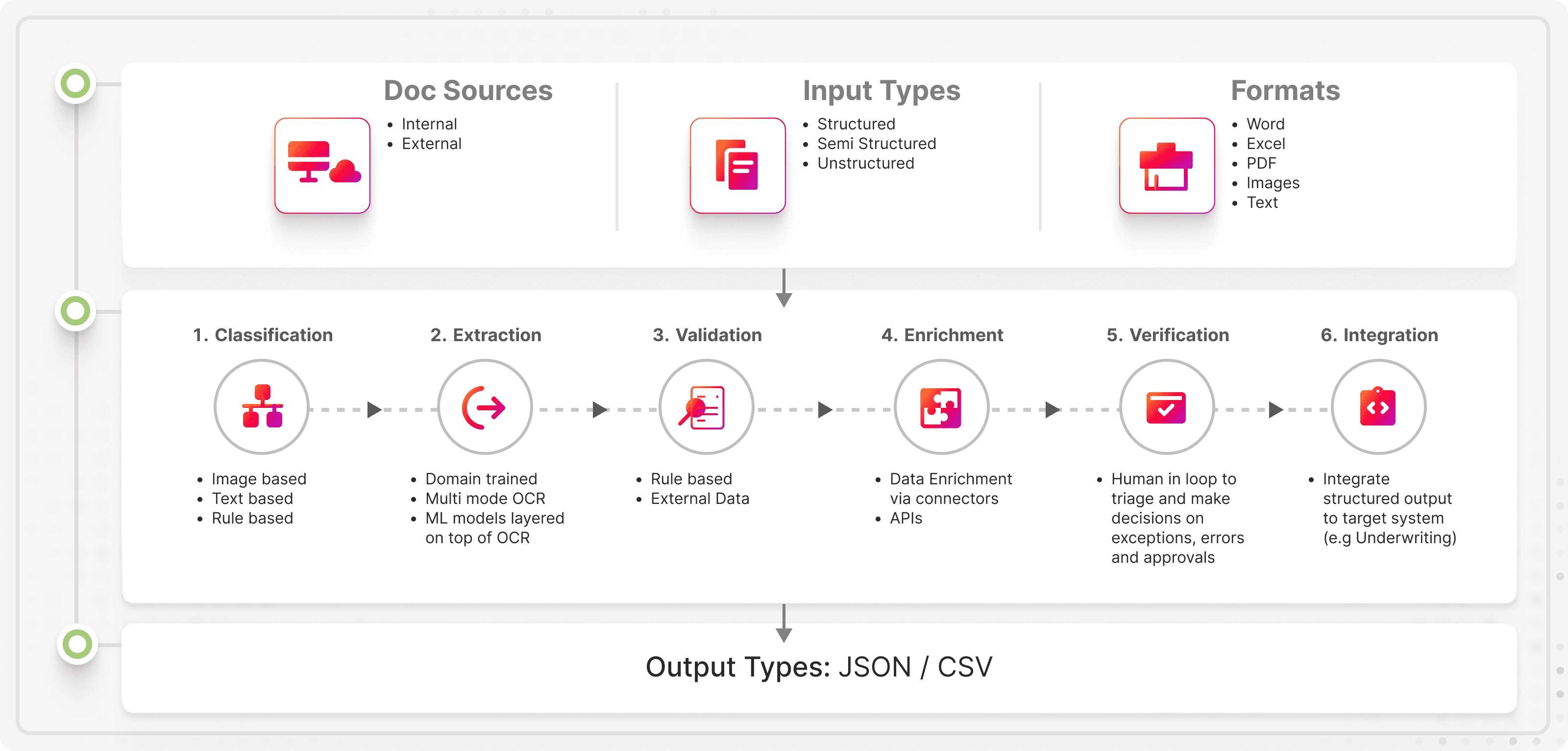
How did IDP evolve over time?
In a recent report, Dan Lucarini, a senior analyst at Deep Analysis mentioned that the fourth wave of IDP is here. Here’s how IDP has evolved over the years:
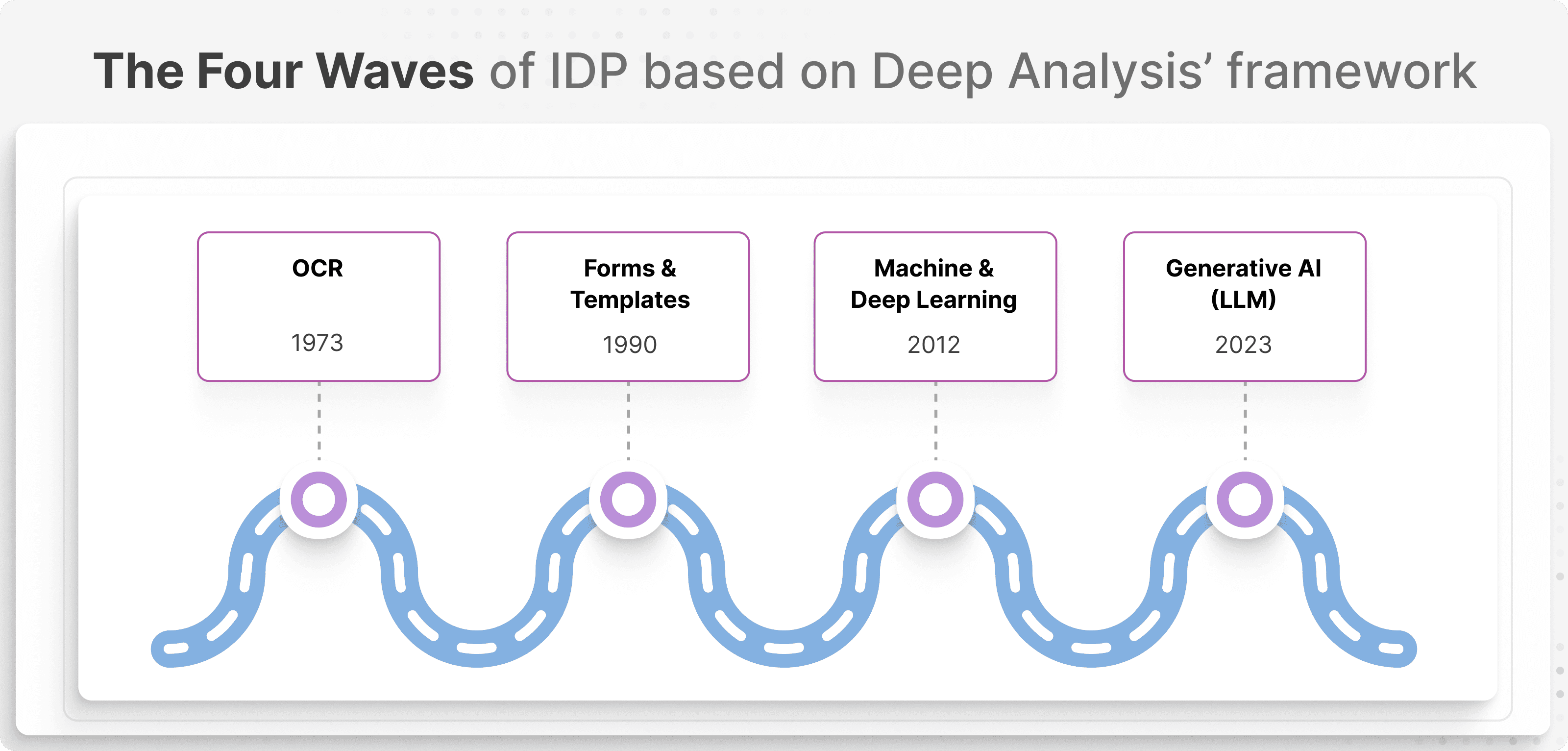
The four waves of IDP based on Deep Analysis’ framework
Wave #1: Basic OCR and document digitization
The first wave of IDP began with Optical Character Recognition (OCR), pioneered by Ray Kurzweil in the early 1970s. It was developed to assist visually impaired individuals. But over time it became a tool for businesses to digitize paper-based documents and convert printed text into editable digital formats.
It practically eliminated the need for manual data entry. But because it couldn’t understand different document types and had to rely on an internal database of characters, its use was limited.
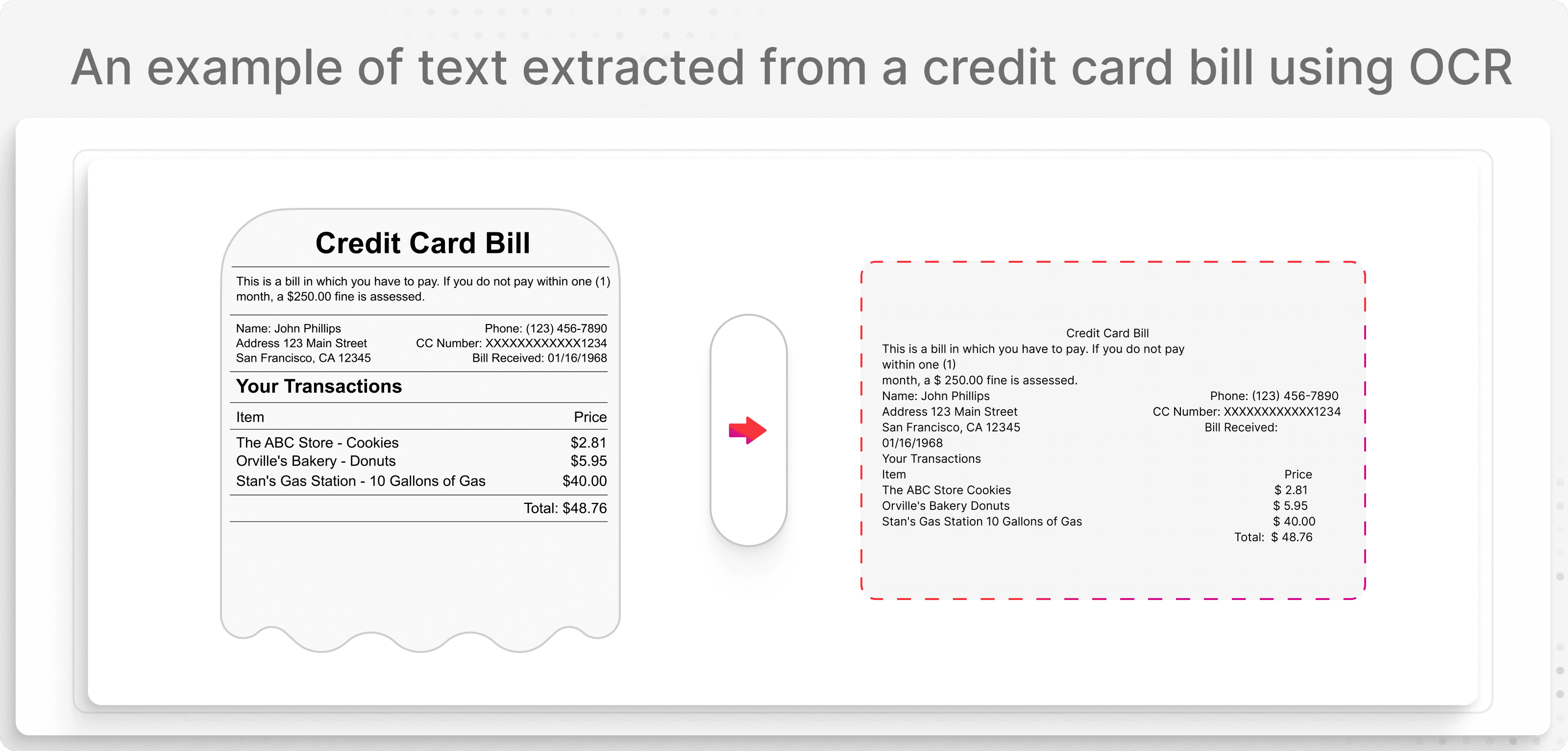
An example of text extracted from a credit card bill using OCR
Wave #2: Rule-based systems and template-driven document processing
As businesses required more structured document automation, rule-based IDP emerged.
This second wave started around the early 90s and now, software could process documents as long as they followed a specific template.
Here’s an example of a packing list that follows a specific structure:
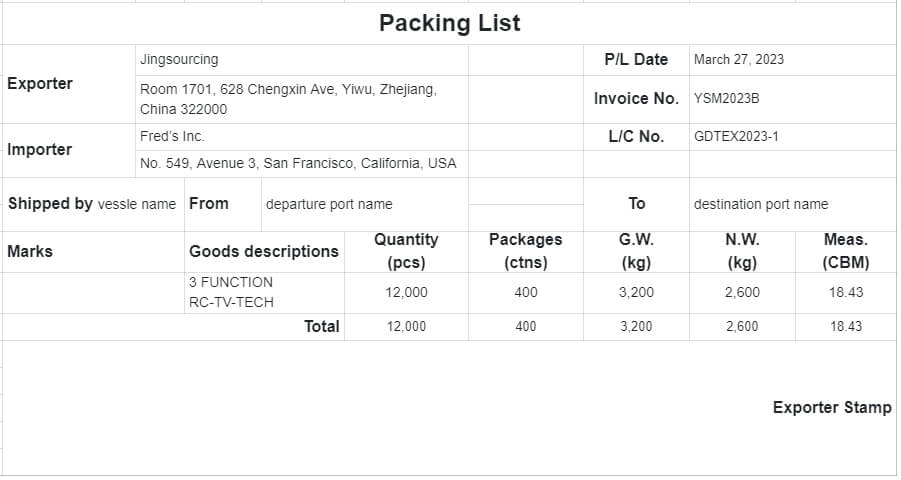
But this system struggled with even slight format changes. If a vendor adjusted the invoice document layout, the automation broke. Developers had to create document templates but many companies struggled to achieve a straight through processing rate of more than 50%.
Wave #3: Artificial intelligence and machine learning
The third wave transformed document processing with artificial intelligence (AI) in 2011. Related technologies like machine learning (ML) and natural language processing (NLP) allowed document processors to:
Recognize patterns in the document
Extract the meaning using NLP
Process unstructured data without templates
In addition, you could even layer in computer vision to identify additional elements like images, logos, and the like. So, we weren’t limited to text-based documents anymore.
Wave #4: Large Language Models (LLMS) with zero-shot learning
The fourth wave happened in August 2017 marks a fundamental shift. IDP is no longer dependent on templates, predefined rules, or even training samples.
Instead, LLMs like GPT-4 enable “zero-shot learning” as Lucarini puts it. Without prior exposure, AI can process different document types. This means AI can process a wide range of document types on the fly, without prior exposure.
With the advent of LLM and GenAI, not only has IDP become faster, cheaper and more versatile, it also brings with it a host of new applications and uses. New age IDP platforms using LLM and ML models can now facilitate "automate on the go" and 'citizen automation'. It's no longer necessary to hire an implementation partner or in-house IT team to build automations. It just needs any person from any team to have a little bit of enthusiasm to get started AND also scale.
— Ramzy Syed, Founder, Docxster
In short: we’ve moved from rigid, template-based systems that require IT support to AI-led document automation.
What are the benefits of IDP?
We’ve explained how IDP has changed and how we’re in the age of the LLMs, but how does it actually benefit your business? Here are a few advantages you can experience:
1. Accelerate processing efficiency
Time is money. Previously, you’d take days to process 100 invoices, but now that can be done in minutes.
Companies like FinlyWealth are already experiencing this benefit. They’ve automated their entire document workflow—so much so that they spend only 10% of their time on manual data entry.
The biggest sources of delays are invoices, bank statements, and compliance documents, which often require verification and reconciliation. Automating these processes has significantly improved efficiency, allowing our team to focus on higher-value tasks instead of repetitive paperwork,” explains Abid Salahi, co-founder and CEO of the company.
— Abid Salahi, Co-founder and CEO, FinlyWealth
2. Improve data accuracy
You don’t have to worry about the type of document or the format it uses. IDP platforms adapt to document variations and extract data with higher precision. So, there’s a lower likelihood of errors and you can further improve accuracy through additional validation measures.
Let’s say your team receives bills of lading (BOLs) from multiple carriers. A small typo in a cargo weight or container number could cause issues at customs or during shipping. But IDP scans each BOL, extracts critical data, and flags inconsistencies before they become a problem.
3. Dial down operational costs
IDP can help you save money by removing excessive manual work and improving data quality. Ryan Carter, founder and CEO of NetSharkx says he has seen enterprise companies reduce operational costs by 30%.
Enterprises I've worked with have achieved up to 30% savings by consolidating technology providers and optimizing their workflow through managed AI tools,” explains Carter. “Such concrete data illustrates the ROI and informs smart investment decisions, helping leadership buy-in for implementing new processes.
— Ryan Carter, Founder and CEO of NetSharkx
4. Speeds up compliance and audits
If you’re in a highly regulated industry or need to comply with certain industry regulations, your documents need to be up to date. An IDP platform can ensure that all required documents are captured, validated, and stored properly, reducing compliance risks.
Let’s say your team is handling tax reports for year-end reporting. Your IDP tool scans these documents for missing information, validates it against other relevant documents, and verifies if everything’s in order. Next thing you know, you’re audit ready.
5. Scales effortlessly with demand
Whether you’re a small business or a large enterprise, document processing needs may increase as your company grows.
A manual process or basic OCR system worked when you had 100 invoices a month. But when it’s 1000, 10,000 or 100,000? It won’t be sustainable because you’ll have to hire more staff. That’s not the case if you use an IDP solution. The platform simply processes documents as they come—round the clock.
6. Accelerates decision-making
When you process documents in real time, your team gets access to critical data instantly. You don’t have to wait for manual data entry or search endless PDFs. Faster data means faster decisions and a more agile business.
Imagine you’re a finance manager and a supplier’s invoice lands on your desk. Before you can approve it, you need to check if:
The invoice matches the purchase order
The goods were received and verified
The correct payment terms were applied
This means you’re chasing down emails, cross-checking spreadsheets, and waiting for different departments to confirm details. This could take days—or even weeks. IDP does that in minutes and you can get on with the rest of your day.
7. Enhances document storage and security
Manual document handling comes with risks. You can lose paper files, delete emails, or accidentally leak sensitive data. But the best IDP platforms come with built-in document storage. You can digitize, encrypt, and securely store documents in one place.
Say you’re in charge of tax compliance of your company. With IDP, you can categorize, encrypt, and store all tax documents in the cloud. It’s all securely organized and easily accessible.
8. Integration with existing business systems
IDP tools offer integration capabilities that work with the tools you already use. You won’t have to context switch between different tools because the IDP platform integrates with them or offers the option to directly import/export data
If your company uses SAP ERP to manage supplier payments. Your finance team manually enters invoice details into the system which eats into their day all the time. If you build a workflow which includes a step to push the data into SAP directly, your team just got hours back in their day.
What are the use cases for IDP?
Here are a few examples of document types you can process with IDP platforms:
1. Invoice processing
Invoice processing is a pain. A small error costs you your margins and messes with vendor relationships. Here’s how you can use Docxster’s IDP to extract data from them:
Upload your invoices or pull them from relevant sources
Capture key details like invoice number, supplier details, and payment amounts from scanned or digital invoices
Cross-checks invoice details with purchase orders (POs) and goods received notes to detect discrepancies
Use HITL automation to route documents to relevant stakeholders and review discrepancies
Push the validated data into your tool of choice (using integrations or APIs)
2. Bills of Lading (BOL) processing
If you’re handling freight, warehousing, or shipping, you’re probably dealing with BOLs. Different carriers use different formats so it’s hard to standardize the format.
Here’s how you process BOLs using Docxster’s IDP:
Upload your BOLs or pull them from relevant sources
Use AI to detect and extract critical shipment details
Flag missing or incomplete BOLs for quick human review
Push the validated data into your tool of choice (using integrations or APIs)
3. Customs documents processing
Customs paperwork is one of the biggest bottlenecks in global shipping. You can deal with issues like a missing tariff code, incorrect HS classification, or an unchecked declaration box that holds up shipments.
Here’s how you can process them using Docxster’s IDP:
Upload your customs documents or pull them from relevant sources
Extract critical details like consignee details, product descriptions, duty rates, and shipping values
Cross-check tariff codes and shipment values to flag compliance risks
Set up a workflow step to submit documents automatically to customs brokers and compliance teams
How does Intelligent Document Processing work?
IDP automates document handling, turning unstructured data into structured, usable insights—and it uses a ton of background technologies to do so.
Let’s look at how IDP works:
Step 1: Ingest documents without human involvement
The first step in IDP is getting your documents into the system. The IDP tool automatically ingests documents from various sources including:
Email
PDFs
Cloud storage
ERP systems
Scanners
You can either upload it manually or set up a workflow to automatically pull specific documents (either using the document title or email ID) to bring them into the system.
Step 2: Preprocess the documents to improve quality
Once the documents are ingested, the IDP tool performs preprocessing tasks before any text extraction can begin. Why? Because these steps ensure that the text in your documents is clearer and easier to read for the OCR system.
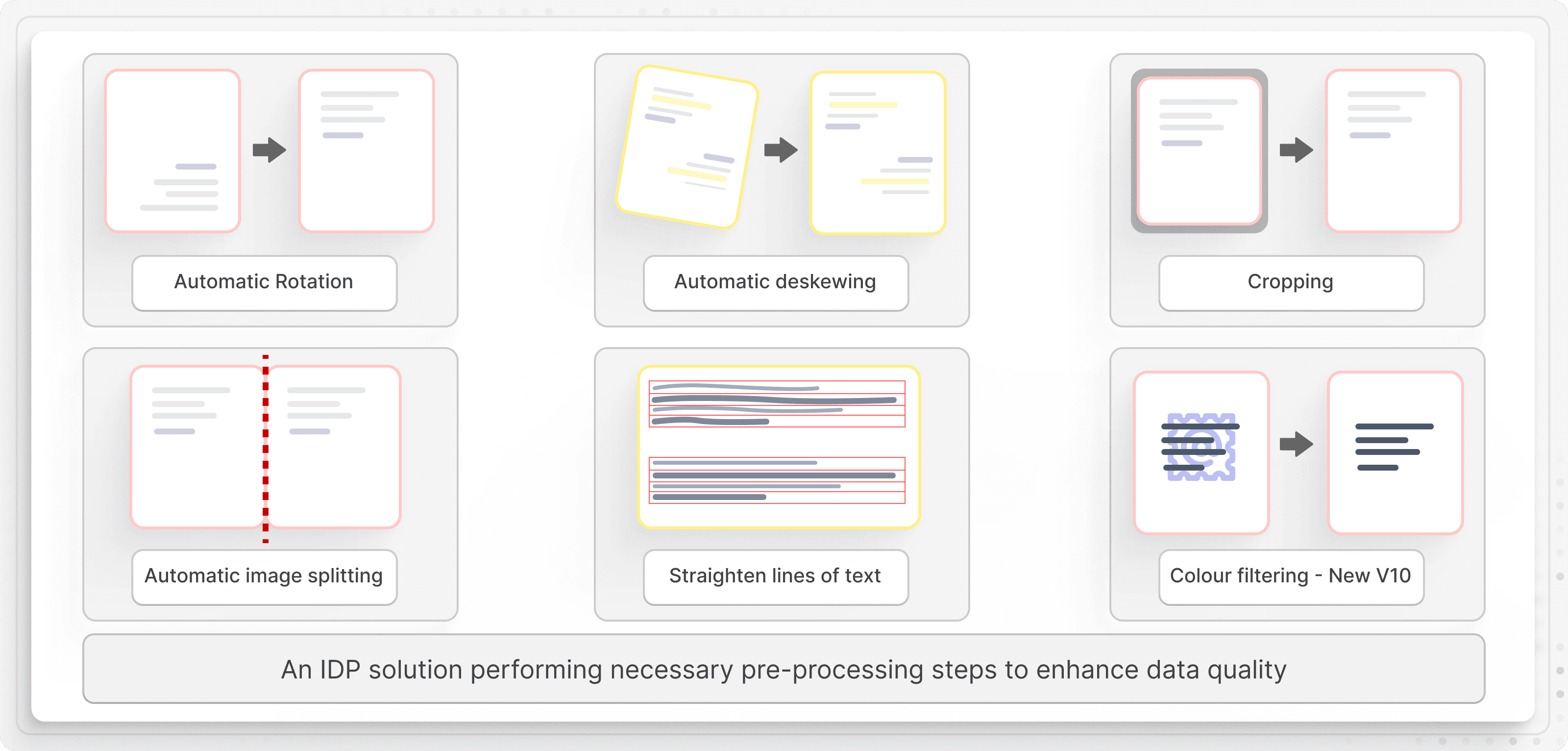
Here’s an overview of preprocessing tasks that improves the overall quality of your documents:
Noise removal: Ever noticed tiny specks, smudges, or dust marks on scanned receipts or contracts? These might seem harmless, but they can throw off the accuracy of your OCR. Noise removal techniques including Gaussian blur and median filtering clean up these distractions so the text stands out clearly.
Here’s an example of how denoising process removes distractions from documents:

Converting a dirty image into clean image using denoising technique
Binarization: Converts images to black-and-white and simplifies text recognition by improving contrast between characters and the background. Techniques like Otsu’s thresholding or adaptive thresholding are used in this step to differentiate text from non-text regions, reducing OCR errors.
Contrast & brightness adjustment: If your document is too dark, too bright, or just looks faded, OCR might struggle to pick up the text properly. This technique adjusts the contrast and brightness using adaptive contrast enhancement and makes your text crisp and readable.
Here’s an example of before and after of brightness adjustments in a document:

Adjusting the contrast and density of the document to improve text clarity
Dewarping & deskewing: If you’ve ever scanned an invoice and ended up with curved or slanted text, you know how frustrating it can be. Deskewing straightens tilted documents, while dewarping flattens out those curved lines so the text stays in its proper place.
Here’s how deskewing process aligns the text in a receipt:

Before and after images of a receipt being deskewed for better readability
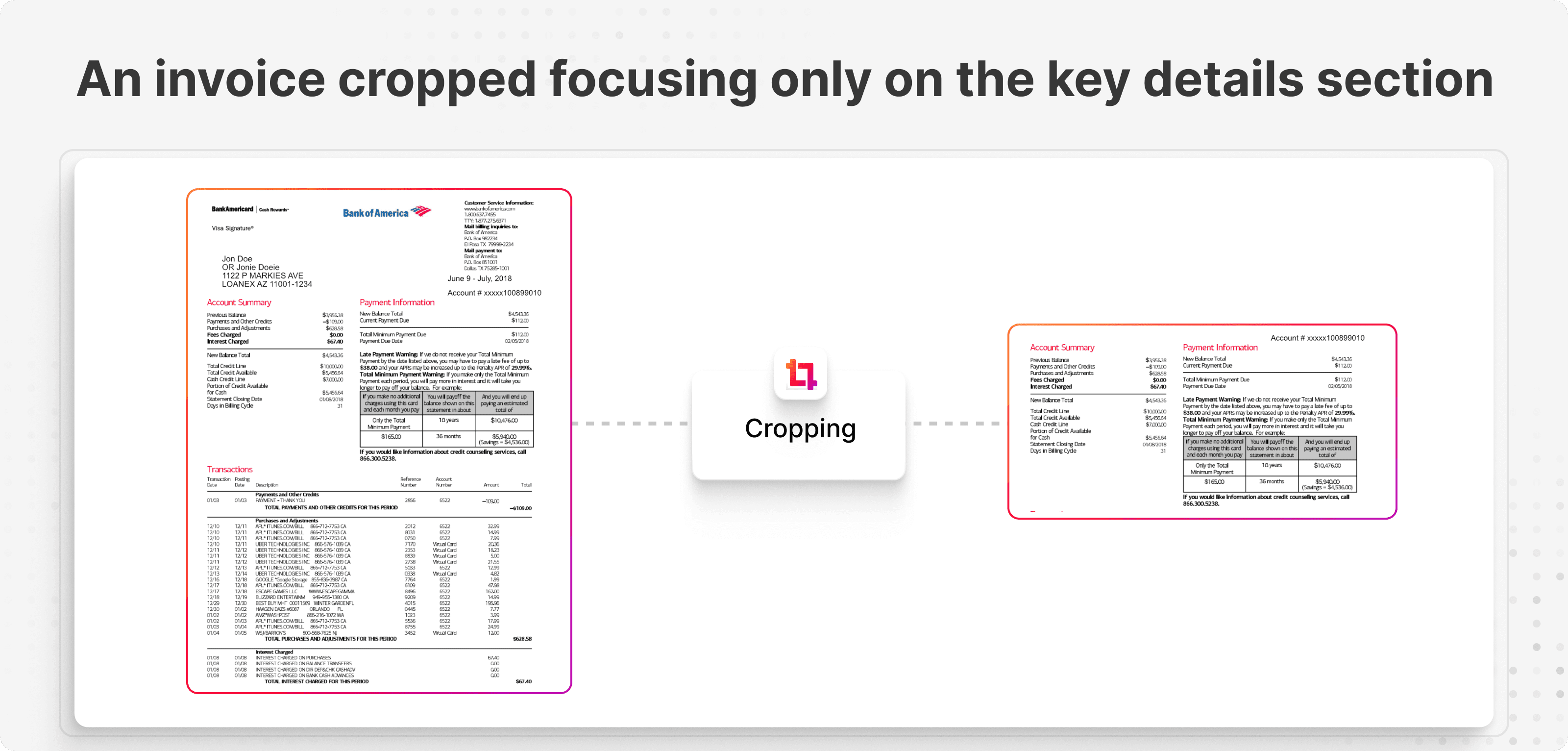
Edge & border cropping: Typically, you don’t need extra white spaces or black edges in your documents. That’s why automated cropping techniques trim away the unnecessary parts so your document looks clean and focused.
Step 3: Convert documents into machine-readable text
After preprocessing, OCR first starts with identifying the regions in the document that contain text. Here's how OCR goes about the whole process:
Layout analysis: OCR first analyzes the layout of the document. The technology identifies each component such as headings, paragraphs, columns and tables. If you’re processing invoices, the OCR locates the heading “X Invoice”, then individual lines such as dates, account number, and more.
Segmentation: OCR then identifies the boundaries of the text regions and separates them from non-text elements like images or graphics.
Pattern recognition: OCR uses pattern recognition and feature recognition algorithms to compare each letter or symbol in the document to a database of predefined patterns or templates.
Instead of relying on whole-character patterns, it breaks characters down into smaller features (example, lines, curves, and intersections). It then matches them to the databases and extracts the characters that are matched. For example, it will match the shape of the character in the image (like A or B) to a stored model.

Step 4: Extracts relevant data accurately
After OCR processes the text, the next step is to understand the content. It’ll first classify the type of document (invoice, contract, tax form, etc.,) and extract the relevant data fields (e.g., invoice number, amount, date).
This is where natural language processing (NLP) and computer vision technologies come into play.
Here’s how NLP models understand the context, structure, and semantics of your documents:
Tokenization: Tokenization breaks down text into smaller units called tokens (such as words, sentences, or subwords). This process splits continuous text into words or phrases to understand the meaning.

NLP algorithms splitting a sentence into words and subwords using tokenization technique
For example, if the invoice has a line, “The invoice for shipment is due in March 2025”, then the tokenized text would be “The”, “invoice”, “for”, and “shipment.”
Named Entity Recognition (NER): NER identifies and categorizes named entities in text such as person names, organizations, dates, or locations. The model scans through your invoice to identify specific words or phrases that are relevant entities. For example, when you're processing invoices, the potential entities would be:
Entity 1: DHL (Organization)
Entity 2: New York (Location)
Entity 3: March 15, 2025 (Date)
Part of Speech Tagging (POS Tagging): POS tagging assigns grammatical tags to each word in a sentence like noun, verb, adjective. This process determines the grammatical role of each token (word) in a sentence. If your invoice has a sentence like, “Invoice must be paid before 26”, then it would categorize invoice as Noun, paid as verb and so on.
Sentiment analysis: Sentiment analysis determines the emotional tone of a piece of text (positive, negative, or neutral). The model uses words and context to classify the sentiment of the text.
Complex documents don’t arrange the text in a linear fashion. You’d need to extract data from visual elements as well. This is where computer vision helps. Look for and segment visual components like tables, forms, signatures, images, and logos. And then the convolutional neural networks (CNNs) identify these regions and extract line items and other data accordingly.
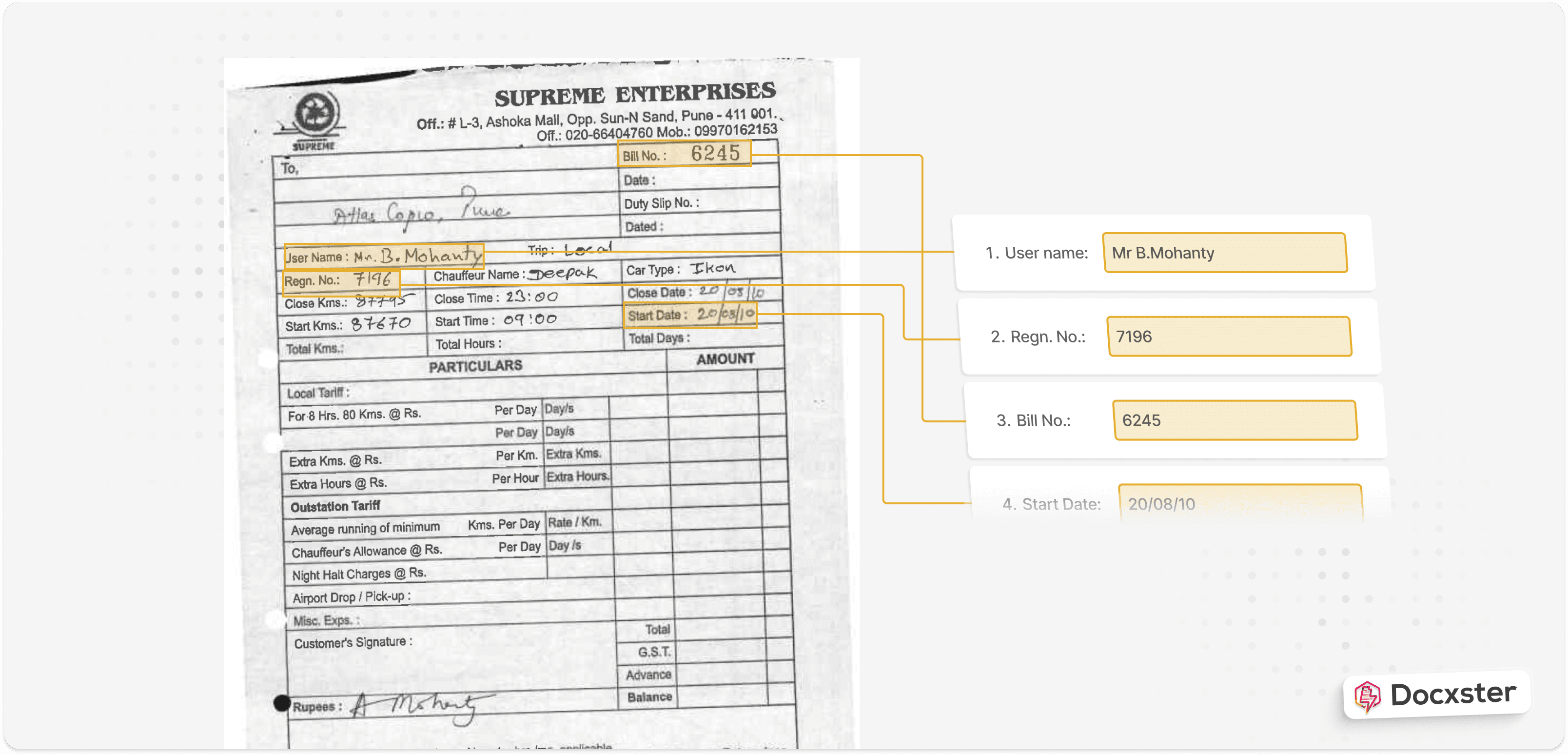
For example, when you're processing invoices, IDP systems use NLP and computer vision to interpret context and extract data. It pulls the key value pairs and line items are extracted without relying on predefined templates:
Name
Invoice number
Dates
Addresses
Invoice amounts
GST number
Step 5: Validates the extracted data automatically
Now, the system checks if the extracted information is correct and validates them against predefined business rules. Some IDP tools also cross-verify the information with external sources such as vendor databases to improve accuracy.
As the last step, the IDP tool also assigns a confidence score so that you can prioritize high-risk errors and flag fields that may need human intervention.
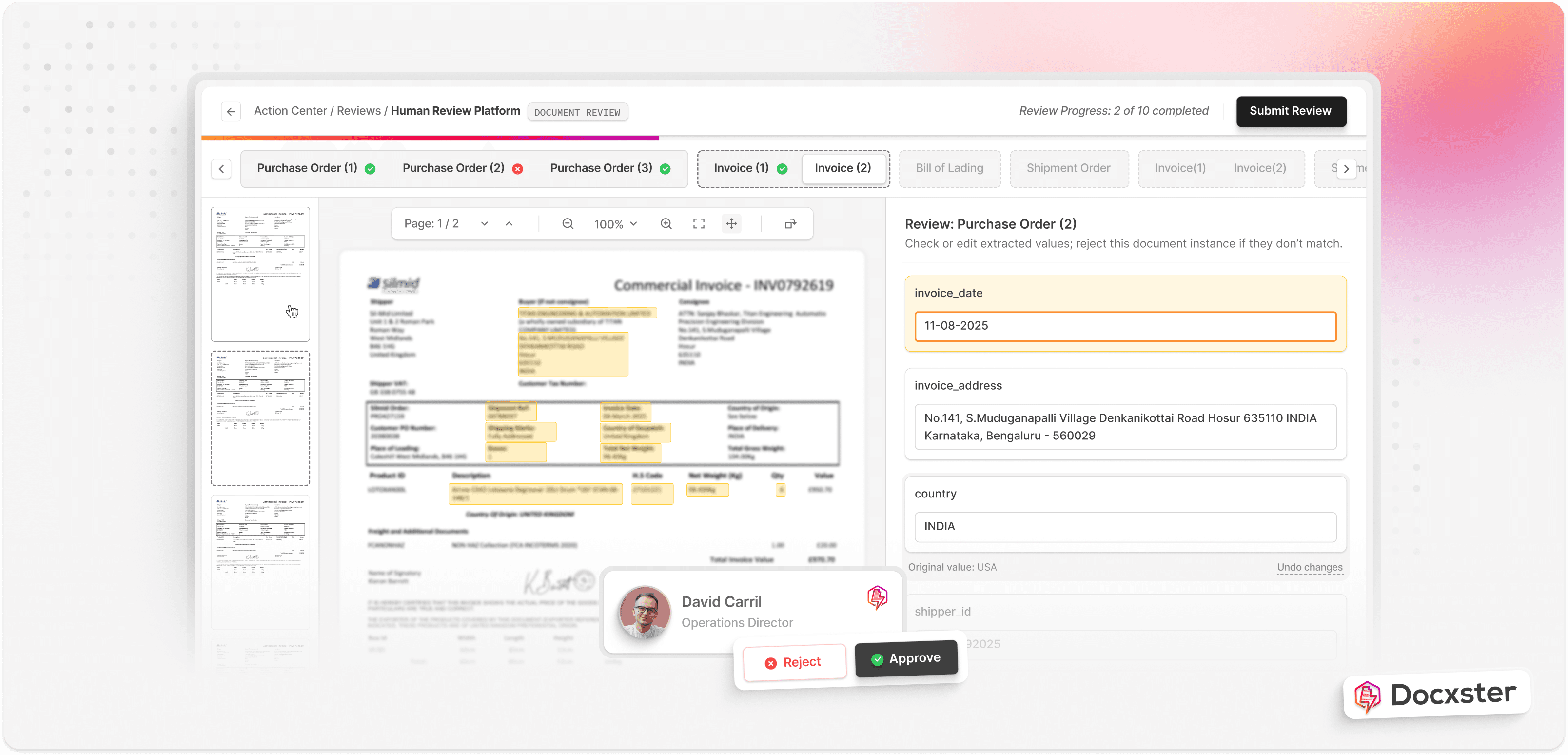
If it’s not fully confident about the extraction, the platform triggers a human-in-the-loop (HITL) validation step. You can manually go in and see if the data is correct and approve/edit it.
Step 6: Export data to other business systems
Once validated, the extracted data is sent to backend systems (like an ERP or CRM) for further action. Or you can export it yourself and upload it into the relevant platform.
For example, if you want to tally data from a shipping manifest to another customs document, you can do that. Just create a workflow to cross-verify data from both these documents and flag any discrepancies.
Where does IDP fall short for today's businesses?
Even though IDP has come a long way, many platforms don’t live up to its expectations for the following reasons:
1. Stuck on predefined templates
Many IDP solutions still rely on predefined templates to pull data. And that’s where things can get tricky. Your IDP system might fail to extract data if there are variations in the structure and format, leaving you with a pile of manual work.
Companies like AIScreen deal with a wide variety of document formats—with almost 25% of them that don’t fit standard templates.
These tend to be more complex, like custom contracts, client requests, or documents with unstructured data,” explains Nikita Sherbina, co-founder and CEO of AIScreen. “We process these by blending manual intervention with flexible automation tools. I've integrated AI models that can adapt to varying formats, but human review is still crucial for final validation, ensuring nothing slips through the cracks.
— Nikita Sherbina, Co-founder and CEO of AIScreen
2. Limited flexibility/no-code workflow customization
A lot of intelligent document processing (IDP) platforms still don’t offer no-code workflow builders. This makes it much harder for you if you’re trying to modify workflows without technical expertise or IT team involvement. You could be waiting days (or weeks) to manually adjust simple things. And that’s a serious bottleneck.
That’s one of the reasons we built a platform that uses drag-and-drop interfaces and condition logic. As a result, you can configure workflows on your own and route documents to relevant stakeholders as needed.
3. Heavy reliance on human validation
Even the best AI systems are far from perfect. Many IDP tools still need a human eye to validate the data—especially if the confidence score is low.
In a recent podcast, John Michelsen, founder of Krista Software said that only 30% of invoices are considered straight-through processable invoice orders. And this happens because the documents have watermarks, new layouts or unusual properties that you can’t prepare for. In this case, you need human validation to make sure everything’s tip top.
4. Limited on-premise AI deployment
Many enterprise organizations prefer using on-premise solutions because it’s more secure and easier to comply with industry regulations. The problem here is two-fold. There’s a misconception that cloud-based IDPs are not “fully secure” and on-premise deployment is generally more time consuming and expensive.
As for the former, that’s not true. Syed explains:
IDP based on LLM is nearly impossible to deliver as an on-prem solution. IDP providers use LLMs like OpenAI GPT, Google Gemini, Anthropic etc. that are deployed in a hosted cloud and are therefore able to deliver solutions as a service. Self Hosting LLM requires high end HW/SW configurations, the pricing of which may not make sense. We have already gotten ISO and GDPR certified. With these certificates come stringent data security and data protection measures that are treated very seriously internally. The world has started moving to the cloud ages ago and with coming times, this percentage will only grow.
— Ramzy Syed, Founder, Docxster
In short: cloud-based IDP is not a drawback but a boon.
How to choose the right IDP solution for your business?
Some tools focus on data extraction, others on system integration, and only a few provide end-to-end workflow automation.
So, how do you find the best fit for your business?
The key is understanding your document processes, automation goals, and scalability needs. Let’s break it down:
1. Define your document workflow
Document your current state and goals for the document processing project. Start with the following questions:
How many types of documents are you dealing with?
Do your documents contain handwritten data or non-text elements?
Does your team need to validate and export the data manually?
How much human oversight do you want to enable?
Do you tend to use too many tools just for document processing?
Do you need a system to process, validate, and route documents automatically?
Be specific and realistic about the current state of your business—and where you want to be.
2. Assess the solution’s data extraction capabilities
Data extraction is the heart of IDP. If the system struggles with extraction accuracy, everything else falls apart. Choose a solution that does the following:
Extract structured & unstructured data from different sources without templates
Improve extraction accuracy with automated validation
Handle handwriting, multi-language text, and complex layouts
Continuously improve accuracy with AI and ML
3. Assess compatibility and integration with your existing systems
Check whether the IDP tool easily connects with your current systems using APIs or built-in connectors. For example, platforms like your ERP, CRM, or shared drives. This way, you don’t have to worry about proper data flow between different tools.
At the very least, it should have powerful exporting capabilities so that you can export structured data and upload it directly into your platform of choice. Check if it exports in common formats like CSV and JSON.
4. Factor in scalability and flexibility
Your IDP solution should be able to handle increasing document volumes without performance issues Some tools work well for small-scale processing but struggle when dealing with:
Large datasets
Multiple document formats
New document types
Complex document workflows
Also, your IDP of choice should be flexible. You should be able to define unique data fields and adapt to industry-specific requirements without heavy IT intervention.
5. Prioritize a no-code, user-friendly interface
A complex, IT-dependent system can lead to adoption challenges. This is especially true if you’re planning on rolling this out to non-technical teams.
If that’s the case, do the following before finalizing an IDP platform:
Take a demo or try the product for free in a sandbox environment
Let multiple stakeholders try the product and build workflows for themselves
Collect feedback from everyone involved (including IT teams)
Assess if non-technical users can actually get up to speed quickly
Typically, with no-code tools like Docxster, you should be able to ramp up in a day without IT teams or developers.
6. Review security and compliance certifications
Data protection is absolutely paramount—especially for enterprise organizations. Cross-check if the platform has undergone certifications like:
ISO 27000
General Data Protection Regulation (GDPR)
California Consumer Privacy Act (CCPA)
Health Insurance Portability and Accountability Act (HIPAA)
If your industry has other regulations, ask your vendor if they comply with those too. Also, ask them how they encrypt their data at both rest and transit to ensure complete privacy.
7. Account for built-in document storage and management
Many IDP tools stop at data extraction or data exports. But what happens to the documents you’ve processed? You can’t store them in another drive folder, hoping to find them when you need them.
Prioritize an IDP that offers a document management capability. For example, we offer Docxster Drive that:
Lets you store documents in dedicated folders
Share files/folders with relevant stakeholders only
Search for and within your documents using AI
What are the potential roadblocks when implementing a new IDP solution?
Adopting new technologies always comes with its own set of risks and concerns. Here are some common roadblocks you might face—and how to overcome them:
Challenge #1: Keeping security and compliance in check
There’s a good chance you’re handling sensitive documents. As a result, you can’t afford to choose a tool that isn’t secured by industry standards—like GDPR and ISO 27000. However, “security” goes beyond that. You also need to make sure that:
Your workflows can be created by specific stakeholders
Your documents access is limited to relevant stakeholders
Your documents are encrypted at all times
You can access detailed audit logs when you need it
You documents are processed/generated without AI hallucinations or data leaks
We recommend constantly checking if you’re running into such issues and working with your vendors to make sure this doesn’t happen.
Challenge #2: Overcoming employee resistance to change
If your team is used to doing things a certain way, they might fully embrace a new tool at first. Also, Marco Cevoli, managing director at Qabiria says lack of trust in AI is another factor.
Employees fear that this new technology will only be adopted as a replacement measure—that they will be replaced by it in the medium to long term,” explains Cevoli. “Middle managers, who are used to leveraging the available human resources, oppose change because of their innate resistance to change. Things have always been this way, why change them? It’s usually the top management that, more far-sighted, sees the immediate and long-term benefits of introducing AI for document processing: fewer manual errors, faster processes, so that human resources are free to devote their time to more valuable tasks.
— Marco Cevoli, Managing Director, Qabiria
The key? Communicate the benefits early and run upskilling programs if needed.
Challenge #3: Handling accuracy issues
If you’ve signed up for the platform but the accuracy rates stay below 80%, you might not experience the true benefits of automation.
Choose an IDP solution that is trained on large datasets and that learns over time and adapts to different document types. At the very least, conduct a trial phase or onboarding phase with your vendor before you sign up for the platform.
Train the AI model using your own documents so that it can learn what to expect in the long run.
Challenge #4: Maximizing user adoption
Irrespective of how big or small your investment is, if employees don’t use the platform, it’s a wasted investment. There are a few reasons why they might find it hard to use:
The platform is clunky and hard to navigate
The platform is difficult to integrate with existing workflows
Your employees don’t understand how to use the platform
Lawrence Guyot, president of ETTE says:
To ensure successful automation adoption, I typically recommend investing in comprehensive training and capacity building. At ETTE, we prioritize user adoption by implementing extensive training programs when rolling out new technologies.
— Lawrence Guyot, President, ETTE
In addition, get feedback from your employees in the pilot phase to see where they’re getting stuck. You can create training programs around that—and make it easier to adopt the platform.
Challenge #5: Tackling extensive customization
Some IDP solutions require a lot of configuration and IT team involvement to support your needs. It leads to longer setup times and higher costs. To avoid this, use an IDP platform that’s powered by large language models (LLMs) and generative AI (GenAI).
Due to these challenges you could say that this was reserved for large enterprises with deeper pockets and the brave few who are usually early adopters and forward thinkers. With the advent of LLM and GenAI, not only has IDP become faster, cheaper and more versatile, it also brings with it a host of new applications and uses.
— Ramzy Syed, Founder, Docxster
The future of document processing lies in adaptability—not in structure
For far too long, businesses have been stuck forcing documents into rigid templates. They’re constantly trying to squeeze every invoice, contract, and report into a single format.
But that’s not how it usually works. No matter how hard you try, vendors will always send the document in a format that’s specific to their organization. In some cases, they even handwrite it, which only exacerbates the problem.
You need to consider adopting AI-driven tools for document processing that can:
Adapt to any document format you throw at it
Break free from rigid templates you’ve created
Process documents in minutes instead of days
Let you create flexible document workflows using your tech stack
It’s time to make the switch to a templateless IDP tool—and experience how your document workflows change.
Ready to see how Docxster can improve your document workflows?
FAQs: Intelligent Document Processing
What is Intelligent Document Processing (IDP)?
IDP uses AI (often with OCR, NLP, and machine learning) to read, understand, classify, and extract data from documents automatically. Unlike template-based OCR, it can handle varied formats—including unstructured docs—without constantly rebuilding rules.
How is IDP different from traditional OCR?
Traditional OCR mainly converts images into text and usually needs rigid templates to extract fields reliably. IDP goes further by understanding context, classifying document types, and extracting key fields even when layouts change.
What types of documents can IDP process?
IDP can process structured, semi-structured, and unstructured documents such as invoices, contracts, bills of lading, tax forms, customs paperwork, inspection reports, and handwritten notes. It’s designed for real-world variability, not perfect templates.
How does IDP typically work end-to-end?
Most IDP workflows follow a similar path: ingest documents, preprocess images, extract text via OCR, classify the document, extract fields/entities, validate against rules, and export to systems like ERP/CRM. Human review is usually triggered only when confidence is low or exceptions occur.
What are the biggest benefits of using IDP?
The main wins are faster processing, higher accuracy, lower operational costs, and fewer workflow breakdowns when document formats change. It also helps with audit readiness and faster decisions by turning documents into usable data quickly.
Does IDP eliminate the need for human validation?
Not always—especially for edge cases like poor scans, watermarks, new layouts, or handwritten content. The best setups use “human-in-the-loop” review for exceptions, while routine documents flow through automatically.
What should I look for when choosing an IDP platform?
Start with extraction accuracy across messy, real documents, then evaluate integrations, scalability, and how easily non-technical users can adjust workflows. No-code workflow building, strong validation controls, and clear audit logs usually matter a lot in practice.
Are cloud-based IDP tools secure enough for sensitive documents?
They can be, as long as the vendor follows strong security practices and has relevant compliance certifications (like ISO and GDPR) plus encryption and access controls. In many cases, cloud delivery is the practical way to use modern LLM-based IDP at scale.
What are common roadblocks when implementing IDP?
Teams often run into change resistance, workflow adoption issues, or accuracy challenges if documents are highly variable. A pilot phase, training, clear validation rules, and stakeholder buy-in typically make the rollout much smoother.
When does IDP make the most sense to implement?
IDP is most valuable when document volume is high, formats vary often, or manual entry creates bottlenecks and errors. If you’re constantly fixing templates or re-keying data into ERPs, it’s usually a strong signal that automation will pay off.
Turn documents into decisions.
See how Docxster gets you from inbox to insight in minutes, not days. Bring your toughest workflow — we'll show you what it looks like solved.


