-
OCR vs IDP: What's Right for Your Document Automation Needs?
Learn which technology best suits your business needs for automating document workflows and enhancing efficiency.
Last updated:
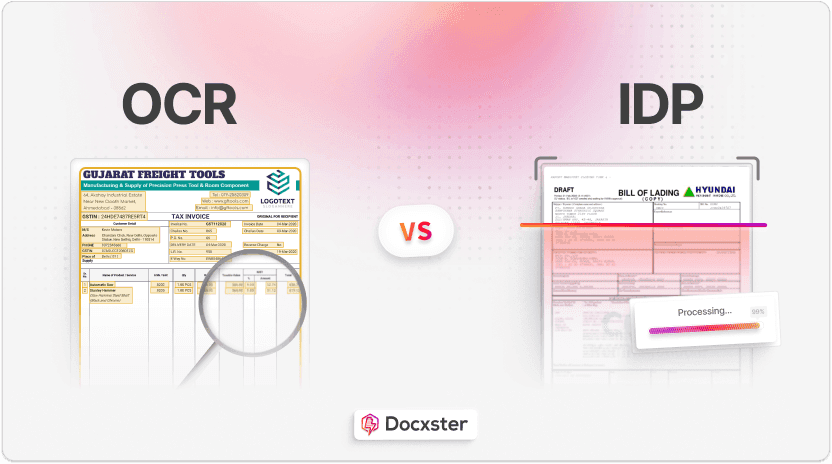


TL;DR
OCR converts scanned or imaged documents into machine-readable text, but it doesn’t understand structure, context, or meaning.
IDP builds on OCR with AI (ML, NLP, computer vision) to classify documents, understand fields and relationships, and extract richer, more accurate data across structured, semi-structured, and unstructured formats.
OCR suits simple, stable templates and low-complexity use cases; IDP is better for handwritten, noisy, multi-layout, or multi-language documents where accuracy and resilience really matter.
IDP can continuously learn from feedback, automate downstream steps (validation, routing, exports), and integrate into workflows, while OCR remains mostly a one-step text extraction tool.
Both have implementation costs, but at scale IDP tends to be more cost-effective because it reduces manual review and enables end-to-end automation—especially when combined with a no-code workflow platform like Docxster.
For a long time, businesses used optical character recognition (OCR) to digitize documents. While an OCR works well for scanning and extracting data from documents, it’s not enough for today’s business needs.
These days, you need something that can understand your data's context and automate the document process's busy parts.
Why? Because our work has changed. A simple OCR doesn’t allow you to interact with your data and act on it as needed. That’s where intelligent document processing (IDP) comes in.
In this article, we’ll review the differences between OCR and IDP and explain which technology is a better fit for your business.
What is an OCR?
Optical Character Recognition (OCR) is a technology that turns printed or scanned documents into searchable, editable text.
It examines the shapes of letters and words in an image, compares them to internal databases of patterns, and converts them into digital text. This makes finding, editing, and storing documents much easier without manually retyping everything.
Here’s an example of how an OCR engine tallies characters within its database:

An OCR engine comparing the character ‘A’ to its database of patterns
If you have a paper receipt or an invoice and want a digital copy, an OCR tool can scan it and pull the text. Instead of just an image, it becomes actual text you can search, edit, or save—way more convenient than doing it by hand.
What is IDP?
Intelligent document processing (IDP) uses OCR but takes it further. Because it uses artificial intelligence (AI) to understand documents, you can process a variety of document formats and categorize the information automatically.
The “intelligent” part is where you’ll feel the difference. Irrespective of your document’s layout, font, or template, these solutions can classify, extract, and understand the data.
What are the differences between OCR and IDP?
While OCR and IDP might sound similar, they have some key differences. Let’s look at what those are:
| OCR | IDP |
Technology | Pattern recognition and feature recognition algorithms convert documents into digital texts | A combination of OCR with AI technologies, understand and process documents to extract valuable data |
Complexity | Best suited for simple, consistent document formats | Handles complex, unstructured, and semi-structured documents with different layouts and content types |
Accuracy | Accuracy is comparatively lower as it cannot understand the structure or meaning of the text | Higher levels of accuracy and the model learns from mistakes to improve over time |
Learning capabilities | No learning capability; relies on predefined rules | Learns and adapts to new document types |
Data analysis | Does not analyze or interpret data | Interprets and understands information to extract relevant data |
Automation level | No possibilities for automation | IDP with no-code workflows automate data extraction, validation, classification, and export |
Flexibility | Limited customization | Highly customizable to different document types and business workflows |
Costs | High costs required for implementation and operation | High costs due to its advanced technology, integrations, and ongoing maintenance |
1. Technology
OCR involves processing and converting documents into texts using algorithm for:
Image processing
Pattern matching
Feature recognition
These algorithms convert color images or documents into black-and-white pixels to distinguish text from the background.
It then recognizes individual characters, numbers, and punctuation marks and compares them to a database of pre-configured patterns. Finally, OCR extracts matched characters and converts them into machine-readable formats.

OCR technology separating words and individual characters to compare and identify the matched ones
IDP is like OCR’s more intelligent cousin. It combines OCR with AI and uses a subset of technologies such as:
Here's an overview of how each technology contributes to extracting accurate data:
Machine Learning (ML): ML helps the IDP system recognize patterns in document structures and data, improving it over time. When you’re processing shipping documents with different layouts, ML models compare them with previous examples to understand the differences. As a result, the accuracy rate increases in the future.
Natural Language Processing (NLP): NLP helps IDP systems understand and interpret human language in documents. It does not just look at words but also understands the context. For invoice processing, NLP extracts and categorizes payment terms and due dates. It can understand variations in wording like “Net 30,” “Due in 30 days,” etc.
Deep learning: Deep learning (a subset of machine learning) uses neural networks to analyze complex data, such as different fonts or handwriting. It gets better at recognizing patterns the more it’s exposed to them. If you're processing a bill of lading, deep learning can handle the nuances of handwritten text, recognizing signatures or address variations, even if they're hard to read and inconsistent.
Computer vision: Computer vision processes and interprets visual elements in documents. These elements could be images, logos, videos, or barcodes. So, if your document has a logo or similar, it can identify and classify those elements.

IDP’s workflow from document ingestion to post extraction
For instance, when you process invoices like this (see image), the IDP engine accurately classifies them to the correct document processing workflows.
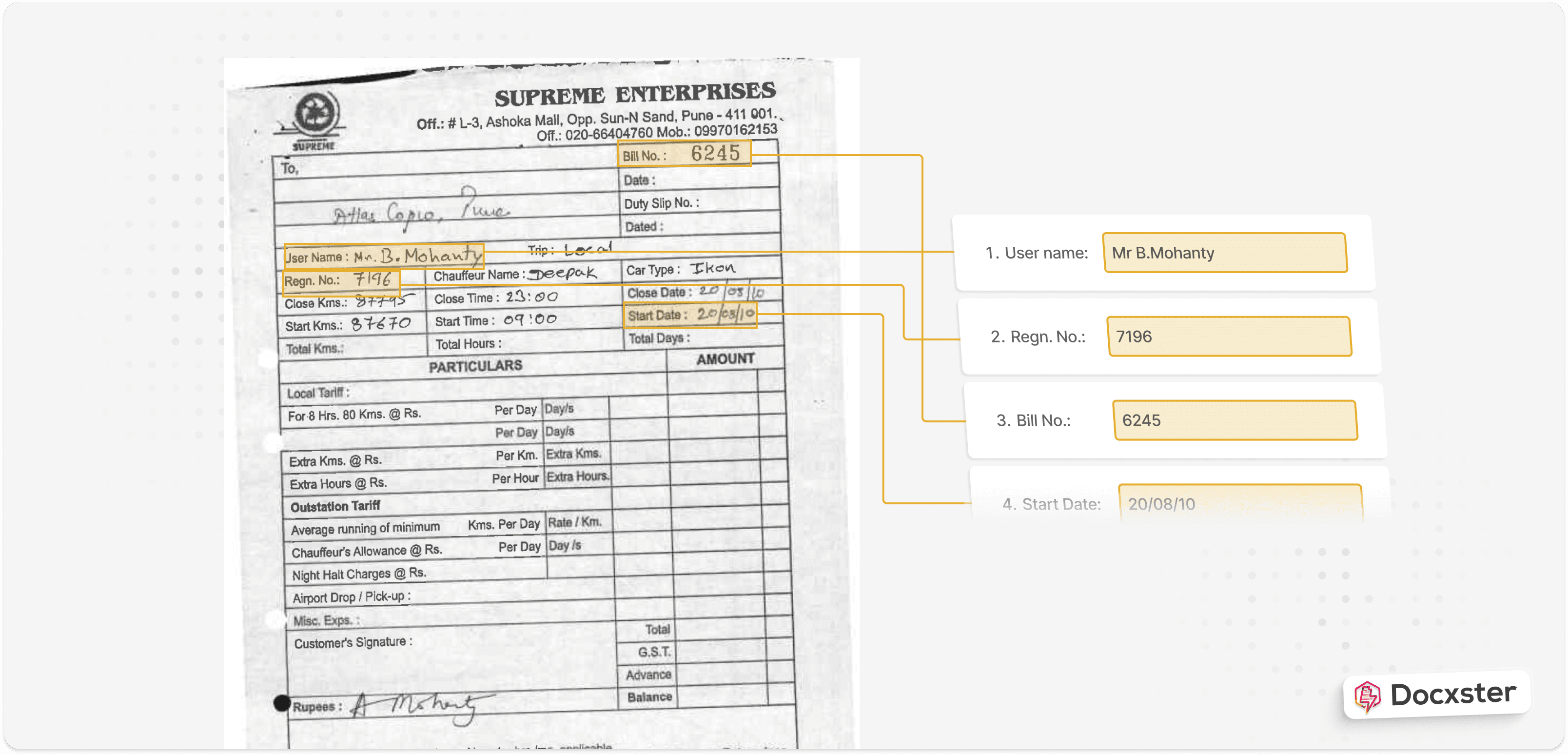
An invoice with key details extracted using IDP
Then, the IDP tool locates the data points and extracts key-value pairs and line items based on the content or with the help of its advanced context-understanding capabilities. This includes:
Pay to Name
Seller Name
Invoice Date
Invoice Number
Total Tax
Invoice Amount
Currency
Payment Due Date
This way, IDP extracts more accurate and relevant information from different documents.
2. Complexity
OCR is relatively more straightforward. It offers basic text extraction capabilities based on predefined templates.
It's great for structured or simple documents. But OCR struggles with handwritten characters, unique layouts, highly stylized text, and documents with images.
Here’s how OCR technology extracts data from documents with handwritten notes. If you notice, paragraph two contains errors such as ‘cursin’ instead of ‘cursive’.

An OCR tool extracting data from handwritten documents
However, IDP is much more nuanced than OCR. It can handle structured, unstructured, and semi-structured documents. As a result, it can handle handwritten documents, complex layouts, or even multiple languages.
“A significant percentage of documents don't fit standard templates,” shares Elma Taddeo, CEO of Parachute. “Forms with handwritten notes, unique customer requests, or industry-specific compliance documents often require manual processing. From my rough estimate, usually 20% to 40% of documents fall outside of standard formats.
— Elma Taddeo, CEO of Parachute
IDP tools can do this because they’re already trained to process different document types. That’s why they can handle non-standardized formats without human oversight.
3. Accuracy
OCR’s accuracy isn’t always the best. It focuses only on converting text, often without the context of the document's structure and meaning. So, it’s more likely to misinterpret things like unusual fonts, formatting errors, or mismatched data.

An example of how low accuracy can be with OCR tools
IDP tends to be more accurate because it does three things:
Recognizes your document's structure
Extracts data from the document using an OCR
Understands the meaning and relationships between characters
As a result, it can correct potential errors, learn from new data, and improve its capabilities over time.
Ashok Leyland, one of India’s leading manufacturers, used artificial intelligence-based document processing tools to extract data from thousands of invoices daily. The company deals with errors in fewer than 0.5% of cases.
4. Learning capabilities
OCR doesn't learn or adapt from experiences. It's rule-based, meaning it doesn't improve once it's set up. It's limited to the templates and rules created when it was first implemented.
IDP uses ML and feedback loops to act as a student. As you process more documents, the ML model continuously learns from different structures to improve its pattern recognition capabilities.
In addition, you can add a human review layer to help the model avoid the same errors in future documents and improve accuracy.
For instance, if you start processing invoices from a new vendor, IDP will gradually learn to recognize the vendor’s format and the data it needs to extract. This is a huge advantage when dealing with dynamic and unstructured data.
5. Level of automation
OCR doesn’t offer any level of automation, so to speak. It extracts data, and that’s where the buck stops. If you want to classify or analyze the data further, you’ll have to do that manually.
But with IDP, that’s not the case. IDP takes it a step further, automatically understands the context of your document, and classifies the data accordingly. The real value lies in what you can do after that.
For example, no-code IDP solutions like Docxster include workflow builders so that you can move your data and act on it as you please. As a result, you can even automate the ingestion, extraction, validation, and data transfer process—if that’s what you need to do.
6. Flexibility
OCR is not very flexible. If you want to customize it, you’ll have to do it manually or invest in other software, which can be a real headache.
On the other hand, IDP handles any document types since you train the model or use pre-trained models. So, it’s a much more flexible option.
And if you can build your own workflows? You’re golden. Platforms like Docxster offer a no-code workflow builder where you can add different steps like:
Import documents from Google Drive
Process through Docxster’s IDP
Verify output using automated validation/HITL validation
Send extracted data into Google Sheets
Now, you can customize and scale the solution for different use cases and business goals.
7. Costs
Operational costs can be high for OCR and IDP due to implementation expenses, ongoing maintenance, licensing fees, processing power, and cloud storage. However, considering the benefits it offers businesses, IDP can be cost-effective in the long run.
But what if IDP isn’t enough for your business?
At Docxster, we’ve spent almost four years developing an IDP for our customers. Ultimately, our prospects and customers had one question: “What’s next?”
“This question would eventually lead to conversations where our solution has to be molded, enhanced, configured, and customized into a different solution for each conversation we got into,” explains Ramzy Syed, Docxster’s founder. “It was quickly apparent that every prospect we spoke to would lead to a "services project," i.e., one that comes with engineering efforts taking time and money.”
— Ramzy Syed, Founder, Docxster
That’s why we returned to the drawing board and built a no-code document automation platform to answer that question.
Here’s how Docxster helps you manage the entire document processing workflow with its advanced capabilities:
1. Capture and classify documents automatically
In our experience, IDP is the first step—not the last. That’s why we use an AI-powered OCR engine that ingests documents from several sources:
Gmail
Outlook
Document scanners
Mobile image uploads
The engine then processes the document. First, it classifies the document based on its structure, maps the necessary fields, and gives a structured output.
It’s an entirely hands-off process and prevents high error rates since it uses pre-trained AI models to do the heavy lifting for you.
2. Extract data with a high accuracy rate
Even the slightest mistake can lead to payment and compliance issues in business documents. That's why accuracy is not only essential but non-negotiable.
With Docxster, you don't have to worry about human errors creeping in. The platform’s OCR, ML, and NLP work together to pull the correct details from handwritten, printed, and scanned documents with a 99% accuracy rate.
For instance, if you process invoices using Docxster, it will automatically extract the following data with high precision:
Vendor name
Invoice number
Invoice date
Payment amount
Bank account number
Due date
Bank name
You can quickly start using pre-trained models and automate accurate data extraction from large volumes of documents. And if you need something custom? Train your document processing model according to the variations in document layouts and structures.
3. Validate the extracted data without lifting your finger
With this extracted data, your employees don't have to spend days in manual validation or worry about reviewing or approving within a specific due date. According to Eugene Lebedev, the managing director of Vidi Corp Ltd., even some IDP solutions struggle with:
Handwritten notes
Poor quality scans
Documents with too many elements
That’s why he recommends using a mix of AI and low-code tools.
“A better approach can be a mix of AI + human validation, using Robotics Process Automation (RPA) alongside IDP, or leveraging low-code AI solutions like Microsoft Power Automate,” explains Lebedev.
But we’ve found a way around that too. You can use our no-code IDP workflow builder to handle the validation process. Either automate the entire process with an “automated validation” option or use a HITL automation process where you can verify the data yourself.
To make things easier, Docxster assigns a confidence score to each extraction. This way, you can instantly decide whether a document needs manual review or is ready to go.
4. Store your documents securely and avoid data loss risks
Most intelligent document processing systems in the market don’t offer the ability to manage and store documents. They just stop with data extraction and validation, which means you have to look for other solutions to store your extracted data.
But with Docxster, you don't need to invest separately in a document storage system. or struggle with computer storage capacity issues. Use Docxster Drive to store and securely organize all your documents.
With automated backups and recovery, you never have to worry about losing files again. Plus, easy file sharing and industry-standard encryption mean your team can access what they need when they need it—without compromising security and compliance.
5. Find any information almost instantly
No one has time to sift through piles of documents or digital folders for a specific data point. While finding one piece of data may take only a few minutes, the process can easily take hours when you need to retrieve a lot of information.
Docxster’s Universal Search makes this process simple. This feature lets you quickly find specific data points from your entire repository.
Simply type what you’re looking for in the search bar, and Docxster will search through the document content (not just titles) to get you the information. Whether you’re looking for a particular contract term or payment details from an invoice, you’ll get results in seconds.
6. Export data easily into your existing business systems
Integrating extracted data into your business systems shouldn't be a struggle. With Docxster, you can export the data in your preferred format and sync it in your business systems without errors. Or integrate it with your tool of choice and push data directly into your tool.
Whether you use accounting systems or ERP platforms, you can quickly move data between them. This ensures smooth, real-time updates across all your business systems.
7. Build custom workflows and standardize processes effortlessly
In our experience, any document processing tool must be flexible enough to be customized for businesses. It shouldn't take months or demand IT teams to step in every time.
Anyone on the team (even one without technical expertise) must be able to customize and standardize document processing workflows in minutes. Simply put, a document processing tool should adapt to your business, not vice versa.
This is precisely what Docxster enables with its no-code workflow builder. You can:
Configure workflows in minutes
Create templates for relatable tasks
Add complex conditional logic and routing
Set up multi-step approval processes
Customize Docxster to fit your business needs without writing a single line of code. Now you can reduce operating costs, eliminate manual hand-offs, and improve operational efficiency.
Think beyond OCR and IDP—it’s time to embrace no-code document automation
It might feel safe to rely on OCRs as a core of your document processing workflows. But it’s stopping you from fully embracing digital transformation today.
While OCR has its place, it limits your ability to innovate and keep up with the market and your customers. You deserve an advanced solution beyond just reading documents.
With no-code IDP, you can automate complex document processing workflows, handle various document types, and extract data more accurately—without requiring specialized technical skills.
This approach allows you to focus on what truly matters:
Freeing your employees from repetitive tasks
Focusing more on strategic tasks
Growing your business
Staying ahead of the competition
Why settle for OCR when you have a more innovative, faster, and more efficient way to process documents?
Ready to process your documents in seconds?
FAQs: OCR vs IDP
1. What exactly is OCR and how does it work?
Optical Character Recognition (OCR) is a technology that looks at the shapes of characters in an image or PDF, matches them against known patterns, and outputs editable, searchable text. It’s great for turning scans of receipts, invoices, or forms into digital text you can copy, search, or store, but it doesn’t really “understand” what that text means.
2. What is Intelligent Document Processing (IDP)?
Intelligent Document Processing (IDP) combines OCR with AI technologies like machine learning, natural language processing, and computer vision. Instead of just reading characters, it classifies documents, understands context (e.g., what’s an invoice date vs. due date), and extracts structured data that can flow straight into your systems and workflows.
3. Is IDP just a more advanced form of OCR?
IDP includes OCR as one component, but it’s not just “better OCR.” OCR handles the “see text → output text” step; IDP goes further to interpret the document’s layout, meaning, and relationships between fields, and then automate what happens next (validation, approvals, routing, exports, etc.). Think of OCR as the eyes and IDP as the eyes plus brain and hands.
4. When does it make sense to use OCR instead of IDP?
OCR is usually enough when you’re dealing with simple, highly structured documents that rarely change—like standardized forms or fixed-layout reports—and you only need basic text extraction. It’s also a fit for low-volume or budget-constrained scenarios where you’re okay with doing validation and data entry manually after the text is captured.
5. When is IDP the better choice than OCR?
IDP is the better pick when your documents are messy, diverse, or numerous—think invoices from many vendors, shipping docs, contracts, KYC packs, or handwritten forms. In these cases you’ll want higher accuracy, the ability to learn new layouts, and automation of downstream steps, which is where IDP (especially no-code platforms like Docxster) really shines.
6. Can IDP handle handwritten, noisy, or unstructured documents better than OCR?
Yes. Traditional OCR struggles with handwriting, unusual fonts, noisy scans, or documents that don’t follow a fixed template. IDP uses deep learning and computer vision to recognize patterns in handwriting and complex layouts and can be trained on your real-world documents, so its performance improves as it sees more examples.
7. How do accuracy and learning differ between OCR and IDP?
OCR is largely rule- and template-based: once configured, it doesn’t get smarter on its own and can break when layouts change. IDP systems use machine learning and feedback loops, so they can learn from corrections, adapt to new document types, and continuously improve accuracy—especially important at scale and in multi-vendor, multi-format environments.
8. Is IDP always more expensive than OCR, and is it worth it?
IDP typically has higher upfront and platform costs because it bundles OCR, AI models, integrations, and workflow tools. But for organizations dealing with large volumes or complex documents, the reduction in manual work, errors, and exception handling usually makes IDP more cost-effective over time compared with stitching together OCR plus manual processes.
Turn documents into decisions.
See how Docxster gets you from inbox to insight in minutes, not days. Bring your toughest workflow — we'll show you what it looks like solved.


