State of No-Code Document Automation Report 2026: Finance Segment
What 109 finance and accounting leaders say about the document layer powering their processes.



Executive summary
Finance and accounting teams in document-intensive industries have already done a lot of the heavy lifting. They’ve invested in better document-processing tools and achieved a higher level of automation maturity than the average team in our broader survey.
However, our data shows that the investment hasn’t fully paid off.
Finance teams hit the document-quality wall harder than other functions. The cost shows up in delayed payments and stretched teams. And the answers Finance leaders are reaching for next look different from what their current tools deliver.
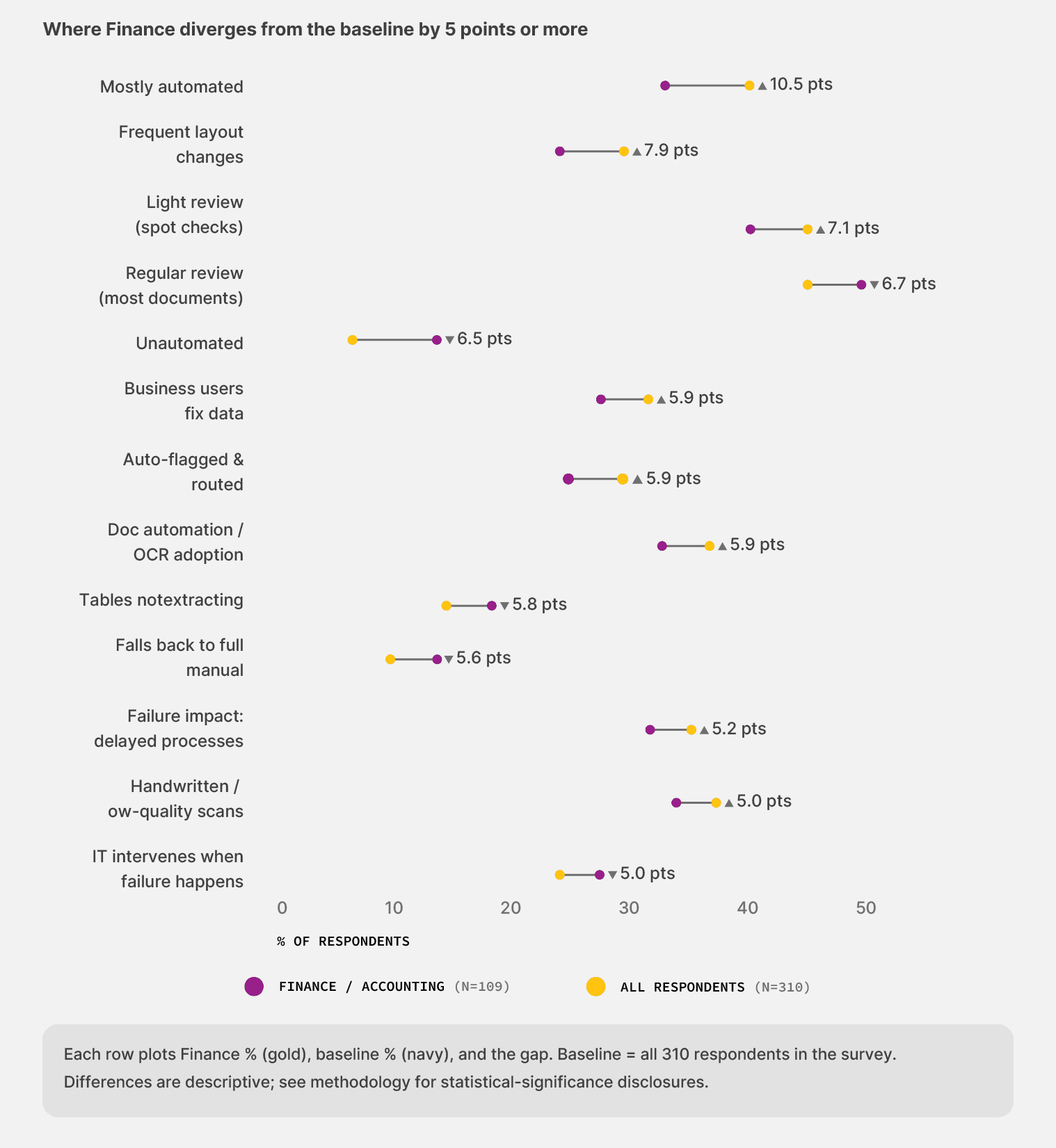
The chart below tells the segment story in one frame. It plots the thirteen places where Finance pulls away from the broader survey baseline by five percentage points or more.
A few patterns stand out:
Finance teams describe themselves as “mostly automated” at a rate roughly 33% higher than the broader survey average.
They’ve also invested more in document automation and OCR tools, and they’re nearly twice as clear-eyed about what sits in their stack.
And yet two patterns hit Finance harder than the rest of the field. Intake issues land more often, and the path to seeing real value runs longer.
The rest of this report unpacks why those divergences sit where they sit. Each chapter closes with a short list of moves Finance leaders can take based on the data.
For the broader picture across all 310 respondents—finance, operations, IT, and automation leaders in document-intensive industries—see the State of No-Code Document Automation 2026 main report here:
State of No-code Document Automation 2026
1. Finance has done the work. The wall is still there.
Finance and AP teams have been automating their invoice and purchase-order workflows for years. Most teams in our survey have something working. The data shows the wall most teams hit next, and how much investment sits behind it.
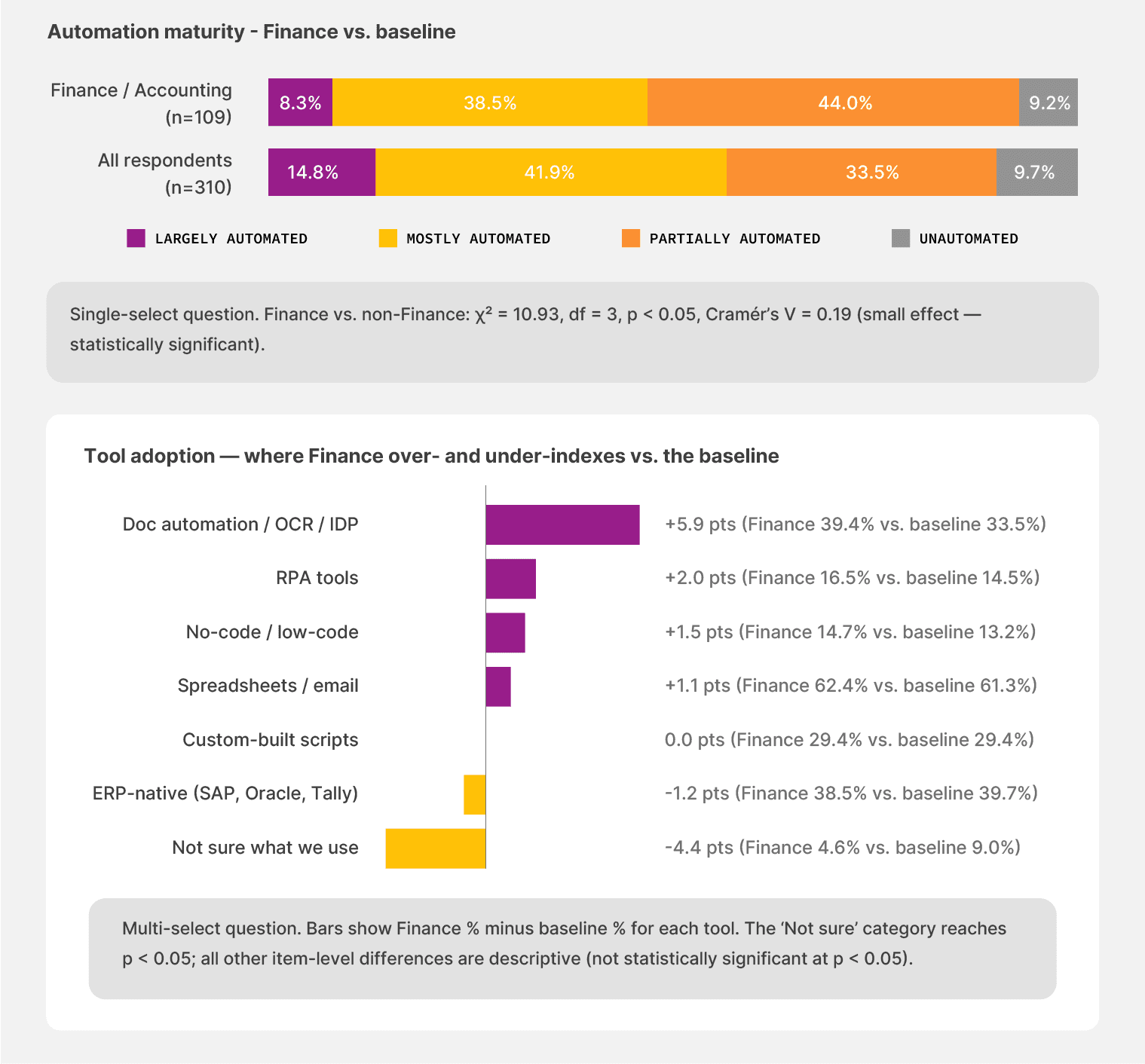
Among Finance teams in our survey, 44.0% describe themselves as “mostly automated.” Across the broader survey of finance, operations, and IT leaders in document-intensive industries, the same figure runs at 33.5%. They’ve also adopted better tools.
Document automation and OCR layers reach 39.4% of Finance teams, up from 33.5% in the baseline. They’re nearly twice as clear-eyed about what sits in their own stack. Only 4.6% report being unsure about their tool mix, against 9.0% across the broader sample.
That’s the easy part of the story. The cohort is past the starting line.
The harder part follows. Teams that did the work also report more intake problems and a longer path to value than the rest of the survey. The wall sits in front of the most prepared cohort in the room.
The intake problem got worse, not better
Across Finance teams, 37.6% say document intake issues hit “often” or “almost always.” The baseline rate is 33.3%. A higher share, 12.8%, puts it at “almost always,” compared with 11.0% in the broader sample.
Only 2.8% of Finance teams say intake automation doesn’t apply to their work, compared to a baseline of 6.1%. They’ve automated more of the intake than the average team. So they see more of what intake automation breaks on.
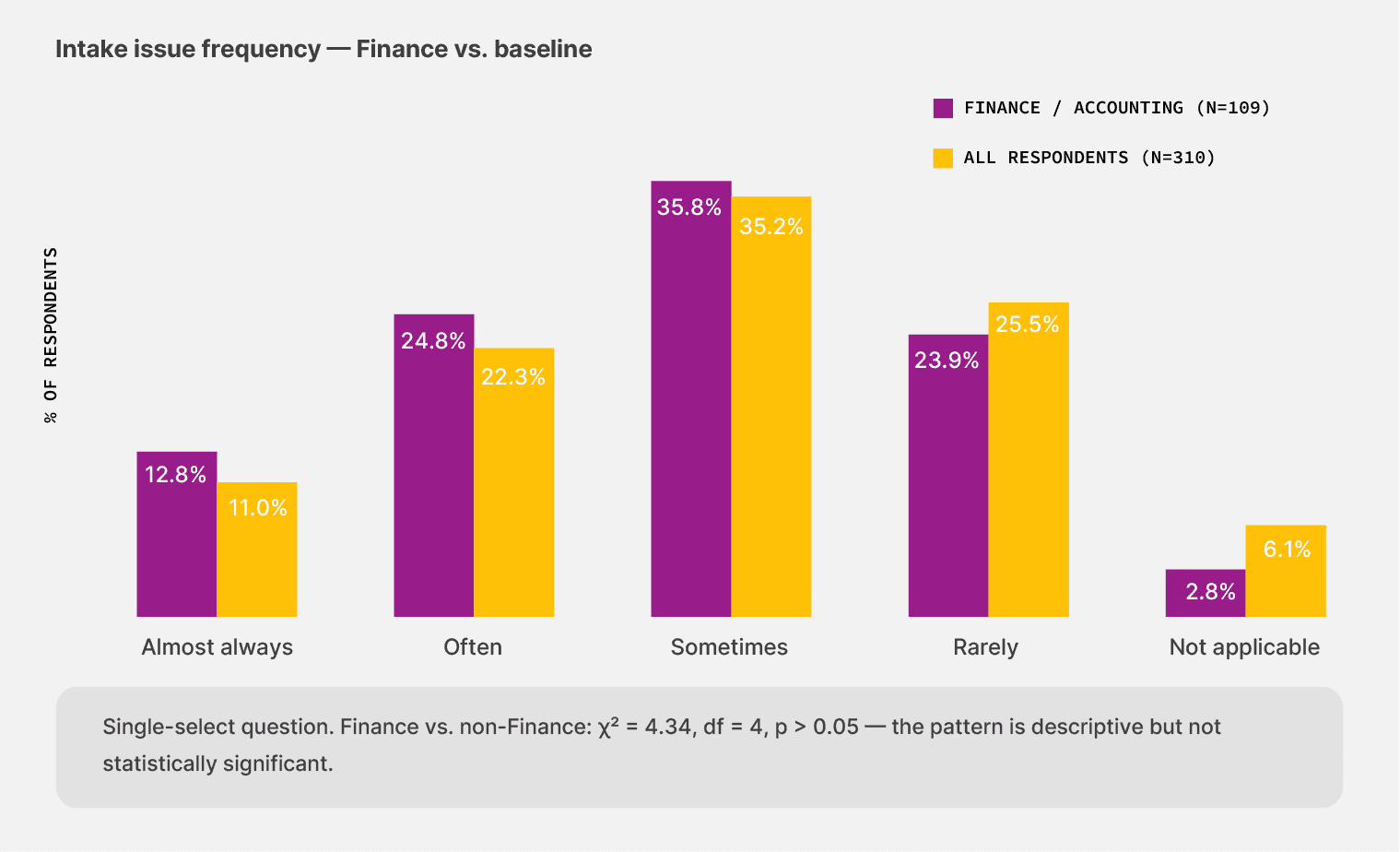
Across the Finance cohort, 97.2% have automated some part of their document intake, against 93.9% in the broader survey. They see the breakage that other functions haven’t discovered yet
The wall sits in the document layer
Finance has invested more in tools and reached a higher level of maturity. They still face the most intake variability. The data points toward a document-layer problem that the current toolkit doesn’t address.
The problem is that document volume amplifies what shows up. Across these teams, 38.5% process between 5,001 and 50,000 documents per month. That’s the band where format variability turns structural, and every new vendor adds a tax on the existing setup.
Another 32.1% process more than 50,000 documents a month. Higher volume against a tooling generation that wasn’t built for vendor format variability is the load-bearing crack for them.
HOW TO ACT ON THIS DATA:
Two specific moves before adding another automation layer:
Pressure-test what you already have against your three highest-volume vendor formats, not against the demo dataset. The tool that handles a clean PDF won’t necessarily handle a smudged carrier scan or a PO that arrived as a screenshot in an email.
Map where your team currently picks up the slack. If extraction failures are routed back to senior accountants for cleanup, the issue persists as an automation issue.
2. Late payments and stretched teams are where the cost surfaces
Across the Finance cohort, the cost of an automation failure appears in two specific areas. First in delayed payments. Then, the time senior accountants and controllers spend cleaning up extracted data that should never have left the system.
Across the Finance cohort, 74.3% of teams face at least occasional disruptions to their document workflows. The broader-survey baseline runs at 67.4%. This disruption is a regular tax on the month-end reconciliation cycle and the AP queue, and it shows up on the team’s calendar long before it appears in the budget.
Late payments lead to the impact of automation failure
When automation fails, Finance teams report a different top consequence than the broader sample.
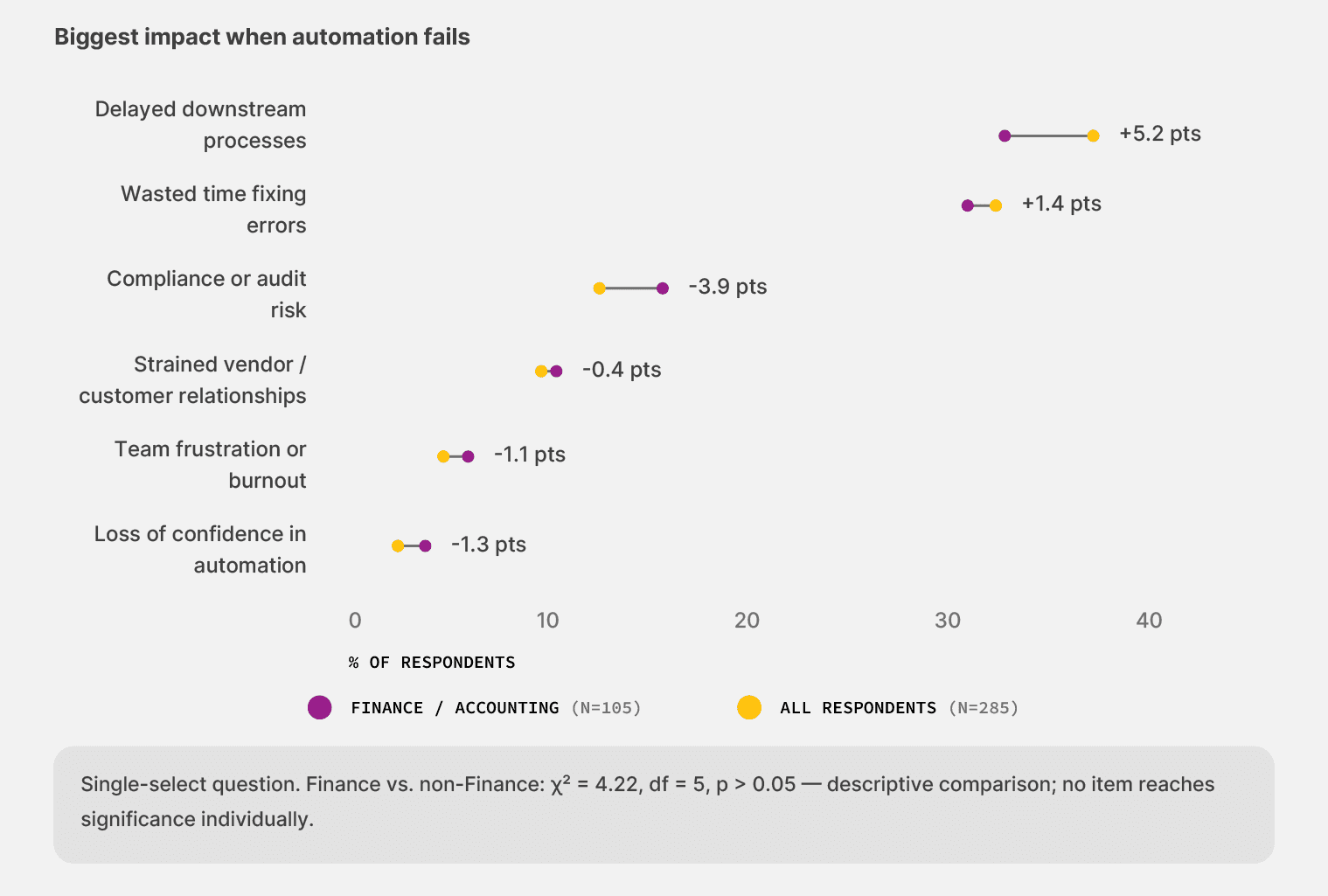
Among Finance teams, 37.1% name delayed downstream processes as the highest cost when automation fails. The baseline runs at 31.9%. “Delayed downstream” reads neutral on the page. In practice, it usually means a few things:
Late payments to vendors, often past the 2/10 net 30 terms, cost real money in lost early-payment discounts.
Vendor relationships that erode over time, especially with strategic suppliers who notice when the same delays repeat.
Cash flow visibility problems, where the controller can’t tell what’s actually outstanding versus what’s stuck in a workflow exception queue.
A month-end close that runs an extra day or two because reconciliations are still in flight.
The cost shows up across the function as a steady drag on the team’s ability to do its actual job.
The cleanup work lands on the wrong people
The second cost is who picks up the work when the extraction fails. Among Finance teams, 33.3% say business users manually fix the data when automation breaks, against 27.4% in the baseline. At the same time, they’re five points less likely than the baseline to get IT to step in (24.8% vs. 29.8%).
That distribution reflects how the work actually moves. When extraction breaks on an invoice, the person who can validate the right value is the AP lead who knows the vendor, not a developer in another department. So the work routes back to the team that owns the documents.
The cost beneath that surface stat is what staff can’t do while doing this work. Manual cleanup is the work that automation was supposed to take over. Every hour spent on it is an hour not spent on analysis or close support.
Document variability from vendors breaks the system
More than any other challenge, document variability is the biggest challenge finance teams face right now. In fact, these teams fight the documents vendors send more than the tools they chose.
Frequent layout changes hit Finance teams roughly a third more often than the baseline (32.1% vs. 24.2%).
Handwritten or low-quality scans are five points more common in finance than in the broader survey (38.5% vs. 33.5%).
Tables and line items not extracted are 5.8 points less of an issue for finance (17.4% vs. 23.2%). The team has solved the structural extraction problem but hasn’t cracked the format-variability one.
This happens because vendors decide the format of their own invoices. When a vendor changes a layout or switches to a new PO numbering format, the extraction layer trained on the old format breaks.
It’s usually an OCR tool that works on template-based extraction, which stops working with a new format. Finance teams run into this constantly because they’ve automated the most.
HOW TO ACT ON THIS DATA:
Two specific moves Finance leaders can make this quarter:
Pick the workflow where one wrong number costs the most. That usually means AP for high-value vendor invoices. Demand verifiable accuracy there before expanding anywhere else, and test the system on the messy real invoices rather than the clean demo set—especially if you work with handwritten documents.
Audit where the extraction failures route in your current setup. If senior accountants or controllers handle the manual cleanup, restructure the exception path. A junior reviewer’s or a confidence-flagged queue carries less opportunity cost than a controller’s morning.
3. What finance leaders want next, and how they buy
Trust runs through accuracy and traceability
Among Finance teams, 40.4% name “risk of incorrect payments or financial errors” as a top trust concern when they think about document automation. The baseline rate across the broader survey runs at 36.8%. Their main source of hesitation is the simplest possible failure mode: getting the dollar amount wrong.
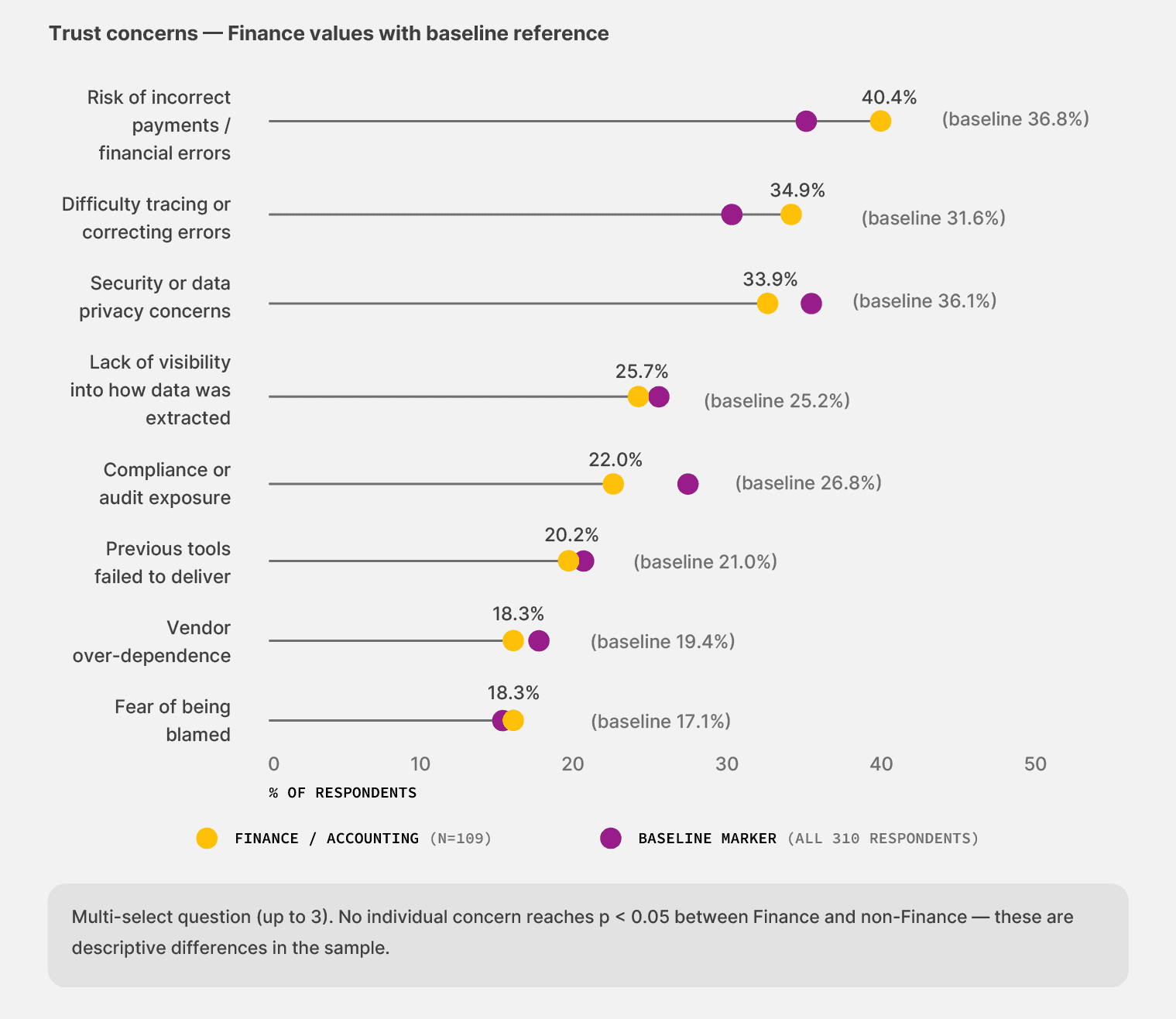
Their next source of concern is the verification problem. Among Finance teams, 34.9% name “difficulty tracing or correcting errors” as a top concern, against 31.6% in the baseline. They need to point at any extracted number and trace it back to the source document, for their own peace of mind and for the auditor’s inevitable review.
What’s quieter but interesting: compliance comes in lower for the cohort than for the baseline (22.0% vs. 26.8%). Finance leaders prioritize concrete failure modes where a wrong number on a payment lands harder than abstract regulatory exposure.
The spot-check sweet spot
Finance teams have already settled on a working model for human review. They sample, instead of reviewing every document:
Light review (spot checks) lands at 45.7% for the cohort, against 38.6% in the baseline.
The regular review rate for most documents in Finance is 43.8%, down from 50.5% in the baseline.
That distribution is the maturity tier where the right verification tooling has the most leverage.
Teams that trust the system enough to sample but won’t go fully eyes-off until they can verify the work are the audience for audit-grade extraction with confidence flagging. They want a way to focus human attention on the 10% of cases that actually need it.
That’s where human-in-the-loop platforms can help by removing that burden and only flagging what needs to be flagged.
Finance buys incrementally
The 12-month outlook reveals a specific buying behavior. As measured as finance leaders are, it’s unsurprising to say the least that the majority of this cohort plans on making incremental improvements instead of full-blown overhauls.
Incremental improvements top the list for 45.9% of Finance teams over the next 12 months, about 11% above the baseline rate of 41.3%.
Active “replace” mode sits at 17.4%, about 5 percentage points below the baseline (21.3%).
Pause or scale back comes in at 1.8% against 3.2% in the broader sample. The market is moving forward, just not in big jumps.
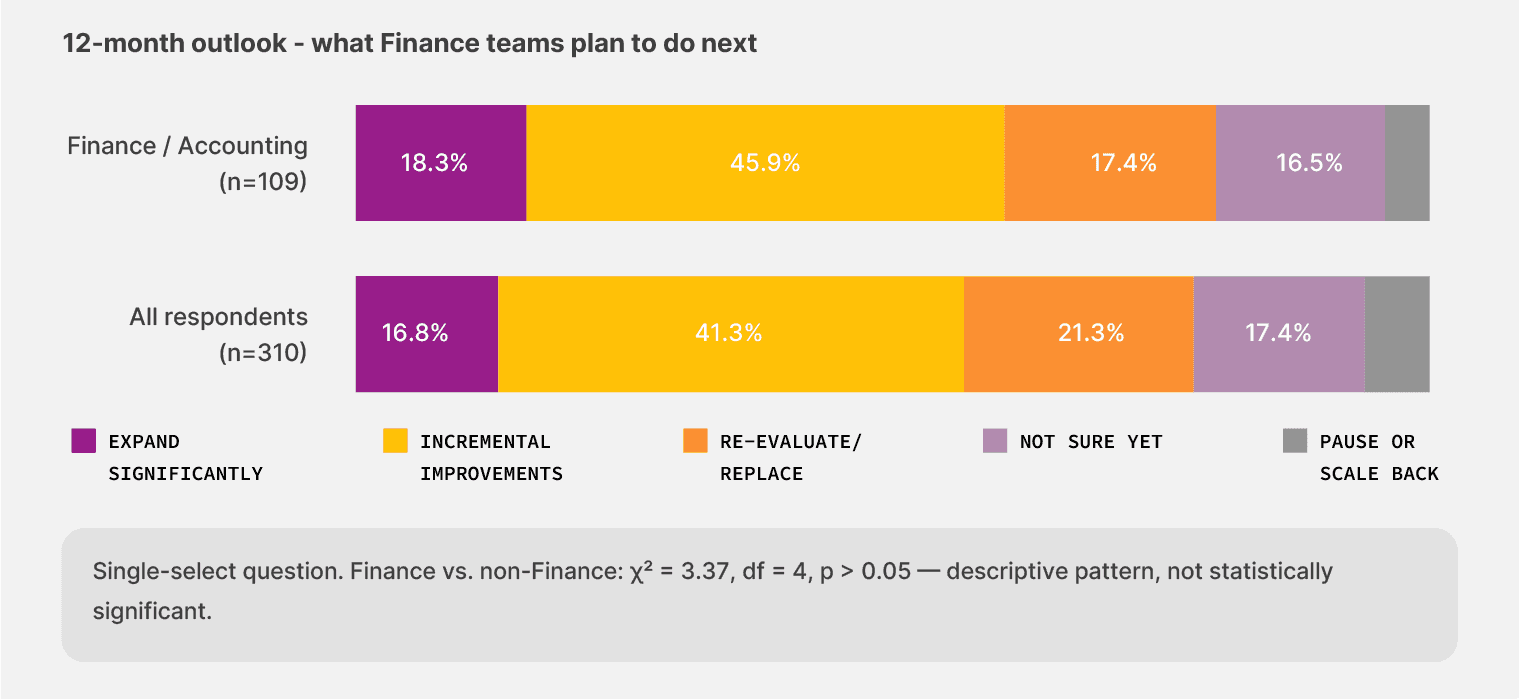
They under-index on rip-and-replace technology programs and over-index on pilot-led, ROI-validated rollouts. The behavior in this survey echoes how Finance buys most things, not just document automation.
The right evaluation question is whether the vendor can prove value in one workflow within 60 days, with an audit trail that a CFO and an external auditor would both accept.
Of the 93 finance teams that haven’t adopted no-code workflow tools, 34 (36.6%) are persuadable in the next 12 months—actively re-evaluating their existing setup or unsure about it. That’s lower than the survey-wide rate of 40.5% and well below the Operations cohort’s 45.7%.
But finance teams aren’t avoiding no-code because they doubt the value. They’re hesitating because they’ve already invested in adjacent tools, and they want to see the next platform earn its way in before they switch.
HOW TO ACT ON THIS DATA:
Two specific moves to put on your evaluation checklist:
Require an audit trail from the source document to the GL entry. Any extraction layer that can’t show where a number came from will fail your team’s bar, regardless of accuracy claims. Make this a hard yes/no requirement, not a nice-to-have.
Pick a single starting workflow and define what success looks like in 60 days. If the tool delivers, expand to the next workflow. If it doesn’t, you’ve spent 60 days on one workflow rather than 18 months in a transformation program. We’ve seen that the teams that start small are the ones that actually finish.
Why no-code document automation comes next for finance teams
From the survey, one thing’s clear. Finance teams in document-intensive industries have outrun the toolkit that got them here. Their investment in better OCR and more ERP integration landed teams in the “mostly automated” tier. Then it stalled them there.
The wall is the document layer itself, and the current generation of tools wasn’t built for it.
What Finance teams want next has a clear shape. They need the following:
Templateless extraction that flexes around vendor formats without an IT release
Audit trails that finance leaders can stand behind in front of any auditor
Human review concentrates on the cases that need eyes, instead of every document
In short: they need to start adopting no-code document automation platforms. These platforms pair AI accuracy with workflow builders, allowing business users to make changes as they see fit.
Early movers in this survey have already moved in this direction. The rest of the field is reaching for the same shape.
Methodology: Finance segment
This report draws on the Finance and Accounting cohort within the broader State of No-Code Document Automation 2026 survey.
The full survey reached 310 finance, operations, IT, and automation leaders in document-intensive industries, including manufacturing and logistics, across the US, UK, and Canada. The Finance cohort comprises 109 respondents, or 35.2% of the sample.
When this report says “baseline” or “the broader survey,” it means all 310 respondents, including the Finance cohort itself. Comparisons show the rate at which Finance teams chose a given response, relative to the rate across the full sample. Differences appear as percentage-point gaps or as direct comparisons between the two numbers, whichever is clearer for the finding.
About Docxster
Docxster is built for finance and accounting teams in document-intensive industries like logistics and manufacturing. We focus on these industries by design because they share a document load profile most automation tools weren’t built for.
For instance, Controllers and AP leads in these teams review hundreds or thousands of vendor documents every week, using the same patchwork of legacy tools and spreadsheets.
Four things make Docxster a fit for these challenges:
Data ingestion module that pulls in documents from different sources like email, WhatsApp, ERPs, or even manual upload.
Templateless extraction that handles vendor-format variability, one of the biggest blockers for finance teams right now.
A full audit trail that runs from the source document to the extracted value to the downstream system. Every extracted field stays traceable, and every change is logged.
Human-in-the-loop validation that routes low-confidence outputs to a sampling queue rather than to the senior accountant doing the month-end close. The difference is that the spot-checks come from the system, not from a person reviewing every document.
If the patterns in this report describe your team right now:
We’ll show you how Docxster can solve your document automation problems
Benchmark Your Finance Team
Get the Finance cut of our 2026 survey, covering 109 finance and accounting leaders in document-intensive industries.
Turn documents into decisions.
See how Docxster gets you from inbox to insight in minutes, not days. Bring your toughest workflow — we'll show you what it looks like solved.


