The State of No-Code Document Automation in 2026
We surveyed 310 finance, operations, and IT leaders in the USA, UK, and Canada. Learn how these leaders think of document automation today and how they're future-proofing themselves.


Executive summary
You already know what the inside of your AP queue or freight billing pile looks like at the end of a long week. The technology to clear it has existed for years. So why does your team still spend half its day moving numbers from one screen to another?
To answer that, we surveyed 310 operations, finance, and IT leaders across the US, UK, and Canada. The pattern repeats everywhere.
Document automation today behaves like a treadmill at a steep incline. You can run faster, but you don’t actually move. Four numbers describe the working reality across most of the field:
Only 13.2% of teams use no-code tools to handle document workflows. Of the ones who haven’t adopted them, 40.5% are open to changing their tools in the next 12 months.
90.3% haven’t reached full automation. Most sit in the stuck middle, paying for the tool and the people to wrangle it.
68.4% say document intake is unpredictable, the upstream condition with the strongest association to downstream disruption in our dataset.
56% still need regular or heavy human review of most documents, a rate that barely changes as automation maturity rises.
That’s why this report matters. The current playbook produces diminishing returns, and the leaders who feel it most have the least power to change the tooling. If your team is one of them, you’re not behind. You’re sitting inside a category mispriced for a decade.
The market knows it. A meaningful share of teams are preparing to re-evaluate their tools in the next 12 months, and when asked what they want unprompted, two answers rise to the top: AI, and human oversight. Both.
That middle path is the next chapter of this category. The data ahead is a map for walking it.
— Ramzy Syed, Founder & CEO, Docxster
Chapter 1: 2026 baseline for document automation
Finding #1: The document automation tech stack hasn’t kept up with the work
If the data your team needs every day is locked inside documents that someone has to retype before it can land in a spreadsheet, an ERP, or a downstream report, you’re in the majority. This chapter is about what the rest of the field is doing, and what the small group that has moved on is doing differently.
When we asked 310 finance, operations, and IT leaders which tools they actually use to handle document work today, only 13.2% reported using no-code workflow tools, the only category built for documents that change shape from one batch to the next.
The rest of the field splits across familiar tools. Spreadsheets and email-based processes handle document work for 61.3% of teams, while ERP-native flows handle it for 39.7%. Document automation and OCR tools account for 33.5%, and custom-built scripts account for 29.4%.
Most respondents combine more than one of these in practice, and 54.5% run two or more tool categories at once.
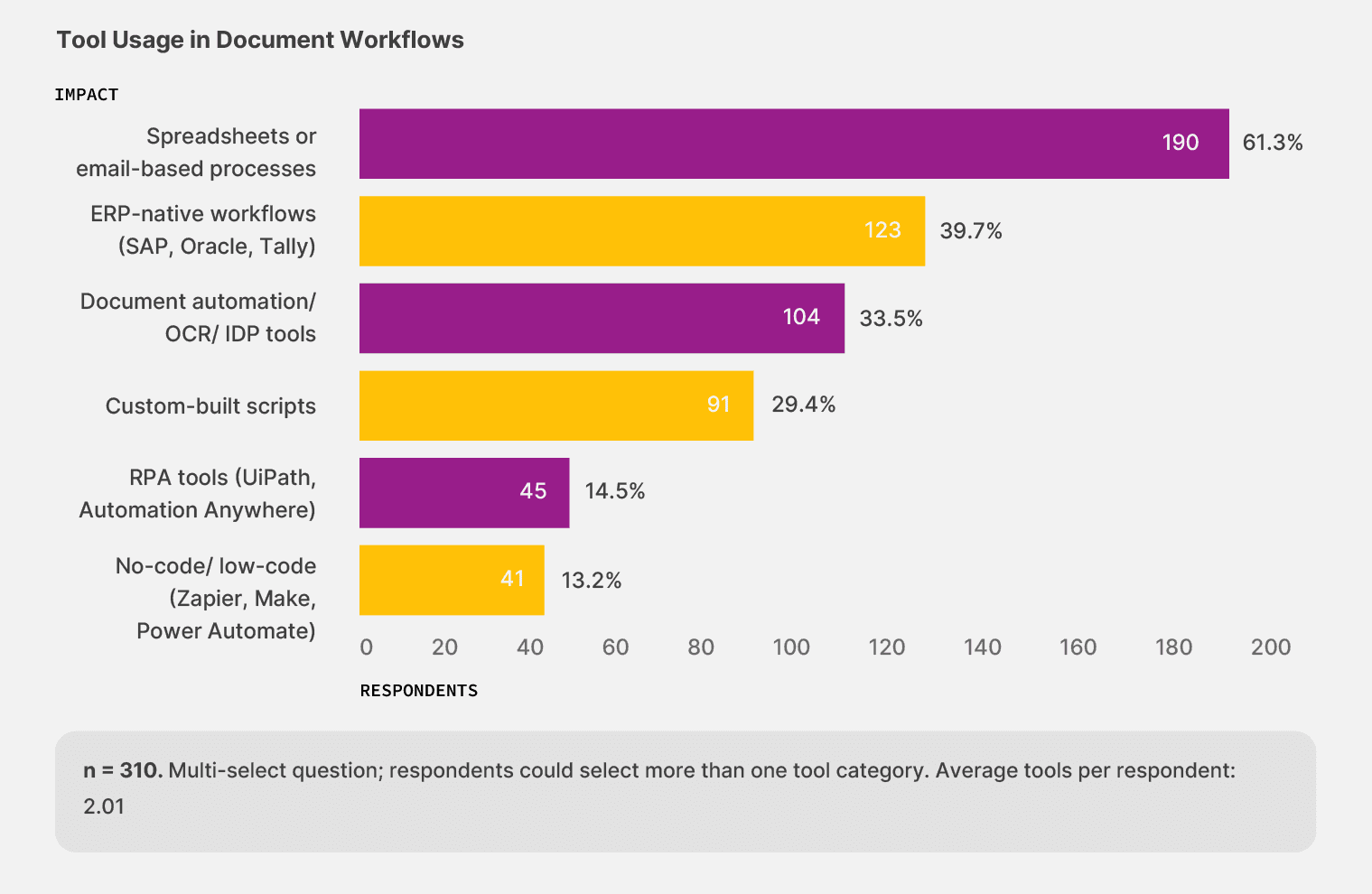
Teams adopt no-code workflow tools less than any other category in the survey, even though the technology has existed for several years.
The teams that have made the move are seeing the difference: among the 41 respondents using no-code tools, 53.7% describe their automation as mostly or largely automated, compared with 41.6% across the rest of the sample. The category that should be growing fastest is sitting at the bottom of the adoption curve, and the teams ahead of it are pulling away from everyone else, one workflow at a time.
That position has consequences that surface throughout the rest of our survey. 90.3% of respondents say they have not reached full automation, and the single largest cluster, at 41.9%, describes their setup as partially automated. Your workflows run until they meet a document that the system can’t handle. Then someone on your team finishes the job, and that someone is usually pulled off work the company is paying them more to do.
Finding #2: Operations teams feel the heat of low automation
The gap concentrates by role. Operations and supply chain leaders make up half the sample (155 respondents) and report the lowest automation maturity in the survey. 73.5% describe their setup as partially automated or worse, compared to 46.8% in finance and 19.5% in IT. The same teams that touch the most documents sit furthest from the tools designed to handle that work.
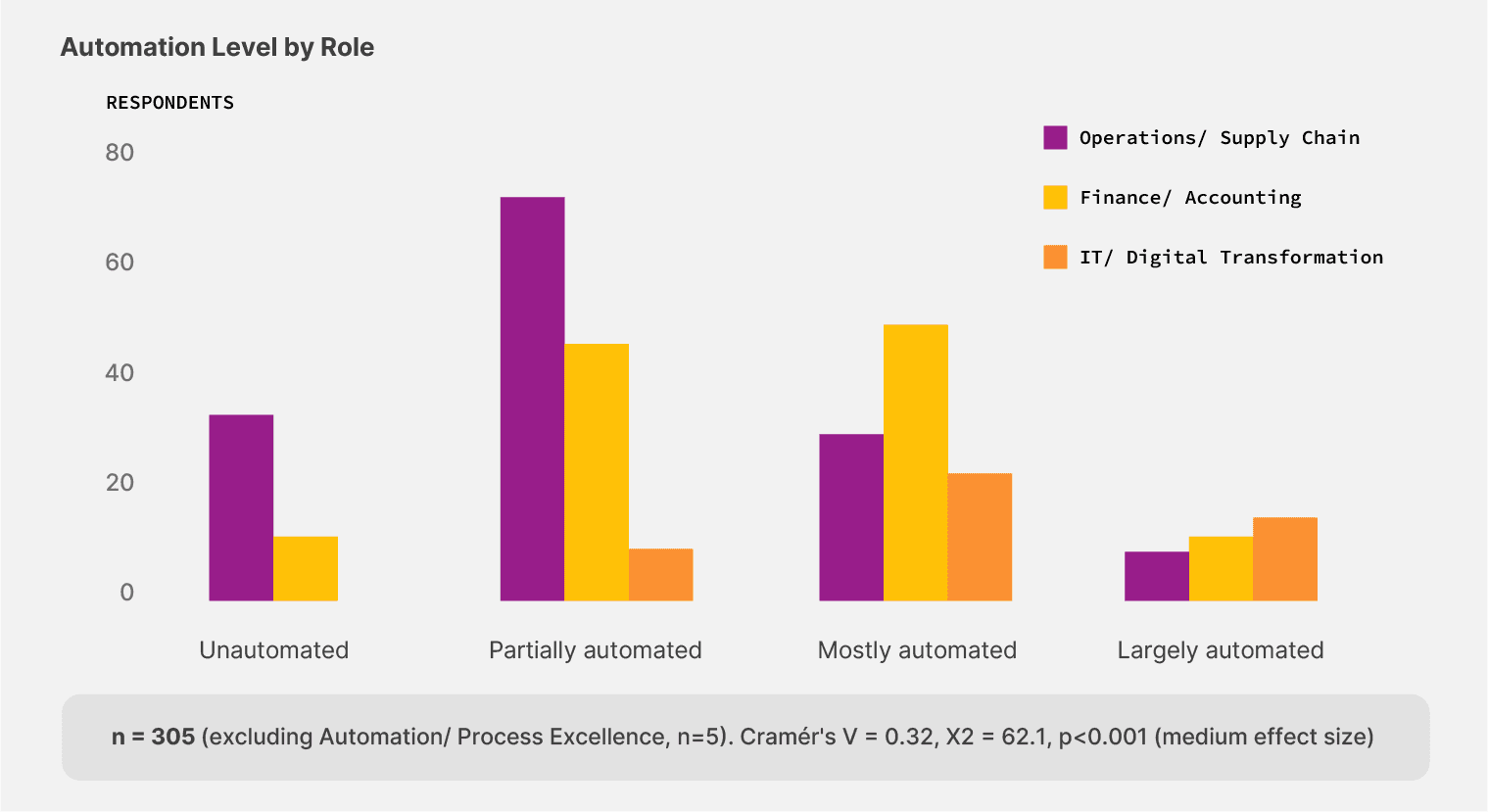
73.5% of operations and supply chain leaders run on partially automated or fully manual document processes — the highest of any role in the survey.
It’s a structural issue.
Operations teams handle the documents with the highest variability:
Bills of lading from 200+ carriers
Freight bills that change accessorial codes mid-quarter
Lumper receipts that arrive by phone or paper slip across a dock
Customs declarations that change with each port and shipment
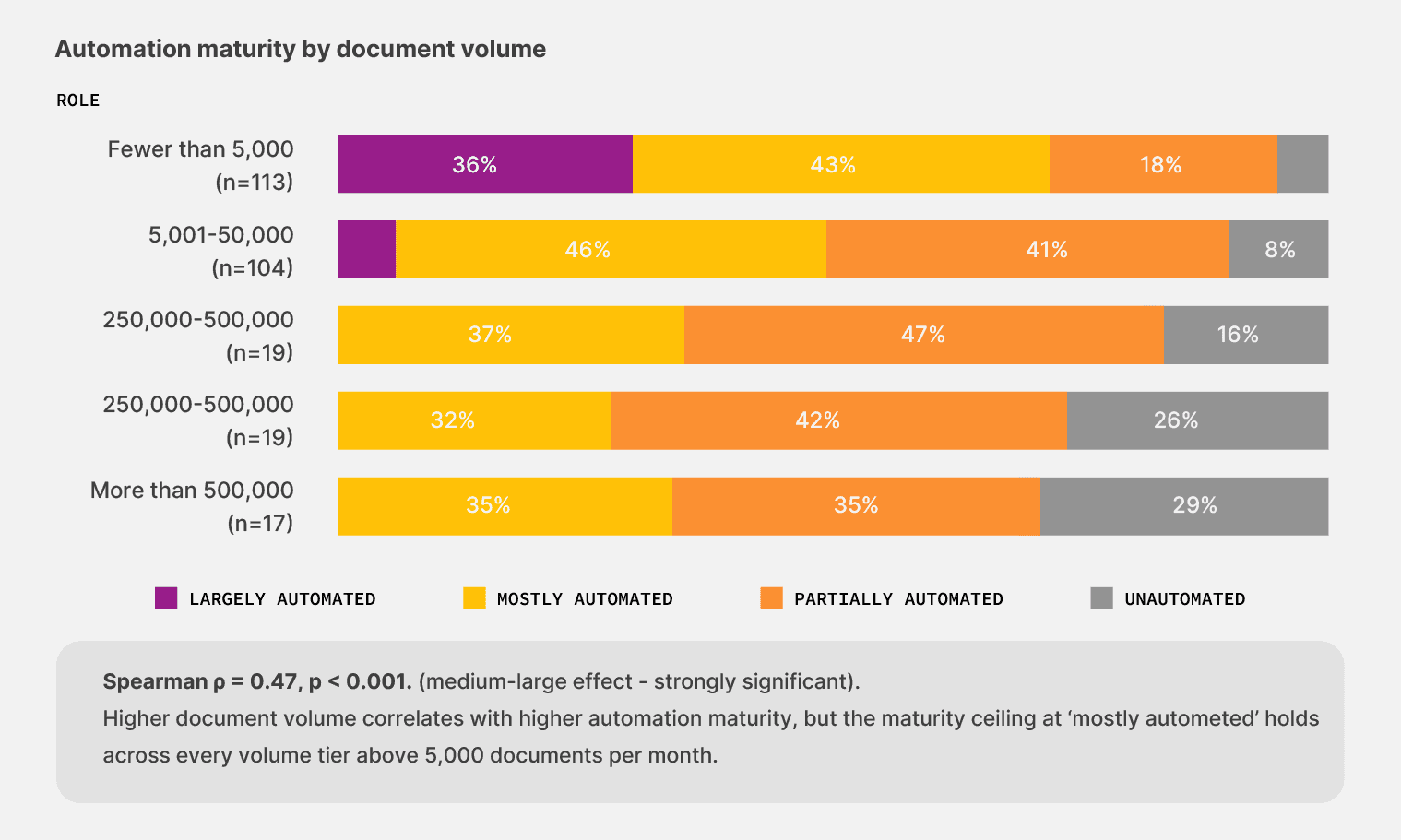
The volume side of the problem makes it worse. While 32.3% of operations respondents process between 5,001 and 50,000 documents per month, another 19.4% process more than 50,000 documents per month. That’s a load that needs an extraction layer feeding the rest of your tech stack, not a person retyping numbers from a PDF into a cell.
The fix lies in tools that bend with the document load rather than breaking under it.
So, what are the 13.2% doing differently?
The 12-point maturity gap between no-code adopters and the rest of the sample is small enough to look like noise and large enough to matter.
Across the 41 teams using no-code tools, the working pattern is different. They adjust workflows the same week a vendor sends invoices in a new format, instead of waiting for a developer cycle. Exceptions route back to the person who can read the document, and workflows change in an hour instead of sprint cycles.
Pro tip: The fastest way to gauge your current automation maturity is to see who handles the next workflow change. If a layout change from one vendor goes through an IT ticket queue before reaching the person doing the work, your tech stack has outlived its usefulness.
That working pattern is what tools like Docxster make possible—pairing AI that handles document variability with workflows business users can change without an IT release.
The broader market signal is the same regardless of vendor.
The leader in your category who first unlocks the data trapped in their documents is positioned to compound the advantage every quarter, the rest of the field stays on the old stack.
What can you do about it?
The data in this chapter point to one decision worth making before any of the rest. Look at who currently controls the document workflow in your team and who can change it tomorrow.
If the answer is a queue, your tech stack is the bottleneck, and the volumes you handle every day are paying the cost. If the answer is the person who handles the documents, you are already inside the small group this report calls the early movers.
The technology has existed for years. The advantage compounds every quarter, and it goes to the team that picks it up first.
Chapter 2: Where documents break
Finding #3: Unstandardized document intake processes increase downstream disruptions
You can have a perfectly designed workflow and still watch it break. Our survey shows that the break rarely happens inside the automation. It happens at the front door, precisely at the moment a document enters your system in a shape the system can’t read.
When we asked respondents how often intake variability disrupts work before automation runs, the answers concentrated at the unhealthy end of the scale. 33.3% reported intake issues “often” or “almost always.” Another 35.2% reported them “sometimes.”
Only one in four respondents called their document intake process standardized.
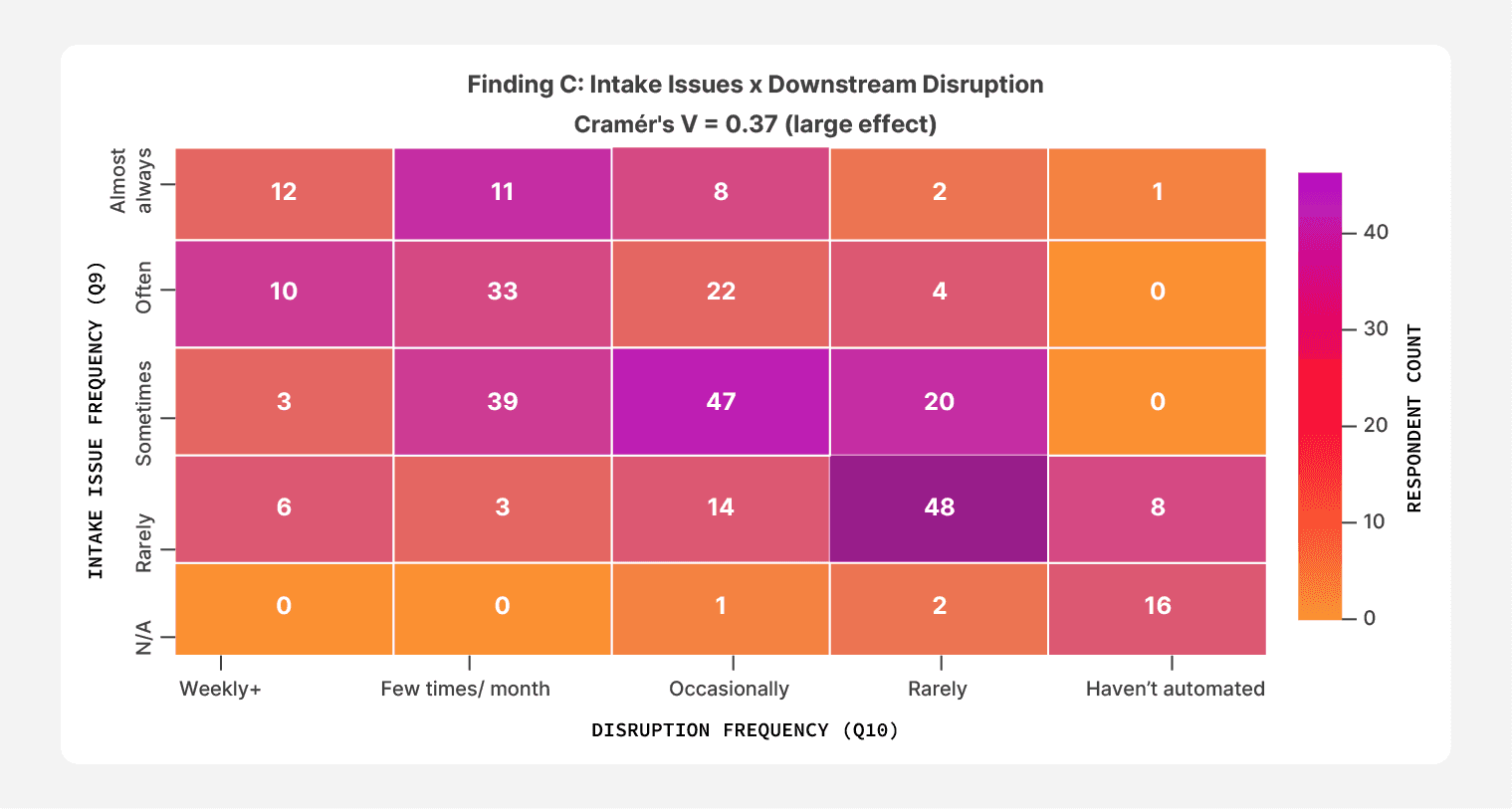
The strongest relationship in the entire dataset sits inside this picture. Teams that report intake issues happening “almost always” also report the highest rates of downstream disruption. 67.6% of that cohort says document-related issues disrupt their workflows weekly or a few times a month. When the front door breaks, the rest of the building shakes.
67.6% of respondents who say intake issues happen “almost always” also report weekly or near-weekly disruptions to their document workflows.
However, the pattern isn’t confined to high-pain teams. Even respondents who described intake as a “sometimes” problem still report disruption: 39 of those 109 say document issues hit a few times a month, and another 47 say issues hit at least occasionally.
The intake door doesn’t have to be wide open to let trouble in. A few unpredictable batches a month are enough to slow the work behind it.
Finding #4: Document challenges don’t come one at a time
The breakage doesn’t trace back to a single document problem. The top concerns sit within ten percentage points of each other, with the most important upstream issues being:
Missing or incomplete fields
Handwritten or low-quality scans
Multi-channel intake
A single challenge doesn’t dominate the picture, but they share the load equally.
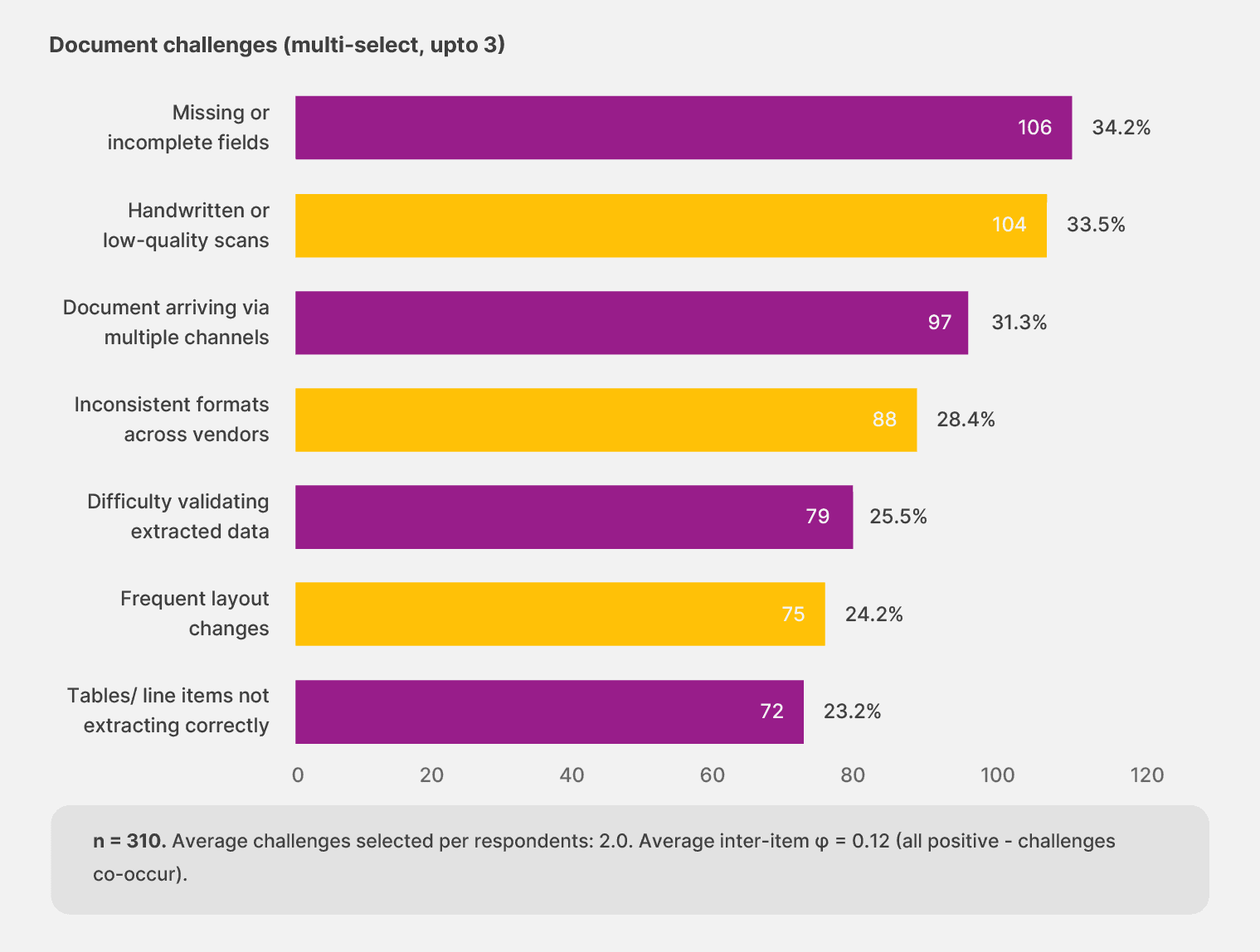
The compounding shows up in respondents’ answers. 64.2% selected two or more challenges. 38.1% selected the maximum three choices allowed in the survey, suggesting the cap fell short of the actual number of pain points they would describe with more space.
The average respondent named two challenges. Any fix that addresses one of them in isolation will leave most of the work untouched, which is the trap teams fall into when they buy point tools to handle a single failure mode.
“Most internal automation difficulty is with smaller vendors who rely on manual documentation. But no clear solution."
— Operations leader, Canada
That observation captures the reality across the sample.
Document problems live in the gap between what your platform expects and what comes through the door. You can solve handwritten scans and still trip on layout changes, or solve layout changes and still trip on the WhatsApp invoice nobody told the workflow about.
The shape of the document load keeps shifting, and the tooling has to keep up or fall behind.
Finding #5: What humans do after the automation runs
Even at the highest tier of automation maturity, humans don’t disappear. They pick up the exceptions and verify what the audit trail demands.
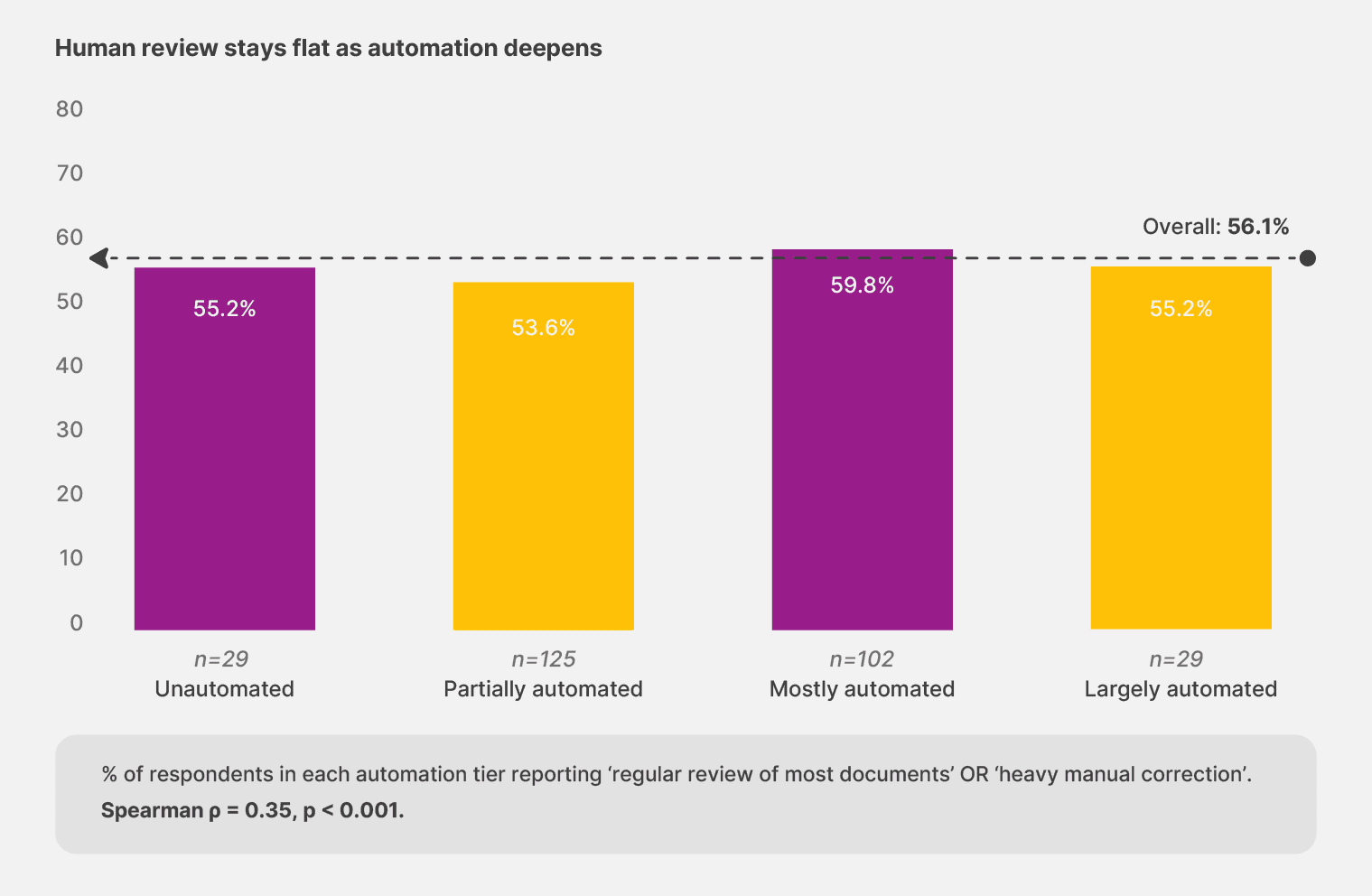
56.1% of respondents say their teams need regular or heavy review of most documents. The rate barely moves across maturity tiers. Teams that describe their setup as “largely automated” report regular or heavy review at 55.2%, almost identical to the partially automated group at 53.6%. The mostly automated cohort actually sits slightly higher, at 59.8%.
A business’s automation maturity changes what the humans do—not whether they’re needed in the first place.
Implication: The flat curve is the surprise. If automation reduced human review the way most pitches imply, the largely automated cohort should sit far below the partially automated one. They sit roughly the same. The current generation of tools redistributes human effort rather than eliminating it.
The whole document workflow, from the front door through the human pickup at the end, assumes documents will behave. Real documents don’t.
So, the teams that build for that reality, instead of around it, are the ones that get to move on.
What can you do about this?
The strongest single relationship in the dataset sits between intake variability and downstream disruption. Document challenges co-occur, and the average respondent named 2 of 7 problems.
Any extraction layer that assumes consistent inputs will leak under real conditions, and the leak shows up on your team’s calendar before it shows up on the dashboard.
You need to change your workflows to go from rigid extraction to adaptive or templateless extraction. You need tools that adapt to the document load rather than requiring the document load to adjust to them. It should have:
AI that reads a vendor’s new invoice layout the same week it arrives.
Workflows that route handwritten edits to a person without breaking the rest of the run.
Review and validation modules to bring in manual review when needed.
The extraction layer becomes a service the business can change as the document load changes—and the front door stops being where the work breaks.
Look at the last three times your document workflow tripped this quarter. If two of them are traced back to a document the system had not seen before, you’re buying tooling that assumes a world your team does not work in. The move is to put an adaptive extraction layer between your documents and everything downstream.
Chapter 3: Who owns the document processing work
You can use a document workflow every day, but you have no power to change it without filing a ticket. That’s the position 67.4% of respondents say their teams are in. IT either builds the workflow or maintains it, or both. The people who feel the breakage live downstream of the people who can fix it.
When we asked who builds and maintains automation today, 43.5% said IT handles the entire job. Another 23.9% said business users build, but IT comes in to maintain. Only 15.8% said the business handles both ends without regular IT involvement. And 8.7% said ownership is unclear or varies by workflow.
That distribution would be unremarkable if IT and the business agreed on the picture. But they don’t.
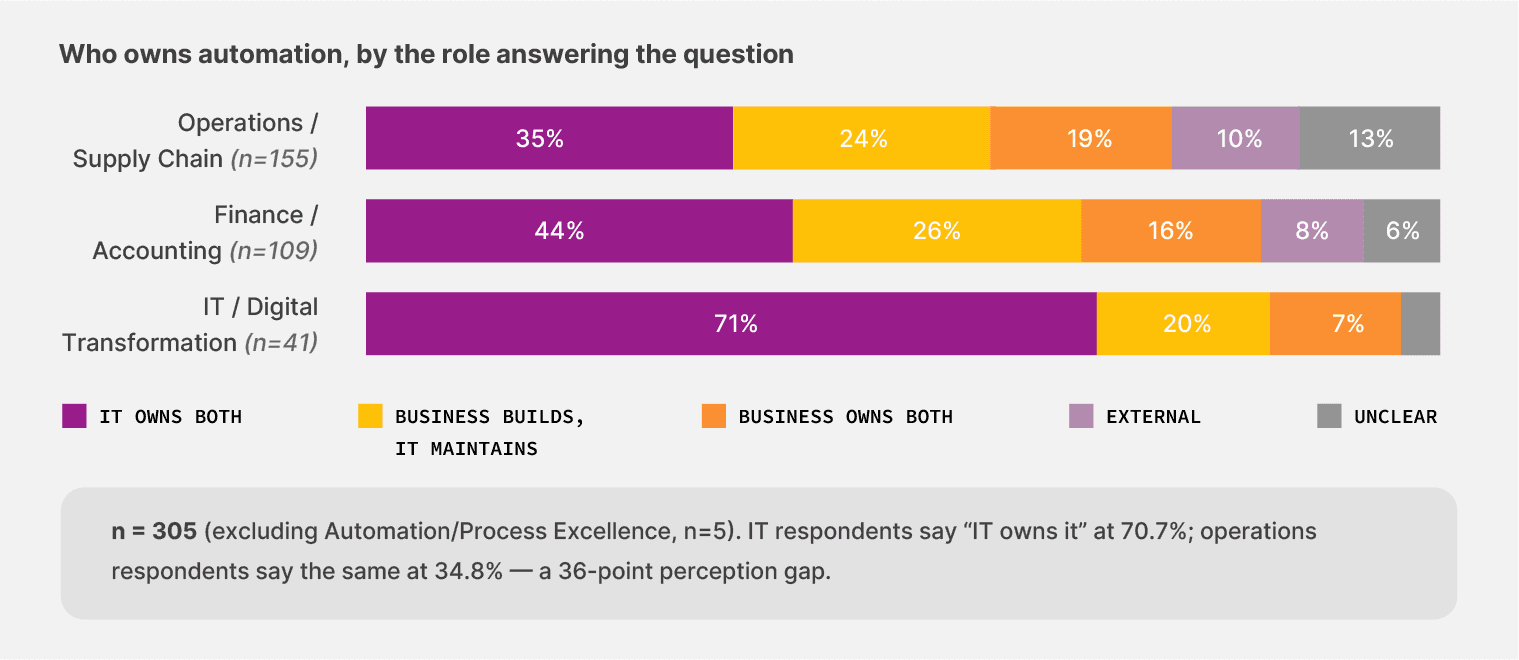
70.7% of IT respondents say IT owns automation end-to-end. Among operations leaders, only 34.8% say the same. Operations is more likely to describe ownership as fragmented: 18.7% say the business owns both ends, 12.9% say ownership is unclear or varies. Finance falls in between, with 44.0% naming IT as the owner.
The same workflow looks different from each chair, and the people closest to the documents see less clarity than the people writing the policies.
70.7% of IT respondents say IT owns automation. Only 34.8% of operations respondents agree. The picture changes depending on which chair you’re in.
Finding #6: Where ownership gets the most unclear
The smallest companies have the fuzziest picture of automation ownership.
Among teams under 50 employees, 27.4% say automation ownership is unclear or varies by workflow, the highest rate of any size cohort, and roughly 17 times the rate at companies with 1,000+ employees. The smallest teams have the most flexibility to let business users own the workflow, and 19.2% of them do (vs. 14.3% at 1,000+). That flexibility comes with a trade-off, though: confusion about who is responsible when something breaks.
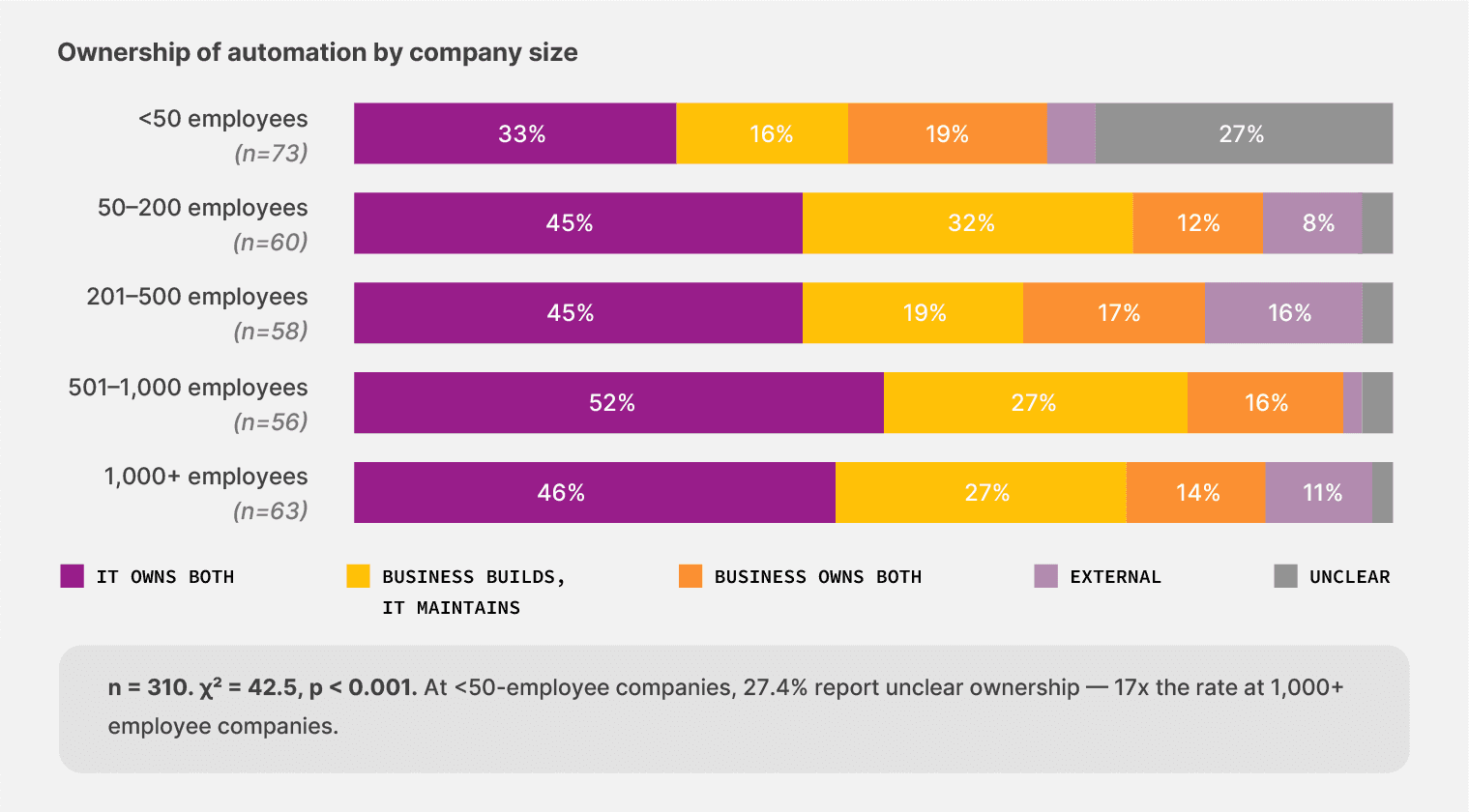
Most companies hire a specialist and build the function around them. But we found that that’s not the right approach anymore. Teams that distribute ownership across business and IT report fewer maintenance shocks than teams that concentrate it.
Finding #7: Maintenance load moves with the shape of ownership
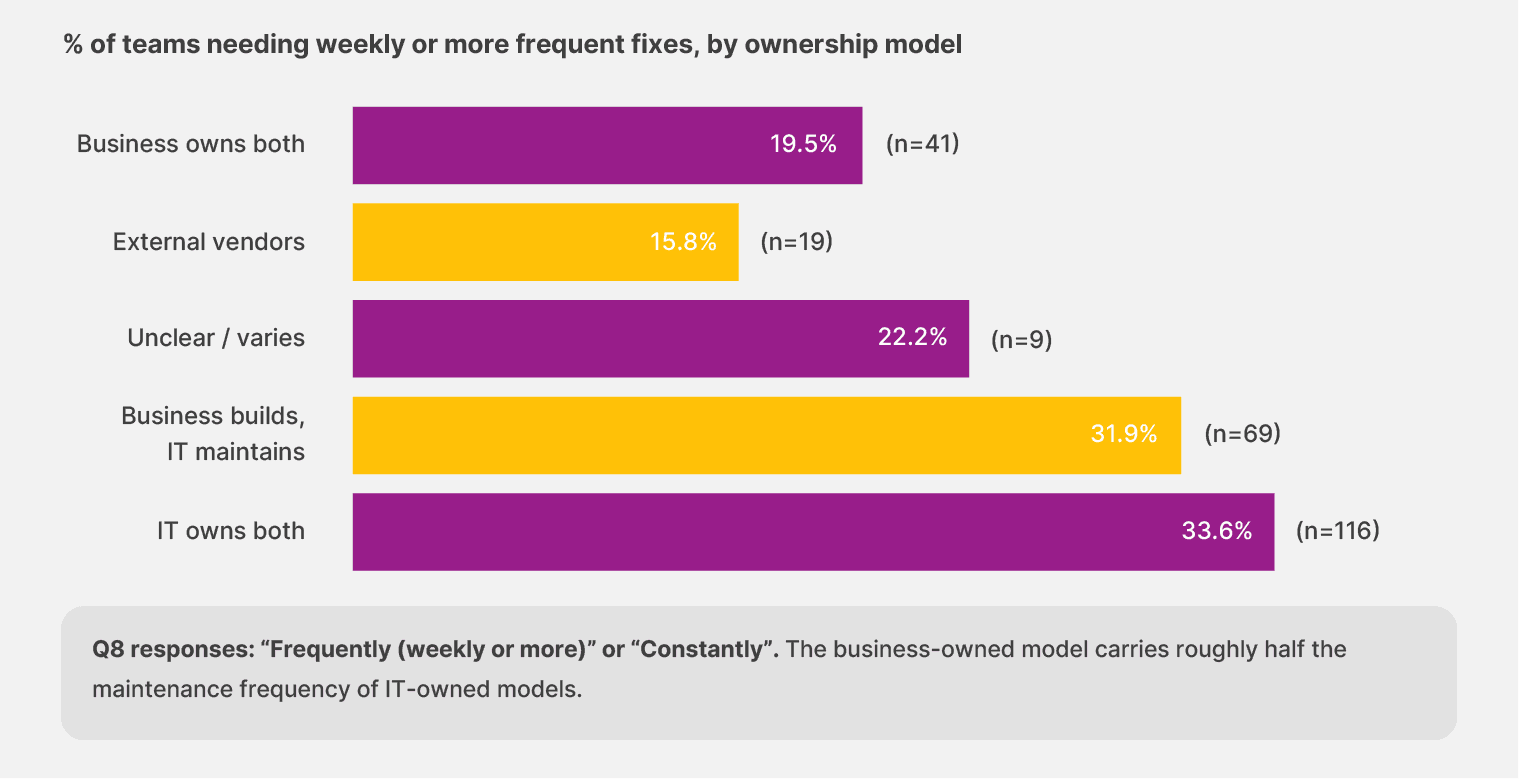
When the business owns both the build and the maintenance, 16.3% of teams report needing weekly or more frequent fixes. When IT owns both, the rate climbs to 28.9%. When ownership splits between the two (business builds, IT maintains), it sits at 29.7%. The fully business-owned model carries roughly half the weekly maintenance load of the IT-led models—and the gap is consistent enough across the sample to be taken seriously.
That payoff is not accidental. Teams that own their own workflows learn the document patterns faster. They adjust the rules the same week a vendor changes a layout, instead of opening a ticket and waiting for someone three teams away to schedule the fix.
Maintenance gets smaller because someone close enough to the work catches the change before it compounds.
Implication: The lowest weekly+ maintenance rate in the survey is reported by teams using external consultants (15.8%, n=19). That cohort is small, and the outsourced model carries its own costs of vendor lock-in and slower change response. The number worth noticing is the in-house IT-owned model: it carries more weekly maintenance than every other ownership model in the data, including the smaller external cohort.
The maintenance gap connects to a bigger trend in the survey. Teams that own their workflows directly are the same teams that adapt fastest. When a vendor changes a form or a port adds a customs requirement, the response time is the time it takes to absorb the change and avoid falling behind.
What can you do about this?
You need to move from IT-owned automation to distributed ownership with shared guardrails. Push the workflow logic and the daily changes to the business users who handle the documents.
Keep the architecture and the security guardrails with IT. Each side does the work it sits closest to, and the maintenance load drops because nobody waits in someone else’s queue. The Center of Excellence model is one path. A faster one runs through the people already touching the documents every day.
Look at how a layout change from one of your vendors moved through your workflow last quarter. If the fix sat in an IT queue for more than a week, your ownership model is costing you the weekly maintenance load they survey has surfaced.
Chapter 4: Trust doesn’t grow with maturity
Most automation buyers expect trust to scale with experience. The longer a team runs the tools, the more confidence they should have in the outputs. The data shows the opposite. The teams that have lived with automation longest carry the most concerns because they’ve seen what failure actually costs, and they know it can happen again.
The top two trust concerns in our survey, each named by more than a third of respondents, are the risk of incorrect payments (36.8%) and security or data privacy (36.1%).
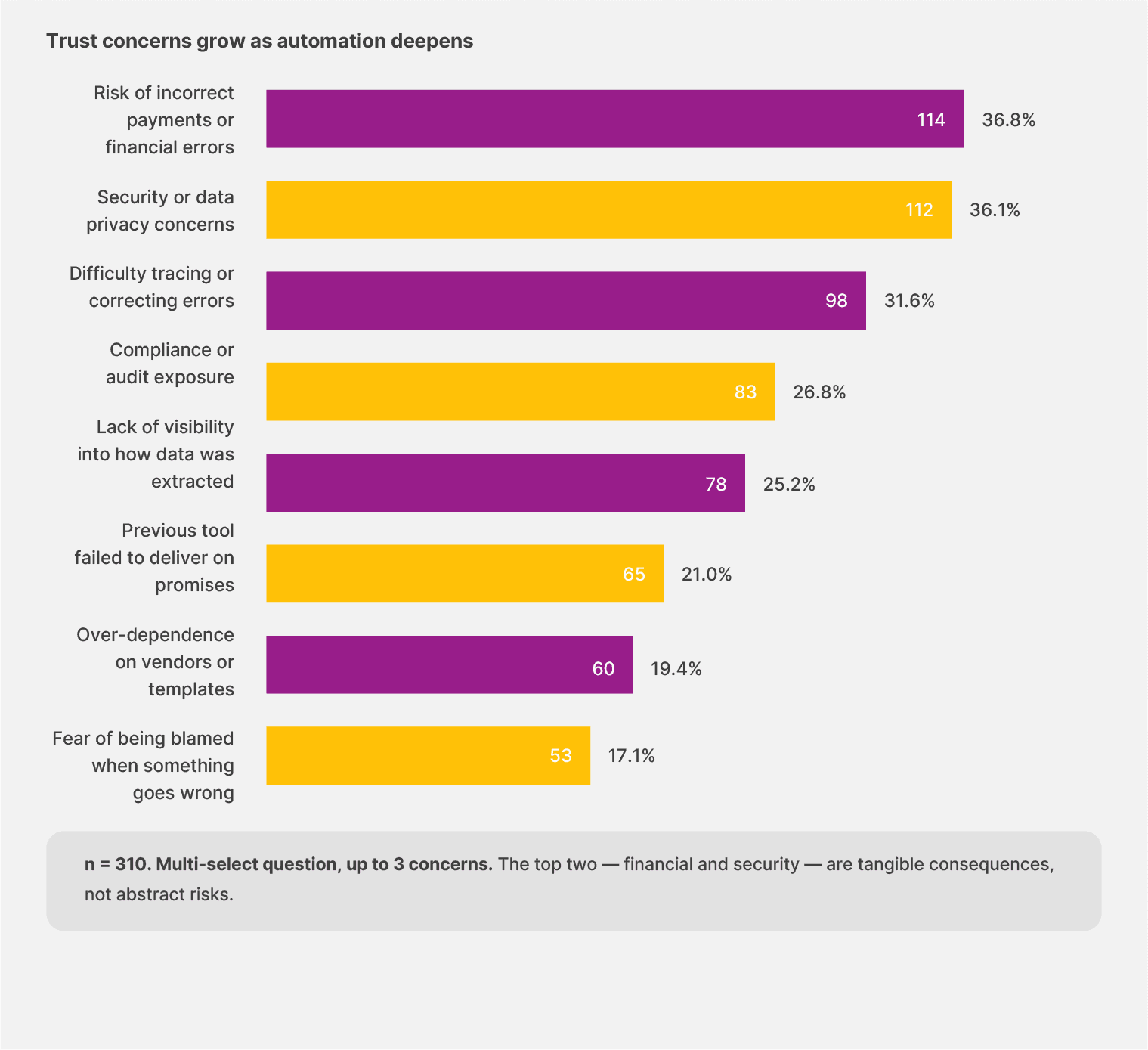
It tells us which teams buy automation. They’re buying speed, and they’re also buying liability. Every workflow becomes a path that could lead back to a missed payment or a flagged audit weeks later.
The top two trust concerns are incorrect payments and security. Together, 62.3% of respondents selected one or both. The fear of being personally blamed comes in last at 17.1%.
Finding #8: As automation expertise grows, trust reduces
We expected to see that more automation would lead to fewer concerns. But in reality, that’s not the case.
Teams running unautomated workflows select an average of 1.65 trust concerns from the list. Partially automated teams select 2.20. Mostly automated teams hit 2.28, the highest of any tier. The largely automated cohort, the smallest in the sample, drops back to 2.13.
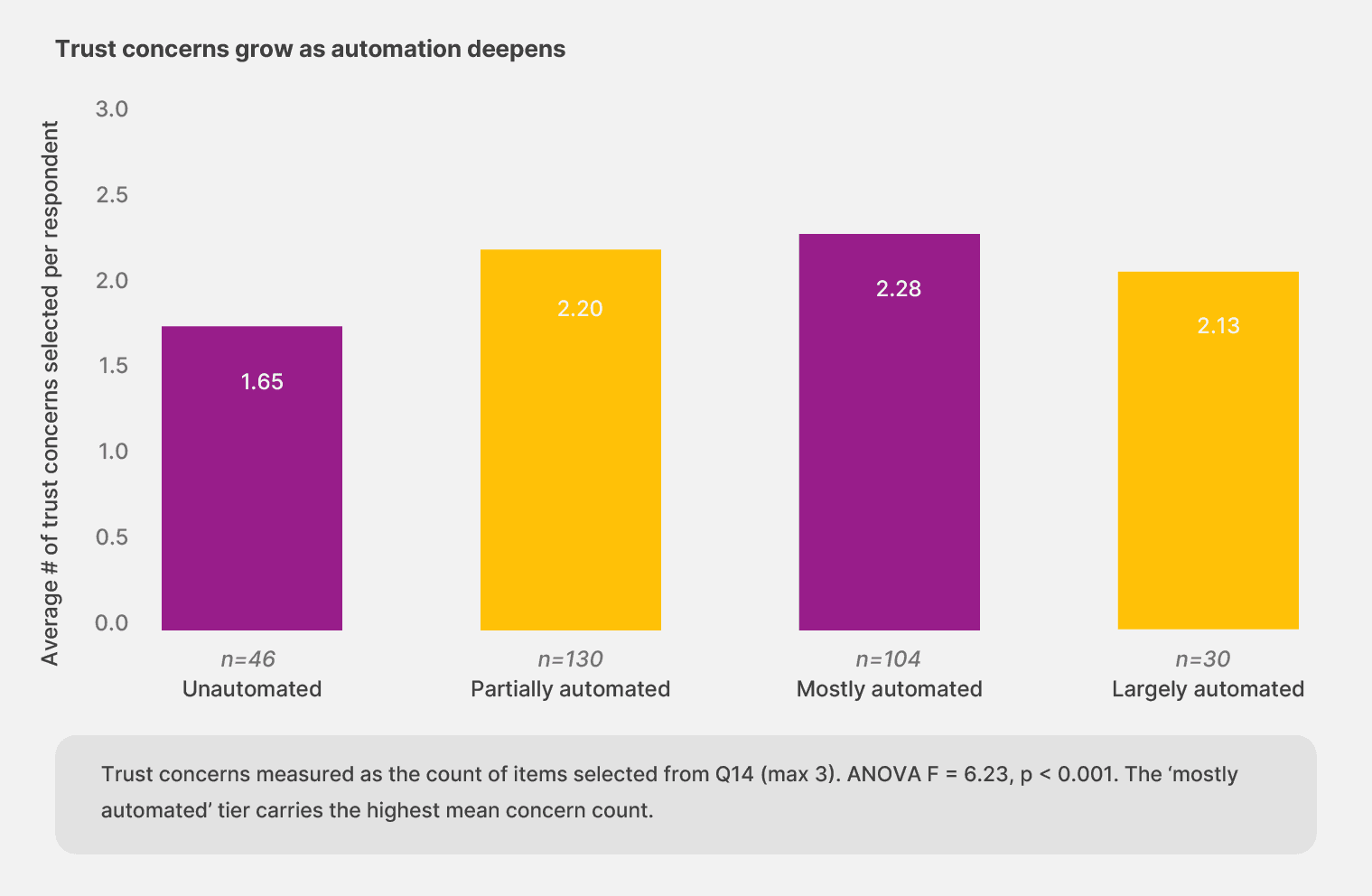
The increase makes sense once you look at one specific concern: “previous tools failed to deliver.” Among unautomated teams, 13.0% select that concern. Among teams further along the maturity curve, the rate climbs above 21% and stays there.
In short: experience with automation includes experience with automation that didn’t work. The teams that have been through more cycles carry more memory of what broke.
The pattern also shows up when comparing no-code adopters with non-adopters. The 41 respondents using no-code tools select an average of 2.51 trust concerns, compared with 2.08 for the rest of the sample. The teams closest to the work are also the ones who can name the gaps with the most precision. This means their concerns are not a sign of distrust but of expertise.
Implication: Trust ceilings move with verifiability. The teams that earn long-run trust build audit trails and surface low-confidence outputs before they hit a customer or an auditor. Outputs the system can’t trace are outputs teams won’t act on, no matter how many features the vendor adds.
Finding #9: Failure shows up in different shapes, depending on the chair you sit in
When automation fails, teams from different functions name different consequences. Each role’s failure profile mirrors the work that role is responsible for.
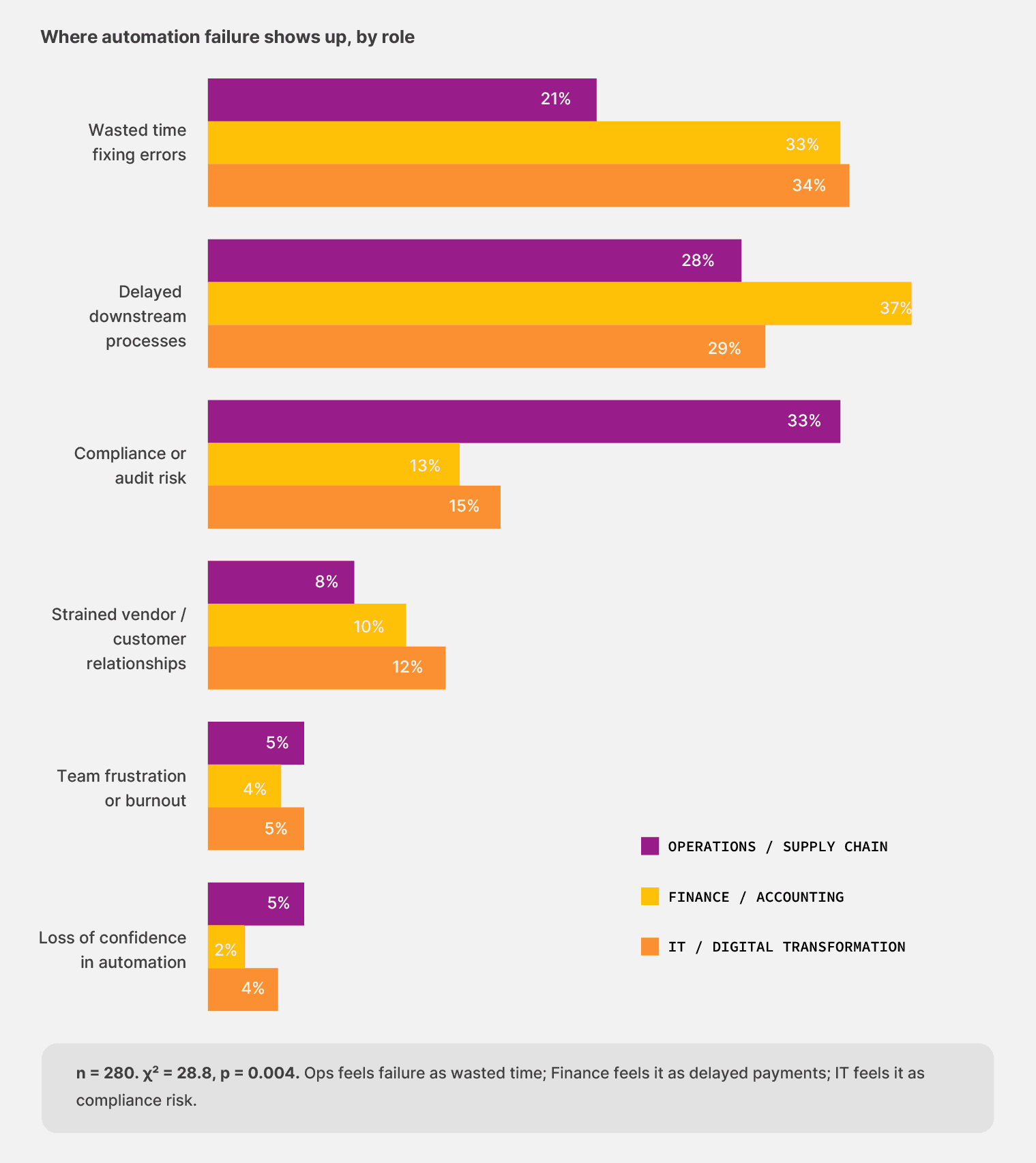
Operations leaders named wasted time fixing errors as the most common failure impact, at 33.8%. For finance respondents, the most common impact was delayed downstream processes (37.1%), like the missed payments and late approvals that follow when an automation hiccups.
IT respondents broke the trend entirely: their most common impact was compliance or audit risk at 33.3%, more than twice the rate of either operational role.
The asymmetry matters because trust gets built workflow by workflow, not in a single broad stroke. Each role is asking the same question: “Can I rely on this when it counts?”
But measuring the answer against a different set of consequences. A platform that earns a finance team’s trust through payment accuracy still has to earn IT’s trust with audit logs and the operations team’s trust with exception handling. The teams that get all three right are the teams that get to scale.
What can you do about this?
You need to stop focusing only on accuracy claims and review no-code document automation platforms as a whole. For example, it should have:
Audit trails that show where a document surfaced from.
Visibility into errors that surface low-confidence outputs before they cost money.
Approval flows that put the right eyes on the right document at the right moment.
Trust comes from what the system can show its work on.
Look at the last automation failure your team had to clean up that the team couldn’t trace. You’re running a tool that has rented your trust without earning it.
Choose a solution that builds validation checkpoints and enables human-in-the-loop automation within its platform.
Chapter 5: The realistic path forward for document automation
Our survey has consistently pointed to a specific shape for the next layer of document automation throughout this work. AI that handles the variability current tools can’t, with human oversight kept in the loop where it matters. That ask shows up most clearly in the open-text data, where teams wrote about what they wanted with no prompting at all.
Finding #10: What teams ask for when nobody is selling
We asked finance, operations, and IT leaders what would most improve the reliability of teams’ document automation today. Out of 309 responses, 30 wrote about AI unprompted, or 9.7% of the sample.
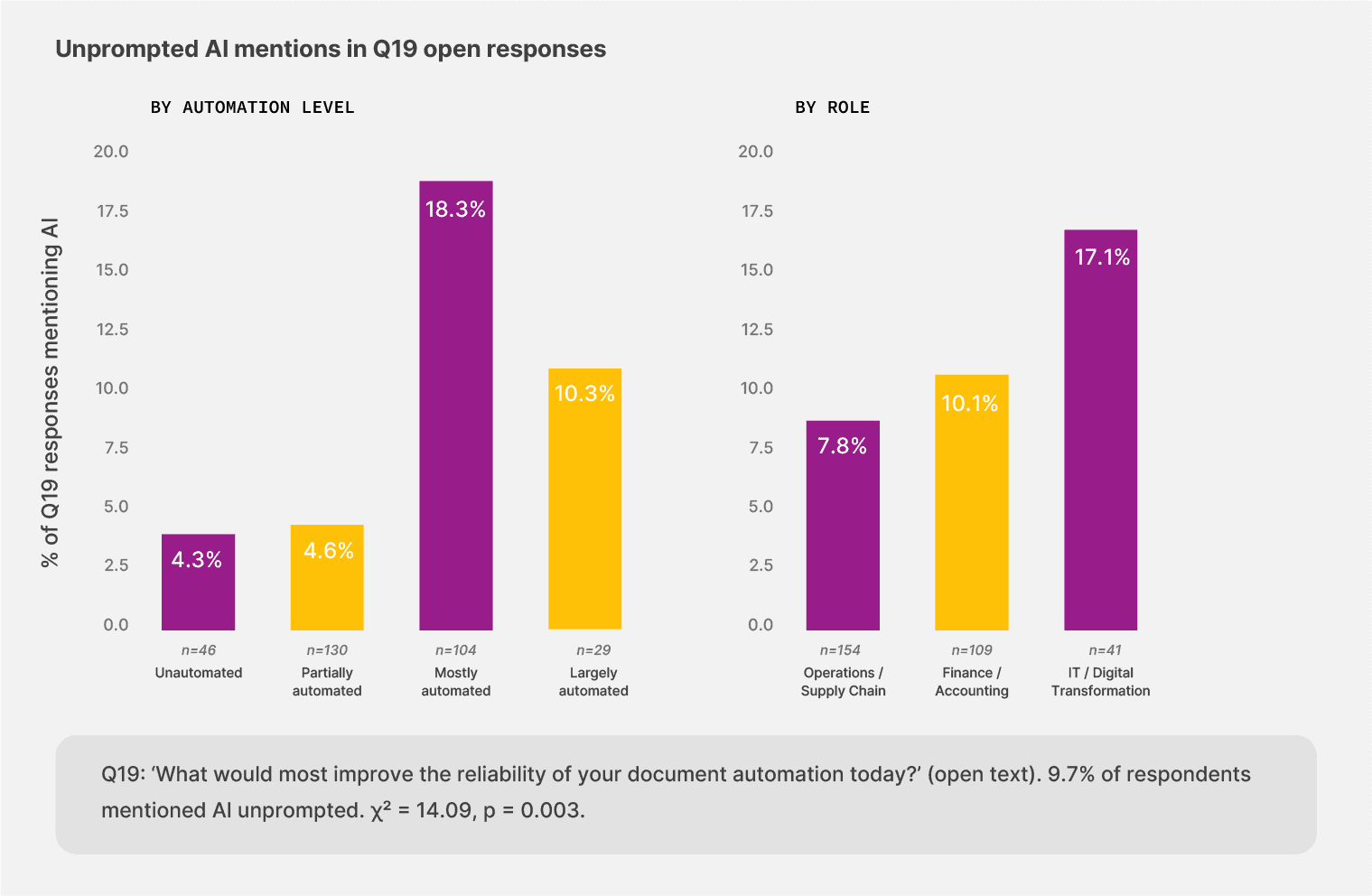
17.1% of IT respondents mentioned AI in their open text, more than twice the rate of operations respondents (7.8%). Among teams that describe themselves as “mostly automated,” 18.3% mentioned AI, four times the rate of unautomated and partially automated cohorts (around 4.5%). The pattern lines up with experience.
The teams that have lived with current automation long enough to know its ceiling are the ones reaching for the next layer.
"Highly trained AI would curtail the need for the documents to be reviewed by staff members."
— Operations leader, Canada
Teams keep asking for AI that handles the document variability that current tools cannot, with human oversight kept in the loop where it matters.
Finding #11: The first 60 days predict the rest
When teams pick a tool that fits the work, value tends to arrive quickly or not at all. But the bifurcation is clear. Only 25.3% of respondents said their current automation reached meaningful value in less than 30 days. And 17.9% sit in the danger zone of more than six months to value for document automation tools, or no clear value yet.
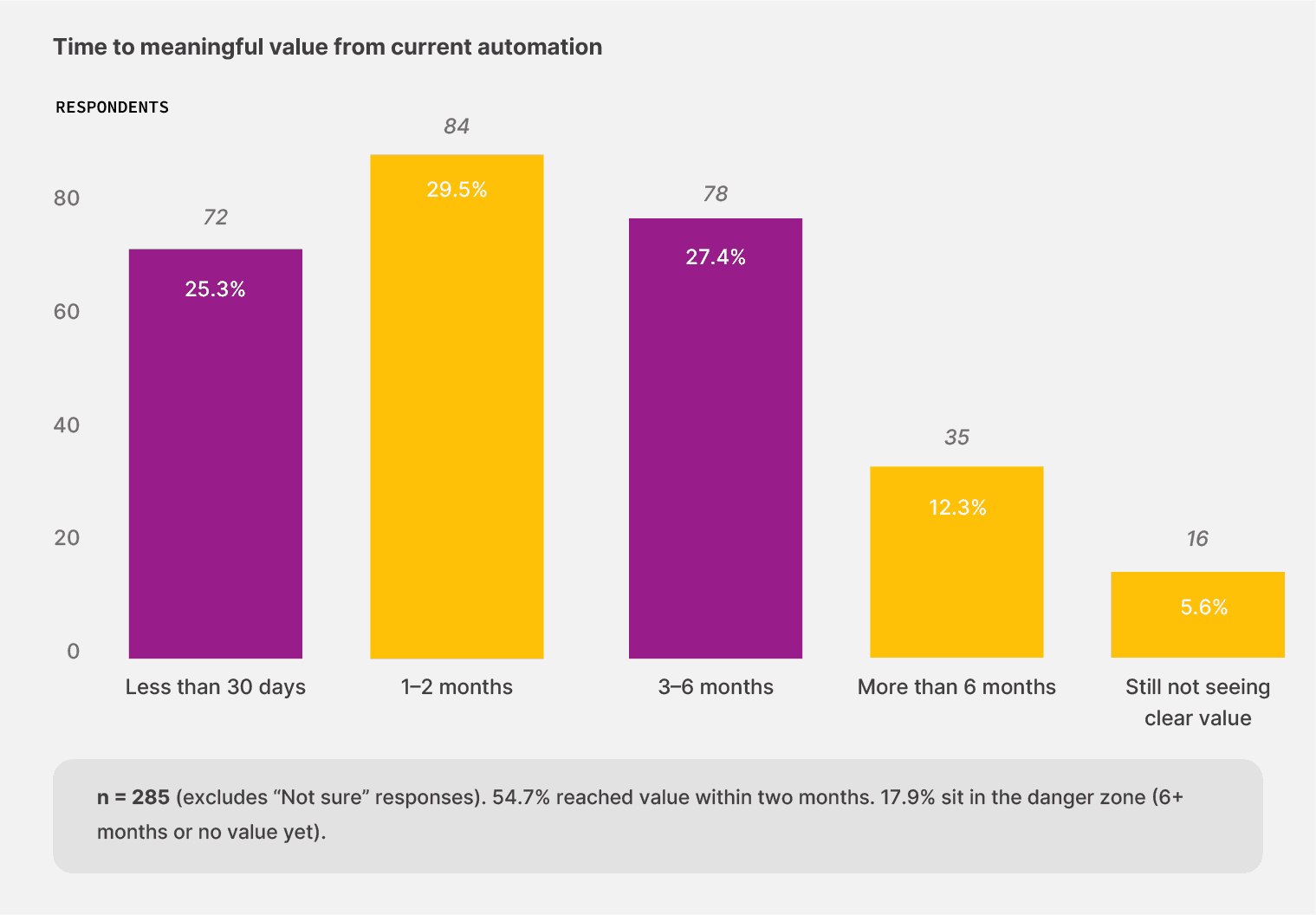
Even when we looked at the unautomated cohort, the teams that started from a manual baseline. 12 of those 29 respondents (41.4%) reached value in under 30 days when they did automate. That’s a higher proportion than in the partially automated cohort, where 24.8% reached that value that quickly.
Starting from zero with the right tool gets you results faster than spending 18 months upgrading a half-built workflow. The barrier sits in the act of starting. Teams that pick a tool fitting the document load and try it find value quickly.
54.7% of respondents reach meaningful value within two months of getting their automation in place. Of the unautomated teams that tried, 41.4% achieved value in under 30 days.
Finding #12: The market is shopping
The next 12 months are likely to see meaningful turnover in the document automation category. Here’s what we saw:
21.3% of respondents say they’re re-evaluating or replacing their existing tools.
17.4% are not sure yet
38.7% of the sample is persuadable in either direction
The pause-or-scale-back cohort sits at just 3.2%.
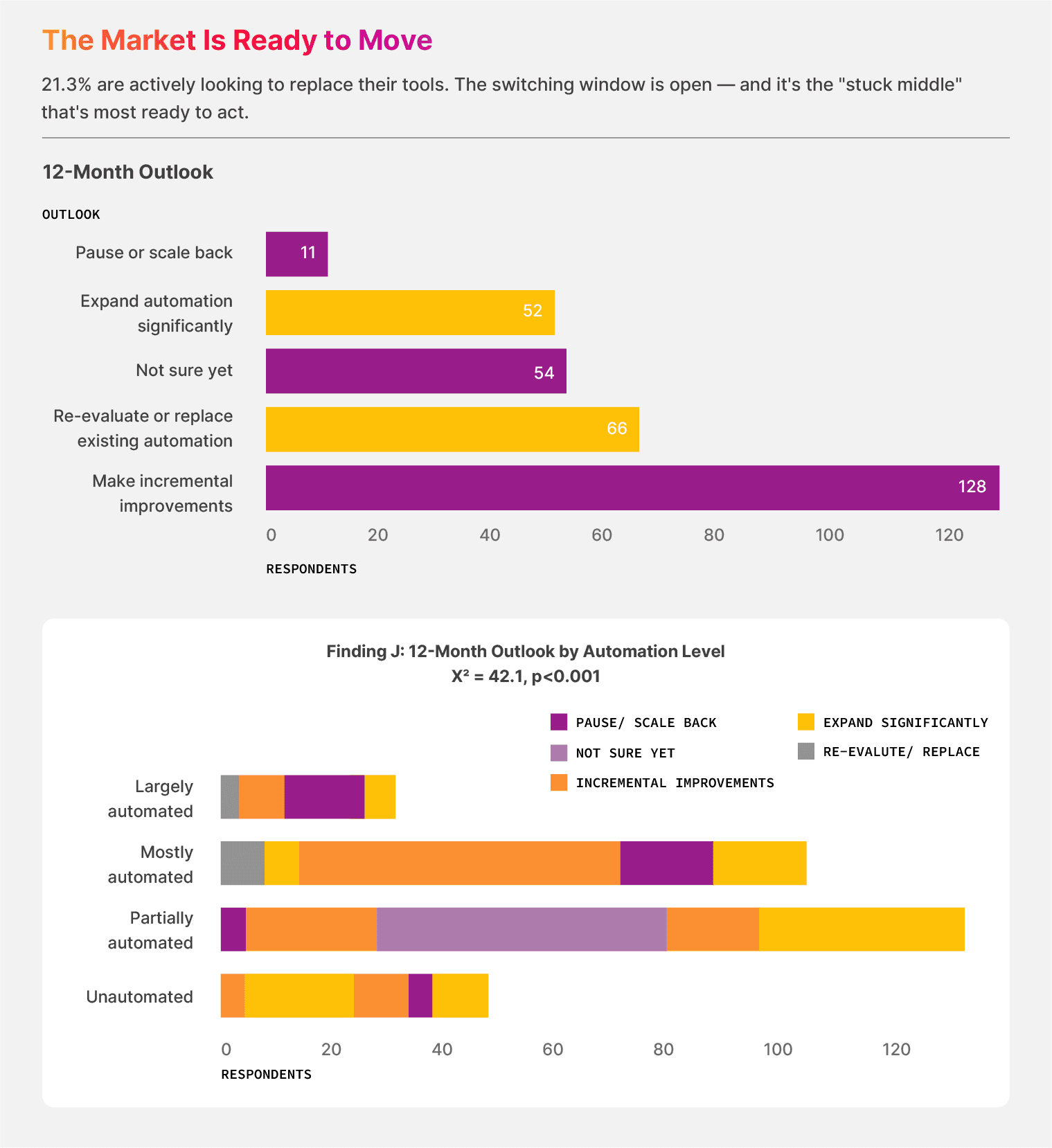
In the partially automated cohort, 25.4% of teams say they want to re-evaluate, the highest re-evaluation rate across all maturity tiers. The teams that sit in the stuck middle have spent enough time with their current setup to know what it can’t do, and they’re looking for what comes next.
The largely automated cohort tells a different story. 40% of those teams want to significantly expand their automation. They have proof that their current setup works, and they want more of it.
The no-code document automation gap:
269 of 310 respondents (86.8%) have not yet adopted no-code workflow tools. That is the addressable pool. Of those, 109 respondents (40.5%) are open to changing their tools in the next 12 months.
What’s the next step?
It’s clear that document-intensive businesses need to shift from automation-as-cost-savings to automation-as-capacity. For example, a finance team that closes the books 3 days faster has earned 3 days of strategic time with the right no-code automation tool. While an operations team that stops retyping bills of lading has earned the hours to investigate the carriers that keep sending malformed bills of lading.
That recovered time is what justifies the next investment, and it’s also what compounds when the next layer of AI lands on top.
Now, you need to adopt what the early movers have successfully. If your team is in the 38.7% persuadable pool, the data has made your case.
The next move belongs to you.
Survey methodology
This study surveyed 310 finance, operations, and IT leaders across the United States, the United Kingdom, and Canada. Our fieldwork ran in February 2026 through Centiment, an anonymous panel provider that qualified respondents by role and company size before routing them to the questionnaire.
The sample is evenly split by geography (33% US, 33% UK, 34% Canada) and weighted toward operational roles: 50% Operations and Supply Chain, 35% Finance, 13% IT—reflecting the teams that handle the highest daily document volumes.
For each finding reported in this document, we ran the appropriate statistical test for the data type and question. We tested categorical relationships using the chi-square test and Cramér’s V for effect size. We measured ordinal relationships, such as automation level by human review, with Spearman’s rank correlation. The trust-concerns-by-maturity finding used a one-way ANOVA. The threshold for significance was p < 0.05.
About Docxster
Docxster is a no-code document automation platform built for the finance and operations teams that handle high-volume, high-variability document work. For example, the freight bills, invoices, purchase orders, customs declarations, and batch records that move money and shipments through manufacturing and logistics businesses.
The platform pairs templateless AI extraction with no-code workflow builders you can change without filing an IT ticket. Operations leaders configure the rules while Finance leaders verify the outputs. Each side does the work it sits closest to, and the maintenance load drops because nobody is waiting in someone else’s queue.
If you’d like to extract document data and turn it into actionable intelligence, get in touch with us, and we’ll show you the ropes.
Benchmark Your Document Stack
Get the full report PDF from our 2026 survey of 310 finance, operations, and IT leaders across the US, UK, and Canada.
Turn documents into decisions.
See how Docxster gets you from inbox to insight in minutes, not days. Bring your toughest workflow — we'll show you what it looks like solved.


