State of No-Code Document Automation Report 2026: Operations Segment
What 155 operations and supply chain leaders say about the document layer holding their work back.



Executive summary
Operations and supply chain teams in manufacturing and logistics are the largest segment in our survey, accounting for half of the 310 respondents across finance, operations, and IT. They’re also the most underserved by current automation tooling. The data ahead shows where the gap sits, why it sits there, what it costs the team in lost hours, and why this same cohort is also the most ready to switch.
The chart below summarizes where Ops teams pull away from the survey average by 5 percentage points or more across finance, operations, and IT teams. Most of the divergence runs in the same direction.
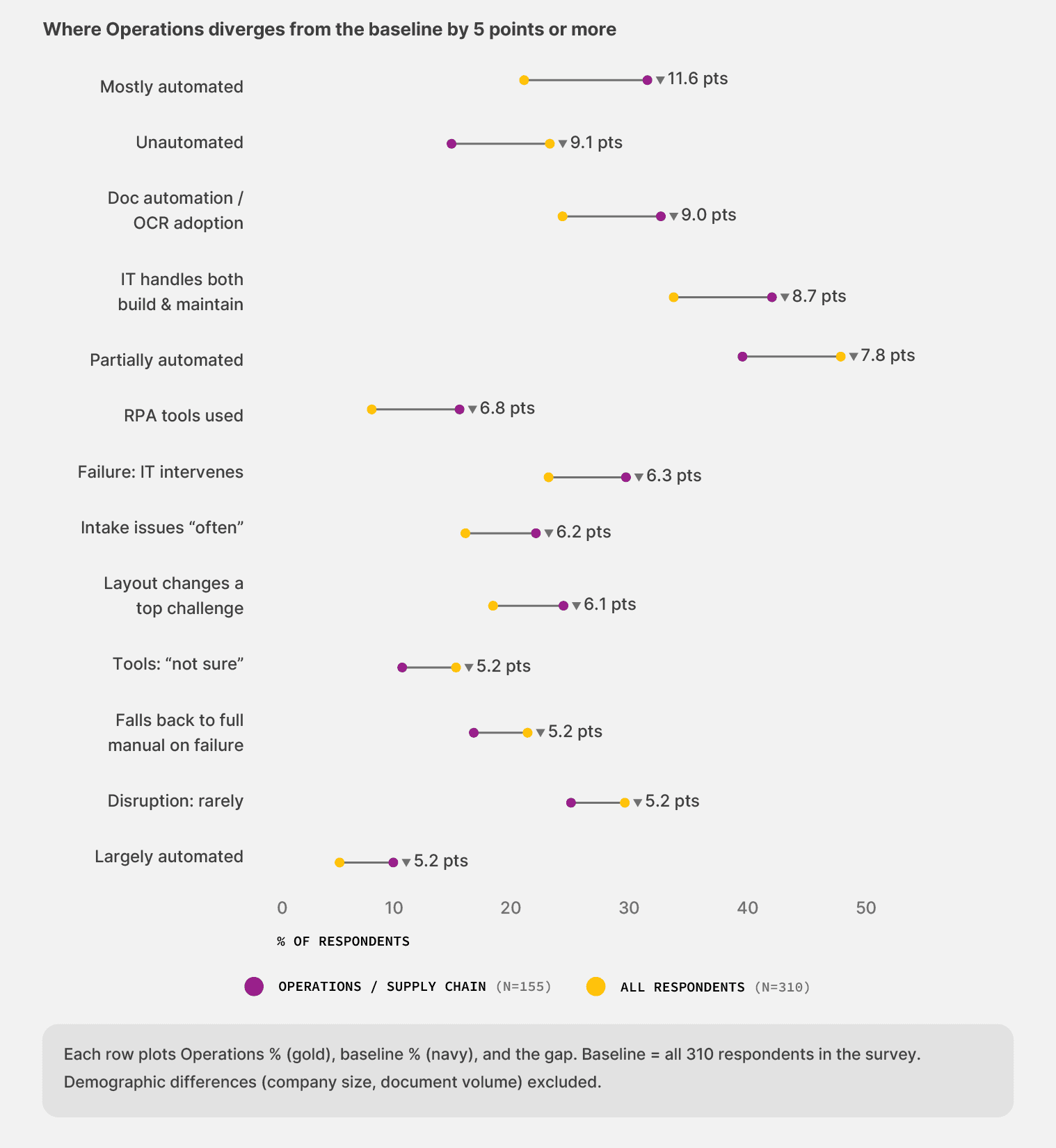
A few trends stand out:
Ops sits at “partially automated or worse” at 73.5%. The survey average is 56.8%. That’s the largest segment-to-average gap in the dataset.
Adoption of modern document automation tools runs lower in Ops on every category that matters. Document automation and OCR sit at 24.5% (survey average 33.5%). RPA sits at 7.7% (survey average 14.5%).
1 in 7 Ops respondents say they don’t know which tools their team uses today, compared with 1 in 11 across the survey average. The awareness gap is the largest of any segment in the data.
The cost shows up as labor and silent failure. Ops teams are about a third more likely than the survey average to fall back to fully manual handling when automation breaks (21.3% vs. 16.1%), and almost twice as likely to report failures that go completely unnoticed until they cause downstream damage (3.7% vs. 2.1%).
The opportunity shows up in the same data. Ops reports the highest switching intent of any segment in our survey, and they see meaningful value faster than the average team when they automate. The barrier is starting.
The rest of this report unpacks why those divergences sit where they sit. Each chapter closes with a short list of moves Operations leaders can take based on the data.
For the full picture across all 310 respondents in our survey of finance, operations, and IT leaders, see the State of No-Code Document Automation 2026 main report:
State of No-code Document Automation 2026
1. Operations is the least tooled when it comes to document automation
Operations teams in document-intensive industries handle the widest range of document types in our survey. For instance, bills of lading from carriers, freight bills with frequently changing accessorial codes, or customs declarations that shift with each port.
The work has more variety than most other functions, yet the tooling supporting it has the least depth.
Across our 310 respondents in finance, operations, and IT, Ops teams sit furthest from the automation that would help. They make up half the sample, run the messiest document load, and use the least specialized tooling.
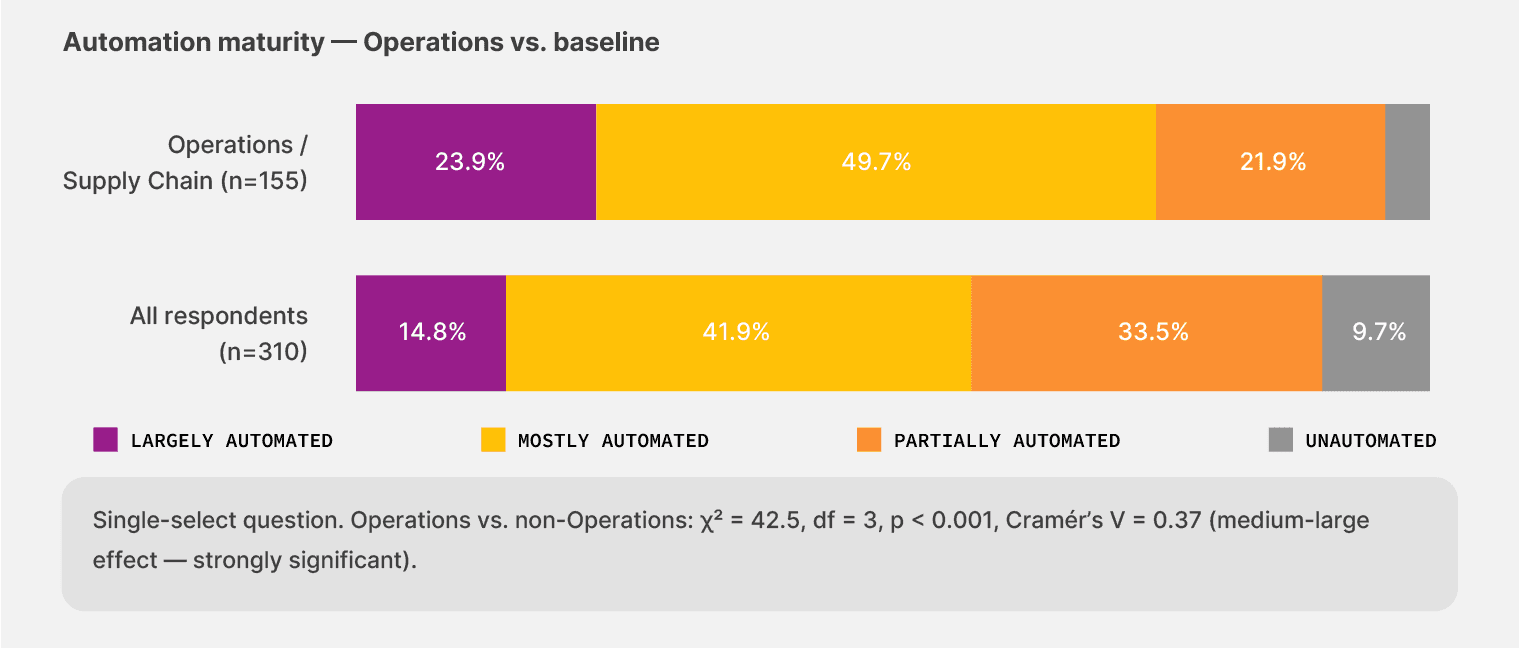
The document automation maturity gap is the largest in the dataset:
73.5% of Ops teams sit at “partially automated or worse”—about a third more often than the survey average of 56.8%.
23.9% report being fully unautomated, against 14.8% across the survey. Ops is more than half again as likely to be doing document work entirely by hand.
Only 4.5% describe themselves as “largely automated,” about half the survey average.
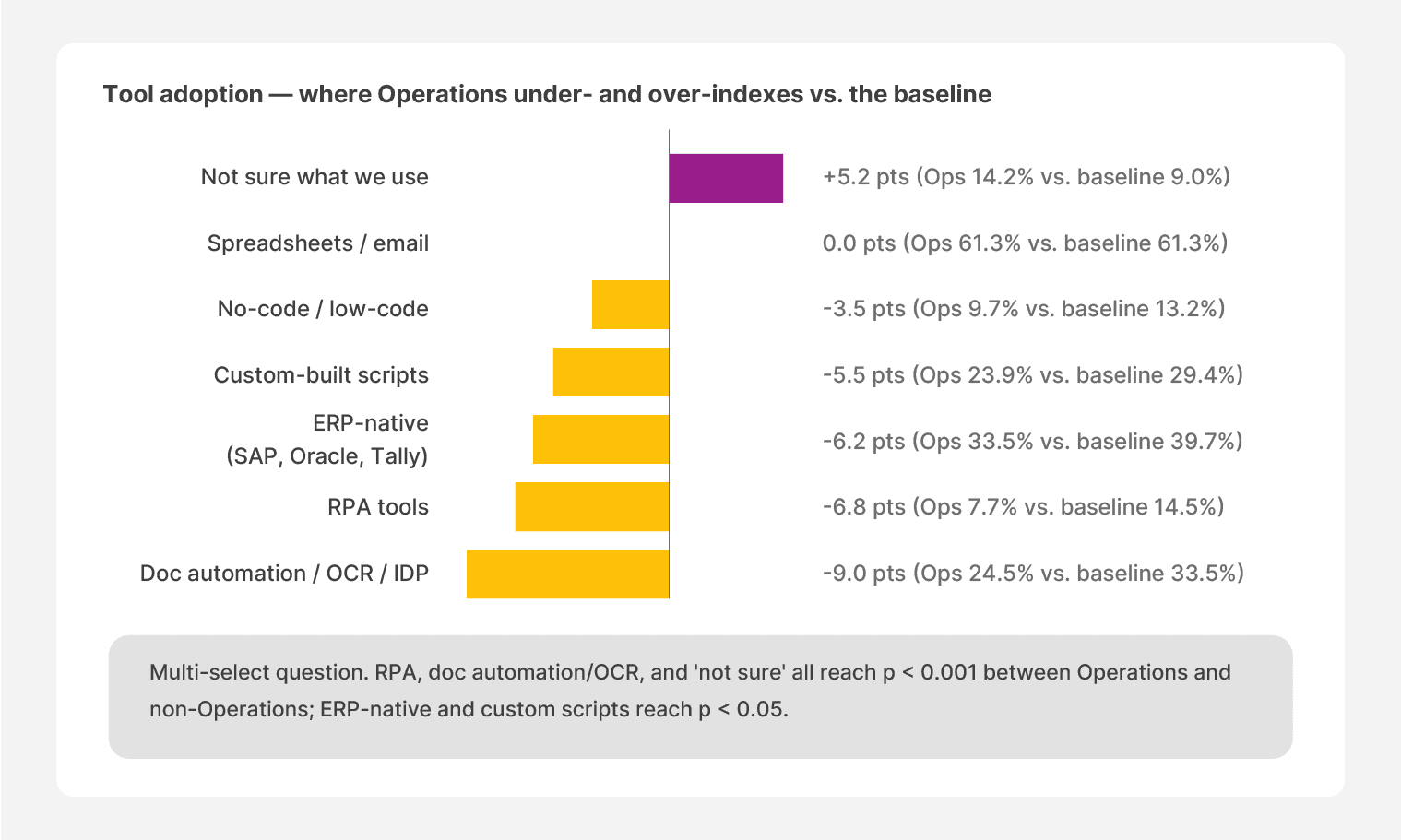
The tooling side tracks the same direction. The categories most relevant for document work are also the categories with the lowest Ops adoption:
Document automation, OCR, and IDP reach 24.5% of Ops teams, against 33.5% across the survey average. It’s 9 percentage points lower than the average across finance, operations, and IT.
RPA tools sit at 7.7%, a little over half the survey average of 14.5%.
No-code workflow tools sit at 9.7%, about a quarter below the survey average of 13.2%.
The reason for the tooling gap appears in two places. The first is awareness. About 1 in 7 Ops respondents say they don’t know which tools their team uses today, compared with 1 in 11 across the survey. Without a dedicated IT person to ask, the tool stack often grows quietly. The AP supervisor uses one workflow, and the dispatcher uses another. But it’s very likely that nobody has visibility across both.
About 1 in 7 Ops respondents (14.2%) say they don’t know what automation tools their team uses today. The survey average is 1 in 11 (9.0%). The awareness gap is the largest of any segment in the data.
Less IT involvement means more unclear ownership
The second reason is structural. Ops often works at smaller companies, with rarer dedicated IT support. About a third of the cohort sits at organizations with fewer than 50 employees, well above the survey average of 23.5%.
At that scale, the AP supervisor or operations lead frequently doubles as the workflow owner. There’s no IT calendar to check, and no governance in place to enforce a single tool. Every decision takes place within the workflows they’re meant to serve. But this also means ownership becomes a fuzzy problem.
Here’s what we found:
34.8% of Ops teams say IT handles both the build and the maintenance of automation. The survey average is 43.5%. Ops is about a fifth less likely to have IT fully owning the work.
12.9% report ownership is unclear or varies by workflow, against 8.7% across the survey. Ops is roughly half again as likely to be in that “ownership unclear” bucket.
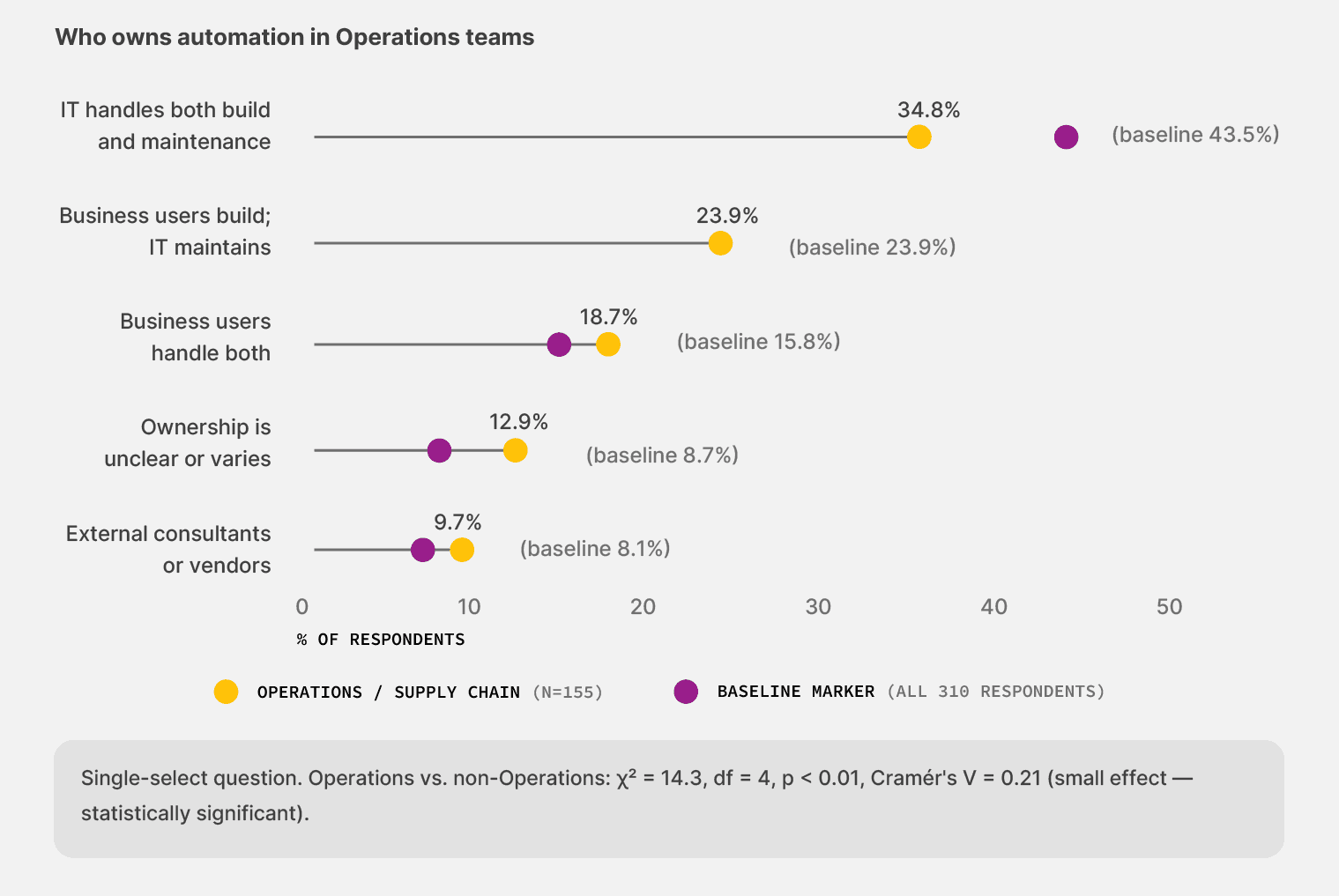
When the operations lead doubles as the workflow owner, and there’s no IT to support a category-wide rollout, automation gets adopted in pieces—and stays there.
HOW TO ACT ON THIS DATA:
Two specific moves Operations leaders can make this quarter:
Audit your team’s tool awareness before evaluating new tools. If 1 in 7 Ops teams in the survey can’t name what they’re running today, the first step is to map the existing setup. Ask the team that handles documents a direct question: “What tool processes our freight bills?” The answer tells you where to start.
Pick tools sized for teams without dedicated IT. No-code workflow builders and templateless extraction matter more for Ops than for any other segment because they don’t require an IT release for every change. When an automation fails, the impact falls on the business user, so you need to choose flexible, adaptable tools to get the job done.
2. The cost of failed automation lands on your employees
When automation breaks for a Finance team, the cost is usually a delayed payment or a missed close window. But when it breaks for an Ops team, the cost is the team itself. The freight still moves, and the dock supervisor stays late.
That’s why most respondents in this cohort say that “wasted time fixing errors” is the biggest impact of failed automation. Our survey found that 33.8% of Ops teams name wasted time as the biggest cost when automation fails. The survey average is 31.9%. It’s a small gap, but the meaning behind it is sharper than the percentages suggest.
Ops absorbs failures as a cost employees have to pay, rather than letting them cascade downstream into payment delays or compliance flags.
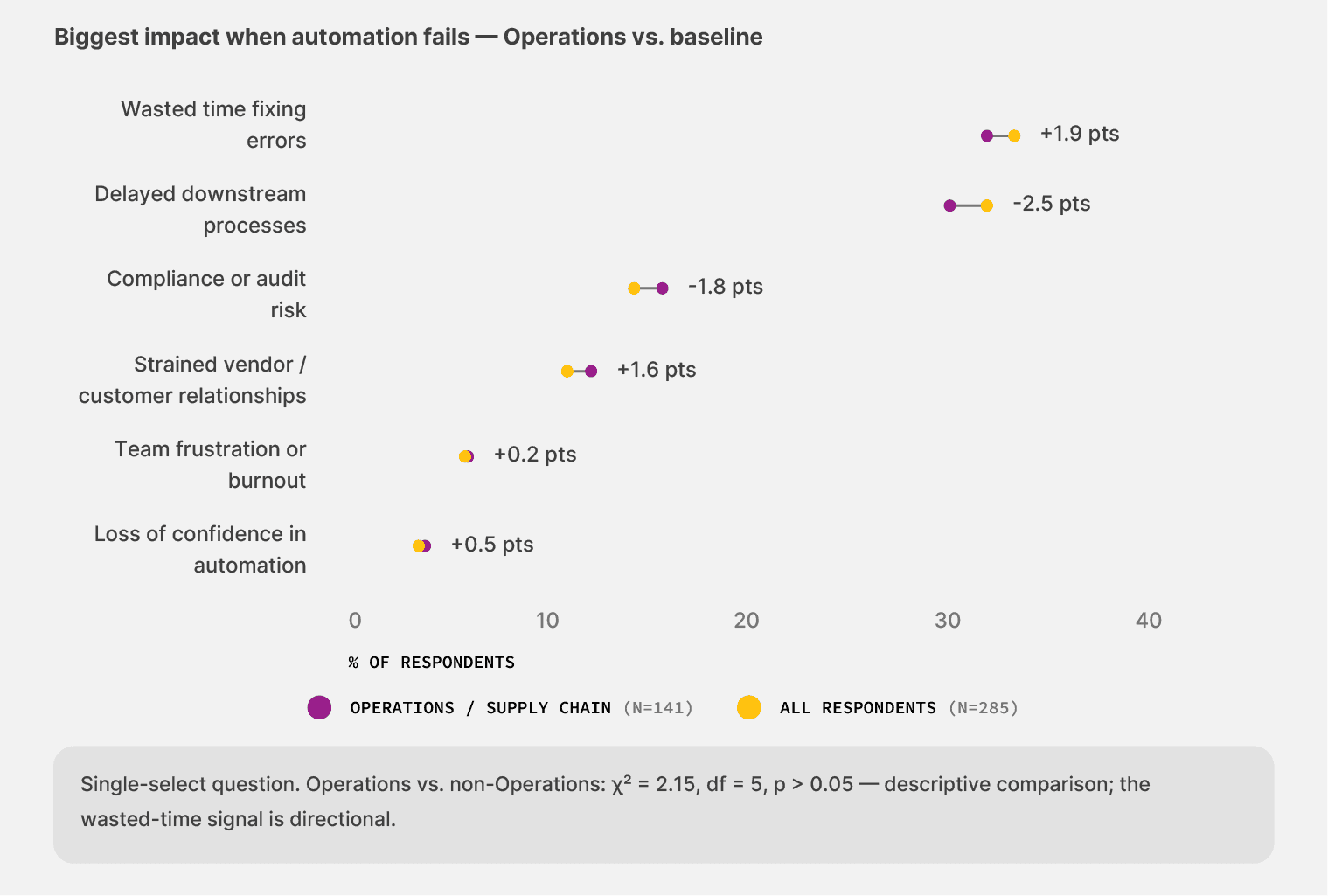
That distribution exists because Ops is closer to the work. Operations teams handle the widest variety of document types in the survey. For instance, BOLs from one carrier, freight bills from another, customs forms from a third and most of those documents need to move through the workflow today, not next week. So when extraction fails on a customs declaration, someone keys it in and clears the shipment.
When automation breaks on a freight bill, someone reconciles it manually before the carrier disputes it. The work is too time-sensitive to wait in a ticket queue.
When automation breaks, Ops teams are on their own
Even though the burden of failure shows up as extra repair work. The recovery infrastructure that other segments rely on is structurally weaker here. For example:
21.3% of Ops teams say their processes revert to full manual handling when automation breaks. The survey average is 16.1%. Ops is about a third more likely to revert to manual document processing.
23.5% of Ops teams say IT or automation teams intervene during a failure. The survey average is 29.8%. Ops is roughly a fifth less likely to have IT step in when something goes wrong.
3.7% of Ops teams say issues go completely unnoticed until they surface as downstream problems. The survey average is 2.1%. Silent failures hit Ops at almost double the rate of the average team in the survey.
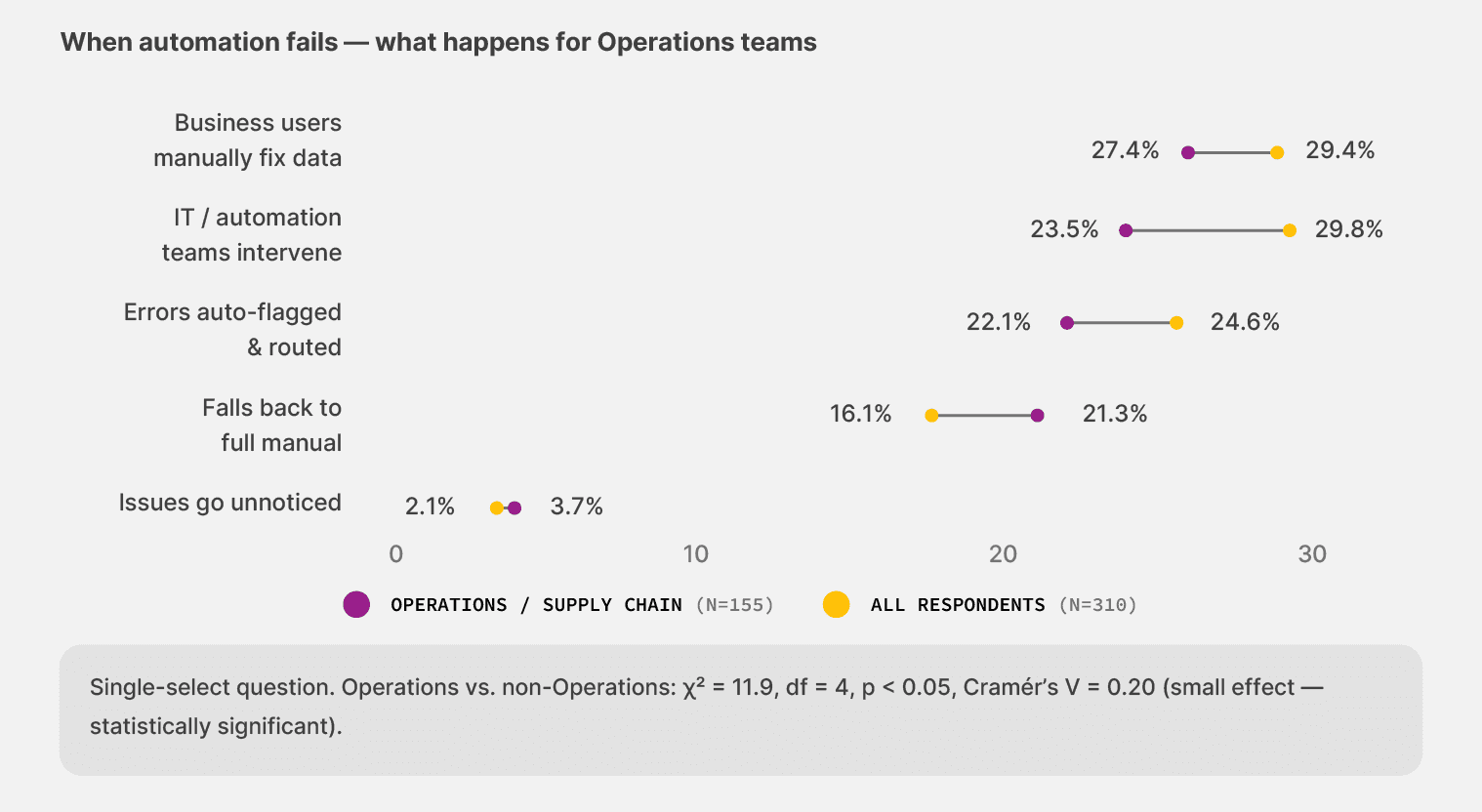
Because these teams typically work without dedicated IT support, they don’t always have the technical capabilities to fix it. And they also lack the ability to monitor when and how workflows break, so they don’t realize it until something goes wrong downstream.
For example, an incomplete HS audit documentation, or missed shipment documentation. By then, the damage is already done, and they’re back to square one.
HOW TO ACT ON THIS DATA:
Two specific moves Operations leaders can make this quarter:
Set up monitoring for silent failures before adding new automation. Track two numbers each week. How many documents did the system process without flagging anything? And how many downstream issues came back from those documents within 30 days? The second number tells you what you don’t currently see.
Plan for the no-IT-fallback scenario. When extraction breaks, who actually fixes it on your team? If the answer is “We wait for IT,” or “We’ll figure it out when the time comes,” you’re inside the manual-fallback group the data describes. If the answer is “We have a tool the AP lead can adjust,” you’re outside it.
3. The most ready buyers in the survey are also the least equipped
The same teams running on the least mature stack are also the most ready to switch, and they see meaningful value faster than the average team when they automate. It’s a structural issue just like everything else. These teams tend to start from a manual document-processing baseline, which is also why they value the fastest option more than our survey average.
Operations sees value fast when they automate
The time-to-value data reads like the inverse of what the maturity numbers would predict:
29.4% of Ops teams reach meaningful value in less than 30 days when they automate a workflow. The survey average is 25.3%.
27.9% reach value within 1 to 2 months, putting more than half of the cohort (57.4%) inside a 60-day value window once they get going.
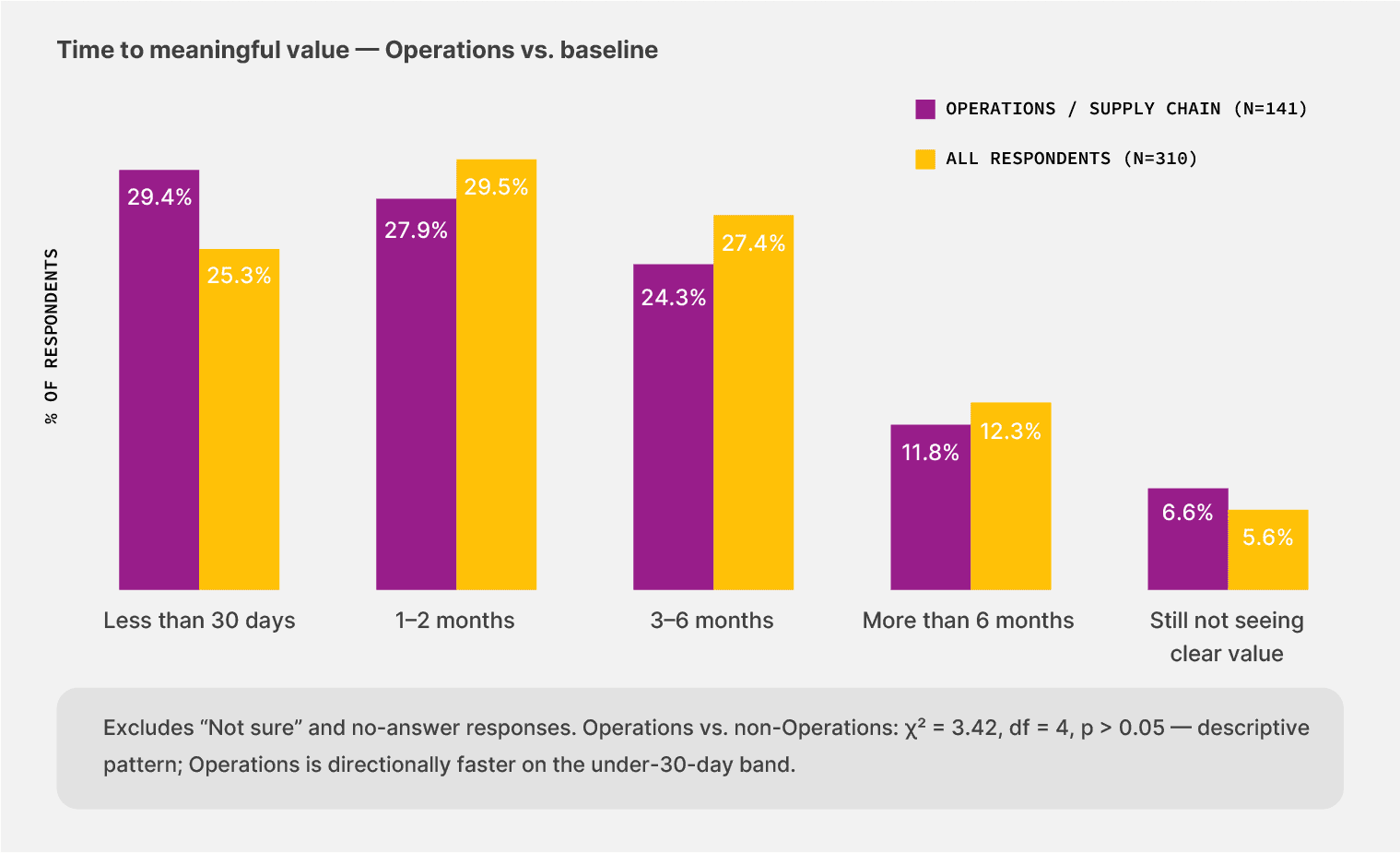
That speed makes sense once you look at where Ops teams start from.
A team automating its first freight-billing workflow sees the impact immediately because the prior baseline is fully manual. The team had nothing to lose, and the new tool replaces hours of typing and reconciliation right away.
However, teams further along the maturity curve, like the Finance segment, hit the kind of edge cases where the easy wins are already taken. For Ops, those wins are still on the table.
Switching intent is highest in Ops
The 12-month outlook tracks the same direction. Ops reports the highest switching intent of any segment in our survey. Here’s what our survey found:
23.2% of Ops teams say they’re actively re-evaluating or replacing their existing tools. The survey average is 21.3%.
21.3% are “not sure yet” what they’ll do, a higher rate of undecided respondents than any other segment.
Combined, 44.5% of Ops teams are persuadable in the next 12 months.
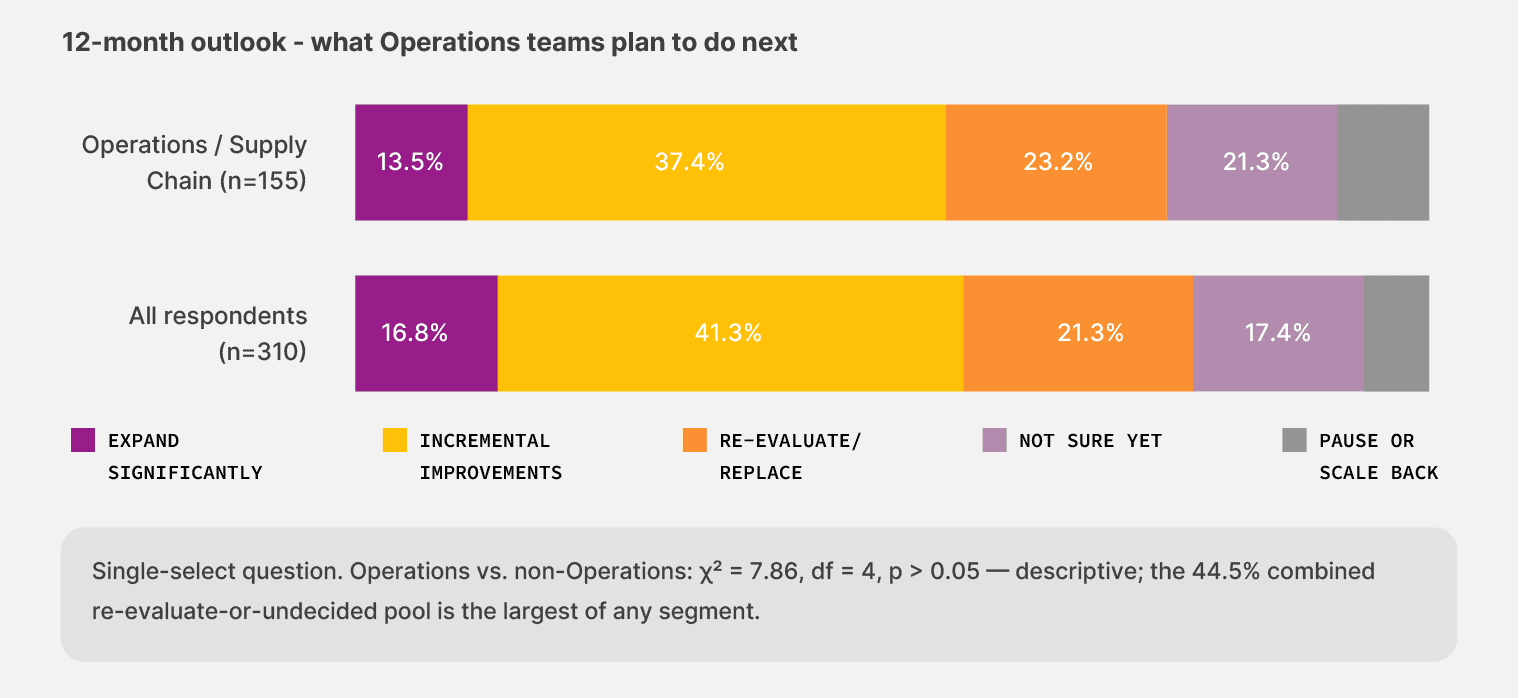
That readiness exists because Ops has felt the most pain and has the lowest sunk cost in expensive tooling. Teams that already invested in heavy ERP customization and bespoke RPA bots have switching friction the size of those investments.
Ops doesn’t carry that weight. The cost of trying something new is comparatively small.
Of the 140 Ops teams that haven't adopted no-code workflow tools, 64 (45.7%) are persuadable in the next 12 months — actively re-evaluating their existing setup or unsure about it. Across the full survey, that figure sits at 40.5%. Ops isn't just the most underserved cohort. It's also the most ready to switch.
The “not sure yet” group is worth a closer look. Across the survey, 17.4% of respondents fall into that bucket. Among Ops teams, the share is 21.3%. That number overlaps heavily with the 14.2% awareness gap from the first chapter.
Many Ops teams aren’t holding off on automation because they doubt the value. They’re holding off until they understand what they’re choosing between.
HOW TO ACT ON THIS DATA:
Two specific moves to put on your evaluation list:
Start with one workflow, with the messiest documents you have. The data in this report shows that Ops teams who try the right tool see value within 60 days. Pick the workflow where the document load is hardest, like handwritten POs or multi-channel intake, and use that as the test. A tool that survives your worst documents will handle the rest.
Choose tools that don’t need IT to adjust. If the workflow change requires a developer, you’re back in the IT-support gap that the data describes. The right tool gives the AP lead or operations supervisor access to change rules without filing a ticket.
Why no-code automation is the only model that fits how operations teams actually work
Operations teams own the documents, but not the developer roadmap. The work depends on automation, and the IT support to build and maintain it isn’t there in the same way as for other functions.
About a third of Ops teams work in organizations with fewer than 50 employees. About 1 in 7 can’t name what tools they’re running today. About a fifth fewer of them have IT fully owning automation than the survey average.
That structural reality is what no-code document automation is built for.
You don’t have to worry about adjusting the data extraction templates or asking vendors to follow a standard format. That’s not practical given how variable documents can be. Whether you’re using a spreadsheet or TMS to store the data, the platform you choose should be able to work with any type of document and tool you use.
The only model that survives the Ops document load is one in which the AP lead or operations supervisor can adjust the workflow themselves and work within the tools of their choice.
That’s why we built Docxster.
To help operations teams in document-intensive industries, the option to own the documents and the processing workflow with confidence.
Methodology: Operations segment
This report draws on the Operations, Supply Chain, and Logistics cohort within the broader State of No-Code Document Automation 2026 survey. The full survey reached 310 finance, operations, and IT leaders in manufacturing and logistics across the US, UK, and Canada. The Operations cohort represents 155 of those respondents, or 50.0% of the sample—the largest segment in the data.
When this report says “the survey average,” it means all 310 respondents across finance, operations, and IT, including the Ops cohort itself.’
Comparisons show the rate at which Ops teams chose a given response versus the rate across the full sample. And the differences appear as percentage-point gaps or as direct comparisons between the two numbers, whichever is clearer for the finding.
About Docxster
Docxster is built for operations in manufacturing and logistics companies. We focus on these businesses because they share a document load profile most automation tools weren’t built for, especially in terms of automation ownership.
Here’s how we solve for the document automation gap:
Data ingestion module that pulls in documents from different sources like email, WhatsApp, ERPs, or even manual upload. As a result, you can solve document intake
Templateless extraction that handles the variability in document types or templates, which is currently hitting Ops teams the hardest. You don’t have to create a new OCR template every time something changes
A no-code workflow builder that gives Ops leads access to change automation rules without filing an IT ticket. Realistically, the business user should be able to configure workflows themselves, and we give them the capabilities to do so.
Human-in-the-loop validation capability that routes low-confidence outputs to a sampling queue rather than to the operations supervisor handling end-of-day reconciliations. The platform flags cases that need human eyes, and your team handles only those that require their attention.
If the findings in this report describe your team right now:
We’ll show you how Docxster can solve your document automation problems
Benchmark Your Ops Team
Get the Operations cut of our 2026 survey, covering 155 operations and supply chain leaders in manufacturing and logistics.
Turn documents into decisions.
See how Docxster gets you from inbox to insight in minutes, not days. Bring your toughest workflow — we'll show you what it looks like solved.


