
-
16 min read
How Manufacturers Use No-Code Automation to Fix Document Bottlenecks
Still stuck retyping data from PDFs and scans? See how no-code automation helps manufacturing teams automate document processing.
Last updated:
TL;DR
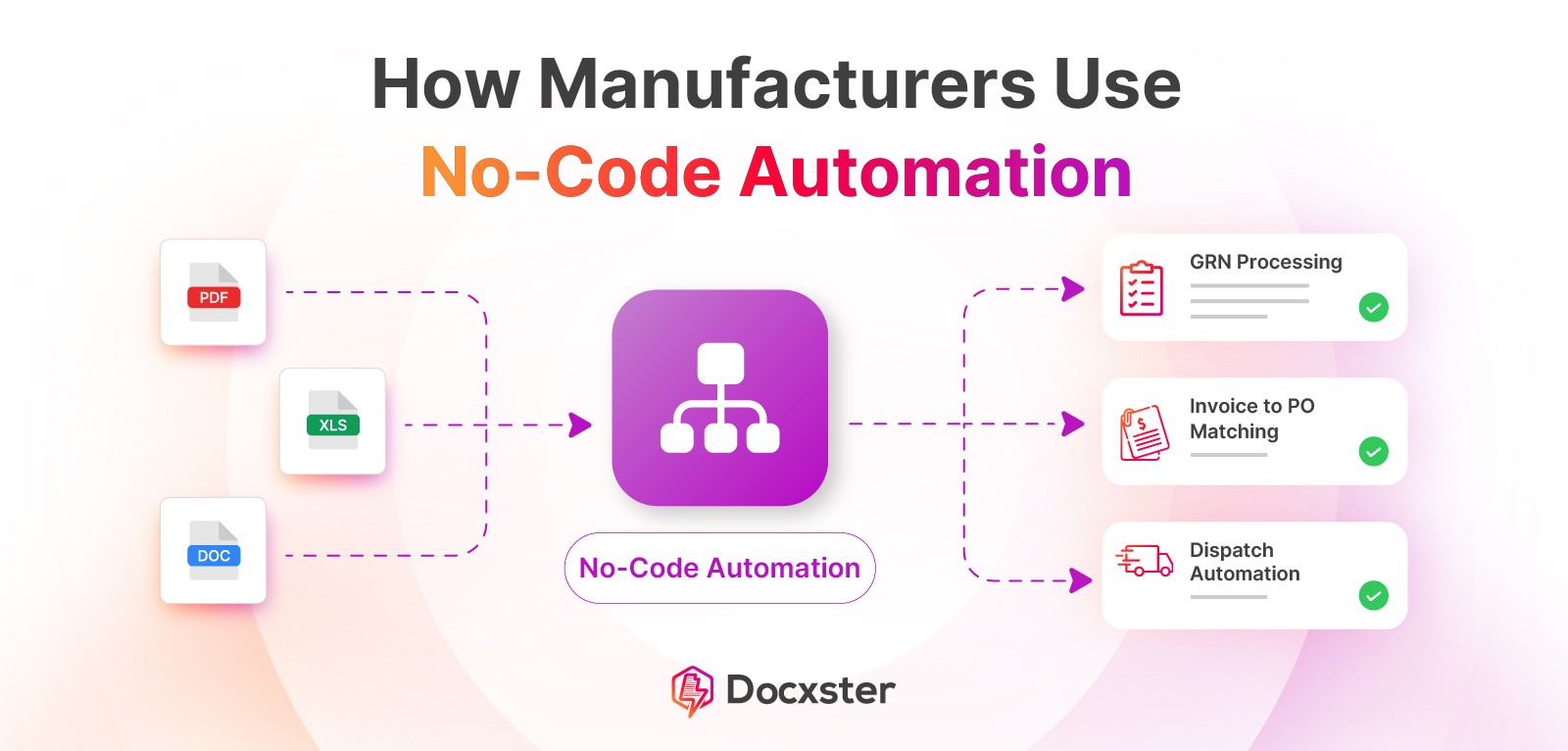
No-code automation in manufacturing enables teams to automate document-heavy workflows without relying on IT or writing code.
It’s gaining traction due to IT bottlenecks, labor shortages, and the need for faster digitization on the factory floor.
Traditional no-code tools fall short because they struggle with unstructured documents, layout complexity, and real-world variability.
High-impact use cases include GRN processing, quality inspections, invoice-to-PO matching, and dispatch automation.
Modern platforms like Docxster focus on document understanding, flexibility, and empowering operations teams to manage workflows independently.
At 8:30 AM, a truck unloads material at your plant gate.
By 9:15 AM, the goods receipt note is filled out by hand. By noon, someone scans it. By evening, it’s sitting in an inbox waiting for quantities to be re-entered into ERP—because the batch number is smudged, one line item doesn’t match the PO, and nobody wants to be the person who posts it wrong.
Meanwhile, production is already waiting on that material.
This has been the reality of manufacturing for a long time—and it's time that changes. No-code automation for manufacturing is about automating these exact moments.
In this article, we’ll look at where no-code actually fits on the factory floor, why most traditional tools fall apart in document-heavy operations, and which manufacturing workflows teams are already automating.
What is no-code automation, and how does it work for manufacturing companies?
No-code automation in manufacturing is the automation of operational workflows without writing code or relying on IT teams. It allows finance and operations teams to configure how work flows—using visual rules instead of code—based on how manufacturing actually runs on the ground.
It works by automating document-driven workflows. When a goods received note (GRN), inspection sheet, invoice, or delivery document is uploaded, the software captures key data and checks it against predefined rules. The workflow proceeds automatically when conditions are met and flags issues for review when they are not.
Why is no-code gaining momentum on the factory floor?
No-code is gaining momentum on the factory floor because manufacturing teams need to digitize documents faster than IT can support. Let’s look at why that shift is happening:
1. Increased pressure to digitize without IT bottlenecks
A study of 300+ manufacturing professionals reported that only about a third of facilities had fully automated key document-related processes like quality management and inspection sheets, which implies the majority still rely on manual workflows.
The issue isn’t that teams don't want to digitize processes like data entry. It's that IT teams can't take on every operational workflow at the speed operations need. Most digitization requests compete with ERP maintenance and other long-term IT initiatives, so shop-floor use cases continuously get delayed.
That creates pressure on operations to find ways to digitize without waiting on IT. No-code tools work well here because they allow teams to move specific workflows forward without adding to IT backlogs.
2. Frontline ownership is becoming the norm
Frontline workers are no longer just executing processes designed elsewhere. More manufacturers are giving them ownership of document processing tools.
This matters in manufacturing because operators, logistics coordinators, and QA managers are closest to the work, meaning they see issues as they happen. When they can resolve problems instead of escalating them, workflows become more efficient, and processes improve.
In a study across 1,500 factories, plants that equipped frontline workers with connected digital tools saw an 81% increase in employee engagement and a 35% reduction in turnover. When companies entrust teams with tools they can actually use, they stay longer and take more responsibility for outcomes.
3. Automation is no longer optional
As workloads and process complexity increase, manufacturing operations are becoming harder to run with humans alone.
At the same time, hiring is no longer a dependable way to scale. Nearly 48% of manufacturers report moderate to significant challenges filling production and operations management roles, and 46% report the same for planning and scheduling roles, underscoring persistent labor shortages in manufacturing that make automation necessary.
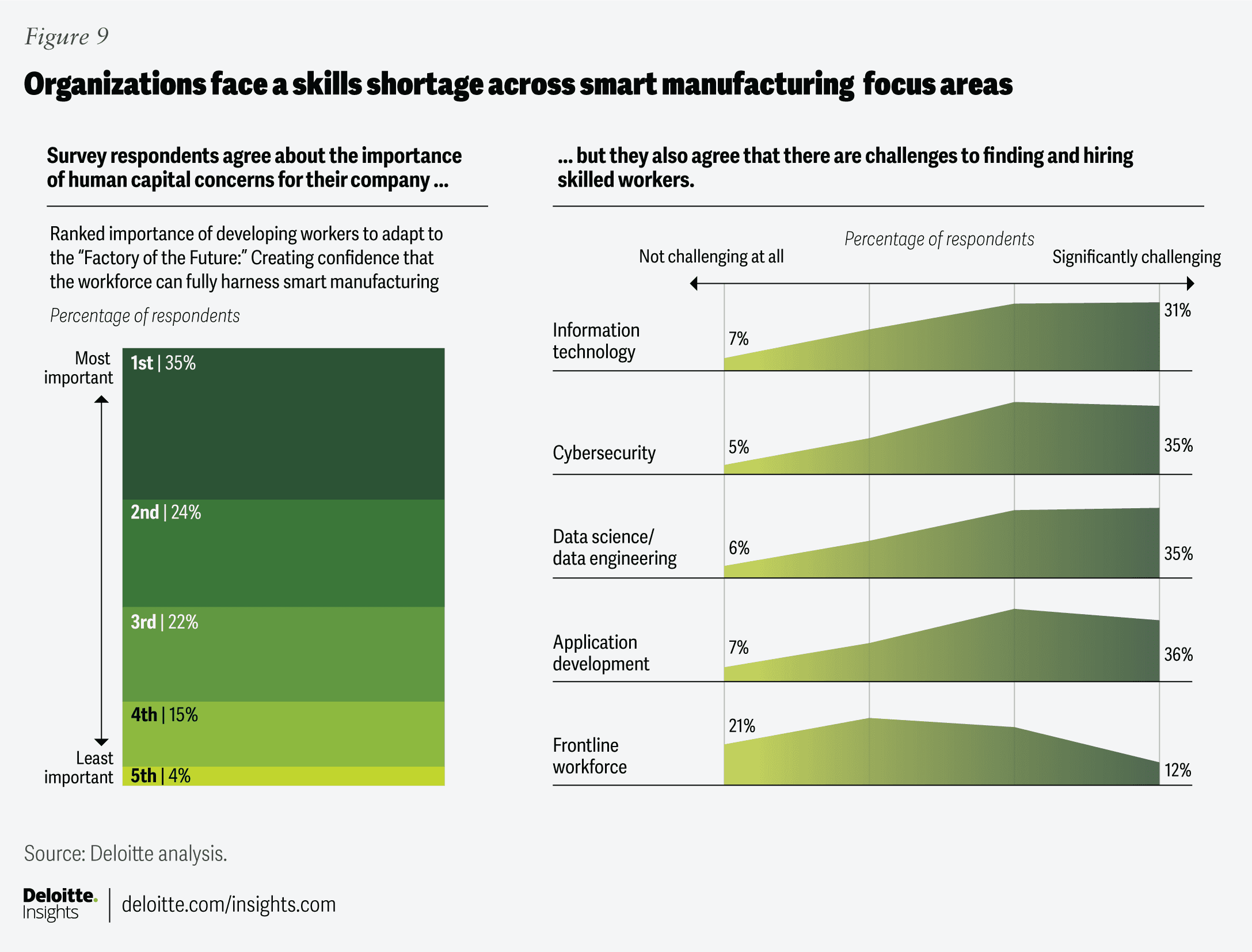
This creates a different kind of constraint than manufacturers have dealt with before. They need to scale output and control without increasing headcount. Manual processes don't hold up under that pressure.
No-code automation matters in this context because it allows teams to reduce manual effort without large IT projects. It gives manufacturers a way to maintain consistency and scale operations within real workforce limits.
Where traditional no-code tools fall short in manufacturing
Most no-code platforms were built for SaaS workflows—not manufacturing operations. Below, we’ll explain the real limitations teams face when trying to use traditional tools for messy manufacturing processes:
1. They’re built for apps, not documents
Most no-code platforms are designed to move data between software systems, not to understand real-world documents. Let’s take Power Automate, for example. It can trigger workflows when a file is uploaded, but any uploaded document is treated as just a file. To extract any usable data, teams must add AI Builder text recognition or document processing models as a separate layer.
This extra step creates a fundamental limitation in how these systems work. Instead of the document driving the workflow, the workflow exists first, and the document is forced to fit into it. Teams must choose extraction approaches and deal with failures when scans are unclear or formats change.
On the shop floor, where documents vary daily and arrive late or incomplete, this breaks down quickly. The platform moves data once it's structured, but it doesn't understand the document itself.
2. They assume structured, digital data
No-code platforms are built around structured digital sources, such as form entries, database records, and APIs. However, manufacturing data rarely arrives as structured digital input. GRNs, inspection sheets, delivery slips, weighbridge prints, and supplier notes are often unpredictable digital fields because they vary by layout, text quality, and format.
Because these tools depend on structured output, the automation only works once the document has already been normalized into clean fields. Any deviation, like unclear handwriting or a shifted table, stops the workflow or pushes it into manual correction.
On the shop floor, document formats change frequently, data often arrives incomplete, and layouts are rarely consistent. Tools that rely on clean, structured digital inputs don’t hold up under these conditions and struggle to scale across real manufacturing operations.
3. They don’t offer layout or schema awareness
On the shop floor, your documents aren’t simple forms. For example:
GRNs have line items with batch numbers and received quantities
Inspection reports mix tables, checkboxes, and handwritten remarks
Dispatch notes spread material details across multiple sections and pages
Most no-code platforms can't reliably understand this layout. Even in enterprise no-code tools, tables, line items, and key-value relationships require dedicated document models because the workflow engine itself doesn't understand document structure.
In manufacturing use cases, these tools break quickly. What you end up with is extracted text that still needs manual review. And if a system can't understand the structure of your manufacturing documents, it can't automate manufacturing workflows in any meaningful way.
4. They rely too heavily on IT or developer setup
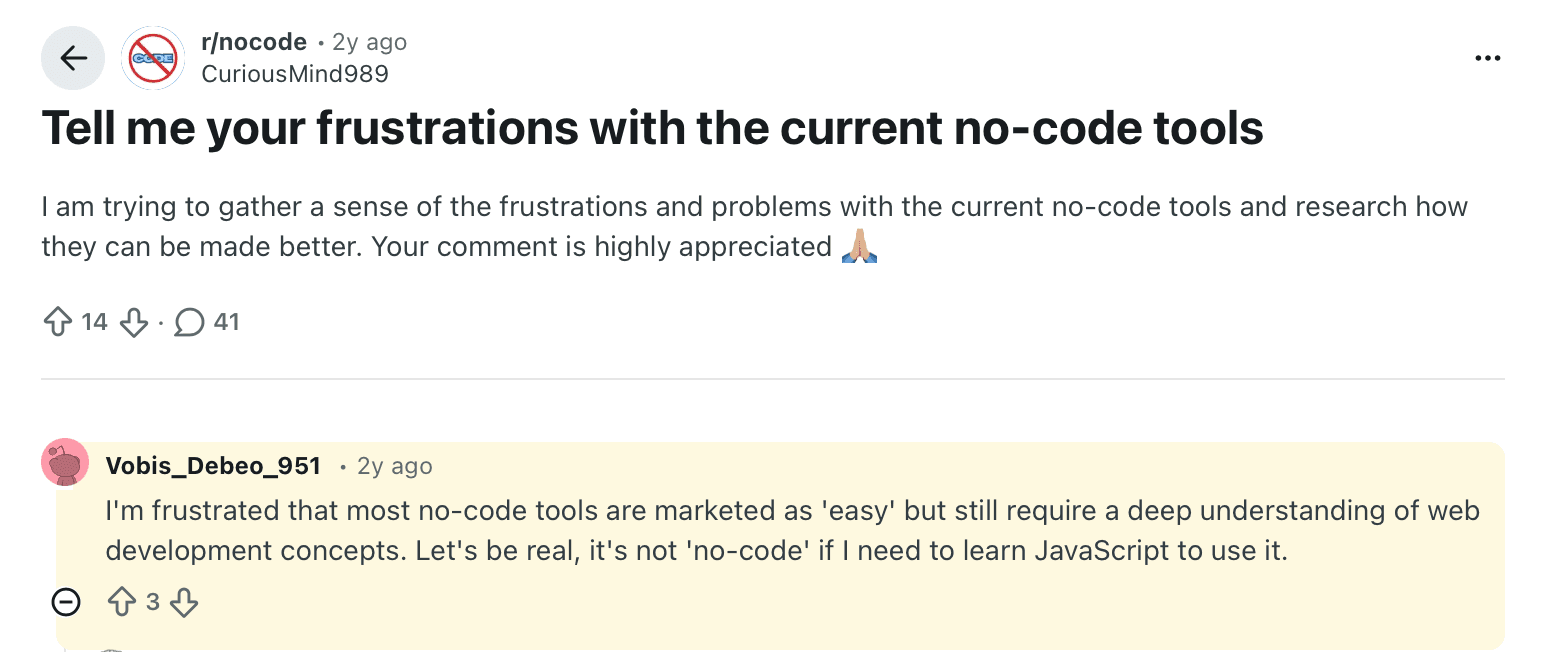
You’re told these tools are no-code, but the moment you try to use them on the factory floor, you hit a wall. Many users on Reddit explain this frustration, too. One user talks about how they are frustrated that most no-code tools are marketed as easy but need technical knowledge.
The people expected to use no-code tools are frontline and back-office teams responsible for daily execution. They are close to the process, but they can't configure integrations or debug code errors.
That is where IT dependence starts. A new condition or a small workflow tweak turns into a ticket and a wait. Automation slows down, and ownership shifts away from operations.
At that point, the promise of no-code falls apart. The tool may look simpler, but control still sits with technical teams. For manufacturing teams that need to react quickly on the shop floor, that dependency defeats the whole purpose.
4 real manufacturing workflows to automate with no-code platforms
Here are four actual use cases of no-code automation in manufacturing businesses:
1. Goods received note (GRN) validation and export
GRNs are one of the most document-heavy and error-prone steps in inbound operations. They often arrive as paper forms or supplier PDFs and then get manually re-entered into ERP or inventory systems.
With no-code automation, you can:
Extract key fields (supplier, material, batch, quantity) from scanned or digital GRNs
Validate quantities against purchase orders
Flag mismatches or missing data instantly
Export clean, approved data directly to ERP or inventory systems
Archive GRNs with full traceability for audits
As a result, you'll experience faster goods reception, fewer posting errors, and no dependency on IT for rule changes or format variations.
2. Quality inspection and reporting
Quality inspections are still largely paper-driven. Operators fill out handwritten checklists and scan forms at the end of a shift, only noticing issues after the batch has already moved forward.
No-code automation makes these inspection documents actionable instead of archival. You can:
Upload handwritten or scanned inspection forms from the shop floor
Capture measurement values and pass/fail results automatically
Check results via predefined quality rules as soon as the document is processed
Route any failed parameter to QA managers immediately
Flag non-conforming lots before they move to the next step
Store inspection records centrally for traceability and audits
Instead of reviewing inspection reports days later, quality teams see problems as they happen and act while the material is still on the floor. This gives you fewer missed issues and faster decision-making.
3. Invoice to PO matching
Invoice to PO matching can have multiple issues, like missing PO numbers or confusing partial deliveries. With no-code automation, you handle these problems at the first pass instead of fixing them downstream.
You can ingest invoices in any format—PDFs, scans, or email attachments. The system extracts key fields like supplier name, PO number, line items, quantities, and prices. If a PO number is present, the invoice is automatically linked to the correct purchase order.
If the PO number is missing or unclear, you can define matching rules using supplier details, material codes, quantities, and date ranges—without writing any code. You can also set tolerances for price and quantity differences, including partial deliveries.
Invoices that meet your rules move forward automatically. Anything that doesn’t is flagged immediately, with a clear reason, so you only step in when a decision is actually needed.
4. Dispatch and delivery note automation
In a manufacturing plant, it's common to dispatch a product first and then create a delivery note. No-code automation ensures that both are captured and reconciled as part of the same workflow.
You don't need your team to forward files or wait on IT to make changes. As soon as a delivery note or carrier document is generated, scanned, or uploaded, it enters the workflow. The system pulls out order numbers, customer details, materials, quantities, carrier information, vehicle numbers, and dispatch dates automatically. This is where the real document processing benefits show up in day-to-day operations.
What to look for in a no-code automation platform for manufacturing
Not all no-code tools work in manufacturing environments. Here are the questions to ask when you're selecting a no-code automation platform for manufacturing:
Can it handle PDFs, scans, and handwritten documents? GRNs, inspection sheets, dispatch notes, and weighbridge slips often arrive as scans or photos. If the platform can’t extract structured data from these documents without manual cleanup, your team will still end up doing the work by hand.
Can business teams build and update workflows independently? Quality teams and back-office staff should be able to change rules and routing. If every update requires IT or a vendor, the tool will slow teams down instead.
Does it support validations, error handling, and approvals? Your workflows depend on checks at every step—from verifying quantities to checking for required fields. A platform that just triggers actions without built-in logic won't hold up in real operations.
Is it flexible across vendors, formats, and layouts? Supplier documents change frequently, and formats vary by vendor and sometimes even by plant. If the system breaks whenever a layout changes, it won't scale. The platform you choose should handle variation without constant reconfiguration.
Can it integrate easily with other platforms? The data you extract needs to move into downstream systems. Whether you use SAP, an MES, Excel, or email, you should be able to use the output immediately without additional processing.
Does it provide visibility at the document level? You need to know which documents were processed successfully, which ones failed, and where you’ll need to conduct a manual review. A simple “workflow completed” message doesn’t give you enough control.
Why Docxster is built for manufacturing operations
Traditional no-code tools are not designed for today’s manufacturing operations. They assume stable formats, clean inputs, and workflows that rarely change. That is not how shop-floor and logistics operations work.
At Docxster, we understand the reality of today’s manufacturing companies. Docxster is built for document-heavy manufacturing environments where formats change constantly and data arrives late or incomplete. It helps you automate real operational workflows without templates or ongoing IT involvement.
Here’s a detailed breakdown of how Docxster works in manufacturing operations:
1. Works without templates or constant setup
With Docxster, you don’t have to build or maintain document templates. You define the data you need—such as batch numbers or dates—and the platform extracts it directly from the document, even when the format is new.
Because the system doesn’t depend on fixed layouts, you don't need to reconfigure workflows or retrain models when documents change. Your workflows continue to run without ongoing setup, so automation stays stable as volume and variation increase.
Here's how you can create a document schema in Docxster:

2. Designed for real manufacturing documents
Docxster works directly with the documents your operations already use. You can process GRNs, QA reports, dispatch notes, and supplier paperwork as-is, without converting them into clean digital inputs first.
The system extracts structured data from scanned, photographed, or handwritten documents and feeds it directly into your workflows. You don't need to clean files, standardize layouts, or re-enter information before automation can start.
3. Keeps control with operations and finance teams
With Docxster, operations and finance teams can build, update, and test workflows themselves. If you need to change routing or update a rule, you can do it without raising a ticket or waiting for an implementation sprint. That keeps control with the teams who understand the process best.
4. Catches errors before they cause problems
Manufacturing workflows can't afford silent errors. Docxster uses confidence scoring, field-level validation rules, and human-in-the-loop review to catch issues early. When data looks uncertain or doesn't meet defined rules, it's flagged before it reaches ERP or downstream systems. This ensures that automation improves reliability instead of introducing new risks.
5. Produces data you can actually use
Automation only matters if the output is usable. Docxster produces structured data that’s ready to export. You're not left with raw text or partial results. Your workflows end with clean, structured data that fits into the systems you already use, so automation connects smoothly into day-to-day operations.
Adopt no-code automation to improve your factory floor’s operations
That truck will still arrive at your gate tomorrow morning. What does not have to follow is manual data entry or operational delays caused by incomplete documentation.
No-code automation gives you a way to take back that time by automating the document workflows your team already deals with every day. The shift doesn't require a massive rollout or an IT-led program. It starts by picking one workflow your team already dislikes handling manually and letting automation take over the repetitive checks and data movement.
Docxster is built for exactly these moments. It lets you automate document-heavy workflows even when formats change or layouts are inconsistent. You don't have to maintain templates or spend time fixing rules every time a document looks different.
If you want to see how this works on one workflow you already manage manually, the Docxster team can walk you through it.
Ready to automate document processing on your factory floor?
FAQs: No-Code Automation in Manufacturing
1. What is no-code automation in manufacturing?
No-code automation allows manufacturing teams to automate workflows using visual tools instead of writing code. It’s especially useful for document-heavy processes like GRNs, invoices, and inspection reports, helping operations teams move faster without relying on IT support.
2. Why is no-code automation becoming important on the factory floor?
Manufacturers are under pressure to digitize quickly while dealing with limited IT bandwidth and labor shortages. No-code tools help frontline teams automate processes themselves, reducing delays, manual work, and dependency on technical teams.
3. What types of workflows can be automated with no-code tools?
Common workflows include goods receipt processing, quality inspections, invoice-to-PO matching, and dispatch documentation. These are often repetitive, document-heavy tasks where automation can reduce errors and speed up day-to-day operations.
4. Why do traditional no-code platforms struggle in manufacturing?
Most traditional no-code platforms are built for structured SaaS data, not messy real-world manufacturing documents. They often struggle with handwriting, inconsistent layouts, scanned files, and the document complexity that’s common on the shop floor.
5. How does no-code automation handle unstructured documents like PDFs or scans?
Advanced no-code platforms can extract and structure data from PDFs, scans, photos, and handwritten documents. Once the data is captured, the system can validate it against business rules and push it into downstream workflows automatically.
6. Do no-code tools completely eliminate the need for IT teams?
Not completely, but they significantly reduce day-to-day dependence on IT for workflow changes and updates. Operations and finance teams can usually manage rules, routing, and approvals themselves, while IT focuses on larger systems and integrations.
7. What should manufacturers look for in a no-code automation platform?
Manufacturers should look for strong document processing, flexible workflow logic, built-in validation, and support for varying formats and layouts. Easy integrations with ERP, MES, spreadsheets, and email systems are also essential for making automation useful in practice.
8. How does no-code automation improve accuracy in manufacturing processes?
Automation reduces manual data entry and applies validation checks consistently across every document. That means issues like missing fields, mismatched quantities, or low-confidence extractions can be flagged early before they create downstream errors.
9. Can no-code automation scale across multiple plants or vendors?
Yes, as long as the platform can handle variation in supplier documents, layouts, and workflows without constant reconfiguration. A flexible system makes it much easier to scale automation across plants, teams, and vendor ecosystems.
10. How can a company start implementing no-code automation?
The best place to start is with one painful, repetitive workflow like GRN processing, invoice matching, or inspection reporting. Once that process is mapped and automated successfully, teams can expand step by step into other operational workflows.
Turn documents into decisions.
See how Docxster gets you from inbox to insight in minutes, not days. Bring your toughest workflow — we'll show you what it looks like solved.


