

-
17 min read
Why Document-Intensive Businesses Are Moving From Manual to Automated Text Extraction
Struggling with slow, error-prone document work? See how automated text extraction converts files into accurate, ready-to-use data,
Last updated:
TL;DR
Automated text extraction converts PDFs, scans, and images into structured, ready-to-use data — not just readable text like basic OCR.
It improves scalability, reduces operational costs, and accelerates decision-making by standardizing document inputs across teams.
AI-based extraction adapts to changing layouts and mixed document types, while rule-based systems break when formats shift.
Modern platforms like Docxster combine OCR, layout-aware AI, validation, and workflow automation to deliver clean outputs directly into business systems.
Choosing the right tool requires evaluating document types, integration needs, security standards, adaptability, and total cost of ownership.
If you’re here, you’re probably dealing with one of two things. Either you’re still stuck with manual text extraction that slows everyone down, or you’ve tried basic optical character recognition (OCR) and realized it’s not giving you what your workflows actually need.
Manual entry is slow, inconsistent, and error-prone. OCR speeds things up, but it only gives you words on a page. It doesn’t give you structure, context, or clean, ready-to-use data. And the moment the layout shifts, accuracy drops, your team fixes half the output, and the whole process breaks on anything unfamiliar.
In this guide, we’ll break down how automated text extraction solves these problems, why it works better than manual or OCR-only methods, and how teams use it to clean up messy document workflows at scale.
What is automated text extraction?
Automated text extraction is a process that reads text from documents and converts it into structured outputs. You use it to pull text from PDF documents, images, or scans without manual typing. The process works across many formats and supports teams that handle high volumes of documents.
Automated text extraction shows you:
What text is in the document
Where that text appears
How it should map into your systems
Here's a simple example: You upload an order form. The system reads the text on the page. It locates the order number, item details, and quantities. It returns those details in a structured format that your systems can receive. This way, you stay in control of the review, so you don’t have to work through the document line by line.
Quick note: You might think that automated text extraction is the same as basic OCR. But OCR only reads characters. Automated extraction adds structure and context. Your output becomes ready for actual use rather than just readable.
Why do you need automated text extraction tools?
Here are a few reasons why you need automated text extraction tools:
1. Better scalability and handling of complex formats
Document-intensive businesses need extraction that works even when formats change. You likely also deal with scanned images, irregular fonts, layered tables, and layouts that shift from file to file.
Automated text extraction gives you stability across these variations. The system reads the document, interprets the structure, and adapts to changes in layout. It does this at scale, even when formats multiply.
A technical study on intelligent text extraction found that Large Model-Driven Robotic Process Automation (LMRPA) cut processing time by up to 52% when working with complex layouts.
As it extracts, the system handles challenges like:
Layouts that drift from vendor to vendor
Low-quality scans or distorted fonts
Tables and values that shift position across pages
If anything falls outside expected patterns, the system still interprets the structure and returns consistent fields. That way, format variability doesn’t slow your workflow or force your team to rebuild processes every time a new document type appears.
With automated text extraction, scalability comes from how the technology handles the document, not from how many people you assign to review. The system manages the heavy interpretation work, so your team can focus on validation. Your output remains consistent even when incoming formats do not.
2. Lower operational costs
Manual text extraction gets expensive as volumes rise because you need more people to keep up. Every new batch adds more hours, more oversight, and more room for mistakes. Errors then create rework, which drives costs even higher across purchasing, finance, and logistics.
Automated text extraction cuts these expenses by reducing the amount of manual effort required. In fact, a study of over 247 companies across 15 different industries suggests that employing intelligent automation in financial processes gives a median return on investment (ROI) of 150% within the first year of deployment.
These returns come from a simple shift. Since the system handles the extraction work, your team no longer spends hours keying in values or fixing avoidable mistakes. As volumes rise, your costs don’t. That’s because the workload scales through automation rather than headcount.
3. Faster time-to-decision across business processes
Manual document handling slows decision-making because teams waste time fixing errors and aligning data across departments. Every approval step depends on clean inputs, so even small inconsistencies delay purchasing, scheduling, finance, and customer commitments.
This is exactly what Nikita Sherbina, Co-Founder and CEO at AIScreen, experienced when inconsistent inputs created repeated reconciliation work between procurement and accounts payable teams:
Our procurement team would log supplier invoices differently from accounts payable, which caused duplicate entries and reconciliation errors. When we implemented an automation tool to streamline invoice processing, it initially flagged hundreds of mismatches because the system wasn't aligned with every team's template. I led a cross-functional effort to standardize data inputs, create validations, and train teams on format rules. I also scheduled training sessions so teams understand proper formats.
— Nikita Sherbina, Co-Founder and CEO, AIScreen
Once the inputs were consistent, automation unlocked the speed they needed.“Once aligned, the automation tool reduced errors by about 75 percent and cut processing time in half,” Sherbina says.
This is the core advantage of automated text extraction. Standardized inputs remove decision bottlenecks by giving every team the same structured information upfront. Instead of reconciling documents, team members act on them.
4. Stronger data quality and better insights
Basic OCR only captures the text on the page. It doesn’t understand structure or context, which leads to inconsistent fields, missing values, and data that downstream systems cannot rely on. Poor inputs create poor insights, and teams end up spending time fixing data instead of using it.
Automated text extraction raises data quality at the source. It pulls information into a structured, schema-ready format so every system receives the same predictable inputs. Cleanup work drops, and your datasets stay consistent as volumes grow.
Automated text extraction strengthens data quality by:
Capturing fields with clearer structure
Reducing gaps or misaligned entries
Keeping outputs uniform across changing document types
When your inputs improve, your insights improve. Automated extraction gives you reliable data from the start, supporting faster decisions and more accurate analysis across your operations.
5. Reduced error rates
Manual text extraction makes it easy for errors to slip in. That’s because people read the same fields differently, and accuracy drops as the volume of text increases.
Automated text extraction improves this accuracy by applying a single consistent way of interpreting structure and fields. It removes variation, giving every downstream system cleaner inputs to work with.
In its 2023 automation report, the World Economic Forum found that organizations using intelligent systems in data-heavy processes saw error rates drop by 30 to 50%. That reduction gives teams fewer issues to correct and keeps processes moving without interruption.
Rule-based vs. AI-based text extraction
Method | How it works | What you get | Maintenance | Best for | Breaks when |
Rule-based extraction | Follows fixed coordinates and pattern rules | Consistent results for uniform documents | High. Rules must be updated whenever layouts change | Stable, unchanging formats | A field moves, spacing shifts, or a new template appears |
AI-based extraction | Understands layout, context, and visual cues using machine learning | Structured outputs across PDFs, scans, images, and handwriting | Low. Adapts automatically as formats vary | Mixed, unpredictable document types | Documents are too damaged or contain no readable signal |
Rule-based text extraction
Rule-based text extraction uses predefined instructions to pull information from documents. You set the coordinates, patterns, and field rules. The system follows them every time, as long as the format stays the same.
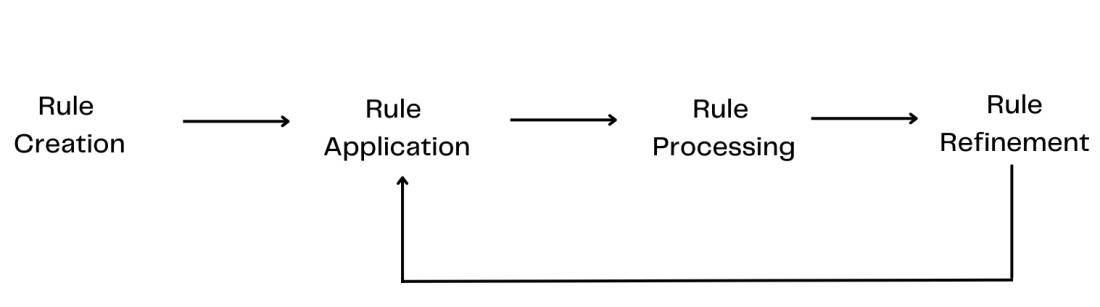
Here's how it works in practice:
You define fixed zones where fields appear
You set pattern rules for what the system should capture
Extraction works only when layouts match the rules
Any format change requires updating the logic
This approach works well when documents stay consistent. It’s predictable and easy to maintain in stable environments. But in manufacturing or logistics workflows, formats shift often. A supplier updates a document layout or a scanned form shifts by a few pixels, and the rules break.
Quick note: Rule-based extraction is not outdated. It is simply rigid. It performs best when variation is low. For example, in logistics intake, even a small change in how a carrier structures container details can halt extraction until the rules are remapped.
AI-based text extraction
AI-based text extraction uses machine learning to understand the layout and meaning of a document instead of relying on fixed rules. It adapts to different formats and works across PDFs, images, scans, and handwritten notes. That flexibility makes it the only approach that stays reliable when documents come in varied or unpredictable formats.
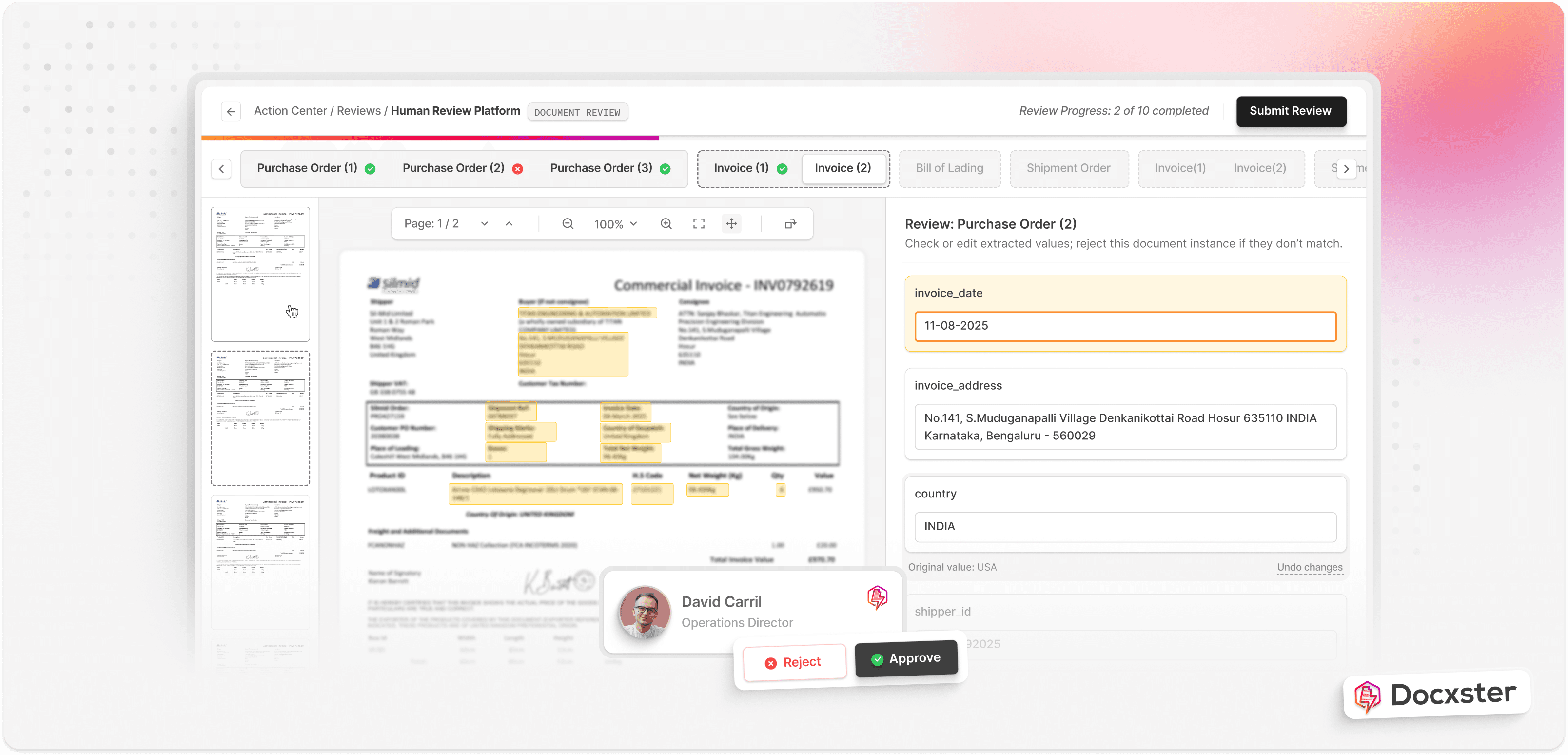
Here is how it works in practice:
Models read layout, text, and visual cues together
Extraction adjusts when formats shift
Low-quality scans or rotated documents still process cleanly
Performance improves as the system sees more examples
This adaptability is what makes AI extraction fit real operations. Most teams work with mixed document types, and AI handles those variations without constant adjustments or rule rebuilding.
The cost of not using AI can be steep. Reem Khatib, Partner at Tax Law Advocates, says:
Human error is expensive when the IRS is on the other side of the table. I’ve reviewed cases where bulk uploaded data was wrong from the start, and instead of one error, it replicated hundreds instantly.
— Reem Khatib, Partner at Tax Law Advocates
How can you automate text extraction with Docxster?
Docxster was built to go beyond basic OCR. It reads layout, context, and structure so your data comes out organized, not just captured. The goal is simple—make automated text extraction accurate, adaptable, and easy for business users to run without technical setup.
Here’s what the process looks like inside Docxster:
Step 1: Document ingestion
Docxster ingests documents from any source you already use. Uploads, email pipelines, scanners, or system integrations all feed into one place. The platform processes PDFs, images, scans, and handwritten documents without needing separate tools or templates.
If you want to build your own document schema, you can do it using this process:
Step 2: Text, layout, and document classification
Once a file enters the system, Docxster reads the text, identifies the layout, and classifies the document type automatically. This is where it distinguishes invoices from bills of lading (BOLs), quality reports from financial statements, and handwritten notes from typed forms.
Step 3: Field and entity extraction
Docxster pulls structured fields using high-accuracy OCR and layout-aware AI. It maps standard fields across document types, discovers new ones during validation, and keeps formats consistent. This is where the core extraction happens, even for handwritten or low-quality scans.
Step 4: Validation and verification
Data is checked against your rules, systems, and confidence thresholds. Docxster verifies fields, flags anomalies, and routes uncertain cases to humans when needed. Corrections improve the model over time, reducing manual oversight with each cycle.
Step 5: Workflow automation and routing
Once verified, the extracted data moves automatically into your downstream workflows. Docxster handles routing, approvals, system updates, and notifications. It connects to enterprise resource planning (ERP) platforms, customer relationship management (CRM) systems, accounting tools, and storage systems so the output lands exactly where your process needs it.
Here's an example of how you can validate freight invoices against rate confirmations:
How to choose the right automated text extraction tool
When you’re ready to move from basic OCR to an automated text extraction tool, here’s a step-by-step approach:
Step 1: Define your business requirements
Before choosing a text extraction tool, get clear on what your workflows actually demand.
Start with the types of documents you process. Each category behaves differently and requires a different level of intelligence from your extraction tool.
Here’s what to map out:
Document types: Structured forms, semi-structured invoices, unstructured PDFs, emails, images, or scanned paperwork
Throughput: How many documents you need to process per day, week, or month
Precision needs: The accuracy thresholds required across finance, operations, manufacturing, or logistics workflows
These inputs give you the baseline for evaluating any tool.
Once you map these requirements, the direction becomes clearer. In most manufacturing, finance, logistics, or operations environments, formats vary too often for templates to keep up. You need an intelligent automation tool like Docxster that adapts to variation, handles scale, and maintains consistent output.
Step 2: Assess technical fit and integration needs
The next step is finding an automated text extraction tool that fits into your existing tech stack.
Start by looking at how the tool connects to the systems you already use. Strong extraction alone is not enough if the data can’t move cleanly into your workflows.
Here’s what to evaluate:
APIs: Do they expose the endpoints you need for ingestion, extraction, and export?
SDKs: Are there language-specific SDKs your team can work with?
Webhooks: Can the tool trigger downstream actions automatically?
Connectors: Does it offer prebuilt integrations for ERPs, CRMs, or storage systems?
Custom effort: If connectors don’t exist, how much engineering time would custom integration require?
This step tells you how smoothly the tool will plug into your operations. A platform like Docxster that offers clean integration paths helps you avoid unnecessary engineering overhead.
Step 3: Opt for a demo or free trial
Now, test how the tool performs with your documents.
A demo or trial show the model handles the real challenges in your workflow. This is where you see whether accuracy improves, where the system struggles, and how well it adapts when you intervene.
Here’s what to test:
Real samples: Imperfect scans, handwritten notes, multi-column layouts, tables, and industry terms
Adaptability: How the system responds when you correct fields or adjust mappings
Consistency: Whether accuracy holds across different document batches
Speed: How long extraction takes at the volume you expect
This step reveals whether the tool can handle your day-to-day complexity. A strong platform like Docxster shows quick adaptation, stable accuracy, and minimal retraining effort during these early tests.
Step 4: Check for security and compliance
Security needs to match the sensitivity of the documents you handle. Make sure that the automated extraction tool you’re evaluating:
Uses strong encryption
Provides clear access controls
Allows you to trace activity through audit logs when needed
Stores data securely, meeting standards like GDPR, ISO 27001, or SOC 2
Has clear retention and deletion policies, keeping you in control of your data
P.S. Docxster is ISO 27001 and GDPR certified so you can be sure that your data is safe and secure within our platform.
Step 5: Compare total cost of ownership
The cost of a text extraction tool becomes clearer when you look beyond the base license. Start by understanding how the platform charges. Usage-based pricing works well for companies that see fluctuating volumes of documents, while subscription models offer predictable monthly costs.
Then, compare the areas that quietly influence your long-term spend:
Integration effort: How much engineering time is needed to get data flowing
Customization needs: Whether adjustments require one-time setup or ongoing work
Maintenance load: How often formats change and how the tool responds
Operational impact: Whether accuracy issues or slow processing add hidden costs
These factors shape your total cost more than the license alone. The right tool stays affordable as your volume grows and your document types expand. A platform like Docxster reduces maintenance effort and integration overhead, keeping your operating costs steady over time.
Make the move from manual text extraction to automated text extraction
Manual extraction has reached its limit. It slows teams down, introduces avoidable errors, and forces your most capable people to spend hours on repetitive, tedious work. The cost is not just time. It is stalled decisions, inconsistent data, and processes that cannot scale.
Automated text extraction changes that. It gives you cleaner inputs, faster throughput, and a foundation you can rely on as document volumes and formats grow. Instead of reacting to errors, you work with structured, ready-to-use data from the start.
This is what we built Docxster for. Our platform goes beyond basic OCR by understanding layout, context, and structure so your data is not only captured but mapped and ready for action. Business teams can run these workflows without technical expertise, and operations stay consistent even when document types change daily.
Ready to automate text extraction from documents?
FAQs: Automated Text Extraction
1. What is automated text extraction?
Automated text extraction converts text from PDFs, scans, images, or handwritten documents into structured digital data. Unlike manual entry, it removes repetitive typing and reduces human error. Unlike basic OCR, it organizes extracted text into usable fields that flow directly into your systems.
2. How is automated text extraction different from OCR?
OCR (optical character recognition) simply reads characters on a page. Automated text extraction goes further by understanding layout, structure, and context so the output is mapped correctly into structured fields. That means your data is ready for workflows, not just readable text on a screen.
3. Is AWS Textract free?
No. AWS Textract is a paid service that charges per page processed. Costs increase with volume, and pricing can rise quickly if you handle complex documents or large batches regularly.
4. Can ChatGPT extract text from images?
Yes, ChatGPT can read and extract text from images you upload. However, it is not a dedicated document extraction system, so layout handling, structured output mapping, and large-scale reliability may not meet the needs of document-intensive businesses.
5. What are the most common use cases for automated text extraction?
Automated text extraction is widely used for invoice processing, bill of lading extraction, quality reports, compliance documents, financial statements, shipping paperwork, and expense reports. It supports any workflow that relies on information locked inside PDFs, scans, or images.
6. What technologies are used in automated text extraction?
Modern extraction platforms combine OCR for text detection with machine learning and large language models (LLMs) to understand structure and context. Many tools also include document classification models and validation engines that check extracted fields against business rules or system data.
7. When should a business move from rule-based to AI-based extraction?
If document formats change frequently or come from multiple vendors, rule-based systems will require constant updates. AI-based extraction adapts automatically to layout shifts and mixed document types, making it better suited for finance, logistics, and operations teams handling unpredictable inputs.
8. What are the main benefits of automated text extraction for business teams?
Automated text extraction improves scalability, lowers operational costs, reduces error rates, and speeds up decision-making. By standardizing document inputs at the source, teams spend less time reconciling data and more time acting on clean, structured information.
9. What should you look for in an automated text extraction tool?
Look for strong integration capabilities (APIs, webhooks, connectors), adaptability to format changes, clear security certifications, and validation features. You should also evaluate total cost of ownership, including maintenance effort and integration complexity.
10. Is automated text extraction secure?
It can be, depending on the provider. Look for encryption, access controls, audit logs, and compliance certifications such as GDPR, ISO 27001, or SOC 2, along with clear data retention and deletion policies.
Turn documents into decisions.
See how Docxster gets you from inbox to insight in minutes, not days. Bring your toughest workflow — we'll show you what it looks like solved.


