-
Why Is Data Extraction Important and How It Drives Growth for Document-Intensive Businesses
Why is data extraction important beyond analytics? Discover how the ground-level benefits of data extraction improve operations and bring revenue.
Last updated:

TL;DR
In 2026, data extraction is no longer a “back-office” IT task—it’s a growth lever for manufacturing and logistics teams.
Most operational data is still trapped inside invoices, POs, shipping docs, emails, PDFs, and physical files—making automation brittle and adoption harder.
Automation projects usually fail because the input data isn’t clean, connected, or consistent—not because the automation engine is “bad.”
Automated extraction reduces operational errors by removing manual re-entry and duplicate logging across departments.
It speeds up internal workflows by pushing data straight into ERP/Tally/Sheets so orders and payments move faster.
It lowers labor costs by reducing repetitive entry work and freeing expensive talent for higher-value tasks.
It improves accessibility by centralizing data so teams can find what they need without searching inboxes or drive folders.
It prevents failures through validation rules and alerts that catch missing/incorrect fields early.
It supports scalability, decision-making, compliance, customer experience, and staff productivity as document volumes grow.
You can’t automate what you can’t extract—extraction is the first step to making document data usable in downstream systems.
For years, data extraction has been treated like a back-office task—something technical teams set up quietly in the background. But in 2025, that mindset is costing businesses a critical opportunity.
Most manufacturing and logistics companies still have data scattered across invoices, purchase orders, and shipping documents—locked away in emails, PDFs, or physical files. That trapped data has a ripple effect throughout your organization.
And when automation initiatives fail, it’s rarely because the automation didn’t work, it’s because the data feeding it wasn’t clean, connected, or consistent.
This article explores why data extraction is important and how your business can take advantage of this simple process.
10 benefits of data extraction
Data extraction helps in operations and analytics. That’s understood.
But what actually changes at the grassroots level? Let’s look at the first and second order benefits of data extraction:
1. Reduces operational errors
When you extract data manually, you can expect to deal with tons of data entry erorrs.In an article for Harvard Business Review, Thomas C. Redman, ex-Manager at AT&T, mentioned how incorrect data entry led to mistakes in 40% of invoices. As a result, those businesses ended up overpaying tens of millions of dollars—in the 1990s.
Even decades later, the issue still exists.
We spoke to Nikita Sherbina, Co-Founder & CEO at AIScreen, a few months back about the same issue. Unfortunately, his experience was similar. He said one of the biggest organizational issues he found was inconsistent and duplicate data across departments, mainly due to manual data entries. For example, their procurement team and finance team would often log the same supplier invoices twice. Each mistake has the potential to harm the business.
He later made the decision to move to automated data extraction workflows, which reduced data mistakes by 75% and the resultant operational errors.
2. Hastens internal operations
Automated data extraction workflows also improve internal operations. For example, once a purchase order lands in your inbox, it can automatically be extracted and loaded to the Enterprise Resource Planning (ERP) platform for the next set of order processing to begin.
The same can be done for processing invoices. As soon as an invoice arrives in the inbox, automated data extraction platforms can extract data and get it into Tally for processing. It reduces operational hiccups due to manual data extraction and entries.
Victor Santoro, CEO at ProfitLeap, says they tested automated extraction workflows for invoice processing. Their invoice processing time was reduced by 15% within six months.
🔥 Pro tip: Use Intelligent data extraction platforms that fit easily in your current workflow. For example, Docxster integrates with Gmail, WhatsApp, or scanner hardware to read documents from where they land. It scans documents, pulls out necessary information, and automatically moves it to Enterprise Resource Planning (ERP)/Tally/Cloud for processing.
3. Reduces labor cost
Manual data entry is anything but simple to do. Every time your team needs to pull data from it, they need to:
Read every line in the document
Accurately punch the details into an ERP
Verify it all over again
Rinse and repeat for another 100 documents everyday
Case in point: Santoro, who is CEO of a document-heavy finance firm, says his team would sometimes spend even 40% of their time on such data entry tasks.
Switching to automated data extraction workflows saves labor costs. Also, it doesn’t make sense to hire skilled labor like financial executives, having an average salary of INR 11.7 lakhs per year, and use their billable time for data entry tasks.
🔥 Pro tip: Using intelligent data extraction platforms with an intuitive interface eliminates the need for skilled engineers for simple workflows. Hiring even one ML engineer would cost close to $50,000 (USD) in India. On the other hand, Docxster, a no-code document processing platform, offers a much-more affordable option.
Finding data was already a challenge with physical files. But things have not gotten better with things going digital as well. A Gartner study shows that almost 47% of workers still struggle to locate the right information to do their job.
The first thing that an automated data extraction workflow does is bring your data into one big centralized system.
For example, an automated purchase order extraction workflow will bring all PO data into ERP. If your shipping coordinator needs a PO to verify a shipping label. They can go to the ERP instead of rummaging through shared drives.
5. Prevents operational failures
Automated data extraction workflows also come with validation steps. You can set up enough validations to send you alerts if the data is incorrect. This helps you be proactive rather than reactive in operations.
For example, Docxster helps you set validation rules and check if a document has the required fields and is in the correct format/values. If your vendor complains about a delayed shipment, you can tackle that issue immediately as you’ll receive an email alert.
6. Promotes scalability
AI and automation soon won’t be a luxury for companies, says Docxster’s founder, Ramzy Syed.
Imagine companies A and B doing a similar kind of business. Company A has already automated repetitive tasks, and Company B has not yet implemented any automation. Soon, it will hold company B back. When a new RFP is issued, their hands would be full even to apply. Because they didn't automate the busywork.
— Ramzy Syed, Founder, Docxster
Staff at companies adopting automation will not be stuck in routine tasks like data extraction and will have time to pick new tenders/business contracts.
As a result, different industries are increasing their investment in automation. For example, 94% of manufacturers plan to increase technology and automation investments to improve efficiency and grow.
7. Supports decision-making
Automated data extraction already gives you standardized data in one location. So the next time you have to make a decision, it’s not a guess but a calculated move. For example, if you want to do an inventory forecast, you can analyze trends in purchase data stored in ERP.
Setting up data extraction workflows makes sure you’re not making decisions on any half-baked data.
As someone who's worked in operations, one of the biggest challenges I faced with manual data entry was the sheer volume of errors that crept in—typos, duplicate records, and misaligned formats. Even with diligent checks, small mistakes piled up and had downstream effects on reporting and decision-making.
— Nikita Sherbina, Co-Founder & CEO, AIScreen
8. Improves compliance and risk management
When you’re dealing with business-critical data like invoices or shipping lists, you have to make sure only the right people have access to that information. That’s why founders like Sherbina add validation steps when using automated data extraction. This helps him make sure the data has been processed and validated in line with compliance regulations.
You can do a similar workflow within Docxster too. Just add validation rules like sending specific purchase orders to finance teams or making sure packing lists are verified against order information. This way, your records are complete and you don’t have to worry about finding all this data during an audit.
9. Improves customer experience
A better data extraction process ensures the end customer doesn’t suffer due to your internal operational inefficiencies. In one of our demo calls, a logistics provider told us about the time when a INR 30 crore shipment was held up due to a data entry error.
Simon Poole, Operations Director at Barrington Freight, says:
The biggest challenge with manual data entry is the sheer volume of repetitive tasks combined with the pressure to be accurate every time. A single mistyped figure in a customs form or bill of lading can cause costly delays at borders, which has a knock-on effect for the entire supply chain. It is not just about speed, it is about ensuring consistency across multiple systems that often do not 'talk' to each other.
— Simon Poole, Operations Director, Barrington Freight
In the end, the customer suffers in the process. Improving your internal data extraction and processing system not only improves operations but also the end customer experience.
10. Improves staff productivity
Around 52% of tasks that your employees do have automation scope. 22% of tasks can be independently handled by machines. The other 30% may require some human assistance. Manual data extraction is one such task.
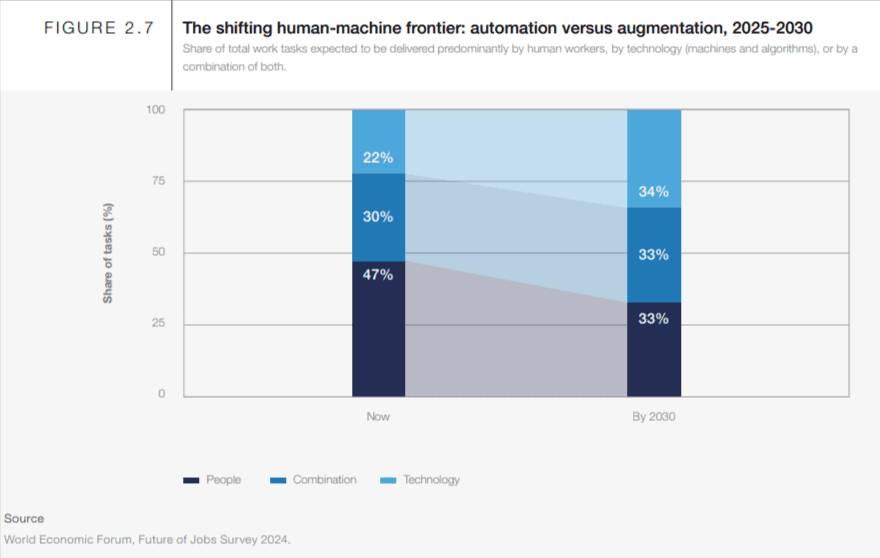
For example, automated data extraction workflows in Docxster can pull data and process small, low-risk expense reports below a certain amount by default.
But for large invoices, it can trigger a human-in-the-loop review where the finance team has to approve and clear the invoice. This step would require the team member to only hit approve rather than pulling all data manually.
Using automated data extraction workflows gives staff back their time, which they can spend on more strategic tasks. For example, instead of typing invoice details in Tally, they can do more detailed financial planning/reporting. Elimination of such routine and boring tasks also improves productivity up to 30%.
You can’t automate what you can’t extract
Data extraction is still one of the most cumbersome yet difficult processes to automate in 202^. While part of the reason is because of the lack of the right technology in place, the other reason is that we always think of just the extraction part of the equation.
What good is the data when we can’t really act on it?
That’s why we built Docxster to be a no-code document automation platform for businesses of all sizes. The automated data extraction module pulls data from PDFs, scanned docs, images, and handwritten forms and processes it in seconds. While you get up to 99% accuracy, the bigger benefit is that all that data gets pushed into your platform of choice—be it an ERP, Google Sheets, or Outlook.
Ready to automate data extraction from your documents?
FAQs: Data Extraction
What is data extraction?
Data extraction is the process of pulling information from documents, emails, PDFs, scans, images, or other sources and turning it into usable data. In business workflows, that usually means moving details from invoices, purchase orders, shipping documents, or forms into systems like ERPs, spreadsheets, or accounting tools.
Why is data extraction important for businesses?
Data extraction is important because automation depends on clean, structured, and accessible data. If information stays trapped in PDFs, emails, or paper files, teams are forced to rely on manual entry, which creates delays, errors, and disconnected workflows.
How does data extraction reduce operational errors?
Automated data extraction reduces the need for employees to manually read and type information into business systems. This helps prevent duplicate entries, typos, missing fields, and mismatched records that can lead to payment issues, shipment delays, or reporting errors.
How does data extraction speed up operations?
Once data is extracted automatically, it can move directly into systems like ERPs, Tally, Google Sheets, or workflow tools. For example, a purchase order can be captured from an inbox and sent into the ERP so order processing can begin without waiting for someone to enter the data manually.
Can data extraction reduce labor costs?
Yes. Manual data entry takes time away from skilled employees who could be doing higher-value work. Automated extraction reduces repetitive typing, checking, and rework, which helps teams process more documents without adding extra headcount.
How does data extraction improve access to information?
Data extraction helps centralize information that would otherwise be scattered across emails, shared drives, PDFs, and physical files. Once document data is structured and stored in one system, teams can find what they need faster instead of searching through folders or attachments.
How can data extraction prevent operational failures?
Automated extraction workflows can include validation rules that check whether required fields are present and values are correct. If something is missing or incorrect, the system can flag the issue early so teams can fix it before it causes a downstream problem.
How does data extraction support business scalability?
As document volume grows, manual extraction becomes harder to manage. Automated data extraction lets teams handle more invoices, purchase orders, shipping documents, and forms without slowing down operations or hiring more people just to keep up with busywork.
How does data extraction improve decision-making?
Clean extracted data gives teams a more reliable foundation for reporting, forecasting, and planning. For example, purchase order data stored in an ERP can help teams analyze buying trends, forecast inventory needs, and make decisions based on real records instead of incomplete information.
How does data extraction improve compliance?
Automated extraction helps keep records complete, structured, and easier to retrieve during audits. Teams can also add validation and access rules so sensitive documents are routed to the right people and checked against required compliance standards.
How does data extraction improve customer experience?
When internal data is accurate and processed quickly, customers are less likely to face delays caused by paperwork mistakes. In logistics, for example, accurate extraction from customs forms or bills of lading can help prevent shipment delays and service issues.
How does automated data extraction improve employee productivity?
Automated extraction removes repetitive data entry from employees’ workloads. Staff can focus on strategic tasks like financial planning, exception handling, reporting, vendor management, and process improvement instead of manually copying information from documents.
Turn documents into decisions.
See how Docxster gets you from inbox to insight in minutes, not days. Bring your toughest workflow — we'll show you what it looks like solved.


