-
The Real Reason Your Document Workflows Keep Failing (And How You Can Fix It)
Why do your workflows feel slow when you’re doing everything right? The issue is outdated tools. See how better systems finally support your work.
Last updated:


TL;DR
If your document workflows keep breaking, the problem is often the tools — not the people using them.
Outdated systems, disconnected processes, and fragile workflows force teams to create workarounds, recheck data, and absorb blame when automation fails.
Better automation tools adapt to existing workflows instead of forcing teams to rebuild how they work.
Templateless extraction, clean data capture, and human-in-the-loop review help teams process messy documents without relying on rigid templates or constant manual fixes.
The right automation platform helps teams reclaim time from rework, improve handoffs, reduce double-checking, stabilize workloads, and focus on higher-value work.
You’ve fixed the same document three times. You stayed late, again, because a document disappeared. You’re exhausted, somehow still behind, and starting to wonder if you’re the weak link in a process that everyone else seems to navigate just fine.
You could blame yourself. Most people do.
But what if the problem isn’t you at all? What if the tools you rely on were never designed to keep up with the volume, complexity, or unpredictability of the work you do every day?
You might never have thought of it this way, but today you should: the thing stalling your automation workflows might be your tools, not you.
3 problems that break your document workflows and stall automation initiatives
When you peel back most stalled automation efforts, the same core issues keep showing up. Here are the three that cause the most damage:
1. Outdated systems that slow every task
The biggest issue that stalls automation initiatives is outdated legacy systems. Legacy automation systems break your document workflows at the source. They force you to process documents across tools that never sync, creating gaps your teams have to fill later.
And here’s what’s worse: Most teams don’t call this a problem, because the slowdown feels familiar. They start adapting to whatever the system gives them, even when it chips away at their time.
I’ve seen teams start building workarounds to keep tasks moving. They treat the delays and rechecks as part of the job, even though they shouldn’t be. A Reddit user described this exact pattern, explaining how people stop noticing system friction. They believe their process is fine because they’ve lived inside it for so long.
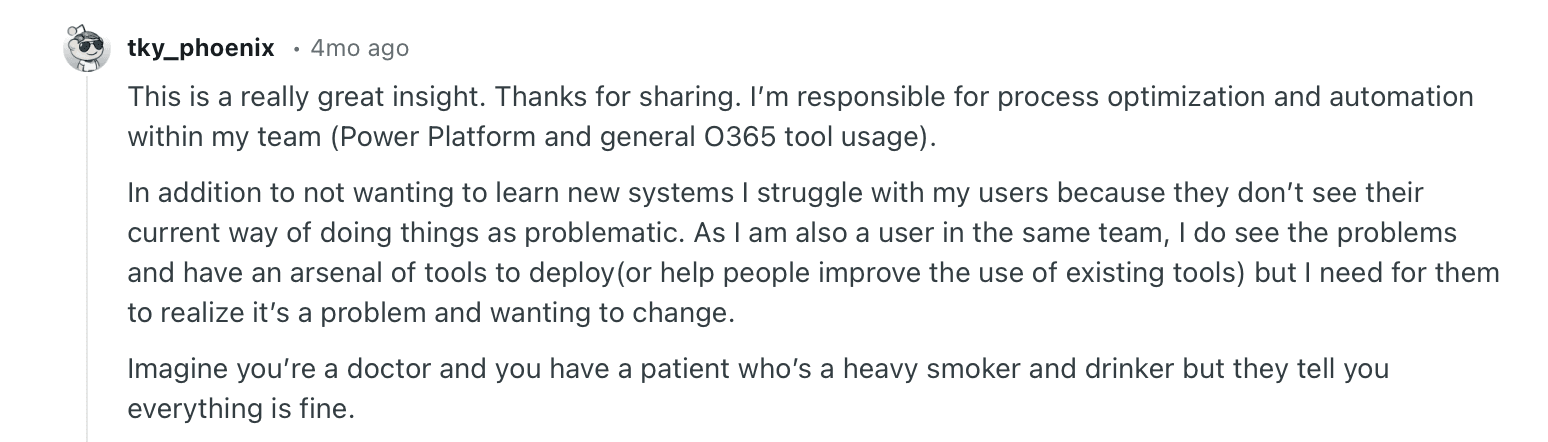
The user described this issue as “Imagine you’re a doctor, and you have a patient who’s a heavy smoker and drinker, but they tell you everything is fine.”
And they can’t be far from the truth. Yes, outdated legacy systems slow your document processing down. But if your team does not recognize that the system is causing the drag, frustration grows.
2. Processes stitched together instead of built to work
When your workflow stretches across enterprise resource planning (ERP) screens, email threads, shared drives, and scattered portals, it stops feeling like a workflow. Instead, it feels like a scavenger hunt because every document looks different.
In a WinPure survey, 50% of customers (small and midsize organizations) reported difficulty consolidating data from multiple sources. This gap makes it hard to create a unified view, which is exactly what an automated workflow needs.
You might see the consequences of this problem in everyday handoffs. For example, a purchase order often lives in pieces—one part sits in the ERP, another lingers in a shared folder, and a newer version circulates over email because someone made last-minute edits.
When the document reaches the operations team, the versions don’t match, and no one can tell which one is current. Your team then needs to stop the process and rebuild the PO from scattered sources. The end result? A slowdown that stems from a workflow held together by systems that never worked as one.
3. Blame falls on the team and not the system
Think about what happens during an automation hiccup. The burden of automation falls on people rather than on the systems that shape their work. When something breaks, leaders look to the individual who ran the task rather than asking whether the process made failure likely.
A comment from Reddit captures this pattern clearly. A sysadmin had to run a command across hundreds of machines. One typo wiped out every system in 120 call centers. The outage may have resulted from a fragile process with no safety checks, yet all eyes turned to the person who typed the command.
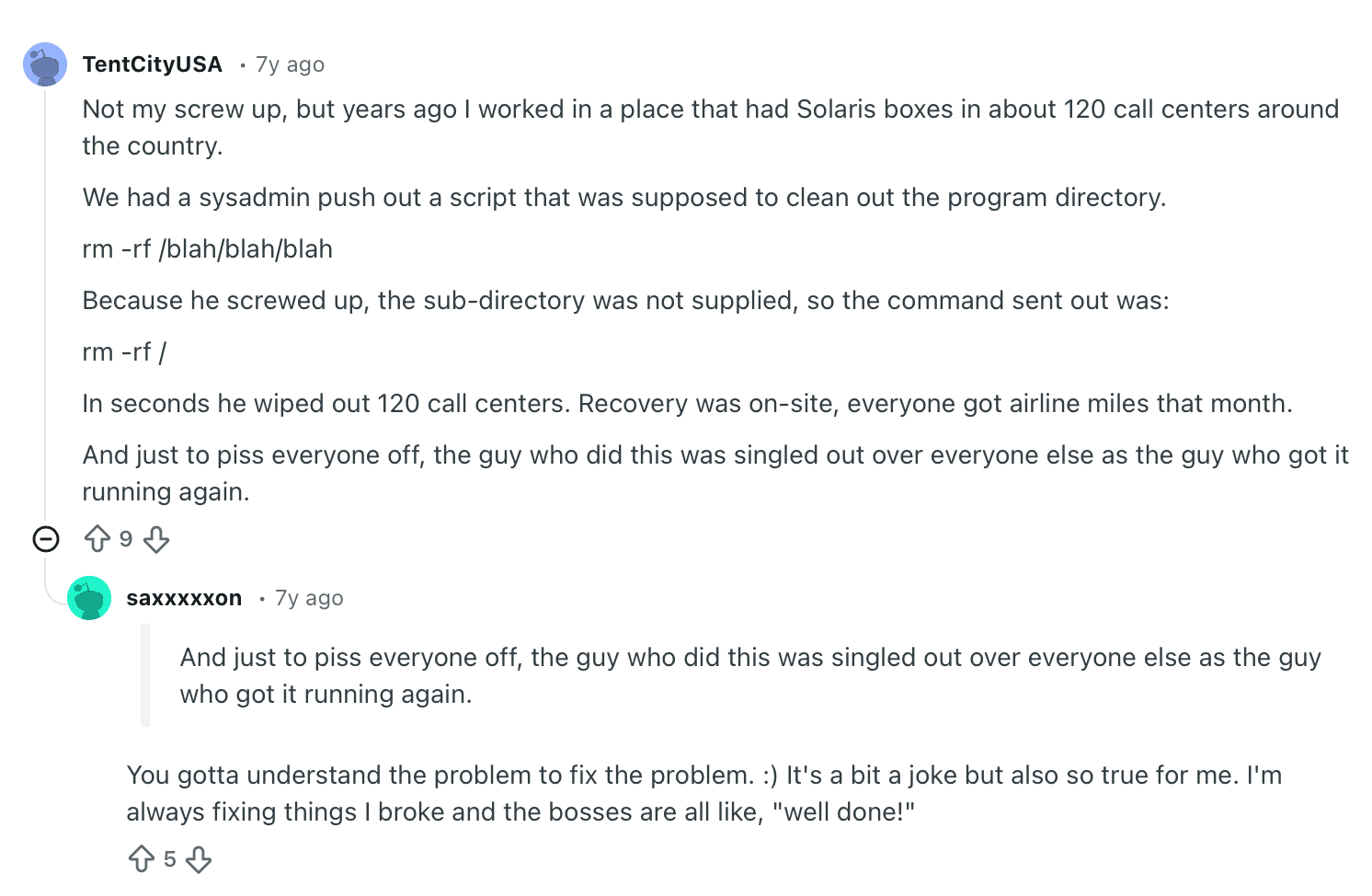
The funny part comes next: This person then helped the team rebuild everything, and leadership praised him as a hero for fixing the disaster he’d been blamed for. Another commenter said the same thing happens in their workplace. The tools create risky conditions, and the person takes the fall. The same person then earns praise for the cleanup.
When blame keeps falling on the team, your team members start pulling back and avoiding new automation workflows. That hesitation breaks document workflows and slows every automation initiative you try to build.
So, what happens when you find automation tools that truly support you?
Here’s what happens when you use automation tools that support your existing workflows:
1. Your tools adapt to the way you already work
When automation works well, it fits the shape of your existing workflow. You don’t have to ask your team to change how they communicate or where they store information. Your automation tool supports the habits that already keep your business moving.
A Reddit thread illustrates this clearly. The original poster built an automation that performed perfectly in testing, but the client abandoned it after a few days. Their real workflow ran on group texts, handwritten notes, and quick calls—not dashboards or new software. The automation wasn’t wrong. It simply didn’t fit the team’s workflow.
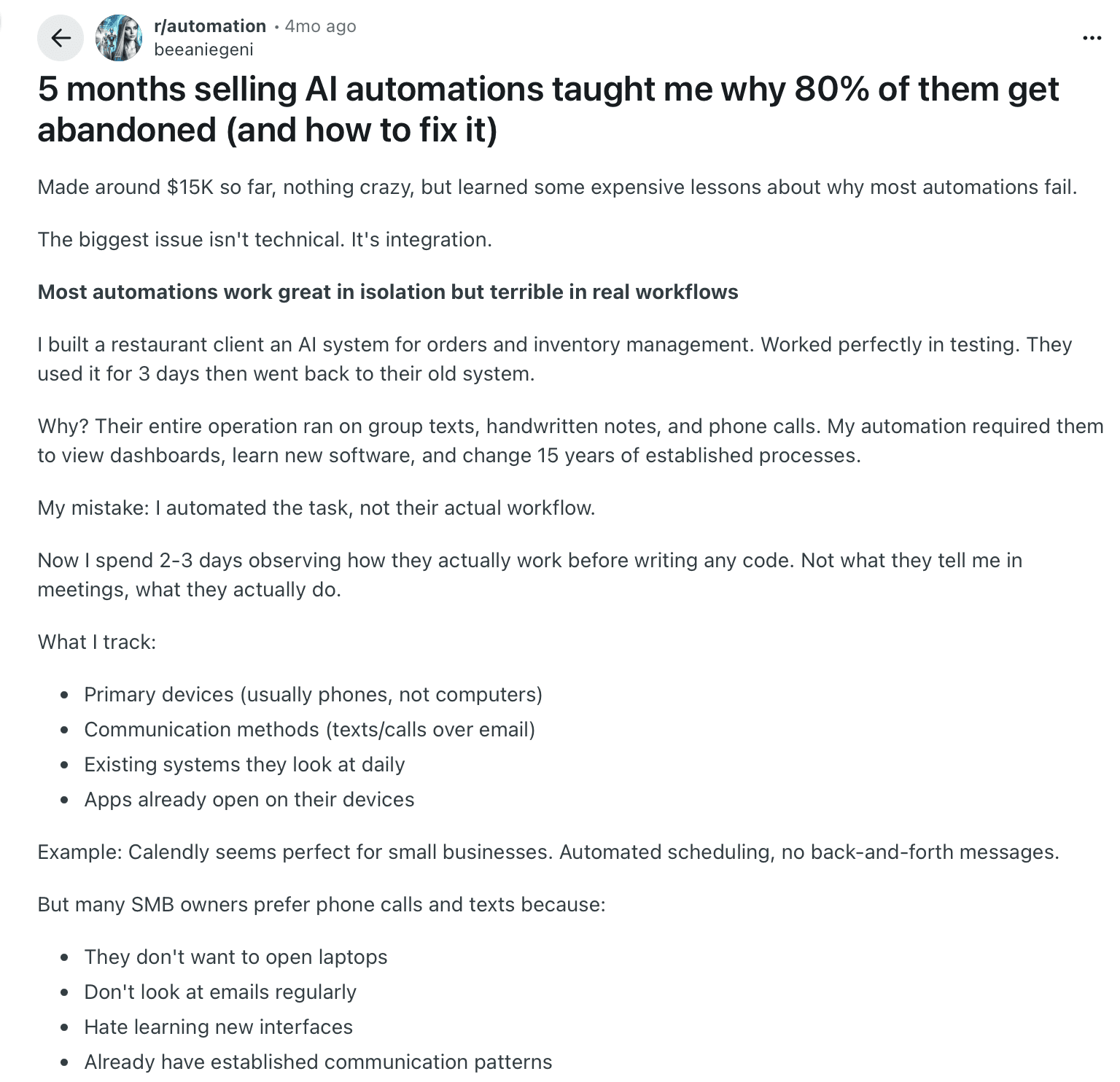
That is exactly why Docxster is designed around real-world workflows. It accepts any type of document, from scanned pages to handwritten notes. You can customize the structure, review what matters, and send the output to your ERP or any other system you use. Nothing forces your team to rebuild its routines. The tool slots into the workflow you already trust.
When a tool adapts to you, automation no longer feels disruptive. It becomes a natural part of the work your team already does.
2. Your data gets extracted without templates
When you work with tools that support your workflow, you don’t have to rely on templates for data extraction. Each template expects a fixed structure, a predictable layout, and a familiar document. That may have worked a decade ago, but it doesn’t match the reality of today’s documents.
As Jishnu NP, CTO of Docxster, explains, “If the vendor also upgrades their document processing software or something, then their invoice template will change. Honestly, that will again affect your business... the process will fail, or it won’t detect the values.”
The right tools use templateless extraction. They understand the document instead of relying on a fixed structure and needing to maintain the rules for extraction. You can extract the data regardless of the document structure.
3. Your data is clean, consistent, and usable from the start
Poor extraction affects everything downstream. When the data gets messy, you slow the process with corrections, duplicate checks, and constant back-and-forth to fix small errors. These manual fixes disrupt handoffs and leave teams unsure which values to trust.
In fact, 70% of small- to mid-sized businesses in WinPure’s study report that duplicate and inconsistent records (poor data quality) remain their most pressing issue. A tool that supports your workflow can change that.
The right tools capture information exactly as your process uses it. Here’s how:
They follow the structure your team recognizes
They extract the fields that matter to your operations
They treat each document as part of a connected system, not an isolated task
When the workflow guides the extraction, the data comes in aligned with your rules rather than in conflict with them. And that is how data remains clean, consistent, and usable right from the beginning.
4. You stay in control with human-in-the-loop design
The right automation platform makes space for human review when necessary. It recognizes that no process runs on perfect documents, and that not every extraction will meet a high-confidence threshold.
Docxster does just that. Its ‘human-in-the-loop’ feature pauses the workflow whenever confidence drops and routes the document for review. Real people can check or correct the fields in question, and the process resumes only after the information is accurate.
This keeps the workflow reliable. Automation handles routine steps, and human oversight is used only where judgment is needed. The control stays with the team, and the system supports that control rather than replacing it.
What kinds of gains can you expect with the right automation platform?
When you have the right automation platform in place, you get a set of very real, practical benefits. Here’s a breakdown of what that looks like:
1. Hours reclaimed from rework
I’ve seen a common pattern across document-intensive industries. Before adopting the right automation platform, teams spend time fixing errors from their systems, correcting mismatched fields, and addressing workflow gaps. Every handoff becomes a chance for something to break, and the cycle of rework never really stops.
With a platform that produces accurate data the first time, those loops disappear. Instead of revisiting the same tasks to troubleshoot and repair, the workflow simply moves forward. The technology becomes dependable rather than something that needs constant supervision.
For you, that means the hours once spent fixing issues are now available for real progress.
2. More confidence in handoffs
Handoff issues rarely come from people being careless—they stem from missing information, unclear ownership, or steps the system failed to surface. When you can’t see what’s supposed to happen next, even well-intentioned work stalls or gets rerouted in the wrong direction.
A platform that keeps documents visible and routes tasks cleanly changes that dynamic entirely. Every stage becomes transparent and predictable, which means your teams no longer have to chase updates or guess where work stands. The process itself creates clarity and confidence in handoffs.
3. Predictable days and workloads
Before the right automation is in place, any task can suddenly derail your afternoon—whether that’s an unexpected exception or a process that stalls without warning. The work isn’t inherently chaotic; the system just makes it feel that way.
Once processes run consistently and the platform handles the routine decisions reliably, those surprise disruptions taper off. Throughput stabilizes, and planning becomes something you can actually trust.
With fewer fire drills, your day feels manageable again. You get steady output, clearer expectations, and the ability to focus rather than just bracing for the next interruption.
4. Faster data-driven decision making
When the system captures data cleanly, consistently, and in the right structure from the start, teams no longer waste time fixing upstream issues before they can act. Information arrives ready to use, not ready to repair.
This creates a noticeable operational shift:
Finance can forecast sooner with reconciled numbers
Operations can plan capacity earlier because inputs are accurate
Logistics can adjust schedules without waiting for someone to correct the latest batch of errors
5. Less need for constant double-checking
When systems are unreliable, everyone feels the pressure to verify every field, attachment, and status just to be safe. That manual vigilance adds friction to even simple tasks.
With an automation platform that consistently produces accurate outputs, that burden eases. You no longer have to hover over every detail or revalidate work you’ve already done. Reviews become intentional, not defensive.
The payoff is a calmer, more confident workflow: you spend less time policing the system and more time actually doing the work that matters.
6. More focus on higher-leverage work
When routine tasks stop demanding constant fixes and follow-ups, space opens up for the kinds of work that actually move the business forward. Instead of getting pulled into extraction cleanups or status hunting, teams can channel their time into forecasting or strategic problem-solving.
As low-value busywork fades, attention naturally shifts to higher-impact initiatives, such as improving processes or strengthening customer experience.
Without data extraction problems bogging you down, you can focus on higher-leverage work and make smarter decisions.
You were never the problem—your automation tools were
Every night you spent fixing mistakes made by a tool, trying to make sense of piles of documents, wasn’t a reflection of your ability. It was the strain of working inside systems that couldn’t support the pace or complexity of your workflow.
When the tools break, people end up carrying the weight—and that burden has never belonged to you. You don’t have to keep blaming yourself for another automation issue or another slowdown that appeared despite your best efforts.
At some point, the only sustainable move is to choose systems that work for you—not the other way around.
You can decide what your document automation looks like going forward. You can choose tools that support the way you work, the workflows you already trust, and the pace your team needs to maintain.
Ready to fix your document workflows with automation?
FAQs: Document Workflow Automation
Why do document workflows keep failing?
Document workflows often fail because the tools behind them are outdated, disconnected, or too rigid for real-world documents. When systems do not sync properly or cannot handle messy inputs, teams end up filling the gaps manually.
Are workflow problems usually caused by people or tools?
In many cases, the tools are the real issue. Teams often get blamed for errors, delays, and missed steps, but those problems usually come from fragile systems, unclear handoffs, and workflows that make failure more likely.
How do outdated systems slow down document workflows?
Outdated systems force teams to move documents across tools that do not communicate well with each other. This creates extra checks, duplicate work, manual updates, and delays that gradually become accepted as “normal” work.
Why do stitched-together workflows create problems?
Stitched-together workflows spread work across ERPs, emails, shared drives, portals, and spreadsheets. When different versions of a document live in different places, teams lose time figuring out which file is current and what needs to happen next.
What should a good automation tool do differently?
A good automation tool should fit the way your team already works. It should accept real-world documents, extract the right data, support reviews when needed, and send clean outputs into the systems your team already uses.
What is templateless extraction?
Templateless extraction is a way to pull data from documents without relying on fixed layouts or predefined templates. Instead of breaking when a vendor changes a format, the system understands the document and extracts the needed fields based on context.
Why is clean data important for automation?
Clean data keeps the rest of the workflow moving without constant corrections. When extracted data is accurate, consistent, and structured from the start, teams can reduce duplicate checks, avoid rework, and trust downstream decisions.
What does human-in-the-loop automation mean?
Human-in-the-loop automation means the system pauses when confidence is low and sends the document to a person for review. This keeps people in control of exceptions while letting automation handle routine steps.
What benefits can teams expect from better document automation?
Teams can expect fewer rework loops, smoother handoffs, more predictable workloads, faster decisions, and less need for constant double-checking. Over time, this frees people to focus on higher-value work instead of fixing system-created problems.
How do you know when your automation tools are the problem?
Your tools may be the problem if your team constantly creates workarounds, rechecks the same fields, hunts for missing documents, or avoids automation because it feels risky. Those are signs the system is adding friction instead of removing it.
Turn documents into decisions.
See how Docxster gets you from inbox to insight in minutes, not days. Bring your toughest workflow — we'll show you what it looks like solved.


