
-
18 min read
What is No-Code Automation and How Does it Work for Document Processing?
Learn all about no-code automation and see how business teams use it to build real, document-driven workflows without waiting on IT.
Last updated:
TL;DR
No-code automation lets business teams build and manage workflows with visual tools, rules, and connectors instead of writing code.
In 2026, no-code matters because document-intensive teams need to update workflows quickly without waiting on IT for every rule, format, or approval change.
Traditional no-code tools often struggle with document-heavy workflows because they are built for structured app data, not PDFs, scans, invoices, bills of lading, or unstructured files.
The strongest no-code automation platforms should handle documents, support business-user control, extract data without rigid templates, manage exceptions, and export clean data downstream.
Docxster is positioned as a document-first no-code automation platform for finance, operations, manufacturing, and logistics teams that need to automate document processing without heavy IT involvement.
For a long time, document processing has relied on traditional approaches such as workflows owned and maintained by IT teams. Even small changes, like adding a new document type or updating a business rule, often require formal requests, development cycles, and long turnaround times.
Today, no-code automation is the next evolution in automation and document processing. However, in many organizations, the reality looks familiar. IT is still deeply involved, and workflows still depend on developers to build and maintain them. This raises an important question: If IT involvement remains necessary, what problem does no-code actually solve?
In this article, we explain what no-code automation really means, how it differs from traditional automation, and how it can simplify document processing when applied in the right way.
What is no-code automation?
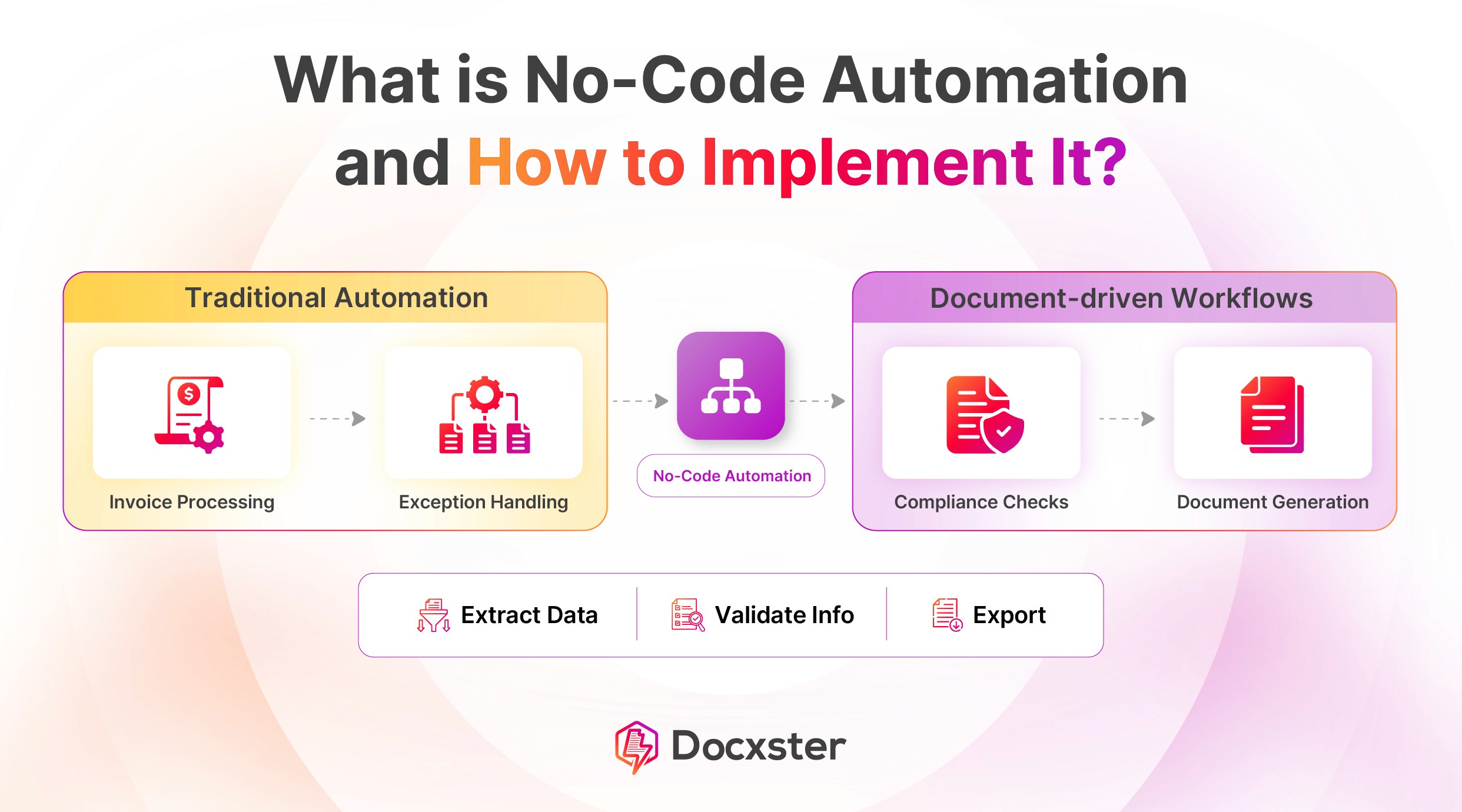
No-code automation lets you build automated workflows without writing code. Instead of custom development, you configure logic using visual tools, rules, and connectors. It allows business teams to automate processes that previously required engineers—such as routing data and connecting systems—using configuration rather than programming.
Here are a few differences between no-code, low-code, and traditional development:
Traditional development relies on custom code, offering flexibility but requiring engineering time and maintenance
Low-code reduces coding effort but still depends on developers
No-code removes coding entirely, enabling faster setup and easier ongoing changes
💡 Note: No-code isn't limited to simple tasks like notifications or form submissions. Modern no-code platforms support complex logic, validations, conditional routing, and document workflows that operate reliably at scale.
Why does no-code automation matter in 2026?
Before we move forward, let’s understand exactly why no-code automation is important in 2026:
1. Democratization of automation
For document-intensive teams, the real bottleneck is that even small workflow changes depend on IT. When a document format changes or a new validation is needed, teams have to pause processing and wait in a backlog.
In our conversations with manufacturing and logistics leaders, this dependency comes up repeatedly. Automation doesn’t break because the logic is unclear, but because the people who understand the documents can’t fix it themselves. As a result, teams either keep processing manually or let flawed automation continue because changing it is too slow or risky.
Democratizing automation addresses this exact problem. Document processing ownership moves to business users, who can then update rules and workflows themselves without IT involvement.
2. Rising pressure on document-intensive industries
The volume and complexity of document processing increase every year. A study by Billentis of the global e-invoicing market indicates that 125 billion bills and invoices were sent digitally worldwide in 2024 (about 90B e-invoices plus 35B e-receipts).
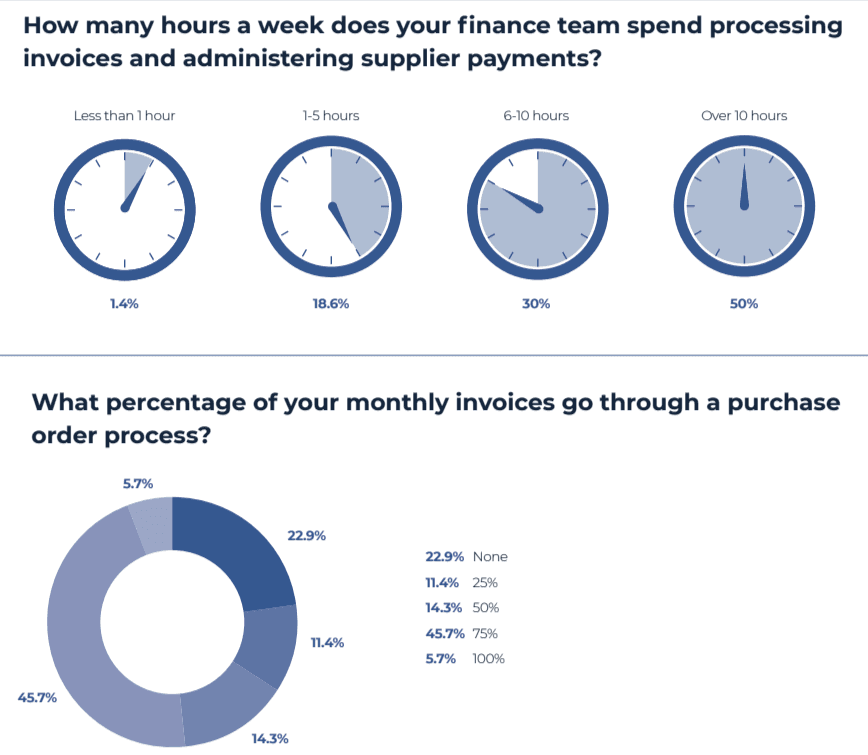
Plus, the 2024 Account Payables Automation Trends report found that 50% of AP professionals spend more than 10 hours per week just processing invoices. As document volumes are growing, so is the work required to process them.
At this scale, document processing can’t remain dependent on centralized technical teams. The ability to adapt workflows has to rest with the teams handling the documents—otherwise, volume and complexity will continue to outpace document processing efforts.
3. Delay in IT support, process debt building up
IT teams see process debt building up as automation spreads across the organization. The reason for this is that routine changes—such as updating an approval step or modifying an export—start falling behind larger engineering priorities. As a result, what should take minutes stretches into days or weeks.
To avoid delays, teams start working around the system. They handle exceptions manually, track documents outside the automated workflow, and postpone fixes because they’re hard to implement. Over time, the automated process no longer reflects how work actually happens.
No-code automation reduces this gap by allowing teams to make necessary adjustments themselves. Workflows stay aligned with reality without relying on IT.
4. The emotional burden of manual work
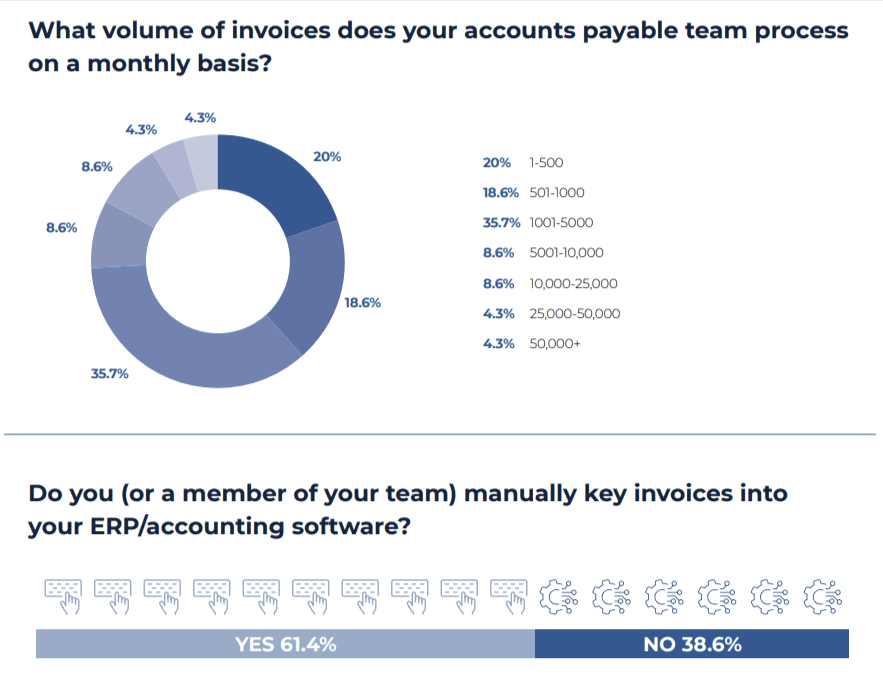
The 2024 study by the Institute of Financial Operations and Leadership says that manual keying of accounts payable still sits at 60%. Meanwhile, manual data entry creates slow, repetitive work that’s difficult to fully eliminate.
Teams recheck entries before sending and stay cautious after posting because errors are hard to spot and expensive to fix. Over time, this wears people down. They slow down, second-guess routine actions, and avoid making changes because even small mistakes mean rework. The pressure doesn’t come from complexity but from doing the same work repeatedly while knowing the cost of errors is high.
No-code automation reduces this burden by removing repetitive handling and isolating exceptions. When the system carries out the routine work, people can focus on review instead of constant error prevention.
What are the limitations of traditional no-code tools?
No-code automation is the way to go in 2026, but traditional no-code tools aren’t enough anymore. They’re filled with limitations that don't work for document-intensive industries. Here’s why:
1. It’s built for app-to-app work, not documents
If you’ve used no-code tools like Zapier or Make, you’ve probably had a good experience when working with structured data. A form submission, a database row, or a webhook event is easy to work with because all the fields are already defined.
The limitations show up when the input is a document. An invoice, a bill of lading, or a scanned form usually enters the workflow as a file attachment. At that point, most no-code tools treat it as a file rather than data, which means they can pass it along or archive it but can’t reason about what’s inside.
As a result, document workflows rarely live entirely inside these tools. Automation handles the handoff between apps, while document understanding and decision-making happen elsewhere or manually. For document-intensive teams, that gap is the limitation.
2. There’s no way for them to process unstructured data
Most classic no-code platforms, like simple drag-and-drop builders, basic BI dashboards, and spreadsheet-style tools, are built around structured datasets like tables and columns. These tools don’t truly understand text or images, and they can’t extract meaning from documents on their own. They can store unstructured files, but they can’t turn them into structured data without additional layers.
Because of this, workflows that rely on unstructured documents break the automation chain early. Teams end up entering data by hand or bolting on separate extraction steps before no-code automation can even start. This fragments systems and increases operational risk whenever document formats change.
3. Error handling and validation are limited
Traditional no-code tools handle basic validation and error handling, usually limited to simple checks, like whether a field is present or a value meets a predefined condition. That approach works when inputs are predictable and structured, and when errors are easy to spot and fix.
In real operational workflows, errors rarely behave that way. Fields may be missing, or records may not align as expected, which often requires context and human judgment. Traditional no-code platforms struggle to apply deeper validations or isolate exceptions without resorting to complex workarounds.
5 use cases of no-code automation in document-intensive industries
Here are five use cases where document-intensive industries can use no-code automation:
1. Invoice processing when formats are inconsistent
In a typical accounts payable workflow, invoices arrive from dozens or hundreds of suppliers, each with its own layout and level of structure. Some come in as clean PDFs, others arrive as scans, and the format can change without notice. This is where invoice automation usually breaks, and manual entry creeps back in.
You can use no-code automation to handle this variability without rebuilding workflows every time a format changes. Finance teams can define which fields are required, how to handle missing or ambiguous data, and when to route an invoice for review.
2. Exception handling at scale
In most document workflows, the real effort stems from the exceptions. At higher volumes, teams struggle to keep up as data issues and policy violations compound across incoming documents. When every exception is handled manually or outside the system, throughput drops and errors slip through.
You can use no-code automation to formalize exception handling instead of reacting to it. Teams can decide which cases count as exceptions and ensure they follow the right path, bringing in human review only when the situation demands it. Routine documents move through automatically, while only the outliers surface for action. This keeps exception handling manageable even as document volume and complexity increase.
3. Compliance checks built into workflows
In many workflows, compliance checks happen too late. Documents advance through the process or get shared externally before teams catch missing fields or incorrect classifications. Fixing these issues later leads to rework and risk.
You can use no-code automation to build compliance checks directly into the workflow. Teams define required fields, thresholds, and review conditions upfront, and the software validates documents before they move forward. When something doesn’t meet policy, it’s routed for review immediately. This prevents downstream errors and keeps compliance from becoming a reactive cleanup task.
4. Document generation from operational data
Document generation often stays manual because automated documents are hard to update. When small changes require technical work, teams fall back to copying data by hand or using outdated templates.
No-code automation removes that friction. Documents can be generated directly from operational data, with structure and logic defined by the business team. When requirements change, updates don’t require rebuilding the process.
What should you look for in a no-code automation platform?
Ready to pick a no-code automation platform? Here’s what to look for:
What to look for | Why it matters |
Document and PDF handling | Real workflows start with PDFs and scans, not clean data. |
Business-user control | Teams can change rules and logic without waiting on IT. |
Template-less extraction | Automation won’t break when document layouts change. |
Built-in exception handling | Reviews and corrections are a necessary part of workflows. |
Reliable downstream exports | Data must flow cleanly into existing systems. |
1. Can it handle documents and PDFs?
Most no-code automation tools are designed around clean, structured data. In reality, document-intensive teams deal with invoices that arrive as PDFs, scanned images, email attachments, and supplier-specific formats that can change without notice.
A usable no-code automation platform should start with documents, not spreadsheets or apps. It should ingest PDFs and images, extract data reliably, and continue working even when layouts shift. If documents break the workflow, the automation is fragile by design.
2. Does it offer business-user control?
If changing a validation rule or approval path requires IT support, the tool isn't truly no-code. It only moves the bottleneck from one team to another.
Document-intensive teams need the ability to define what data matters, add conditions, route exceptions, and control exports on their own. This is critical when document requirements often change.
3. Does it work without templates or retraining?
Template-based document automation looks efficient at first and then quietly becomes a maintenance burden.
Changes in supplier documents introduce breakage across workflows. Even small layout changes or scan-quality issues force teams to patch processes just to keep things running, often reworking templates or adding manual steps along the way. Over time, the effort of maintaining automation rivals the manual work it was meant to replace.
Modern no-code automation requires AI that understands document structure and context rather than fixed layouts. When extraction adapts automatically, teams avoid constant rework, and automation remains usable as volume and variability increase.
4. Can it handle exceptions as part of the workflow?
In real operations, not every document should pass straight through automation. Some require review due to missing data, mismatches, or high financial risk.
A good no-code automation platform treats exceptions as a first-class concept. It should clearly flag issues and route documents for human review, while allowing teams to make corrections without restarting the workflow or exporting data manually. This is critical for finance and logistics teams where accuracy matters as much as speed.
5. Can it reliably push data downstream?
Extraction isn't the finish line. Data needs to move into the systems teams already use, such as ERPs, spreadsheets, internal tools, or reporting pipelines.
No-code automation should support these exports directly, with clear control over timing, conditions, and formatting. If the final handoff requires custom scripts or fragile integrations, teams end up rebuilding manual steps at the end of an automated data entry process.
Why you should use Docxster to process your documents without coding
Docxster was built with a clear goal: make real operational automation possible for business teams without forcing them to rely on constant IT support. Most no-code tools stop at moving data between applications. Docxster starts earlier—at the document level—where most operational work actually begins.
The platform is designed for non-technical users who run document-heavy processes in finance, operations, manufacturing, and logistics. Here’s what that looks like in practice:
1. We’re document-first with the power of AI
At Docxster, we followed the latest document processing trends and spoke with industry leaders before building our document-first automation platform.
In fact, here's a LinkedIn post from our founder on how Docxster was built from a simple idea: start from the documents teams actually process.
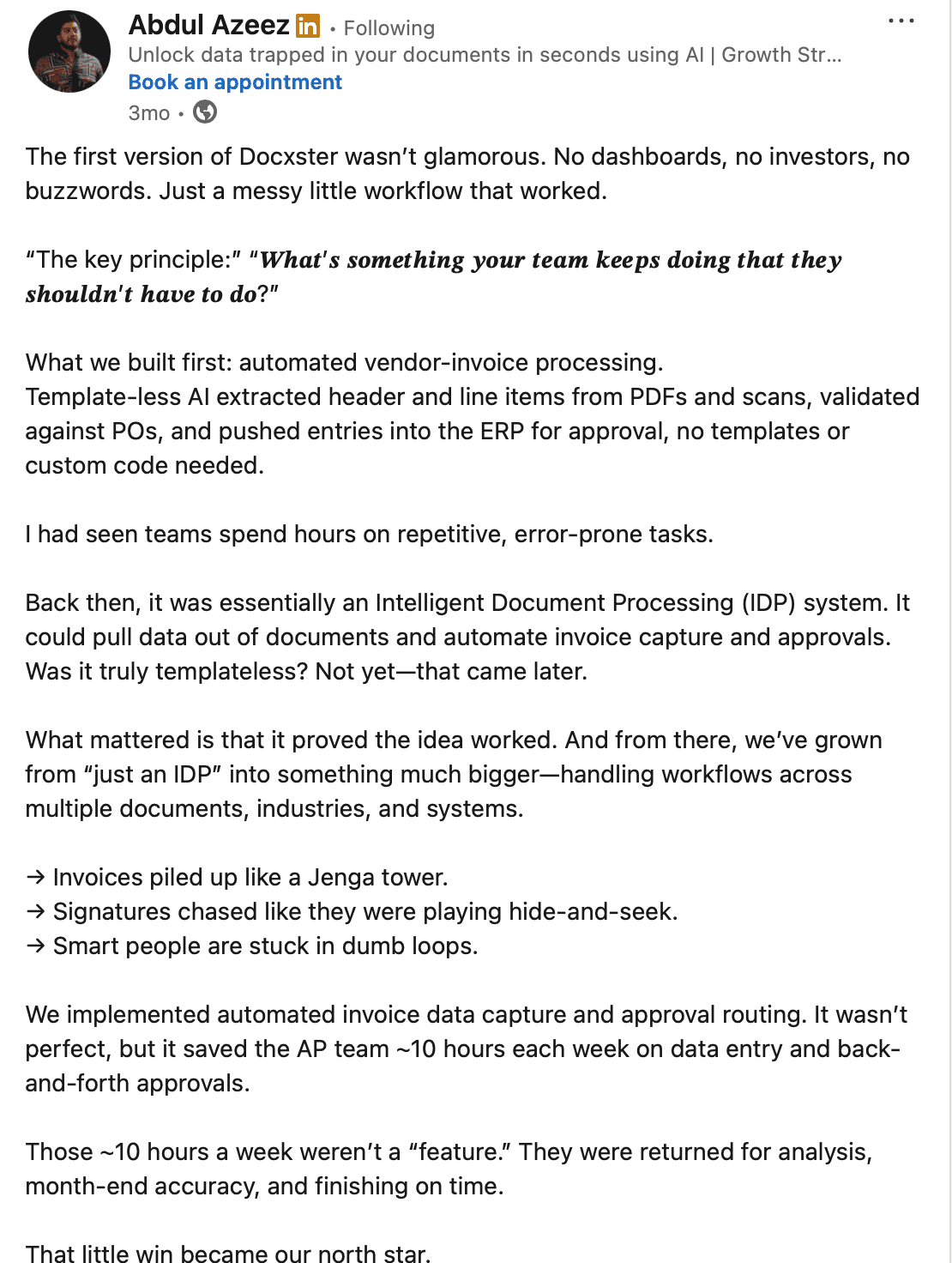
A screenshot of our founder’s LinkedIn post talking about the core idea behind building Docxster
Docxster uses AI-powered optical character recognition (OCR) and extraction to identify relevant fields directly from a document, even when layouts vary across vendors or formats. This works across structured, semi-structured, and unstructured documents, including handwritten and multilingual inputs.
You don’t need to define rigid templates upfront. The system maps known fields and adapts over time based on corrections and validations. That means fewer breakages when formats change and far less ongoing maintenance.
2. You don’t need to code or involve IT extensively
Docxster is designed so that the people closest to the process can run it.
Business users define the data that matters and control validation and next steps using a visual interface. There’s no scripting and no custom code required to keep workflows running.
At the same time, Docxster doesn't pretend automation should run blindly. Human-in-the-loop review can be applied when the system signals uncertainty or elevated risk. This keeps teams in control without pulling them back into manual work.
IT still plays a role—especially for integrations, security, and governance. But day-to-day workflow changes don't need to go through long implementation cycles.
3. You can use the workflow builder to run complex automation
Document workflows are rarely linear. Docxster’s workflow builder is designed for that reality.
You can design a single workflow that handles document extraction and validation, applies routing logic, and moves data through review and approvals before exporting it downstream. The logic adapts based on document content and system confidence instead of fixed paths.
For example, in a purchase order workflow, the system can pull line-item data, check it against ERP records, and surface only the cases that need review or approval before sending clean data forward automatically. Teams can change or extend this flow as requirements evolve without rebuilding it from scratch.
4. It’s purpose-built for document-intensive industries
If you process a handful of documents a week, templates might work. But at scale, they become a liability.
Docxster’s templateless extraction approach is designed for high-volume, high-variation environments like finance, manufacturing, logistics, and operations. As document volume grows or formats change, workflows continue to run without constant reconfiguration.
This is what allows automation to scale without turning into another system that needs babysitting.
5. You can integrate with your tech stack in minutes
Once data is extracted and validated, it needs to move forward.
Docxster can automatically export processed data to downstream systems, including finance tools and internal applications. Data leaves the platform in a consistent, usable format, reducing the need for manual re-entry and limiting errors later in the process.
The result is a document-driven workflow that actually connects to the rest of your systems instead of sitting in isolation.
No-code automation is the future of document processing
No-code only matters if it actually removes the dependency on IT. If document workflows still require developers for every change, then nothing fundamental has improved. The real shift happens when the teams that own the work can also own the automation.
That’s why no-code automation is the future of document processing. It allows operations and finance teams to make changes themselves as requirements evolve, without waiting on technical support or rebuilding workflows.
The best place to start is simple. Choose one document-heavy process that slows your team down today and automate it. The impact becomes visible quickly.
At Docxster, this is exactly what we enable. Our platform lets business teams automate document processing end-to-end without technical expertise, so workflows continue to work as documents change.
Ready to see how no-code automation can change your document processing workflow?
FAQs: No-Code Automation
Is ChatGPT a no-code platform?
No, ChatGPT is not a no-code platform. It can help brainstorm workflows, explain automation logic, and generate process ideas, but it does not function as a standalone system for building, running, and managing document workflows.
What is the best no-code automation platform?
There is no single best platform for every use case because the right choice depends on the workflow you need to automate. For document-heavy operations, the strongest platforms are the ones that can handle PDFs, scans, exceptions, validations, and downstream exports without constant IT support.
What is no-code automation?
No-code automation lets teams build and manage workflows using visual tools instead of writing code. It replaces custom development with configurable logic, making it easier for non-technical users to automate business processes, especially document-driven ones.
How is no-code different from low-code and traditional development?
Traditional development depends on engineers writing and maintaining custom code, while low-code reduces coding but still usually requires technical support. No-code removes coding for most workflow design, which makes setup faster and ongoing changes easier for business teams.
Why does no-code automation matter more in 2026?
It matters more in 2026 because document volumes, process complexity, and pressure on operational teams keep increasing while IT bandwidth remains limited. No-code automation helps teams respond faster by letting the people closest to the work update workflows without waiting in technical backlogs.
What problems does no-code automation solve for document workflows?
It reduces reliance on IT for routine workflow changes such as updating validations, routing rules, or output logic. That helps teams avoid delays, reduce manual work, and keep automation aligned with how document processes actually work day to day.
Why do traditional no-code tools struggle with document-heavy workflows?
Most traditional no-code tools are built for structured app data, not unstructured inputs like PDFs, scans, or supplier documents. They can move files between systems, but they often cannot understand document content well enough to support end-to-end automation on their own.
What are common use cases of no-code automation in document-intensive industries?
Common use cases include invoice processing, exception handling, compliance checks, and document generation from operational data. These are areas where teams deal with repetitive work, high volumes, and frequent variations that make manual handling slow and error-prone.
How does no-code automation improve exception handling?
No-code automation lets teams define which cases count as exceptions and route only those documents for review. Routine documents can keep moving automatically while human attention stays focused on the cases that actually need judgment.
What should you look for in a no-code automation platform?
Look for document and PDF handling, business-user control, templateless extraction, built-in exception handling, and reliable downstream exports. A strong platform should let non-technical teams manage real workflows without creating new maintenance burdens.
Can no-code automation work without templates?
Yes, newer platforms can use AI-based extraction instead of fixed templates. This makes them more resilient when document layouts change and reduces the constant upkeep that usually comes with template-based automation.
Will AI replace no-code automation?
No, AI is more likely to strengthen no-code automation than replace it. AI helps interpret documents and handle complexity, while no-code provides the workflow structure, controls, and reliability needed to put that intelligence into everyday operations.
Turn documents into decisions.
See how Docxster gets you from inbox to insight in minutes, not days. Bring your toughest workflow — we'll show you what it looks like solved.


