
-
9 min read
What Manual Document Processing Really Costs Your Logistics Operation
As a logistics business, if you’re still stuck with manual document processing, you’re incurring hidden costs. Find out what these costs are, the level of losses you might incur, and how to reverse course.
Last updated:
TL;DR
Manual document processing in logistics creates hidden costs across labor, rework, delayed payments, compliance exposure, and lost growth opportunities.
Common logistics documents like BOLs, packing lists, freight invoices, PODs, customs forms, and delivery receipts often arrive as PDFs, scans, emails, or images in inconsistent formats.
The visible cost is staff time, but the larger impact comes from errors, shipment delays, invoice disputes, audit prep, detention and demurrage fees, and missed capacity to take on new business.
Automated document processing helps logistics teams extract, validate, match, and route document data faster while reducing manual keying and exception-heavy workflows.
Platforms like Docxster help operations and finance teams automate document workflows without relying on IT for every new template, integration, or process change.
A $1B+ U.S. logistics company once needed seven full-time employees just to process 100,000 maintenance invoices a year, arriving by fax, phone, and email from repair shops across the country. Seven salaries add up to a major expense—one that’s glaringly obvious on a spreadsheet.
But even bigger costs lurk beneath it—from duplicate invoices that slip through the cracks to correction cycles that drag on for weeks when a 3PL’s packing list doesn’t match what arrived at the warehouse.
These costs don't show up as line items, so most operators never see what they're actually paying. In this guide, you discover the hidden costs of manual document processing in logistics and how they add up over time.
What does manual document processing look like in logistics?
A single shipment usually brings in multiple documents that your team needs to process before anything moves forward. Some common documents include:
Commercial invoices
Customs declarations such as the Importer Security Filing (ISF) and Automated Export System (AES)
Delivery receipts
Freight invoices
Certificates of origin
Proof of delivery
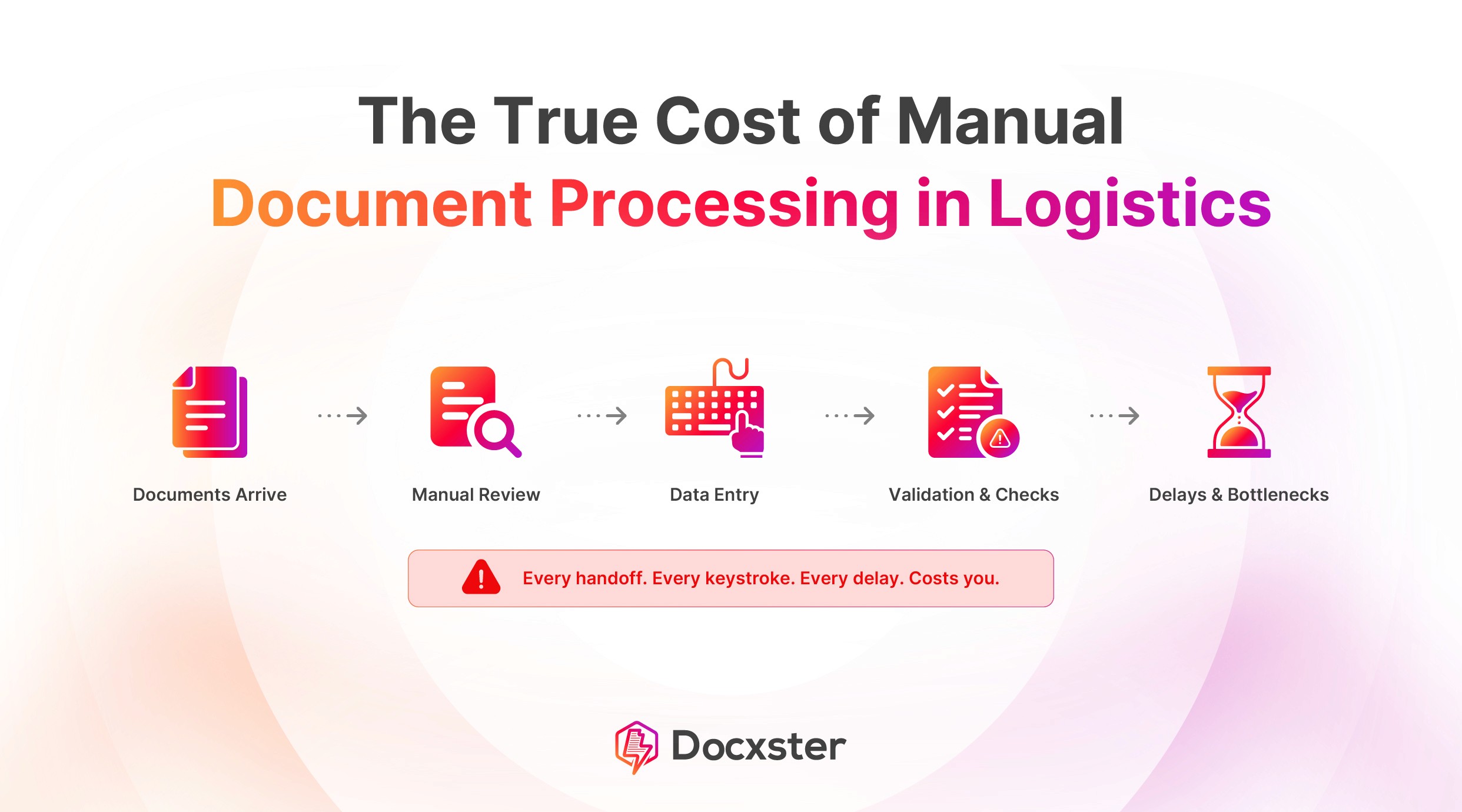
Most of these documents arrive as PDFs, scans, emails, or images—and the layout changes depending on the carrier, supplier, broker, or client who created them. Once they arrive, your team usually follows a manual process like this:
Documents arrive in mixed formats from external parties.
A team member reads each document and enters the required data into your transportation management system (TMS), warehouse management system (WMS), or enterprise resource planning (ERP) system.
They compare values across documents to confirm that the information matches.
When something doesn’t match, they investigate the issue and follow up to resolve it.
After verification, they store the documents to meet compliance and audit requirements.
This workload grows faster than most teams expect. Even mid-sized exporters handle 31 to 50 shipments each month with about nine documents per shipment.
Each document also crosses multiple employees’ desks. One person captures the data, another verifies it, and someone else steps in when an exception shows up or an approval is required.
This isn’t clean, templated data entry—it’s unstructured document processing across multiple external sources. That’s why delays, errors, and compliance risks keep showing up until teams move to automated document processing.
If this feels familiar, this breakdown of why freight teams still rely on manual logging is worth watching:
What are the hidden costs of manual document processing in logistics?
Most logistics leaders know manual paperwork slows them down. What they don't always see is how much it actually costs, because there's no line item on your Profit and Loss (P&L) statement called "manual document processing." Instead, the costs show up in the everyday challenges in document processing that teams deal with across functions.
Here are the four buckets the hidden expenses fall into:
1. Labor and time costs
The most important cost you incur due to manual document processing stems from labor and time.
According to a 2024 ePayables study, the average invoice costs $9.40 to process and takes 9.2 days to clear. Here’s what that looks like for a mid-market logistics firm handling 500 documents a week:
500 documents per week
52 weeks in a year = 26,000 documents annually
$9.40 per document = $244,400 spent on processing alone
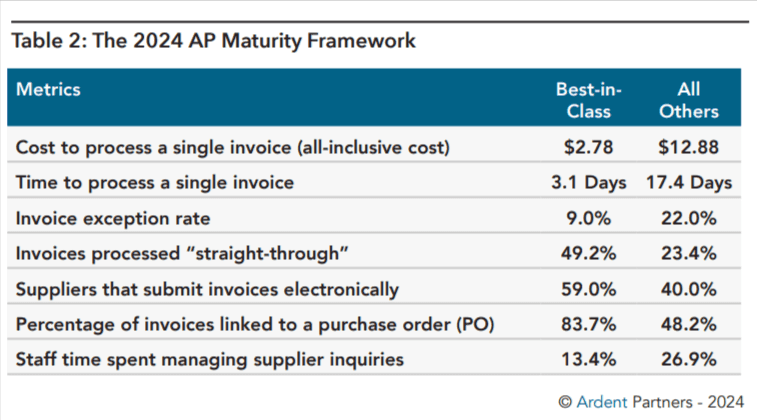
And that $244,400 doesn't even capture the drag. Multiply that across thousands of documents, and you've got a backlog that quietly shapes everything downstream.
But the data entry isn't really the problem. It's what those people aren't doing while they’re processing invoices, such as:
Investigating the 22% of invoices that hit exceptions
Chasing payments that are past due (>20 days)
Managing carrier relationships, like rate negotiation and dispute resolution
Spotting billing patterns, like repeated overcharges or rate mismatches
You didn't hire your ops team to be data entry clerks. Every hour they spend on paperwork is an hour they're not spending on the work that moves your business.
2. Error correction and rework costs
When someone extracts data incorrectly, you're looking at hours of rework that pull in multiple people across your team.
Here’s what happens when incorrect data enters your workflow:
A wrong HTS code holds your shipment at customs, so ops chases the broker, and finance processes the penalty
A mismatched BOL opens a freight claim that your team spends weeks gathering evidence for
An incorrect weight triggers a carrier reweigh and a billing dispute you'll reconcile line by line
A wrong delivery address costs you the redelivery fee plus the service level agreement (SLA) credit you owe the client
The Federal Maritime Commission tracks one slice of this. Between April 2020 and March 2025, the nine largest ocean carriers collected roughly $15.4 billion in detention and demurrage fees, and a meaningful share of that ties back to customs holds and documentation delays that manual document processing makes more likely.
And that's just the charges you can see on an invoice. The rework is the invisible cost of doing business—or rather, processing documents manually. With automation, you avoid all of this and more.
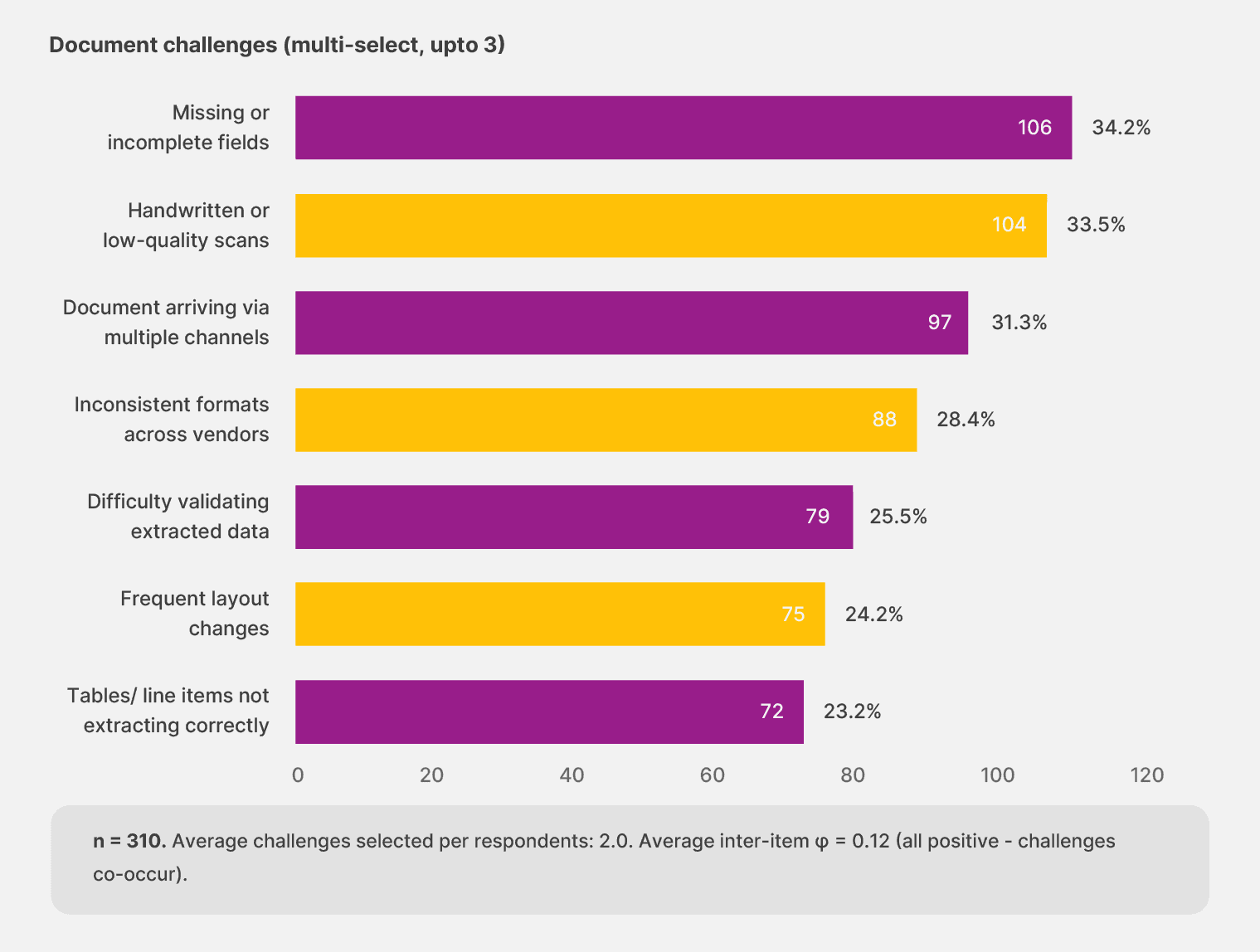
In fact, Docxster’s State of No-Code Document Automation survey found that most finance and operations teams experience document-related challenges like missing or incomplete fields and illegible handwritten scans that impact automation too. So it’s more about choosing the right no-code automation tool.
3. Payment delays and cash flow impact
If you're a finance leader, this is the bucket that should bother you the most. Every day an invoice sits in your workflow is a day you can't use that cash for anything else.
DocuExprt surveyed 500 organizations across different sectors and found that manual processing adds 4.5 days to document turnaround on average, which translates to around $45,000 in delayed revenue recognition for a mid-sized operation.
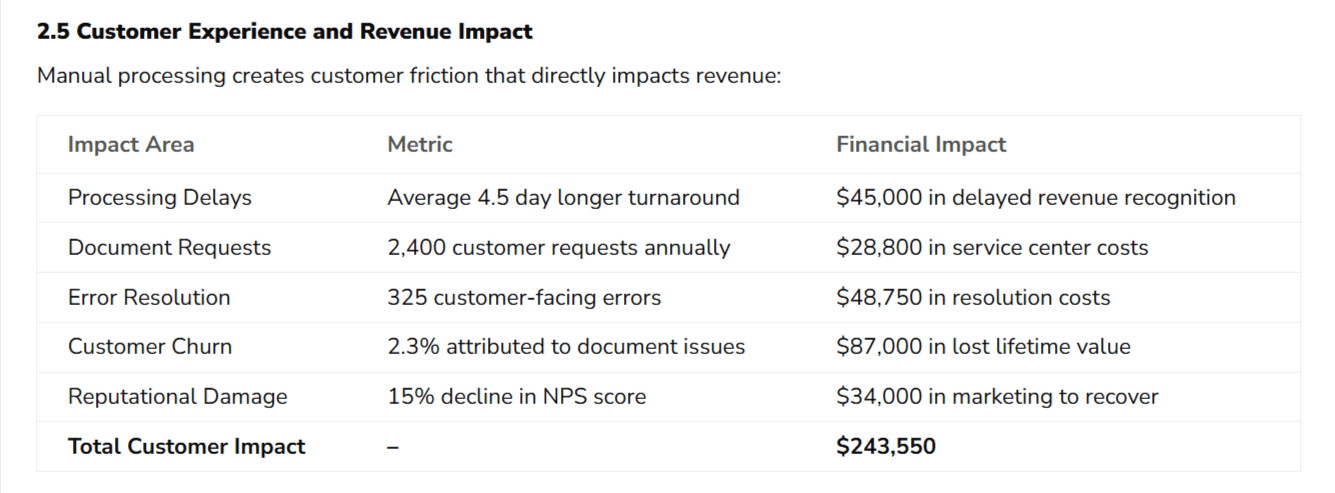
Process delays across the wider business add another $78,000 a year in lost revenue and operational friction. And there's a second-order effect that's easy to miss. Your carriers and vendors keep track of how reliably you pay, and that reputation affects the rates and terms you're offered when your next contract comes up for renewal.
4. Compliance and audit exposure
DocuExprt's 2024 survey found that compliance costs run between $85,000 and $250,000 a year for most firms, with audit preparation alone taking 120 to 200 hours of staff time annually. When something goes wrong, the average fine for a document-related compliance failure is $127,000.
In logistics, the issue often starts with a small error.
An ISF filing goes out with the wrong HTS code, and customs flags the shipment. The container gets held, and demurrage charges begin to build while the team works with the broker to correct the filing.
When the audit comes later, that same shipment needs to be explained. If the records aren’t easy to locate, the audit slows down, and the risk increases.
This happens because the process is manual. There’s no reliable audit trail, so when something goes wrong, your team has to reconstruct what happened from scattered records. That slows audits down and increases the risk of penalties.
5. Scaling costs
Here's the cost that never makes it into a budget conversation: the business you can't take on.
Manual processing doesn't scale the way finance teams assume it does. Adding 20% more shipment volume doesn't cost you 20% more in staff time. It costs more because the complexity compounds as you grow. For a 3PL, this shows up at the worst possible moment. You win a new contract. You need to onboard the shipment volume in 60 days. And you realize your operations team can't absorb the paperwork without hiring three more people, which kills your margin on the account before it starts.
In the end, you either have to turn down the business or take it on and deliver worse service than you promised.
💡 Also read: What is AI document processing?
What does document processing automation look like for logistics?
The costs above aren't separate problems with separate fixes. They share one root cause: every document needs a human to touch it before the next step can begin.
Invoices sit in queues waiting to be matched against rate confirmations. Proof of delivery (POD) gets tracked down across email threads and shared drives. Compliance files get assembled from scratch at month-end. This document-by-document handling is the bottleneck—and that's what automation removes.
When you automate document processing, the default workflow changes. Here's how:
Operations stop passing delays down the line. Standard BOLs, freight invoices, and packing lists get processed in minutes instead of hours, so shipments aren't waiting on paperwork to clear.
Finance moves from chasing matches to reviewing flagged exceptions. Routine documents handle themselves; your team applies their judgment where it actually matters, and month-end close accelerates by days because compliance documentation stays audit-ready by default.
Both teams configure workflows directly, removing the IT dependency that turns every change into a six-month implementation project or a template rebuild for each new document type.
In real-life implementations, teams reduce processing time by up to 75% while pushing accuracy above 95%, with organizations reporting a median ROI of 150% within the first year, driven by faster processing and lower manual effort.
This is the shift that platforms like Docxster are designed for—intelligent document processing built for operations and finance teams, not IT departments.
Here's what it looks like handling a real logistics document workflow:

Over to you: Is the cost of waiting to automate truly worth the hassle?
Seven full-time employees keying in 100,000 invoices a year is what manual document processing looks like at scale, and the salaries are only the part you can see. Underneath the added headcount sits the overtime payments, late penalties, duplicates, correction cycles, and business you turned down because the back office was full.
The question isn't whether manual document processing is expensive. It's whether you can keep absorbing that cost while competitors who've automated their document processing take on the business you can't. Every month without a change is another month of those costs compounding quietly in the background.
Platforms like Docxster are built for exactly this shift. Book a demo to see what it looks like when ops and finance run their own document processing, without IT in the loop.
Ready to automate your document workflows?
FAQs: Manual Document Processing in Logistics
What is manual document processing in logistics?
Manual document processing in logistics means employees read, verify, enter, match, and store shipment-related documents by hand. This usually includes documents like bills of lading, freight invoices, packing lists, customs declarations, delivery receipts, and proof of delivery.
Why is manual document processing expensive for logistics teams?
The obvious cost is labor, but the hidden costs are often larger. Manual processing can lead to rework, shipment delays, duplicate invoices, payment delays, compliance issues, and lost business when teams cannot scale document handling fast enough.
Which logistics documents are usually processed manually?
Common examples include bills of lading, commercial invoices, packing lists, customs declarations, freight invoices, delivery receipts, certificates of origin, and proof-of-delivery documents. These often arrive as PDFs, scans, emails, images, or paper files from different carriers, brokers, suppliers, and clients.
How does manual document processing cause shipment delays?
Delays happen when someone enters incorrect data, misses a field, or has to investigate mismatches between documents. A wrong HTS code, incorrect delivery address, mismatched BOL, or wrong shipment weight can trigger customs holds, billing disputes, rework, or redelivery costs.
What are the hidden costs of manual document processing?
The main hidden costs include labor time, error correction, delayed revenue recognition, compliance exposure, audit preparation, and scaling limitations. These costs often do not appear as a single line item, which makes them easy to underestimate.
How does manual document processing affect cash flow?
When invoices or shipment documents sit in review queues, payments and revenue recognition can be delayed. Over time, slow processing can also affect vendor and carrier relationships because partners notice whether a company pays and resolves issues reliably.
Why is compliance risk higher with manual document processing?
Manual workflows often leave records scattered across email, drives, spreadsheets, and paper files. When an audit happens, teams may have to reconstruct what happened manually, which slows down audit preparation and increases the risk of missing documentation or penalties.
Why does manual document processing become harder to scale?
As shipment volume grows, document complexity grows with it. More carriers, clients, formats, exceptions, and approvals mean teams cannot simply process 20% more work with 20% more effort, so companies may need more headcount or risk slower service.
What does automated document processing do differently?
Automated document processing captures data from logistics documents, validates it, matches it against related records, routes exceptions, and sends clean data into systems like a TMS, WMS, ERP, or finance platform. This allows teams to focus on exceptions instead of manually keying every document.
When should a logistics company automate document processing?
A logistics company should consider automation when document volume is growing, errors are causing delays, invoices are slow to clear, audits take too long, or teams are adding headcount just to keep up with paperwork. A good starting point is a high-volume workflow like freight invoice validation, POD processing, or BOL data extraction.
Turn documents into decisions.
See how Docxster gets you from inbox to insight in minutes, not days. Bring your toughest workflow — we'll show you what it looks like solved.


