-
How Intelligent Document Processing Eliminates Bottlenecks in Manufacturing
Manual document processing doesn't scale with production growth. Learn how IDP eliminates bottlenecks in manufacturing workflows and reduces errors.
Last updated:

TL;DR
Manual document processing works—until scale exposes its limits. As manufacturing operations grow, even small data entry mistakes can snowball into delayed shipments, idle production lines, and significant financial losses.
Intelligent Document Processing (IDP) replaces fragile, template-based OCR with AI that understands document context. It can reliably process invoices, purchase orders, and quality documents across formats, even when layouts vary or handwriting is involved.
IDP dramatically improves speed and consistency by automating extraction, validation, and system entry. Tasks that take humans 15–20 minutes can be completed in a few minutes, with the same accuracy regardless of volume spikes or staff availability.
By validating data against business rules and existing systems, IDP prevents errors from reaching downstream processes. This reduces disputes, production delays, compliance risks, and the operational chaos caused by incorrect or missing information.
For manufacturing teams handling hundreds of documents each month, IDP removes document bottlenecks that limit growth. The biggest gains come from shifting teams away from manual entry toward exception handling, compliance readiness, and higher-value work.
Picture this: Last quarter, a misread digit on a steel supplier invoice created a ₹40 lakh underpayment. The dispute resulted in a two-week delay for your shipment. Production lines sat idle—the final cost: ₹18 lakhs in idle capacity and rush fees.
Your AP specialist has been with you for six years. She's meticulous. But she was processing her 47th invoice when she was interrupted about a delayed shipment. In short: thirty seconds of lost focus created weeks of problems.
That's manual document processing at scale. Your operations grew 40% in two years. Document volume grew with it. But human attention doesn't scale like production lines do. Eventually, something slips through.
Intelligent document processing (IDP) changes this.
In this article, we'll show you how manufacturing companies use IDP to eliminate document bottlenecks—and why choosing the right platform matters more than you think.
What is Intelligent Document Processing (IDP)?
Intelligent document processing combines AI, machine learning, and optical character recognition to extract, classify, and process data from documents automatically. Unlike traditional OCR, which requires templates for each document format, IDP adapts to whatever you send it—structured spreadsheets, semi-structured invoices, or handwritten purchase orders.
Think of traditional OCR like a form that must be filled out exactly the same way every time. One supplier changes their invoice layout, and your system breaks. IDP works more like an experienced clerk who can pull information from any document, regardless of format.
Your steel supplier sends PDFs. Your component supplier scans handwritten invoices. Your logistics partner uses a completely different format. IDP processes all three without requiring you to build separate templates.
How does IDP work for manufacturing companies?
Document ingestion: The platform automatically retrieves documents from various sources, including email attachments, shared folders, and direct uploads. You can set up workflows to automatically retrieve specific files, or your team can manually upload batches of files.
Preprocessing: The tool enhances document quality before processing. It corrects skewed scans, adjusts contrast, removes noise, and optimizes resolution. This step ensures the OCR engine can read even poorly scanned or photographed documents clearly.
OCR conversion: The tool converts documents into machine-readable text. Modern OCR handles multiple languages, various fonts, and even degrades gracefully when parts of the document are unclear or damaged.
Classification and extraction: The AI identifies the type of document it's analysing—invoice, purchase order, shipping manifest, or quality certificate. Then it extracts the relevant fields: vendor names, amounts, dates, line items, and batch numbers.
Validation: The extracted data gets checked against your business rules. Does this invoice match an existing purchase order? Are the quantities within acceptable ranges? Do the totals add up correctly? The system assigns confidence scores to each field and flags any items that require human review.
Integration: Once validated, the data flows into your backend systems—ERP, inventory management, and quality management systems. You don't have to think about manual re-entry. The information moves from document to database automatically.
The difference between this and what you might be doing now comes down to scale and consistency.
A skilled AP specialist can process an invoice in 15-20 minutes. IDP does it in 2-3 minutes with 99% accuracy. More importantly, it does it the same way every time, regardless of volume spikes or team availability.
How IDP helps manufacturing companies reduce the burden of document processing
Improves efficiency across document-heavy workflows
Your AP team processes 500 invoices daily. Each one takes 18-20 minutes—review, extract, match with purchase orders, enter into the ERP, and route for approval. That's 150-167 hours of work daily. For eight people working standard shifts, you're at maximum capacity, so any volume spike will create an immediate backlog.
IDP cuts processing time to 3-4 minutes per invoice. The system handles extraction, matching, and entry automatically. Your team reviews exceptions instead of typing data.
Currently, less than 10% of our team's time is spent on manual data extraction, thanks to AI-driven tools that handle document classification and data entry. That’s what you can expect with an AI-powered IDP.
— Abid Salahi, Co-founder and CEO, FinlyWealth
Reduces errors that cascade into operational problems
A single misread digit during manual entry can create a significant impact. In our steel supplier scenario, INR 45 lakhs was entered as INR 4.5 lakhs. The underpayment triggered disputes, delayed shipments, halted production, and cost INR 18 lakhs in idle capacity.
Elmo Taddeo, CEO of Parachute, explains:
Relying too much on manual review slows things down, but skipping key checks can lead to costly mistakes. Many businesses use a layered approach-automated scanning and categorization first, with human review where needed. Setting clear escalation points helps. For example, financial documents may require more oversight, while internal reports can be processed more quickly. The key is to design workflows that catch critical errors without creating unnecessary bottlenecks.
— Elmo Taddeo, CEO of Parachute
IDP eliminates manual transcription, cross-validates against business rules, and flags anomalies before processing. So you don’t have to worry about data entry errors falling through the cracks.
Ensures compliance with regulatory requirements
Manufacturing operates under strict regulations:
ISO 9001
ISO 14001
Occupational Safety and Health Administration (OSHA)
Good Manufacturing Practice (GMP)
If you have missing or inconsistent records during audits, it can result in significant fines, production shutdowns, or license suspensions. That said, preparing for audits typically pulls your team away from regular work for weeks. They spend days pulling files from different systems, cross-checking data, and creating summary reports.
IDP automatically classifies and tags quality documents as they arrive. Your data gets cross-validated in real-time, and missing information gets flagged immediately. When your auditor asks for documentation on a specific batch, you pull complete records in minutes.
Integrates with the systems you already use
Many manufacturing companies handle document processing through disconnected steps. You use OCR to convert scans and then manually enter data into SAP, Oracle, or Dynamics 365. Eventually, your files become inconsistent, and nobody has a complete view of what's happening with a purchase order or shipment.
An IDP like Docxster can integrate with your existing tech stack. And if the integration is not possible, we can use our APIs to integrate it with your home-grown applications.
It pulls documents from wherever they arrive, processes them automatically, and pushes validated data to appropriate systems. Your ERP receives invoice data, and your inventory system receives goods receipts without manual intervention.
Reduces costs hidden in manual processes
Manual document processing carries costs beyond labor hours. Your three AP specialists spend 50% of their time extracting data, entering it into systems, and matching invoices with purchase orders. That's hours of moving information from one place to another each month.
According to Ramzy Syed, founder of Docxster,
New age IDP platforms using LLM and ML models can now facilitate 'automate on the go' and 'citizen automation.' It just needs any person from any team to have a little bit of enthusiasm to get started and also scale.
— Ramzy Syed, Founder, Docxster
As a result, you don’t have to spend more to hire more specialists or build automation systems. You can use an affordable platform like Docxster to get the job done.
3 IDP use cases for manufacturing companies
Use case 1: Invoice processing
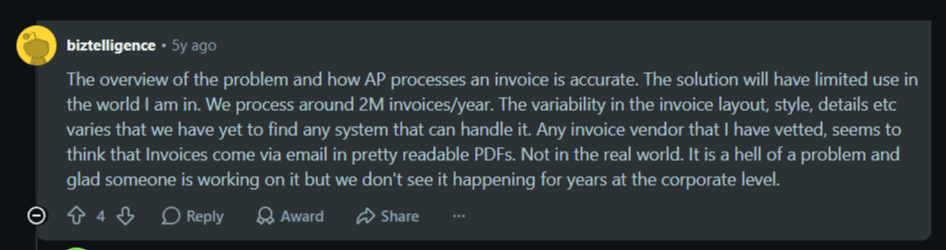
Your team handles invoices from 120+ vendors. Some arrive as clean PDFs via email. Others come as scanned images with handwritten notes. A few suppliers still fax documents that your team photographs and forwards. Each invoice requires data to be extracted, matched against purchase orders, and entered into your ERP before approval routing.
Source: Reddit
The challenge intensifies with format variations. Your steel supplier's invoices list line items in tables, while your component supplier uses a paragraph format. When vendors change their invoice layouts—which happens several times a year—your team adapts manually. Processing time varies from 15 minutes for straightforward invoices to 45 minutes when purchase order numbers are unclear or amounts don't match.
How Docxster improves this process:
Extracts invoice numbers, dates, vendor names, line items, totals, and tax codes from any format with 99% accuracy.
Matches invoices with purchase orders automatically and flags discrepancies with specific reasons.
Routes exceptions to appropriate managers based on your business rules.
Pushes validated data directly into your ERP without manual entry.
Allows you to set up smart rules to flag discrepancies and route invoices.
Validates tax fields and keeps detailed logs for audits and compliance.
Learns from various invoice formats, eliminating the need to create new templates.
Your team's role shifts from data entry to exception management. They review the flagged invoices that require investigation—such as duplicate charges, pricing mismatches, and missing purchase orders.
The time saved on routine processing creates capacity to resolve vendor queries and identify early payment discount opportunities.
Use case 2: Purchase order management
Purchase orders land in various formats across your organization. For example:
Production sends POs for raw materials
Maintenance creates POs for spare parts and equipment
Facilities issues POs for contracted services
Each department has slightly different processes, but all POs eventually need vendor confirmation, goods receipt matching, and financial tracking.
Manual PO processing creates bottlenecks at multiple points. Someone needs to verify vendor details, check that item codes match your inventory system, confirm quantities align with production schedules, and validate pricing against contracts. POs usually require multiple approvals, which is common for purchases above certain thresholds. In those cases, your documents sit in email inboxes waiting for responses.
How Docxster transforms this process:
Automatically fetches POs from shared folders or email, regardless of format
Extracts PO numbers, vendor information, item codes, quantities, prices, delivery dates, and payment terms
Validates data against vendor catalogs, detects duplicates, and flags missing or incorrect information
Routes for approval before pushing to ERP with complete audit trails
Learns from corrections, improving accuracy as it processes more documents
Your procurement team receives a clean queue of exceptions requiring attention—wrong SKUs, pricing outside contract terms, quantities that seem unusual. And your approved POs push directly to your ERP with complete audit trails.
Use case 3: Quality control reports
Every production batch generates quality documentation:
Inspection checklists
Lab test results
Calibration reports
Certificates of analysis
These documents verify that products meet specifications before they ship. They also provide the evidence trail required during customer audits and regulatory inspections.
Managing QC documentation manually creates several risks. Reports get filed in different locations—some in physical binders, others in shared drives, a few in supervisor emails.
When a customer questions product quality or an auditor requests documentation for a specific batch, your team scrambles to locate all relevant reports. If you miss a signature or mismatch batch numbers, it can invalidate entire documentation sets.
How Docxster transforms this process:
Centralizes QC documents from all sources automatically
Extracts material grades, batch numbers, test values, tolerance ranges, inspector signatures, and timestamps
Validates extracted data against product specifications and quality standards
Flags deviations that need investigation
Routes documents through approval workflows to engineers, supervisors, and compliance officers (based on the result)
Maintains version control and audit logs automatically
When an auditor asks for documentation on a specific batch, you can generate complete reports instantly.
Choose an IDP platform that works as hard as your plant
Remember that ₹45 lakh invoice entered as ₹4.5 lakhs? The two-week delay? The ₹18 lakh cost in idle capacity? That wasn't a technology problem—that was a scaling problem disguised as a data entry mistake.
Your operations have grown. Your document volume has grown with it. But manual processing doesn't scale the same way production lines do.
IDP delivers strong returns when you're processing 200+ documents monthly. At lower volumes (under 50 documents), the time saved often doesn't justify the implementation effort.
The key question is: Are your document processes creating bottlenecks that limit growth, or are they simply routine work that gets done?
Generic IDP tools work well with clean documents but struggle with the realities of manufacturing—for example, handwritten notes, mixed formats, and varying layouts. And that's where everything breaks. We know because we speak from experience.
That’s why we built Docxster. Our templateless AI platform adapts to document variations with 99% accuracy, handles semi-structured and unstructured documents, and provides no-code workflows your team controls.
Ready to see how Docxster handles your specific document challenges?
FAQs: Intelligent Document Processing for Manufacturing
What is Intelligent Document Processing?
Intelligent Document Processing, or IDP, uses AI, machine learning, and OCR to extract, classify, validate, and process data from documents automatically. Unlike traditional OCR, IDP can handle structured, semi-structured, and unstructured documents without needing a fixed template for every format.
How is IDP different from traditional OCR?
Traditional OCR mainly converts scanned text into machine-readable text and often depends on fixed templates. IDP goes further by understanding document context, identifying document types, extracting key fields, validating data, and sending clean information into business systems.
How does IDP work for manufacturing companies?
IDP starts by ingesting documents from sources like email, shared folders, or uploads. It then improves document quality, reads the text, classifies the document, extracts relevant fields, validates the data, and pushes approved information into systems like ERP, inventory, or quality management platforms.
Why do manufacturing companies need IDP?
Manufacturing teams handle large volumes of invoices, purchase orders, quality reports, shipping documents, and compliance records. IDP helps reduce manual data entry, prevent costly errors, speed up approvals, and keep document-heavy workflows running as volume grows.
How does IDP reduce errors in manufacturing workflows?
IDP reduces errors by eliminating manual transcription and validating extracted data against business rules. It can flag mismatched amounts, missing purchase orders, unusual quantities, incomplete fields, or low-confidence data before those errors create bigger operational problems.
Can IDP help with compliance and audits?
Yes. IDP can automatically classify, tag, store, and validate quality or compliance documents as they arrive. This makes it easier to retrieve complete records during audits and reduces the risk of missing, inconsistent, or untraceable documentation.
What manufacturing documents can IDP process?
IDP can process supplier invoices, purchase orders, shipping manifests, handwritten purchase orders, quality control reports, inspection checklists, lab test results, calibration reports, and certificates of analysis. It is especially useful when documents arrive in different formats from different suppliers or departments.
How does IDP improve invoice processing?
IDP extracts invoice numbers, dates, vendor names, line items, totals, and tax codes from different invoice formats. It can match invoices with purchase orders, flag discrepancies, route exceptions for review, and push validated data directly into ERP systems.
How does IDP help with purchase order management?
IDP can fetch purchase orders from email or shared folders, extract fields like PO numbers, vendor details, item codes, quantities, prices, and delivery dates, then validate them against vendor catalogs or business rules. It can also route POs for approval and maintain audit trails.
How does IDP support quality control documentation?
IDP centralizes QC documents, extracts batch numbers, material grades, test values, tolerance ranges, signatures, and timestamps, then validates them against product specifications. It can flag deviations, route documents for approval, and make audit-ready records easier to retrieve.
When should a manufacturer consider using IDP?
A manufacturer should consider IDP when document volume is creating bottlenecks, errors are causing delays, or teams are spending too much time on manual extraction and validation. It is especially valuable when the company processes hundreds of documents per month or deals with many suppliers and document formats.
What should manufacturers look for in an IDP platform?
Manufacturers should look for templateless extraction, high accuracy, support for handwritten and scanned documents, validation rules, ERP integrations, audit trails, and no-code workflow controls. A strong IDP platform should handle real manufacturing document variability instead of only clean, standardized files.
Turn documents into decisions.
See how Docxster gets you from inbox to insight in minutes, not days. Bring your toughest workflow — we'll show you what it looks like solved.


