

-
14 min read
10 Types of Data Extraction and How to Choose the Right One for Document Extraction
Explore 10 types of data extraction, from manual to AI-based methods. Learn how each works and which one fits your documents and workflows best.
Last updated:
TL;DR
There are 10 main types of data extraction, ranging from manual entry and basic OCR to advanced AI-driven methods like schema-first and templateless extraction.
Each method fits different document types—structured, semi-structured, unstructured, or web-based—and choosing the wrong one creates hidden maintenance costs.
Rule-based and template-based methods work for stable formats but struggle with layout changes and scaling.
AI-powered approaches (LLM-based, schema-first, and templateless) handle layout variability better and reduce manual corrections.
For document-heavy operations, a schema-first, templateless AI approach offers the most scalable and resilient solution.
Before you worry about whether your data extraction is “accurate,” you have to worry about whether you chose the right extraction method in the first place. In finance, operations, and logistics, the wrong method doesn’t just slow things down. It quietly breaks critical workflows.
A template change can freeze your document processing workflow for days. And when you’re processing 200–300 documents a day across inconsistent formats, even a 2% error rate can turn into hours of manual corrections, re-checks, and escalations.
That’s why different data extraction methods exist for a reason.
Some work beautifully for structured layouts, and others collapse the moment layouts vary. Some scale with volume, while others generate hidden maintenance costs as soon as new document types enter the workflow.
This guide breaks down the 10 main types of data extraction, their strengths and weaknesses, and how to choose an approach that won’t put your compliance, timelines, or team under needless pressure.
What is data extraction?
Data extraction is the process of pulling information from documents and converting it into a structured format. It helps turn unorganized data from PDFs, invoices, spreadsheets, or scans into usable information for digital systems. The goal is to make data accurate, searchable, and ready for automation, helping teams reduce manual work and build connected, efficient workflows.
What are the different types of data extraction?
We’ve picked 10 types of data extraction, split between manual and tech-based methods. Before we do a deep dive, here’s how different types compare side by side:
Type | Key features | Best for | Example |
Manual data entry | Fully human process; slow and error-prone | Low-volume, high-accuracy tasks | Handwritten forms or paper invoices |
Basic OCR | Converts printed text to digital, faster than manual work | Documents with consistent layouts | Scanned PDFs with consistent text layout |
Template-based extraction | Uses fixed zones for data fields; breaks if layout changes | Repetitive, uniform document formats | Standardized invoices or utility bills |
Rule-based extraction | Applies patterns or keywords to extract fields | Semi-structured documents with clear labels | Forms with clear labels, like tax forms or onboarding documents |
Semi-structured parsing | Detects patterns like tables or key-value pairs | Documents with recurring but variable layouts | Bank statements or shipping manifests |
Scripted extraction | Custom scripts or APIs built by developers | Predictable formats managed by tech teams | Internal reports or logs with fixed patterns |
Web scraping | Pulls data from websites instead of files | Market, pricing, or tracking data from web sources | Product listings or pricing pages |
LLM-based extraction | AI reads and interprets documents contextually | Structured and unstructured documents | Purchase orders, compliance reports, or shipping instructions |
Schema-first AI extraction | You define the schema, and AI fits data into it | Documents with different layouts that need one consistent structure | Purchase orders from multiple suppliers, normalized into one schema |
Templateless AI extraction | AI + schema approach with no templates required | Structured and unstructured documents with high variability | Invoices, POs, receipts, and shipping docs in many different formats |
1. Manual data entry
Manual data entry involves manually entering information from various types of documents into digital systems such as Excel, Tally, or enterprise resource planning (ERP) software.
In manufacturing and logistics companies, this often involves typing transaction details, quantities, or account data line by line. It’s a fully human process in which operators read each document and record values in a structured format, ensuring precision but demanding time and attention.
Best for: Low-volume, high-accuracy tasks where automation isn’t justified (for example, occasional one-off forms).
Cons: It takes time and can lead to errors. A Reddit user even called it “the form of torture.”
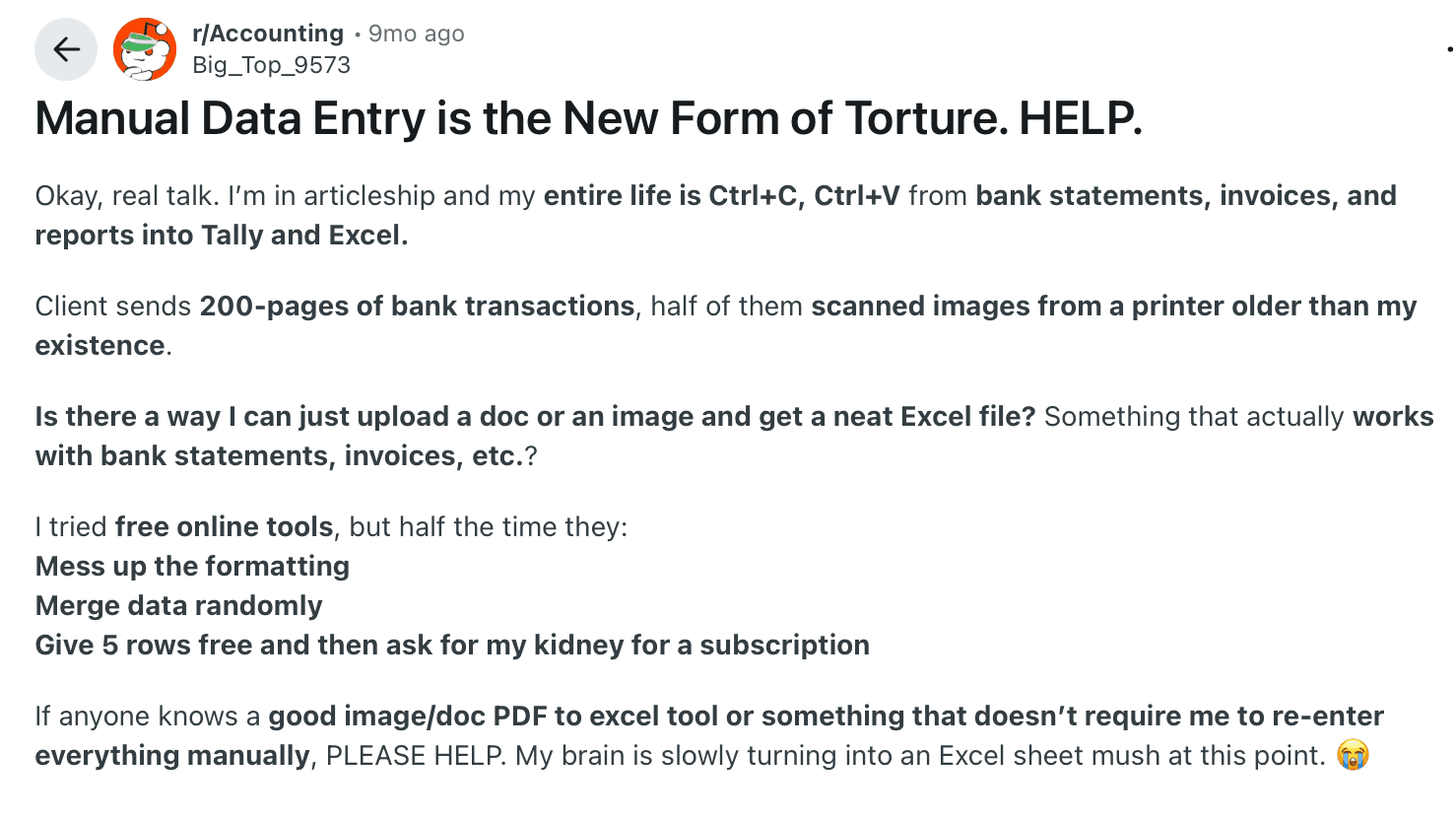
A Reddit user is asking for help, as manual data entry has become torture for them
2. Basic OCR
Optical character recognition (OCR) is a technology that converts printed or scanned text into editable digital text. The OCR engine “reads” the shapes of letters and numbers in an image and matches them to characters it recognizes.
For example, the engine scans each character, compares it to its library of known patterns, and recreates the text so you can paste it into Excel or send it to your accounting or inventory system.
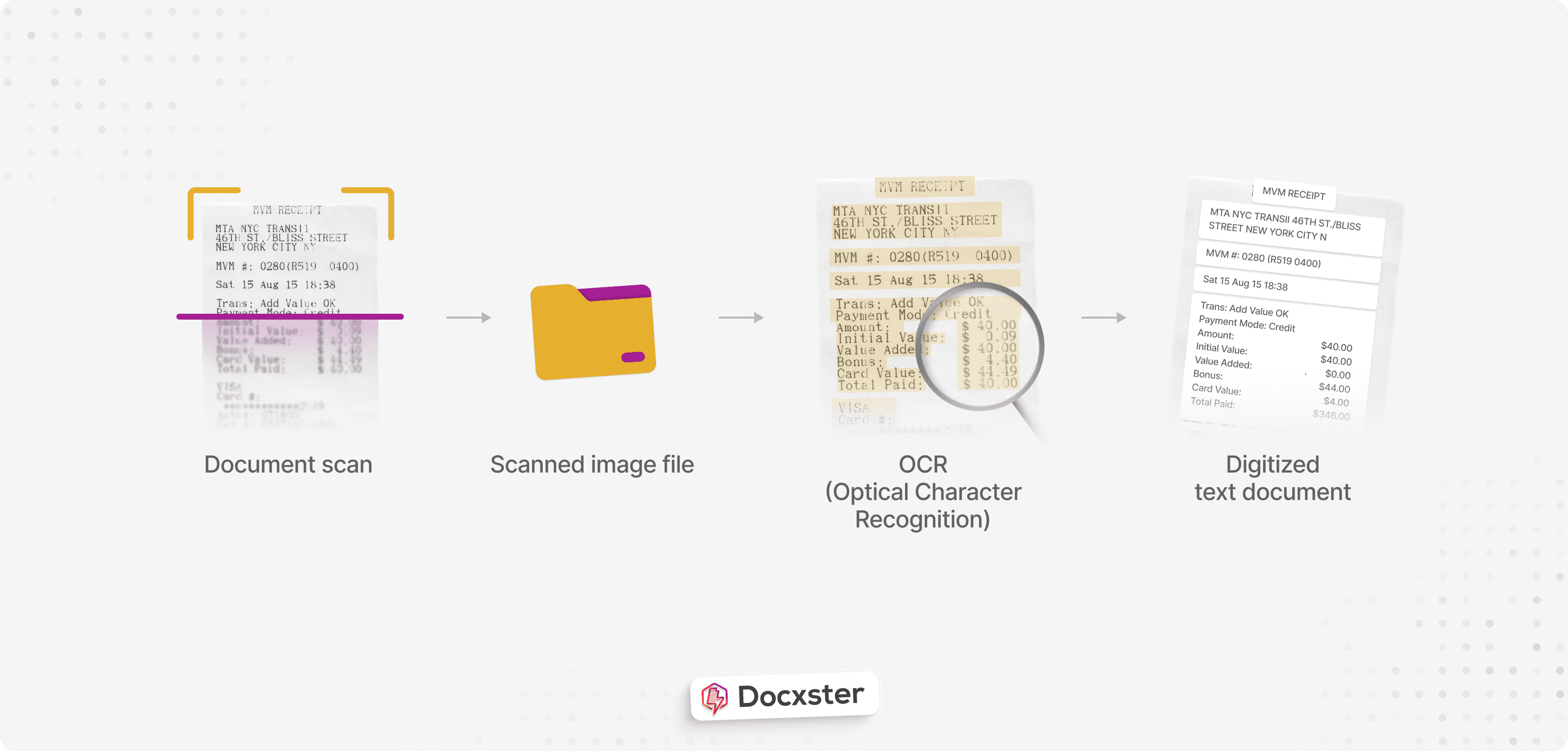
Best for: Businesses that handle printed documents with consistent formatting.
Cons: Basic OCR has limited accuracy when the scan quality is poor, the document contains handwriting, or the layout is unstructured. With those data sources, you usually need to review the output and correct the mistakes, which reduces the speed benefits you hoped to see.
3. Template-based extraction
Template-based extraction relies on predefined zones or coordinates to identify the location of each data field within a document. You upload a sample file from your data warehouse and define bounding boxes around the fields you want to capture, such as invoice numbers, totals, or dates. Every future document with the same structure is processed using those saved zones.
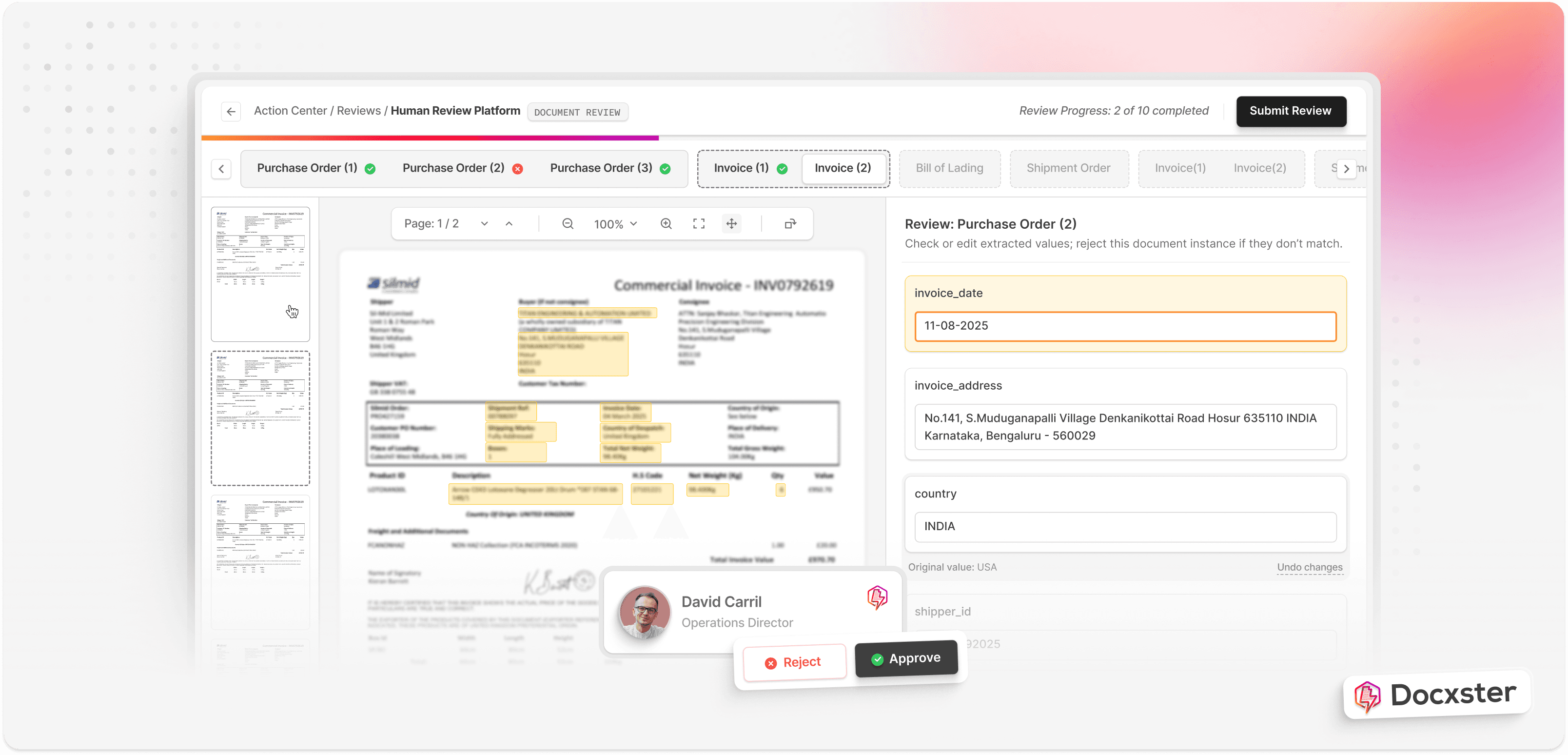
Example of how Docxster extracts data from documents like invoices
For example, say your vendor invoices always place totals in the same corner or list item lines in the same order. Template-based extraction can quickly and reliably pull those details.
Best for: High-volume, highly standardized documents, such as recurring vendor invoices or purchase orders.
Cons: Template-based extraction is rigid and prone to breaking. Jishnu NP, CTO at Docxster, puts this well:
“If the vendor upgrades their accounting software or anything else, then their invoice template will change. And this is where template-based extraction will break.”
4. Rule-based extraction
Rule-based extraction uses manually created rules, patterns, and keywords to identify data and pull it from text. Under this type, you define cues the system should look for, such as labels like “Total:” or “Invoice No.” or formats like dates and amounts.
For example, once a document has been converted to text using OCR, the rule engine reviews the text and applies conditions you’ve set. It might use regex, string matching, or keyword proximity to locate the right values. If you create a rule that says, “Capture the number that appears after ‘Invoice No,’” the system will search for that label and extract the value that follows it.
Best for: Semi-structured documents where cues such as headers or labels remain consistent, even when the overall layout varies across vendors or formats.
Cons: Rule-based extraction needs constant upkeep. As volumes grow or formats change, rules break easily. Any new document type, missing label, or layout change forces you to update the rule set, which can become time-consuming and difficult to scale.
5. Semi-structured parsing
Semi-structured parsing is designed for documents that follow a general structure but don’t use a fixed layout. Invoices, purchase orders, and shipping forms often fall into this category because the same information appears in patterns like tables, line items, and labeled fields, even when the position changes between vendors.

An image showing two invoices with a structure but no fixed layout
For example, the image above shows two invoices from different vendors. Even though both documents contain the same types of information, elements like the billing address, invoice number, and line items appear in completely different positions.
Semi-structured parsing handles this by looking for recurring structures instead of relying on coordinates. It focuses on the logical relationships between fields, which allows the system to identify the same data across varying layouts.
Best for: Invoices, purchase orders, and shipping manifests where the structure is consistent but not identical every time.
Cons: It struggles when layouts vary too much or when documents contain handwriting. It often requires tuning for specific document types to maintain high accuracy.
6. Scripted extraction
Scripted extraction is for teams that prefer building their own extraction system. Developers write scripts in Python or JavaScript to pull data from PDFs, XMLs, or CSVs using libraries like PDFPlumber or PyPDF2.
Tools like Power Automate are a great example. They make this process easier by combining custom code with ready-to-use workflows. But the setup still needs close attention. Flows can break when document layouts change, and troubleshooting often takes longer than expected.

Power Automate interface with a document processing step
Best for: Organizations with an experienced technical team and consistent document formats
Cons: It is worth noting that the flexibility of scripted extraction comes at a cost. If you’re building custom extraction logic (scripts and parsing libraries), you need at least one developer (often more) full-time.
In India: ~ ₹ 8-10L/year minimum for a mid-level developer
In U.S.: ~ US $120k/year for a standard software developer
7. Web scraping
Web scraping is the process of extracting data directly from websites rather than from documents. You use scripts or scraping tools to scan web pages, find the right HTML elements, and collect that information in formats like CSV or JSON.
For example, you can pull live market data, track competitor prices, or gather supplier details from online portals.
Best for: Market data, competitor pricing, supplier portal information, or logistics tracking from web sources.
Cons: Web scraping’s reliability depends on the site itself. Even small changes to page design or HTML can break your scripts. There are also legal and compliance guidelines to consider. This includes respecting robots.txt and avoiding the collection of protected data.
AI-based data extraction
Over the last few years, AI-based data extraction has become its own category. These methods go beyond templates and rules, learning to read documents the way humans do. Here are the most common types:
8. LLM-based data extraction
LLM-based data extraction is a method that uses artificial intelligence to read and understand documents.
With the rise of GPT-powered tools, many teams are using large language models (LLMs) to automate data understanding and extraction. In fact, 67% of senior technology leaders listed LLM adoption as a top organizational priority in 2023.
For example, when you upload a contract or a long financial statement, the model can identify the parties involved, key dates, payment terms, totals, or any clause you ask for, even if these details appear in different places across different versions of the document.
Best for: Unstructured data or variable documents such as contracts, reports, and detailed statements.
Cons: LLMs are powerful but still need human review. They can’t ensure complete accuracy in every case, especially with ambiguous or incomplete data. Another element worth noting is the cost. Here’s a Reddit post explaining this con very well:
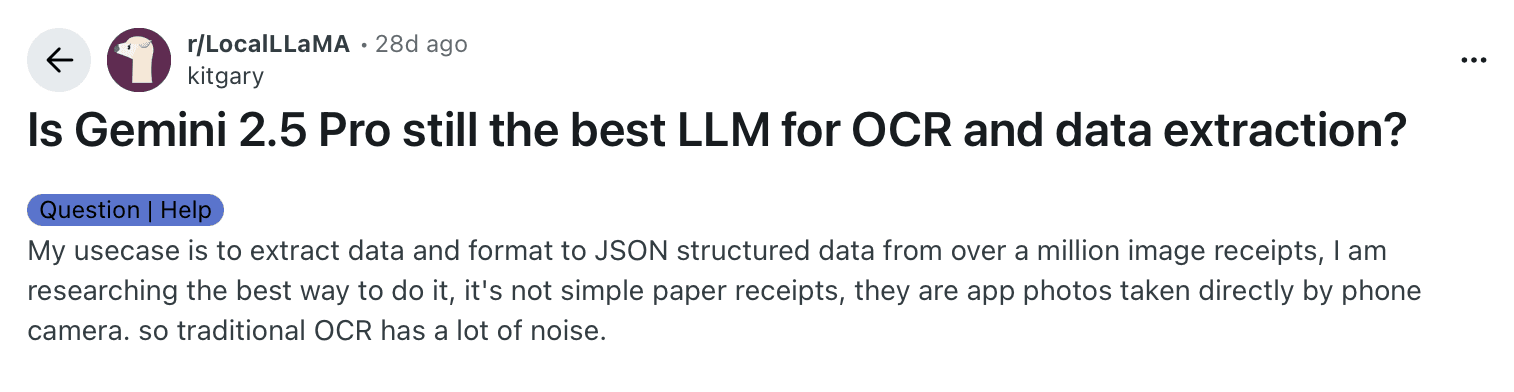
Reddit user’s query about whether Gemini 2.5 pro is good for data extraction
While this post has many comments, a common one is about cost efficiency.
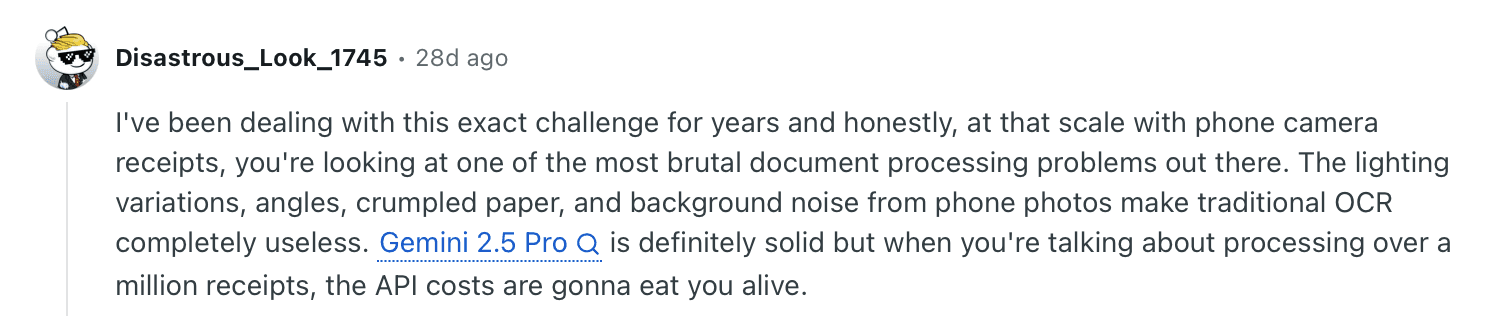
Comment about how costs go up when the volume of documents grows when using Gemini 2.5 Pro
It shows where LLMs stand today: excellent at understanding data in context, but still balancing accuracy, cost, and scale.
9. Schema-first AI extraction
Schema-first AI extraction starts with structure. You define the fields, data types, and relationships you want before the AI begins reading the document. The model then maps the extracted information to the predefined schema, ensuring consistent output every time.
For example, if you set up a schema for an invoice with fields like vendor name, invoice number, due date, line items, and tax amounts, the AI will pull those exact fields from any invoice you upload, even when formats differ. You always get clean, structured output that matches the schema you created.
Best for: Teams that want the flexibility of AI but still need structured control, audit trails, and seamless workflow integration.
Cons: This approach works best when you already know what data you need. Your team will also need time to set it up, since defining and maintaining the schema can be slow when requirements change.
10. Templateless AI extraction
Hybrid or templateless AI extraction combines the flexibility of LLMs and vision-language models (VLMs) with the structure of predefined schemas. It’s a schema-first, AI-powered approach that adapts to any document type without needing fixed templates.
For example, if you upload a mix of scanned invoices, handwritten delivery notes, and typed statements, the system automatically identifies the relevant fields and maps them to your schema. You don’t need to build templates, adjust rules, or handle layout changes.
This is the approach you get at Docxster. The platform uses schema-first, templateless AI extraction that adapts to any document type (scanned, typed, or handwritten). It learns context over time, giving you structured, ready-to-use data without managing templates or complex rules.
Best for: Teams handling large volumes of mixed document formats across manufacturing, finance, operations, or logistics, where templates and manual setup are hard to maintain. In short, the most document-intensive organizations.
Cons: Requires a well-defined schema and might require human review when confidence thresholds drop.
Here's how you can build a document schema in under 5 minutes:
Why AI-based templateless extraction is the best fit for document-heavy operations
When your documents vary in layout and volume, choosing the wrong extraction method creates the same problems you were trying to solve. Inconsistent formats, vendor changes, and daily processing pressure make maintaining accuracy difficult if your tools cannot adapt.
A hybrid, templateless AI approach solves that. It handles both structured and unstructured documents, delivering consistent, reliable output without the need for constant template updates.
This is what Docxster delivers. With schema-first, templateless AI extraction, it turns scattered document workflows into a stable, automated process that scales with your business.
Interested in exploring how Docxster can extract your document data?
FAQs: Types of Data Extraction
What are the different types of data extraction?
The 10 main types include manual data entry, basic OCR, template-based extraction, rule-based extraction, semi-structured parsing, scripted extraction, web scraping, LLM-based extraction, schema-first AI extraction, and templateless AI extraction. Each method varies in flexibility, scalability, and maintenance requirements.
What are the three main categories of data extraction?
Broadly, extraction methods fall into manual extraction, rule-based/template-driven extraction, and AI-based extraction. Most modern systems combine these approaches in hybrid setups to balance control and adaptability.
What is data extraction?
Data extraction is the process of pulling information from documents or data sources and converting it into a structured format. The goal is to make data searchable, consistent, and ready for automation or analytics.
What is data extraction in ETL?
In ETL (Extract, Transform, Load), extraction is the first step. It involves retrieving raw data from databases, documents, APIs, or other systems before transforming and loading it into a central repository or data warehouse.
When should you use manual data entry?
Manual data entry makes sense for low-volume, high-accuracy tasks where automation costs outweigh the benefit. It is not practical for high-volume workflows because it’s slow, error-prone, and difficult to scale.
What’s the difference between template-based and rule-based extraction?
Template-based extraction relies on fixed coordinates or zones in a document, while rule-based extraction uses patterns, keywords, or regex to locate values in text. Both require maintenance when formats change, but template-based systems are generally more rigid.
When is web scraping better than API extraction?
Use web scraping when structured data isn’t available via an API and you need information from public web pages. Use APIs when available, as they provide cleaner, more stable, and legally safer access to structured data.
What makes AI-based extraction more scalable?
AI-based extraction understands document context and layout instead of relying solely on fixed rules. It adapts to new formats and reduces the need for constant template or rule updates, making it better suited for growing document volumes.
What is schema-first extraction?
Schema-first extraction defines the fields and structure you need before processing documents. The AI maps extracted values into that schema, ensuring consistent output across varied document layouts.
Why is templateless AI extraction considered the most resilient?
Templateless AI extraction combines schema control with contextual AI understanding, allowing it to handle both structured and unstructured documents without fixed templates. This reduces maintenance, improves scalability, and supports high-volume operations with changing formats.
Turn documents into decisions.
See how Docxster gets you from inbox to insight in minutes, not days. Bring your toughest workflow — we'll show you what it looks like solved.


