

-
15 min read
The Problem With Template-Based Extraction and What To Use Instead
Struggling with template-based extraction as formats keep changing? See why it falls short and how AI-based templateless extraction works better.
Last updated:
TL;DR
Document workflows often fail because the tools behind them are outdated, disconnected, or too rigid — not because the team is doing something wrong.
Legacy systems, email threads, shared drives, portals, and ERPs often create fragmented workflows that force people to fill the gaps manually.
When automation breaks, blame often falls on employees even though the real issue is usually a fragile process with weak checks and poor system design.
Better automation tools adapt to existing workflows, extract data without rigid templates, produce clean structured outputs, and keep humans involved when review is needed.
The right automation platform helps teams reclaim time from rework, improve handoffs, stabilize workloads, make decisions faster, and focus on higher-value work.
Most teams today depend on unstable documents. Your suppliers may change formats without warning, and your internal teams may follow their own style preferences.
Uber saw the same problem. Their invoice processing relied on rule-heavy workflows that were inefficient and difficult to scale. Then they decided to adopt a Gen-AI-powered approach. This approach to invoices helped Uber double throughput, cut handling time by about 70%, and deliver 25-30% in cost savings.
Template-based extraction is no longer enough for companies that handle high volumes and constant change.
In this article, we look at what template-based extraction is, why it falls short today, and how templateless extraction provides a more reliable path forward for modern teams.
What is template-based extraction?
Template-based extraction uses predefined rules to locate and extract data from documents with a fixed structure. If your documents are variable in format or structure, template-based extraction will struggle to process them.
For example, imagine a PO where the PO number always appears in the same spot. You create a template that expects the PO number in that exact zone or next to that fixed label. Every time you process a new PO, the system checks that zone based on the rule you set and pulls the value only from that predefined location.
Pros
High accuracy when structures remain stable
Fast deployment for predictable workflows
Easy maintenance when document sets stay small
Quick adoption of automation, even when teams lack technical skills
Cons
Extraction failures when formats change across suppliers or plants
Difficult to scale when document volume grows, and layouts vary
Manual template updates, which your teams
Hidden costs from silent extraction errors
Locked into the rigid formats of legacy systems
Why template-based extraction is not the best approach for document processing
Here are five reasons why template-based extraction is not the best approach for document processing in today’s world:
1. Template-based extraction is too rigid for real-world documents
Template-based extraction needs documents to stay the same, but real documents don’t. In busy operations, formats change from plant to plant or vendor to vendor, and those changes break the templates you rely on.
In fact, a 2024 study found that over 50% of invoices are still received in unstructured formats (like paper or PDF).
And these numbers tell a story. For example, when you look at the two invoices below, both share the same purpose yet follow completely different layouts. One uses dense tables with multiple tax rows. The other uses clean sections with fewer fields. You handle both invoices in the same workflow, yet templates can’t treat them the same.
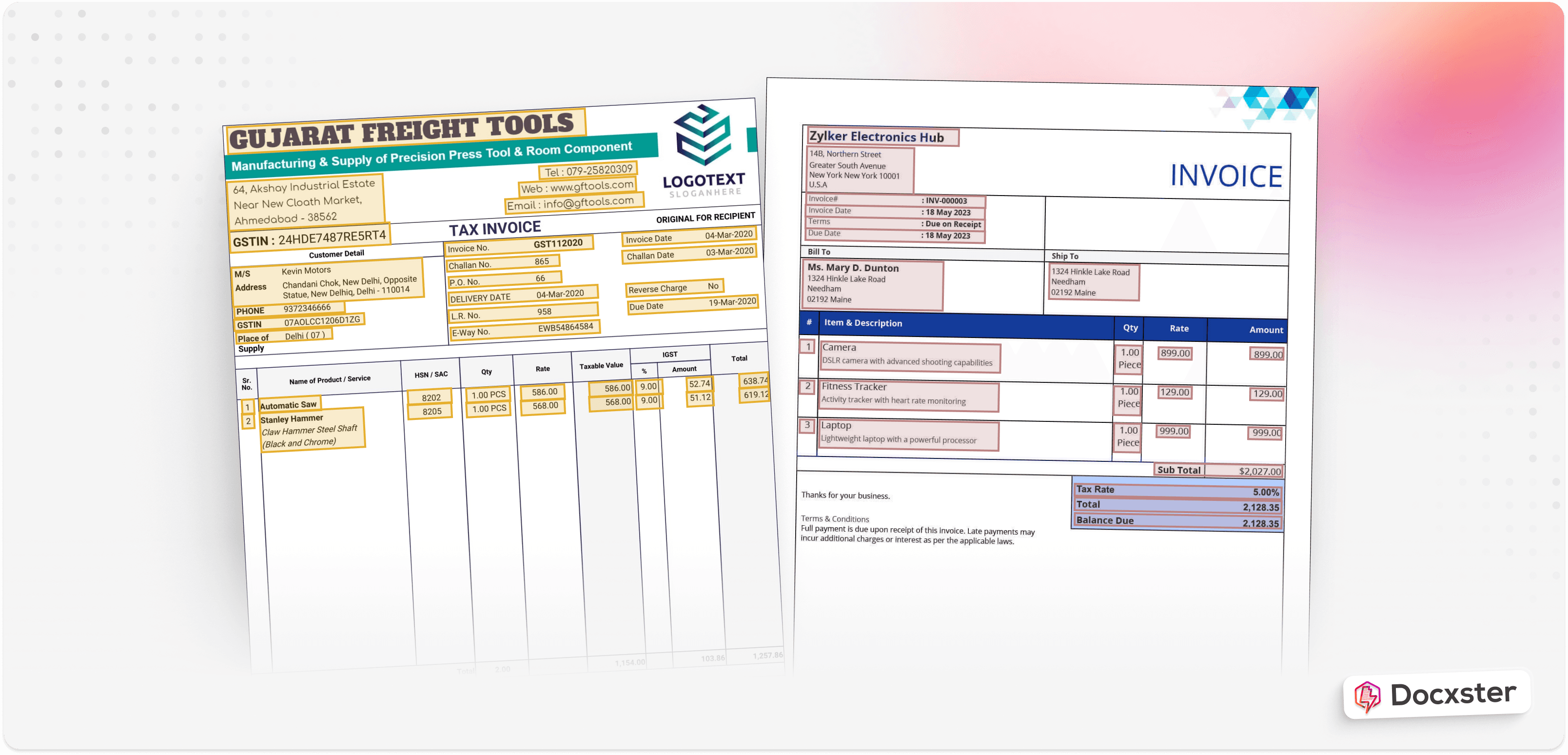
Examples of different invoice formats
Now imagine ten vendors sending invoices like these. This level of variation is common when you work with many suppliers, each using its own document design or version.
As these differences accumulate, they place a steady burden on your workflows, requiring you to update your templates to keep pace.
2. Template-based extraction has a high maintenance burden
The real cost of templates appears long after you set them up. Once the system is live, every change in the documents you receive forces some level of attention. Maybe a supplier updates its software, a finance team switches formats, or a plant introduces a new form. Each shift pulls your team back into the configuration work that you assumed was finished.
What begins as a small set of rules gradually becomes something more. You have to watch every incoming file, spot when fields no longer match, and then generate new templates. It’s an ongoing cycle that grows heavier as the number of templates increases.
There’s also a financial cost to this kind of maintenance. You have to spend hours updating templates and resolving extraction issues. What looked efficient at first starts to wear on people, budgets, and attention.
3. Template-based extraction doesn’t scale well
A template can look perfectly reasonable when the workload is small. With a hundred documents, templates can work, and you feel like you’re in control of the process. But problems start when you process more documents. As new vendors arrive or older vendors switch systems, the documents shift just enough to break down the rules you built with such confidence.
Jishnu NP, CTO at Docxster, puts it plainly:
“If you already have three or four types of layouts, you can hard-code the rules, but once you’re dealing with thousands of vendors, the entire approach stops being efficient.”
You see this most clearly in month-end cycles. A finance team that once managed a simple set of invoices now faces dozens of new formats. Each one displays totals, taxes, and line items differently. Your templates can’t keep up, and a system that used to feel solid is now showing small but worrying cracks.
4. Template-based extraction lacks adaptability
The way template-based extraction works is that it can’t understand meaning, context, or relationships between fields. Hence, template-based extraction lacks the adaptability your document processing needs.
“If it’s the same vendors sending invoices every month, template-based tools are way faster to set up and more accurate. If you’re getting random documents from everywhere, you need something with better AI that can figure out layouts on the fly,” says a user on Reddit.
Template-based extraction also doesn’t learn from corrections or improve over time, which leads to repeated failures as layouts evolve. In contrast, templateless extraction identifies fields based on content rather than fixed positions. It handles varied layouts, unexpected formats, and design changes without needing new rules each time
5. Template-based extraction slows down automation initiatives
In the big picture, template-based extraction harms your automation initiatives in the long run. A minor layout change from a supplier or a revised form from a plant is enough to unsettle a workflow. And when that happens over and over again, your employees start getting frustrated and may even lose trust in automating document processing.
This risk makes template-based extraction a weak base for any automation effort. It pushes your teams into a cycle of fixes and interruptions that slowly erodes the point of automating in the first place. If your document processing automation needs attention with every small change, you can’t gain momentum or scale with confidence.
How to use AI for document extraction
Document processing has become too complex and dynamic for older methods, which is why you need to move toward AI-based extraction.
You’re no longer dealing with a small set of predictable formats. You’re handling documents that shift across vendors, plants, and systems, often faster than your teams can respond. And if you want automation that keeps pace with the rest of your operation, you need to make a change now.
How to extract data from documents using Docxster
Step 1: Upload your documents
AI-driven extraction starts when you bring your documents into the tool, so the model has real files to process. You can upload PDFs, scans, images, emails, invoices, purchase orders (POs), or any routine forms your teams handle.
In Docxster, you can even upload handwritten or low-quality documents in different formats, and the system automatically identifies the document type and layout.
Step 2: Let AI understand the document structure
Once the document enters the system, the next step is letting the model understand how the content is arranged. The AI picks up the structure, context, tables, and fields. This is where newer, vision-based models matter because they interpret the page rather than rely on fixed templates.
In Docxster, the AI reads the layout, discovers standard and new fields, handles multiple languages, and extracts data without templates or manual configuration.
Here's how you can create a document schema in Docxster:
Step 3: Extract and map key fields automatically
Once the system understands your document structure, it moves to identifying the fields you need. This includes reading values, standardizing formats, and mapping them consistently across different document types. You want the extracted data to retain the same structure, regardless of who sent the document.
In Docxster, the model detects key fields, supports custom field creation, learns from corrections, and applies uniform formatting rules to keep your data consistent across vendors and sources.
Step 4: Validate and review with confidence scores
After extraction, the system validates the data to ensure it meets your rules and quality thresholds. This includes checking field types, comparing values with external systems, and confirming the reliability of the output. Documents that miss confidence thresholds need closer attention before moving forward.
In Docxster, this step combines confidence scoring with our Human-in-the-Loop review. The system routes low-confidence documents to the right reviewers, supports targeted reviewer assignment, and learns from every correction, improving over time.
Step 5: Send the data to your systems
With the data validated, the final step is to move it into the systems your teams use. You want the extracted information to be delivered to your enterprise resource planning (ERP), customer relationship management (CRM), or accounting tools without manual effort or reformatting.
In Docxster, the processed data can be synced or exported directly into your business systems and analytics tools through built-in integrations and custom exports.
4 use cases of templateless extraction
Here are four use-case scenarios of what templateless extraction looks like in manufacturing, finance, logistics, and operations:
1. Manufacturing
You handle supplier invoices, QA reports, and production documents that shift daily, even as your workflows demand stability. Templateless extraction absorbs this constant variation, so you move faster without forcing suppliers or internal teams to follow rigid formats.
With templateless extraction, you can:
Capture part numbers from shifting supplier invoices, even if formats change
Process QA reports from many teams, even if each team prepares them differently
Process packing lists fast, while still flagging exceptions for review
Feed structured data into your ERP, even if the source files don’t stay consistent
2. Operations
In operations, supervisors may capture their shifts in their own style, and technicians may record maintenance in their preferred way. But with templateless extraction, this discrepancy isn’t a problem.
With templateless extraction, you can:
Read shift reports clearly, even when writing styles vary across teams
Capture maintenance notes without worrying about layout differences
Bring structure to evolving process sheets, yet keep oversight through exception checks
Send consistent data to your systems, although the documents keep changing
3. Finance
Your finance team handles documents that come in every possible format. Each bank structures data differently, and every vendor follows its own style. These variations slow down reconciliation and increase the risk of small errors that grow into bigger issues.
Templateless extraction gives you clean, reliable financial data without forcing partners to follow a strict template.
With templateless extraction, you can:
Capture totals and charges accurately, even when document formats shift month to month
Process tax fields cleanly, although each region structures forms differently
Spot inconsistencies faster, yet keep human review for low confidence fields
Push standardized data into your accounting systems even if the source files don’t match
4. Logistics
Your logistics workflows depend on paperwork that looks different with every carrier and supplier. Freight bills, delivery notes, and packing lists all follow their own logic, even though you need the same core details from each. These inconsistencies slow down tracking and create blind spots across your chain.
With templateless extraction, you can:
Read delivery notes cleanly even when carriers use non-standard layouts
Capture container numbers accurately, although the documents arrive in many formats
Track shipment costs faster yet still send exceptions to reviewers
Keep your systems updated with structured logistics data, although incoming files never stay consistent
Example of how to validate freight invoices against rate confirmations:

Benefits of using AI for document extraction
Here’s a quick look at the different benefits of templateless extraction:
Works across any format or layout: AI identifies information based on meaning, not on fixed page positions. No matter the document format, AI can parse the content—no manual setup or template updates required.
Accurate document processing: AI can analyze the context of each field, which allows it to process documents with accuracy. This leads to more reliable data capture even when document styles vary widely.
Reduces manual review and intervention: Because AI adapts to layout changes and learns from corrections, your team can spend less time fixing errors or reprocessing documents.
Scales instantly across vendors and document types: With AI extraction, you don’t need to set up new rules. This saves you time, helping you scale faster.
Lowers total cost of ownership: Less template maintenance, fewer workflow interruptions, and reduced manual work translate into lower ongoing costs for you.
Don’t let template-based extraction stall your document processing workflows
Companies like Uber are already moving away from template-based extraction—now it’s your turn. Template-based extraction can’t keep pace with the way documents change today. Formats move too fast, and your teams lose time keeping rules in place.
Templateless extraction is the path forward. It adapts to real-world documents and keeps accuracy steady even when everything around it changes. And benefits like reduced manual review, easy scaling, and the low cost of ownership make it worth it.
Docxster makes this easy for you. It uses optical character recognition (OCR), layout understanding, and vision-language models (VLM) n to extract data without templates. It can process invoices, QA reports, freight bills, and financial documents without templates, automatically adapting to new layouts. What may take hours of fixing rules can happen in seconds.
Ready to make a move to templateless extraction?
FAQs: Template-based extraction
Why do document workflows keep failing?
Document workflows often fail because the tools behind them are outdated, disconnected, or too rigid for real-world work. When documents move across ERPs, email threads, shared drives, and portals, teams are forced to manually bridge gaps the system should have handled.
Are employees usually the problem when automation breaks?
No. Automation failures often look like human mistakes, but the root cause is usually a fragile workflow or tool setup. If a process has no safeguards, poor visibility, or too many manual handoffs, people end up carrying the blame for system-level problems.
How do outdated systems slow down document processing?
Outdated systems often do not sync properly with the other tools a team uses. This creates delays, rechecks, duplicate work, and workarounds that gradually become part of the job even though they should not be necessary.
Why are stitched-together workflows risky?
Stitched-together workflows spread documents across multiple systems that were not built to work together. A purchase order might live partly in an ERP, partly in a shared folder, and partly in an email thread, which makes it hard to know which version is current.
What should better automation tools do differently?
Better automation tools should fit into the way teams already work instead of forcing them to rebuild their process. They should accept real-world documents, extract the right data, support review when needed, and send clean outputs to the systems teams already use.
What is templateless extraction?
Templateless extraction pulls data from documents without relying on fixed layouts or rigid rules. Instead of breaking when a vendor changes a format, the system understands the document structure and extracts information based on context.
Why is clean data important in document automation?
Clean data prevents downstream rework. When information is extracted accurately and consistently from the start, teams spend less time correcting fields, checking duplicates, and resolving handoff issues.
What does human-in-the-loop automation mean?
Human-in-the-loop automation means the system pauses when confidence is low and routes the document to a person for review. This keeps automation fast for routine work while still giving the team control over exceptions.
What benefits can teams expect from better document automation?
Teams can reclaim hours from rework, improve confidence in handoffs, reduce constant double-checking, and make decisions faster. The biggest gain is that people can stop policing broken systems and focus on work that actually moves the business forward.
How do you know your automation tools are the problem?
Your tools may be the problem if your team constantly creates workarounds, rechecks the same information, hunts across systems for the latest document, or avoids automation because it feels unreliable. Those are signs the system is adding friction instead of removing it.
Turn documents into decisions.
See how Docxster gets you from inbox to insight in minutes, not days. Bring your toughest workflow — we'll show you what it looks like solved.


