

-
17 min read
What is Data Parsing & How Does it Work for Data Extraction?
Discover why parsing, before extraction, is what makes your data accurate, consistent, and usable across document workflows.
Last updated:
TL;DR
Data parsing converts raw, fragmented inputs into structured, trustworthy data that analytics and AI systems can actually use.
Without strong parsing, downstream insights break — inconsistent formats, legacy systems, and missing context undermine data trust.
There are four main types of parsing: rule-driven, data-driven (ML/NLP-based), hybrid, and streaming (real-time).
Modern AI-powered parsing combines preprocessing, layout/context understanding, validation layers, and structured output generation.
For most businesses, buying a purpose-built parsing platform delivers faster time-to-value and lower total cost than building in-house.
Every business wants to make data-driven decisions. In fact, according to a Precisely report, 76% of data analytics professionals say that making data-driven decisions is a top goal.
But those decisions are only as strong as the data behind them. The report mentions that 67% of professionals don’t fully trust the data their organization uses. Trust grows only when the parsing layer extracts, standardizes, and prepares information correctly. This must happen before the data reaches an analytics or AI system.
Data parsing is the process that determines whether downstream insights are trustworthy.
In this guide, we’ll break down what data parsing is, why it matters, and how it shapes the accuracy and trustworthiness of modern data systems.
What is data parsing?
Data parsing is the process of converting raw or unstructured data into a structured, usable format. It involves identifying, extracting, and organizing relevant information from sources such as files, databases, or APIs.
This helps businesses make sense of complex data generated by systems like enterprise resource planning (ERP) systems, Internet of Things (IoT) sensors, or financial platforms. For example, a data parser can automatically extract key details from a supplier invoice or logistics report.
What are the types of data parsing?
Over time, data parsing has evolved into various types. Here’s a closer look at the main types of data parsing and how they differ:
Type | Best For | Key Feature |
Rule-driven parsing | Structured, predictable data | Uses fixed rules for high accuracy with consistent formats |
Data-driven parsing | Unstructured, variable data | Uses ML and NLP to adapt to varying data patterns |
Hybrid parsing | Semi-structured, somewhat varied | Combines rules with ML for a balance of precision and flexibility |
Streaming parsing | Continuous, real-time data | Processes data instantly as it flows for timely analysis |
1. Rule-driven data parsing
Rule-driven data parsing relies on a defined set of rules or grammars to interpret and extract information from data. This approach works best with structured and predictable formats, where the data follows a consistent schema or pattern.
For example, rule-driven parsing is ideal for extracting details from standard documents like invoice templates, shipment manifests, or sensor logs. It’s very accurate when the documents follow the same format, but it may need manual updates if the format changes.
2. Data-driven data parsing
Data-driven data parsing uses machine learning (ML) models and natural language processing (NLP) algorithms instead of fixed grammar rules to interpret information. It’s designed for unstructured or semi-structured data where formats often vary between sources.
Data-driven data parsing works like teaching a system to read between the lines. The model learns from your data and adapts to new patterns. This allows it to extract details from emails, contracts, or financial reports that differ across platforms.
3. Hybrid data parsing
Hybrid data parsing blends the precision of rule-based methods with the adaptability of machine learning. It’s a middle ground that works especially well for semi-structured business data. These document formats mostly follow a pattern, but could be inconsistent as well.
The hybrid approach brings you structure where it’s predictable and flexibility where it’s not. For example, it can extract shipment IDs using regular expression (regex) search terms while AI handles unclear sections. It gives you dependable results without forcing one strict method.
4. Streaming data parsing
Streaming or real-time data parsing keeps pace with data that doesn’t stop moving. Instead of waiting for all the data, it processes each piece as soon as it’s created. This turns a constant flow of data into immediate understanding.
This approach is a perfect fit for fast-moving environments where every second counts. It powers IoT, sensor, and transactional systems that depend on quick decisions. For example, it can parse live sensor readings to spot performance issues before they escalate.
What are the challenges of data parsing?
While data parsing has many types, there are common challenges across each type. We’ve dug deep to find the five most common challenges of data parsing:
1. Fragmented and heterogeneous data sources
When teams work across many systems, the main problem isn’t missing data. It’s that each source uses a different language. Every machine, platform, or spreadsheet provides information in its own format.
That’s exactly what one engineer described in a Reddit thread. They work in a manufacturing company managing over 60 Power BI dashboards, 50+ data connections, and 100+ Data Analysis Expressions (DAX) measures. Each source pulls data slightly differently, leading to mismatched KPIs and conflicting reports. Even checking a single metric meant hours of manual validation.
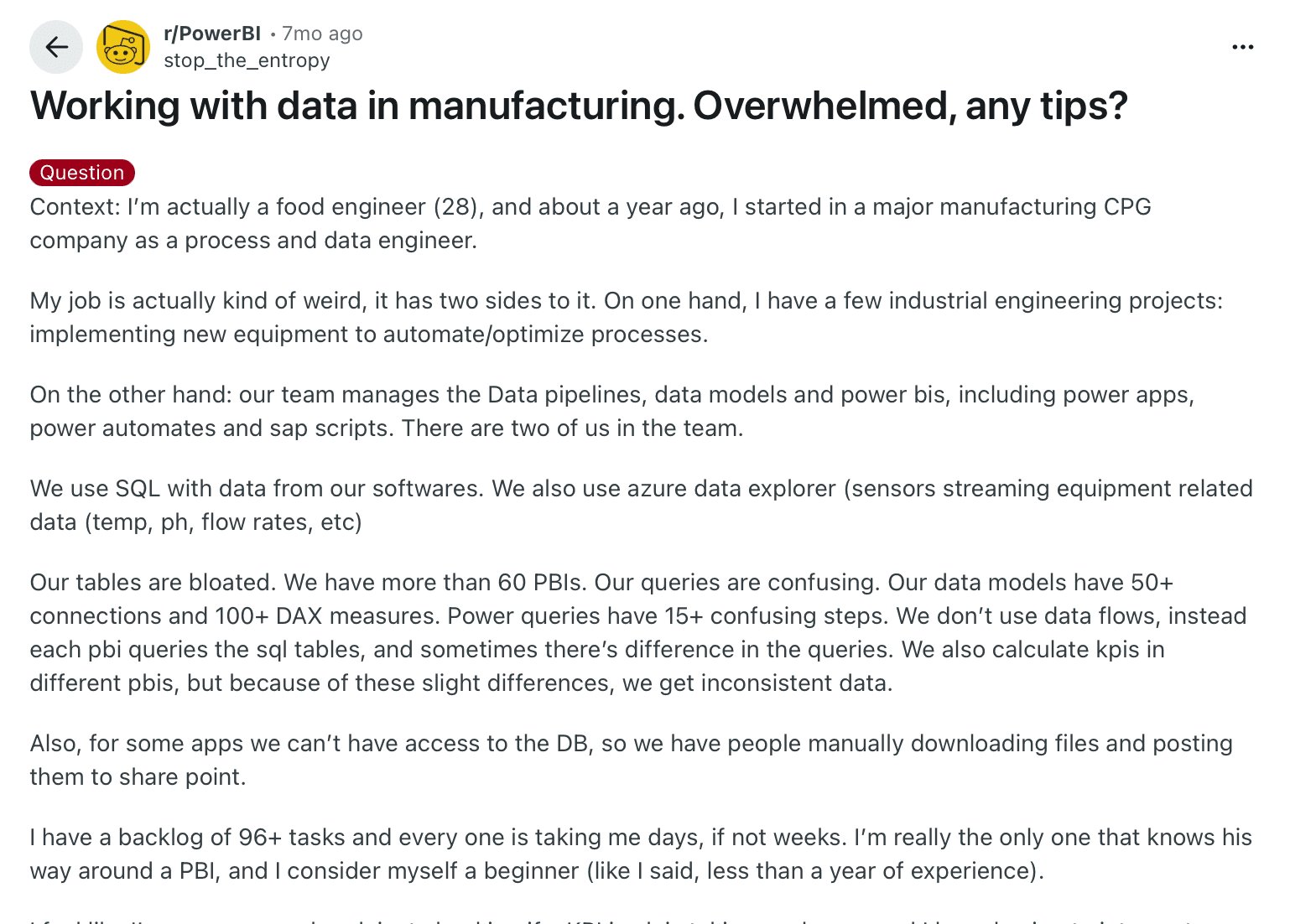
A manufacturing data engineer overwhelmed by 60+ Power BI dashboards, 50+ data connections, and inconsistent KPIs.
This is what fragmented data looks like in practice: sensor readings labeled differently across plants, suppliers using their own templates, or Excel sheets that don’t align with ERP exports. For any data parsing tool, handling that level of variety is one of the hardest challenges.
2. Missing details or an inconsistent data structure
When different people create data files, export them from different systems, or copy them across tools, gaps and structural irregularities crop up. Even if the data comes from a single source, variations in how users enter or format it make uniformity almost impossible.
In Precisely’s report, 45% of organizations report inconsistent data definitions and formats as a major data quality issue. A missing header, a renamed field, or a shifted column can cause the parser to misread information or skip records entirely.
The problem grows as teams scale or share files between departments. Each user adds their own naming style or layout, and what began as a small deviation eventually breaks the consistency needed for accurate parsing. Over time, even well-structured systems start drifting out of sync.
3. Legacy systems and changing vendor formats
Reliance on legacy systems is another challenge in data parsing. These older databases and servers often store data in closed or outdated formats, making it difficult for newer parsers or APIs to access or convert the information.
Teams struggle to maintain performance on aging SQL servers that companies keep due to the “if it’s not broken, don’t fix it” mindset.
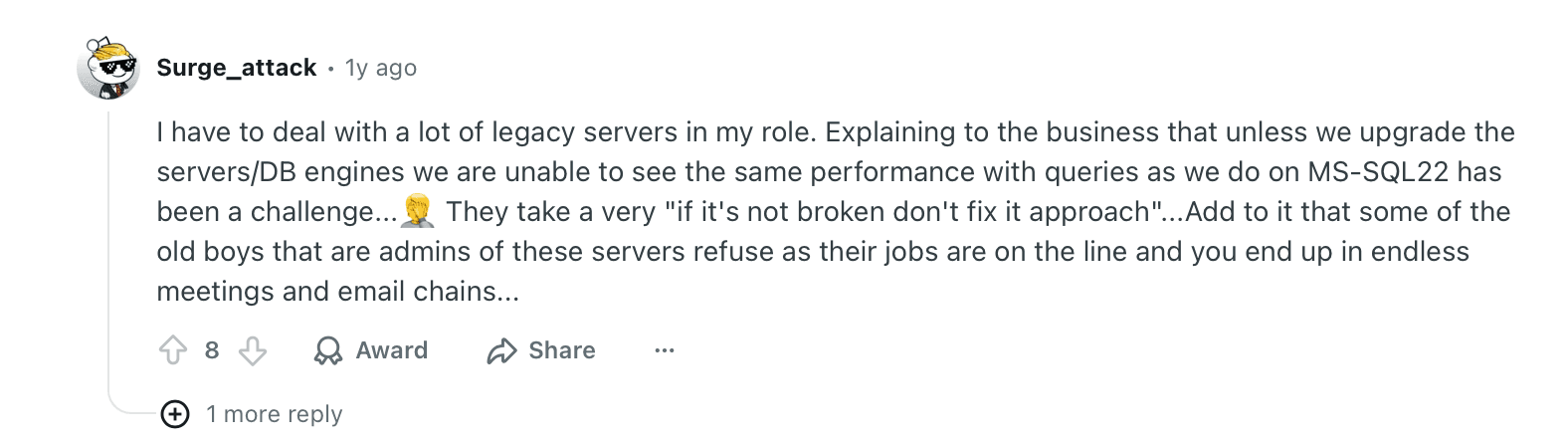
Reddit comment about IT teams delaying SQL server upgrades due to legacy system reliance in manufacturing
Even when internal systems are stable, the problem doesn’t end there. External vendors frequently update file structures, which breaks existing parsing rules and workflows. As a result, teams face constant maintenance cycles just to keep automated extraction running smoothly.
4. Maintaining semantic context & structure during parsing
While parsing complex documents is about extracting text, it’s also about preserving the original meaning. But when information is spread across multiple formats and sources, the structure can disappear. As a result, even accurate text becomes unreliable.
AI models can recognize words, but they often flatten everything into plain text. In complex documents, that means headers detach from values, totals lose their labels, and tables turn into long, unlinked strings of text.
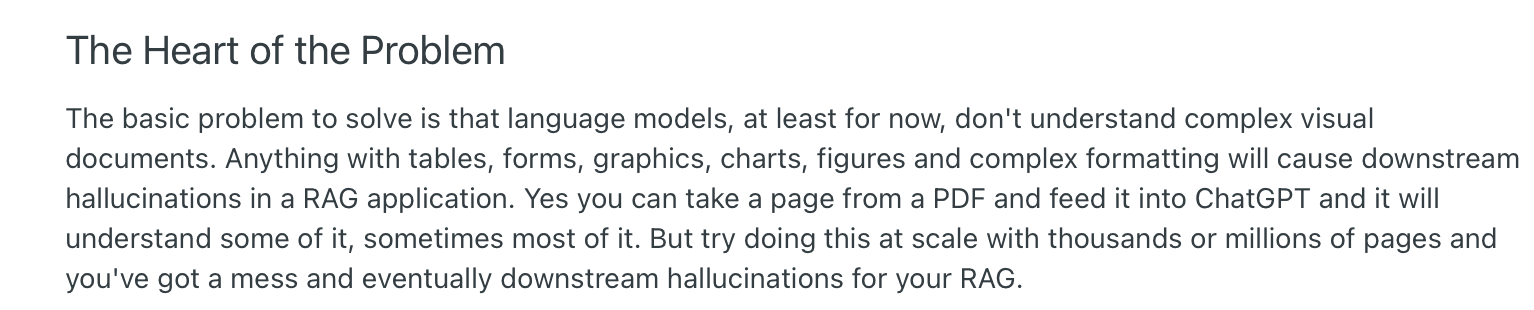
A developer highlights LLM parsing limitations with document structure
A Reddit user explains that when large language models (LLMs) parse PDFs at scale, they understand some or most of the content. But when the volume reaches thousands of pages, the context starts to break down. Without layout awareness, downstream systems receive output that looks right but reads wrong.
So the challenges become bigger. Modern parsers need to understand not only what data is on the page, but where it sits and how it relates to other elements.
5. Lack of credible data parsing tools
Another struggle is the lack of good data parsing tools. As Precisely’s 2025 study shows, 49% of respondents report that inadequate tools for automating data quality processes are a factor keeping them from achieving high-quality data.

This often leaves teams maintaining half-automated workflows with scripts, manual checks, and patched APIs just to keep things running. Instead of reducing workload, weak tools often create more of it.
How does AI-powered data parsing work at Docxster?
Now that you know the challenges of data parsing, let’s look at how data parsing can work if you use the right technologies.
At Docxster, we use highly accurate data parsing models. Our AI models understand what your document says and how the data is structured, ensuring that you see a high level of accuracy.
Here’s how it works:
Step 1: Ingest your documents from different sources
Every parsing workflow starts with bringing data into Docxster’s platform. You can manually upload or automatically import files directly from their original sources. That means your financial statements, invoices, production logs, or shipment reports can all flow into one workspace.
This step creates a single, secure entry point for data, ensuring everything is ready for the cleaning and parsing that follows.
Step 2: Pre-process and clean the incoming data
Next, Docxster prepares your data for parsing through AI-driven pre-processing.
The platform cleans and standardizes inputs by
Removing noise
Correcting inconsistent formats
Handling missing or incomplete values
This step ensures that variations in file types, layouts, or data entry styles don’t interfere with extraction accuracy later.
By the end of pre-processing, every document follows a uniform structure, making it easier for the parser to recognize patterns and extract the right information.
Step 3: Parse the content using AI models
In this stage, Docxster’s ML and NLP models analyze document structure to automatically identify and extract relevant information. The platform detects fields, tables, and relationships between data points, adapting to different layouts without relying on fixed templates. This allows it to parse diverse file types with consistent accuracy.
P.S. You can simplify this process by just creating a document schema for specific documents and automating that process.
Step 4: Validate extracted fields for accuracy
Docxster validates extracted data through three linked components:
Automated validation rules (primary layer)
Cross-verification with external systems (secondary layer)
Confidence-based human-in-the-loop (final layer)
It cross-checks extracted fields against predefined validation rules and external systems where applicable. Then, it flags mismatches, low-confidence values, or missing fields for review. If confidence drops below a set threshold, the document is routed to human reviewers to confirm or correct the data. This ensures each field is accurate before it moves downstream.
Step 5: Generate structured outputs in your required format
Once validated, the clean data is formatted into structured outputs like JSON, CSV, or database-ready tables. Docxster ensures that every dataset retains its original context and relationships, making it easy to integrate with analytical tools, data warehouses, or custom dashboards.
Step 6: Send the parsed data to your tool of choice
In the final stage, the platform connects parsed and structured data directly to downstream systems. The results can flow into analytics dashboards, ERP or finance platforms, and supply chain tools without manual intervention.
This step closes the loop, allowing teams to move from data extraction to real-time insights and automated reporting within their existing workflows.
Should you build your own data parser?
If you’re weighing build vs. buy, think about time to value (TTV), total cost of ownership (TCO), and risk. Building gives you deep control, but it also means hiring and retaining engineers, owning security/compliance, and maintaining code indefinitely.
Hidden costs of building your own data parser:
People cost: The U.S. median annual wage for software developers is $131,450. A small build team of 3–5 developers quickly becomes a seven-figure run rate.
Maintenance & failure risk: Poorly managed software drains time and money. Late-stage defect detection can cost up to 100× more than catching issues earlier in development. When you own the parser yourself, that escalating maintenance burden sits on your team.
Time to first value: Even “simple” internal tools can take weeks to months to ship and stabilize, delaying ROI versus adopting a proven platform.
These costs add up quickly, which is why purpose-built data parsers exist. Here is why choosing a data parser like Docxster is a pragmatic choice:
Offers control without the build: You control how parsing works without writing or maintaining code. Docxster lets you choose the fields you need. You can set clear rules in the Workflow Builder and ensure each document is standardized and extracted correctly. You get full flexibility without owning a custom parser.
Has a lower TCO: Docxster reduces your total cost of ownership by replacing the salaries and infrastructure needed for an internal parser. For example, you avoid hiring engineers to maintain custom extraction logic or update code as formats change.
Scales with your volume: Docxster handles growth without extra engineering work. You can process a few hundred invoices a week or millions of sensor readings a month. The platform scales automatically, so you never need to rewrite your parser to keep up.
Security-first posture: Docxster keeps your documents in one governed place with full access control, logging, and secure storage. You avoid scattered files and reduce your breach surface compared to internal setups. The platform meets GDPR requirements and holds ISO 27001 certification, which is difficult and costly to achieve with an in-house parser.
Faster time-to-value: Docxster lets you launch your parser in days. Pick a template, connect your source, and define the fields you want without writing code. An internal parser needs weeks of engineering work before it reaches the same point.
💡Choose to build if: Your needs are highly specific, compliance requires a custom setup, and you have a dedicated team for long-term maintenance.
💡Choose to buy if: You want enterprise-level control without expanding your team, need faster results, and prefer to rely on a secure, managed platform while keeping flexibility over how parsing works.
Use cases of data parsing
Data parsing delivers the most value in fast-moving business environments where large volumes of data flow daily. Here’s how different businesses can use data parsing:
1. Finance
Your finance team receives hundreds of structured and semi-structured documents to process in large volumes. Each carries data that must be accurate down to the last digit. A misplaced number or transposed figure in a financial record can lead to penalties, failed audits, or days of reconciliation work.
Data parsing helps eliminate that risk by automating how financial data is captured, cleaned, and transferred between systems.
Your finance team can use data parsing to:
Identify line items and tax codes in supplier invoices
Match transactions for Procure-to-Pay (P2P) and Order-to-Cash (O2C) workflows
Ensure compliance with regional e-invoicing and VAT/GST regulations
2. Operations
When it comes to operations, data flows in constantly from production logs and sensor readings to inventory and quality reports. For your operations team, data parsing can help automatically extract and structure that data.
For example, operations teams use data parsing to:
Pull production metrics from machine logs and highlight early signs of downtime
Standardize maintenance and inspection records across multiple equipment types
Merge supplier and inventory data so that planning and dispatch match real-time demand
3. Logistics
In logistics, each shipment generates multiple documents, such as bills of lading, delivery notes, and customs forms, that must align accurately to prevent delays. Data parsing automates the extraction of key information from these sources, keeping transport data consistent across platforms.
For example, logistics teams use data parsing to:
Extract shipment and container IDs from transport reports and emails
Verify and match dispatch data with carrier and delivery systems
Capture customs codes and documentation details for faster clearance
Here's how you can use Docxster to validate freight invoices against rate confirmations:

4. Manufacturing
Manufacturing environments produce a constant stream of production and quality data, machine readings, batch logs, and inspection reports, often stored in varying formats. Data parsing helps unify this information so teams can access consistent, structured insights across the production line.
For example, manufacturing teams use data parsing to:
Parse sensor and equipment logs to monitor performance and output levels
Extract batch numbers and quality metrics for traceability
Consolidate production and maintenance reports for real-time visibility
Parse your data using Docxster’s AI-powered document automation platform
Consistent data makes automation work. Most teams struggle because their inputs arrive in different formats, with missing fields, and without the structure their systems need. That is the real bottleneck, not the workflow itself.
Docxster removes that bottleneck by standardizing every document at the point of entry. It parses, validates, and structures your data so downstream tools receive the same clean format every time. This gives you reliable automation without building or maintaining custom parsing logic.
If standardized data is your blocker, Docxster solves it directly. See how it fits your workflow and schedule a demo with our team.
Wondering how you can go beyond data parsing and automate the whole workflow?
FAQs: Data Parsing Explained
1. What do you mean by data parsing?
Data parsing is the process of converting raw or unstructured information into structured fields that systems can understand. It identifies relevant data points and organizes them into a usable format. This makes the data ready for analytics, automation, or reporting.
2. What is an example of parsing data?
A common example is extracting vendor name, invoice number, line items, and totals from a supplier invoice. The parser reads the document and converts those values into structured fields for an accounting or ERP system. This eliminates manual entry and reduces reconciliation errors.
3. How do you parse data?
Parsing can be done using predefined rules, machine learning models, or a hybrid of both. The system reads incoming data, identifies patterns or fields, and outputs structured results in formats like JSON or CSV. Modern platforms automate this entire workflow end-to-end.
4. What does “parse the data” mean?
To parse data means to analyze raw information, break it into meaningful components, and organize it into a structured format. It transforms scattered inputs into clearly defined fields. This step ensures downstream systems receive consistent and reliable data.
5. How do you parse data with Excel?
In Excel, you can use tools like Text to Columns, Power Query, or formulas such as TEXTSPLIT to separate and structure data. These methods work best when formats are consistent. For highly variable or large-scale datasets, automated parsing platforms are more reliable.
6. How does data parsing differ from data cleaning?
Parsing focuses on extracting and structuring data into defined fields. Cleaning improves quality by removing duplicates, correcting errors, and handling missing values. Both steps are essential for building trustworthy data pipelines.
7. What are common data parsing formats and examples?
Common formats include PDF, CSV, Excel, JSON, XML, and plain text. Examples include parsing invoice data from PDFs, extracting shipment IDs from emails, or processing IoT sensor logs in JSON format. The goal is always to transform raw input into structured, usable output.
8. Should you build your own data parser or buy one?
Building gives you full control but requires engineering resources, long-term maintenance, and higher upfront costs. Buying a purpose-built platform typically reduces total cost of ownership and speeds up time-to-value. The right choice depends on your compliance needs, scale, and internal technical capacity.
Turn documents into decisions.
See how Docxster gets you from inbox to insight in minutes, not days. Bring your toughest workflow — we'll show you what it looks like solved.


