Docxster Tables
A spreadsheet built to run your workflows, not sit next to them.
Docxster Tables is a structured database that lives inside the platform. Store your customer records, shipment logs, or invoice line items in one place, and use them directly in your flows without any external database or integration.
If you've been keeping that data in a spreadsheet nothing else touches, Tables gives it a home your workflows can actually read from and write to.

What's new
More column types for real-world data
Start with the basics (Text, Number, Date) and add richer types as your data needs them.

Dropdown. Options render as colored status pills. Active reads green, Pending yellow, Blocked red.
Multi-select. One row, multiple tags. Design and QA on the same task, for example.
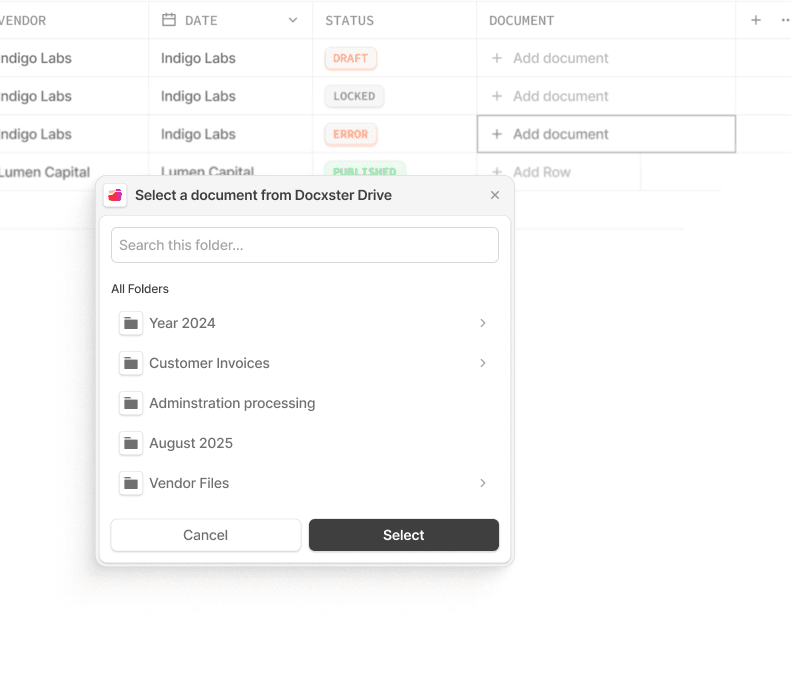
Hyperlink. Link to an external URL or a document picked from Docxster Drive. Drive links keep working even after the file is renamed.
Attachment. Upload a file straight into a cell.
Checkbox. A simple yes or no.
Lookup. Pull a value from a related table, live. Same idea as VLOOKUP, but it stays in sync.
Modified By and Timestamp. Auto-updates to show who last touched a row and when.
50 columns per table
Up from the old cap of 15. Wide operational tables like shipment logs, loan pipelines, and entry registers now fit without workarounds.
Spreadsheet muscle memory
Tables works the way a spreadsheet already does.
Drag column edges to resize
Drag headers to reorder
Pin a column to keep it visible while scrolling sideways
Sticky header row stays put as you scroll down
Column widths, order, and pinned state all persist after refresh
Filter, sort, and search on every column
Every column header carries its own filter. Filter text by value, dropdowns by option, dates by range. Stack multiple filters, sort any column, or search across every column at once.

Saved Views
Save any combination of filters, sorts, search, and column layout as a View. Come back to exactly the same setup with one click.
Row detail side panel
Click a row, or right-click for the row menu, to open a side panel with every field laid out vertically and editable inline. Move to the next or previous row without closing the panel.
Each row's panel has its own Comments and History tabs.

Row menu
Right-click any row, or hover and click the "..." button, for:
Share
Copy link to row
Open in new tab
Duplicate
Delete
Pin to top
Details
Comments on any row
Leave a comment on a specific record. Everyone's replies show up in order with names and timestamps. Conversations about a record now live with the record, not somewhere else.
Complete audit trail
Every create, edit, or delete, on a row or a column, leaves a trace: who did it, when, and for an edit, what the value changed from and to. Each row's History tab shows only what happened to that row.
Bulk actions
Select rows with checkboxes to delete, update, or export a batch at once.
Paste straight from Excel
Copy a cell, row, or full block out of Excel and paste it into a table. It maps in correctly. CSV import works the same way, and flags anything that looks off before saving.
Files stay with their records
Add a Drive column to any table to attach a contract to a client, an invoice to an order, or an image to a product, right on the row itself.
Built into your workflows
Because Tables lives inside Docxster, your flows read from a table or write to it as a normal step. No separate integration to set up.
Permissions carry through
Access follows your existing permissions. Read-only users can look but not edit. Editors can add new columns. A row shared by link still only shows what the recipient's own permissions allow.
Where this is useful
Freight and logistics
Shipment logs, carrier rate sheets, and load tracking outgrow plain spreadsheets fast. In Tables, a shipment's status shows as a colored pill, a Drive column keeps the POD attached to its row, and a workflow can write new shipments in as they arrive.
Customs brokers
Entry tracking needs to be accurate and auditable. Who touched a record, when, and what changed. Tables logs every edit automatically, so an entry's full history is there when a client asks or an audit hits, without anyone maintaining a separate log.
Lending and mortgage
A loan pipeline has a lot of records moving through a lot of stages. A status dropdown shows where each loan sits, a Lookup column pulls borrower details in from another table, and saved Views let a processor jump straight to loans in a specific stage.
Manufacturing and procurement
Supplier records, POs, and GRNs come from dozens of vendors in inconsistent formats. Tables gives procurement one structured place to track all of it, with attachments keeping the source document on the row instead of buried in an inbox.
Turn documents into decisions.
See how Docxster gets you from inbox to insight in minutes, not days. Bring your toughest workflow. We'll show you what it looks like solved.


