" width="27.999999328613065px"><path d="M 2.297 15.581 C 1.941 16.166 1.179 16.351 0.595 15.996 C 0.011 15.64 -0.175 14.879 0.181 14.294 L 8.507 0.599 C 8.862 0.015 9.623 -0.171 10.208 0.184 C 10.792 0.539 10.978 1.301 10.623 1.885 Z M 10.182 1.881 C 9.826 1.297 10.012 0.535 10.597 0.18 C 11.181 -0.175 11.942 0.011 12.298 0.595 L 20.801 14.581 C 21.156 15.166 20.97 15.927 20.386 16.282 C 19.801 16.637 19.04 16.452 18.685 15.867 Z" fill="rgb(77, 97, 252)" height="16.462497368769707px" id="xrwU9Dpku" transform="translate(3.5 6)" width="20.980757172541676px"/><path d="M 4.112 25.144 C 4.769 25.144 5.302 24.61 5.302 23.953 C 5.302 23.296 4.769 22.763 4.112 22.763 C 3.454 22.763 2.922 23.295 2.922 23.953 C 2.922 24.61 3.454 25.143 4.112 25.143 Z M 4.112 28.001 C 2.65 28.023 1.29 27.257 0.553 25.995 C -0.184 24.734 -0.184 23.172 0.553 21.911 C 1.29 20.649 2.65 19.883 4.112 19.906 C 6.322 19.94 8.096 21.742 8.096 23.953 C 8.096 26.164 6.322 27.966 4.112 28.001 Z M 14.112 5.239 C 14.769 5.239 15.302 4.706 15.302 4.049 C 15.302 3.391 14.769 2.859 14.112 2.859 C 13.454 2.859 12.922 3.391 12.922 4.049 C 12.922 4.706 13.454 5.239 14.112 5.239 Z M 14.112 8.096 C 12.65 8.118 11.29 7.352 10.553 6.09 C 9.816 4.829 9.816 3.267 10.553 2.006 C 11.29 0.744 12.65 -0.022 14.112 0.001 C 16.322 0.035 18.096 1.837 18.096 4.048 C 18.096 6.259 16.322 8.061 14.112 8.096 Z M 24.016 25.144 C 24.673 25.144 25.206 24.61 25.206 23.953 C 25.206 23.296 24.673 22.763 24.016 22.763 C 23.358 22.763 22.826 23.295 22.826 23.953 C 22.826 24.61 23.358 25.143 24.016 25.143 Z M 24.016 28.001 C 22.554 28.023 21.194 27.257 20.457 25.995 C 19.72 24.734 19.72 23.172 20.457 21.911 C 21.194 20.649 22.554 19.883 24.016 19.906 C 26.226 19.94 28 21.742 28 23.953 C 28 26.164 26.226 27.966 24.016 28.001 Z" fill="rgb(77, 97, 252)" height="28.00100498432225px" id="I1jhsGhG6" width="27.999999328613065px"/><path d="M 2.089 6.656 C 4.261 3.359 6.799 1.71 9.7 1.71 C 12.602 1.71 15.253 3.327 17.651 6.561 L 19.417 6.151 C 17.823 2.05 14.584 0 9.7 0 C 4.817 0 1.583 2.05 0 6.15 Z" fill="rgb(77, 97, 252)" height="6.655999999999949px" id="Stafhmjq4" transform="translate(4 14)" width="19.41700000000003px"/></g></svg>)
Docsumo
A Comparison Built Around Your Work
Both Docxster and Docsumo can read your documents and turn them into usable data, so comparing them on features alone would tell you almost nothing, because a checkbox cannot tell you how a tool behaves on a Tuesday morning with the messy document in front of you.
Features describe what a tool can do in theory. Your workflow is where you find out what it actually does, whether a business user can run it without waiting on IT, whether it holds up when the format changes, and whether it still works when the scan is crooked and handwritten. That gap between the pitch and the daily grind is exactly where tools get quietly abandoned, and it is exactly where the real differences live.
So instead of lining up specs, this page walks through the jobs your finance and operations team handles every week. For each one, it shows honestly where each tool earns its place, and where it does not.
Who Would These Tools Work For?
Docxster
Docxster works for any team that deals with documents, and it handles clean, tidy paperwork as well as you would expect. The difference shows up when the documents stop cooperating.
If you are in logistics and freight, customs brokerage, lending and mortgage, or commercial real estate, you already know the feeling: the bill of lading, the rate confirmation, the customs paperwork, and the mixed financial package all arrive in their own format, and half of them are handwritten or scanned on the move.
Docxster reads the clean ones without fuss and keeps right on going when they turn messy, and it is built so the person who actually deals with these documents can run it without waiting in line for IT.
"/><stop offset="1" stop-color="rgb(215, 218, 232)"/></linearGradient><linearGradient id="LEQX1KOnE-1379911482-linear-gradient" x1="0.044816823859401445" x2="0.9750557266422923" y1="0.8004246405391185" y2="0.18645931266036703"><stop offset="0" stop-color="rgb(138, 55, 234)"/><stop offset="0.45" stop-color="rgb(90, 23, 208)"/><stop offset="1" stop-color="rgb(59, 22, 187)"/></linearGradient><radialGradient cx="0.4447656895033757" cy="1.0837470666934848" gradient-transform="translate(0.4447656895033757, 1.0837470666934848) scale(1 1) translate(-0.4447656895033757, -1.0837470666934848)" id="CQ2XcmhRG-1379911482-radial-gradient" r="1.2763910894503003"><stop offset="0" stop-color="rgb(140, 18, 250)"/><stop offset="0.2" stop-color="rgb(130, 16, 242)"/><stop offset="0.4" stop-color="rgb(121, 15, 233)"/><stop offset="0.55" stop-color="rgb(109, 13, 223)"/><stop offset="0.7" stop-color="rgb(98, 11, 212)"/><stop offset="0.85" stop-color="rgb(87, 9, 202)"/><stop offset="1" stop-color="rgb(84, 9, 198)"/></radialGradient></defs><g fill="transparent" height="30px" id="reygMTojR" transform="translate(2.08 0.69)" width="28.031047603480157px"><path d="M 0.851 15.665 C 1.221 16.564 2.571 16.455 4.894 16.118 C 7.217 15.78 10.222 14.971 13.256 13.864 C 16.289 12.758 19.107 11.444 21.096 10.209 C 23.085 8.973 24.084 7.916 23.876 7.267 C 22.569 4.436 20.142 2.171 17.118 0.958 C 14.093 -0.255 10.712 -0.318 7.699 0.781 C 4.685 1.88 2.281 4.054 1.001 6.836 C -0.28 9.619 -0.333 12.789 0.851 15.665 Z" fill="rgb(255, 255, 255)" height="16.36432845680271px" id="GLSAG8qzt" transform="translate(4.128 0)" width="23.903168460718923px"/><path d="M 12.384 7.376 C 18.698 4.996 23.406 1.98 22.901 0.638 C 22.395 -0.703 16.867 0.138 10.554 2.518 C 4.24 4.897 -0.468 7.913 0.037 9.255 C 0.543 10.597 6.071 9.755 12.384 7.376 Z" fill="url(%23yLe8DSgGq-1379911482-linear-gradient)" height="9.893507773957008px" id="yLe8DSgGq" transform="translate(5.065 6.59)" width="22.937875223253762px"/><path d="M 3.288 1.794 C 4.992 1.152 6.286 0.399 6.177 0.111 C 6.069 -0.176 4.6 0.112 2.896 0.754 C 1.192 1.396 -0.102 2.15 0.006 2.437 C 0.115 2.724 1.584 2.437 3.288 1.794 Z" fill="url(%23LEQX1KOnE-1379911482-linear-gradient)" height="2.5483774408309996px" id="LEQX1KOnE" transform="translate(13.413 10.186)" width="6.183642999711428px"/><g fill="transparent" height="17.315967574957607px" id="p9C8MCM1J" transform="translate(0 12.684)" width="22.76509698839782px"><path d="M 21.268 0.406 C 20.925 -0.169 19.493 -0.132 17.285 0.509 C 15.077 1.15 12.271 2.344 9.476 3.83 C 6.681 5.317 4.124 6.976 2.36 8.447 C 0.596 9.919 -0.232 11.083 0.056 11.688 C 1.704 14.271 4.361 16.152 7.457 16.927 C 10.554 17.702 13.843 17.309 16.619 15.833 C 19.395 14.356 21.436 11.914 22.305 9.03 C 23.174 6.146 22.802 3.05 21.268 0.406 Z" fill="url(%23CQ2XcmhRG-1379911482-radial-gradient)" height="17.315967604275976px" id="CQ2XcmhRG" transform="translate(0 0)" width="22.765096988397815px"/><g fill="transparent" height="17.3159675749575px" id="nJNpFZaNZ" transform="translate(0 0)" width="22.76509698839782px"><path d="M 21.268 0.406 C 20.925 -0.169 19.493 -0.132 17.285 0.509 C 15.077 1.15 12.271 2.344 9.476 3.83 C 6.681 5.317 4.124 6.976 2.36 8.447 C 0.596 9.919 -0.232 11.083 0.056 11.688 C 1.704 14.271 4.361 16.152 7.457 16.927 C 10.554 17.702 13.843 17.309 16.619 15.833 C 19.395 14.356 21.436 11.914 22.305 9.03 C 23.174 6.146 22.802 3.05 21.268 0.406 Z" fill="transparent" height="17.31596760427593px" id="H6ISFf_GR" stroke-dasharray="" stroke-linecap="butt" stroke-linejoin="miter" stroke-miterlimit="10" stroke-width="2.28" stroke="rgba(0, 0, 0, 0)" transform="translate(0 0)" width="22.765096988397815px"/></g></g></g></svg>)
Super.AI
Docsumo is for a steadier world. If your team lives in banking and finance, insurance, or real estate, and your days are spent pushing high volumes of standardized paperwork like bank statements, ACORD forms, and rent rolls, this is where Docsumo is strong.
It leans on pretrained models and years of doing this same repeatable work, so when the documents are consistent and there are thousands of them, that experience shows.
Quick Comparison
Here is the whole comparison in one view, and the sections that follow walk through each row in the context of real work.
Capability | Docxster | Docsumo |
|---|---|---|
Reads new formats without a template | Yes (Template-less reading is a core feature) | Can do, but best when it trains on ~20 samples min. |
Handwriting and messy scans | Yes (subject to how bad the condition of the note is) | Yes (subject to how bad the condition of the note is) |
Runs without an IT team | Yes + Concierge team for complex workflows | Yes, has an AI agent to assist |
Stores and labels documents automatically (Docxster Drive) | Yes, sorted by what each doc contains | No native storage |
Pulls stored documents back into workflows and tables | Yes | Yes |
Connects to your trade and accounting stack | SAP, QuickBooks, Zoho, Cargowise, Descartes* and more | No direct integration on the base plan |
CBP Forms (customs entry) | Yes | No, no customs templates |
HTS classification | Yes | No, out of scope |
Standardized financial documents at volume | Capable, newer | Yes, proven models and customers |
Standardized insurance forms (ACORD) | Handles varied cases | Yes, 40+ pretrained models |
Compliance | ISO 27001 and GDPR now; SOC 2 and HIPAA in progress | SOC 2, HIPAA, GDPR |
Per-field confidence scores | Hidden by default, but available on request | Yes, on every field |
AI chatbot to chat with documents | No, can have LLM steps inside workflows instead | Yes, Sumo AI (accuracy varied) |
Where Docxster Competes
Each of the situations below follows the same shape: a short scene from a normal working week, a look at how each tool responds, and a plain line on where it lands.
Any format, any handwriting
The scene: No two vendors send the same invoice. Layouts differ, some documents come in handwritten, and every so often a new format shows up that you have not dealt with before. It is not chaos, it is just the normal variation of real paperwork, and the tool you choose either takes it in stride or makes you stop and set something up each time.
Docxster
Docxster handles different document formats without breaking, and that holds true even for a layout it has never seen before, because it does not depend on a template that someone had to build in advance.
Handwritten notes and rough scans are read as ordinary work rather than exceptions, with extraction holding up at around 99% accuracy on them.
So when a format is a little different, or genuinely new, Docxster keeps working instead of stopping to ask for setup.
Docsumo
Docsumo handles the document types it already knows, and it knows a lot of them, so a familiar type in a different layout usually comes through fine.
The friction starts when a document type falls outside its library, because then it needs a batch of samples trained up before it becomes reliable.
It can still read handwritten and messy documents, but the accuracy tends to be lower on them, since fewer of those cases have gone into training the models.
Final Verdict: For work where the documents keep changing, Docxster is the steadier choice, since nothing has to be trained before the data starts flowing.
Setting it up without an IT team
The scene: Most of the people who own this problem are not developers. They are finance and operations leads who already carry a full plate, and they cannot pause the department for a quarter while a rollout works its way through a technical backlog.
Docxster
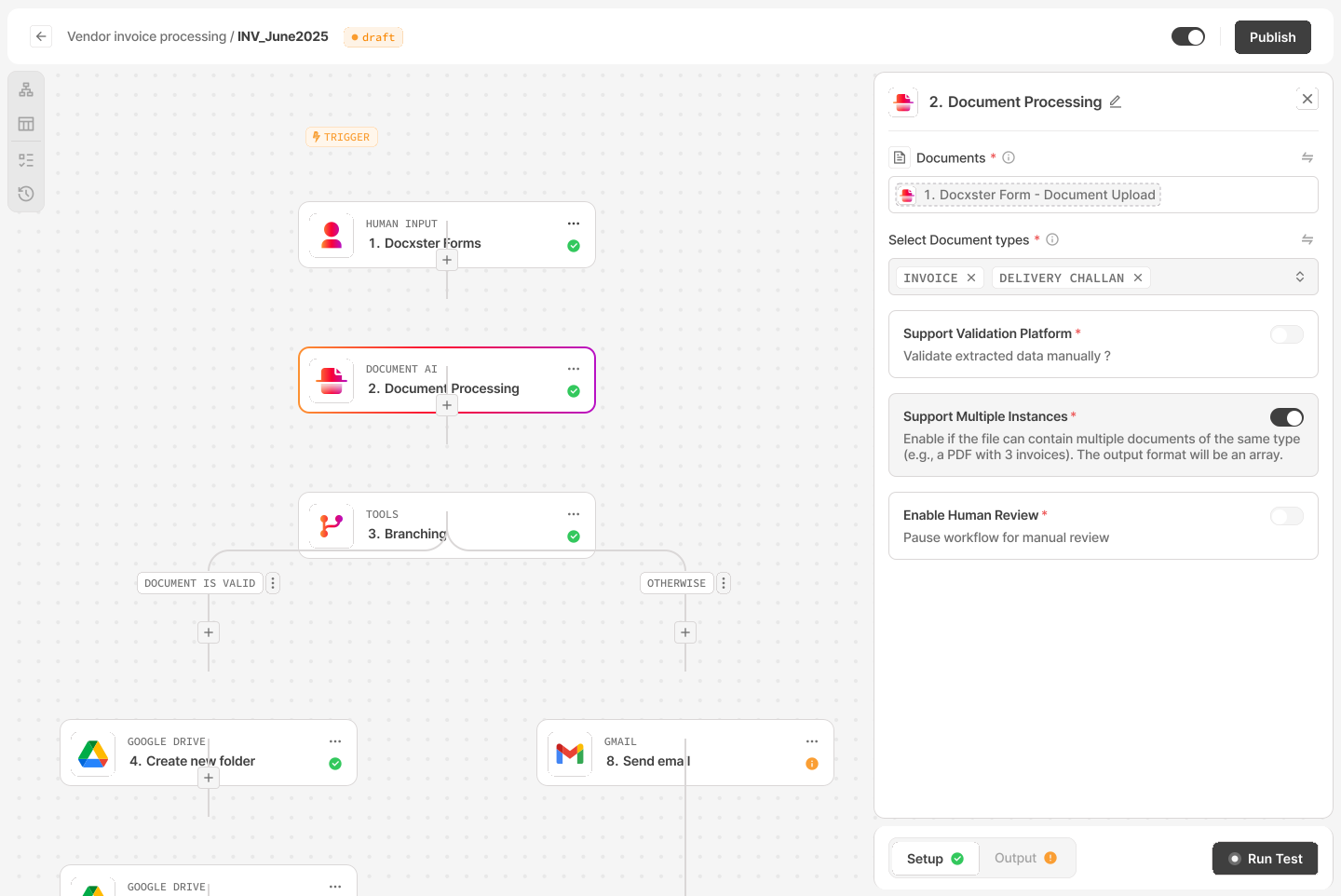
Docxster gives you a drag-and-drop workflow builder, so a non-technical person can assemble even an elaborate, multi-step workflow by moving the pieces into place rather than writing anything.
You lay out the steps, point the workflow at your documents, and start processing the same day, without filing a ticket or waiting for engineering time.
The technical depth is there when the process is complicated, but the building stays visual, so the complexity never lands back on you.
Super.AI
Docsumo takes a different route. You describe the workflow to an AI chat, and it builds it for you. That works well for simple workflows.
The catch is that it gets less reliable as the workflow grows, and in our testing the more complex builds are where it started to break. So the hardest cases are the ones you can least hand over to it.
Final Verdict: When the goal is to get moving this week rather than next quarter, Docxster keeps the work with the person who understands it best.
Storing and finding documents automatically, with Docxster Drive
The scene: Every document your team processes has to live somewhere afterward. The question is whether it lands in one organized place you can search, or gets scattered across drives and inboxes where the data and the original file drift apart.
Docxster
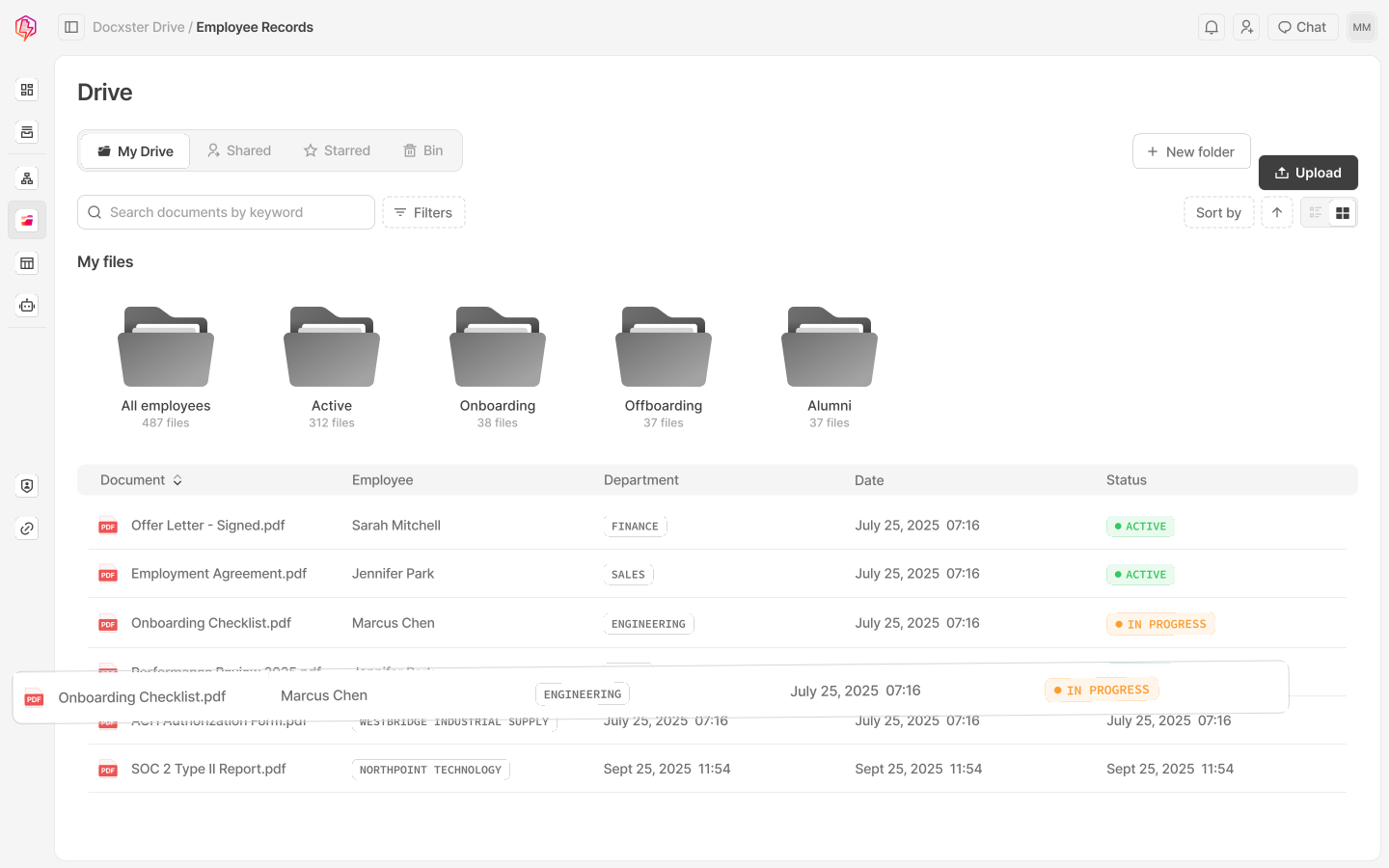
As documents arrive, Docxster Drive stores them for you and labels them automatically based on what each one contains. So a rate confirmation, an invoice, and a lease each land in the right place without anyone sorting them by hand.
Finding a file later is just as easy, because you can search by what is inside a document rather than only by its file name, so a container number or a vendor buried on page two is enough to pull the right one up.
When you build a workflow later, you can pull those stored documents straight back in or drop them into Docxster Tables, which keeps the data connected to the work instead of scattered across tools.
Super.AI
Docsumo does not offer document storage of its own.
It reads what you send and passes the data along, so the job of keeping and organizing the source documents stays wherever it already lives.
Final Verdict: Docxster gives you one organized home for every document and lets you find any of them by content, not just file name, which is something Docsumo does not do.
Connecting to your trade and accounting stack
The scene: Extracted data only helps once it reaches the systems your team works in every day, whether that is your accounting software or the platform that runs your freight.
Docxster
Docxster ships a broad set of connectors, including SAP, QuickBooks, Zoho, Salesforce, and HubSpot, alongside logistics and customs tools such as Cargowise, Descartes, and ClearCustoms, with an API connector for anything not on the list.
The data moves into the place where the work continues, rather than stopping at a spreadsheet.
Super.AI
Docsumo's self-serve connectors focus mostly on moving files in and out of storage apps like Google Drive, SharePoint, and Dropbox, along with Zapier.
Deeper connections to systems like Yardi and MRI exist at the enterprise level, though there are no trade or logistics connectors in the mix.
Final Verdict: For a trade or customs operation, Docxster reaches the systems that matter without a workaround.
Storing and shaping your data, with Docxster Tables

The scene: Pulling data out of a document is only half the job. Once it is extracted, someone on the finance or operations team still has to work with it, sort it, add a column, check it against something else, and turn it into a decision. Where that happens matters, because if the data lands in a grid you cannot change, the real work just moves to a spreadsheet somewhere else.
Docxster
Docxster Tables give you a real workspace for your data, close to what you would expect from a spreadsheet.
You can build a table however you like, with field types for text, numbers, dates, checkboxes, single and multi select, long text, hyperlinks, attachments, lookups, and links to files in Docxster Drive.
Data extracted from your documents can flow straight into these tables, and from there you can shape it any way you need, sort it, run a confidence filter to catch low-certainty fields, or ask for what you want in plain language, like showing every invoice with an amount due over twenty thousand.
You can also build tables that have nothing to do with documents at all, the same way you would start a sheet from scratch, so a finance or operations team can make sense of all their data in one place without leaving the platform.
Super.AI
Docsumo builds a table automatically from the documents you send, laying the extracted data out row by row, which is genuinely handy for reviewing what came through.
You can filter that data to find what you need.
Beyond filtering, though, the table stays close to a readout of the extraction, so it is not really a place to build your own structure, add different kinds of fields, or work with data that did not come from a document.
Final Verdict: Both tools hand you your extracted data in a table, but Docxster turns that table into a workspace you can build on, including data that never came from a document, while Docsumo's stays closer to a filtered view of what was extracted.
Filling CBP Form 7501, the customs entry summary
The scene: A customs broker files a CBP Form 7501, the entry summary, for every shipment that comes in. Getting there means pulling importer details, tariff codes, values, and duties out of commercial invoices, packing lists, and bills of lading, and today much of that is retyped by hand.
Docxster
Docxster is built with the customs workflow in mind, so it reads the underlying trade documents and populates the 7501 fields, which turns the broker's job into a review rather than a re-entry exercise.
Super.AI
Docsumo does not ship customs templates. Its pretrained models are aimed at finance and real estate, so a 7501 workflow is not something it offers out of the box.
Final Verdict: Customs entry is a job Docsumo was never built for, and it is one Docxster takes on directly.
HTS classification for customs brokers
The scene: Every imported product needs the right Harmonized Tariff Schedule code, and the stakes are real, because the wrong code can mean the wrong duty and a compliance problem down the line.
Docxster
Docxster reads the product details and helps assign the correct HTS code as part of the same customs workflow, so classification happens alongside the rest of the entry work instead of in a separate spreadsheet.
Super.AI
This sits outside what Docsumo does, since tariff classification is not part of its finance focused toolkit.
Final Verdict: This is another customs specific task that Docxster covers and Docsumo does not.
Where Docsumo Is Stronger
Standardized financial documents at high volume
The scene: Imagine a team running several thousand bank statements or rent rolls every month, all in familiar formats, where the priority is steady, hands off processing at scale.
Docxster
Docxster can handle this work, though it is newer here and has less public proof at that kind of volume.
Super.AI
This is exactly what Docsumo was built for. It brings pretrained models for bank statements and rent rolls, along with named customers who run thousands of documents through it every month.
Final Verdict: For high volume, standardized financial processing with a long track record behind it, Docsumo is the stronger pick.
Standardized insurance forms
The scene: Insurance paperwork tends to follow a set structure, and teams that live in ACORD forms need reliable extraction across large batches of them.
Docxster
Docxster reads insurance documents and will pull the data you need from them. What it does not have is a library tuned specifically to standardized insurance forms, so for a team whose whole day is ACORD forms at high volume, it is not built around that exact job the way a specialist tool is.
Super.AI
Docsumo has spent years on exactly this. It offers more than forty pretrained models for financial and insurance documents, and standardized ACORD forms sit right in its comfort zone, so it handles large, repeatable batches of them with proven reliability.
Final Verdict: For standardized insurance forms at scale, Docsumo's specialized models give it the edge.
A Note on How Each Uses AI
It is worth being clear about how each tool uses AI, rather than claiming something Docxster does not have.
Docxster
Docxster uses AI only where a document actually needs it. Inside a workflow, an LLM is called at the specific steps where something has to be interpreted, and nowhere else, so you are not spending tokens on work that a simpler step could have done.
That is a deliberate choice, because every token costs money, and we would rather not run up your bill on intelligence the job never called for.
The result is a process that stays predictable and keeps AI, and its cost, pointed only at the parts that genuinely benefit from it.
Super.AI
Docsumo takes an AI-first approach, and leans into it as the main way you use the product.
Through its conversational layer, Sumo AI, you can talk to a document in plain language or build a workflow just by describing it, which makes the tool easy to pick up.
That ease comes from putting the LLM front and center, so more of what you do runs through AI, which is convenient, though in our own testing the answers were often off, and the field notes go into that.
We Tested Docsumo And Here’s What We Found Out
We ran our own documents through Docsumo to see how it behaved, rather than relying on its marketing, and here is what we found.
It includes the useful parts and the limits, and it is what shaped the verdicts above.
The templates are built for finance
Docsumo's ready-made templates are built around banking and finance, covering work like bank statement analysis, cash flow review, and underwriting. You can see the effect when the document does not fit that world. We fed it a logistics rate confirmation, and it reached for a financial invoice template, then went looking for tax fields that the document does not even have.
Those fields came back empty, and the seller address landed at just 41% confidence, with a note that the value could not be found. The templates are not wrong. They are simply built for a different kind of document than a logistics or customs team deals with every day.
The AI was easy to talk to, but often wrong
Docsumo builds AI into the product for two jobs, reading documents and helping you set up workflows by chatting with it. In our testing, neither was very accurate.
The document reader was the weaker of the two, and it often got fields wrong or skipped them. The workflow builder did better, though we still had to check its work. The one real upside was how easy it was to talk to, because you describe what you want in plain words instead of learning technical terms, and that took some of the stress out of building a workflow even when we had to fix the result. The cost is worth watching too. The AI runs on credits, and the cheaper settings make more mistakes, so staying accurate means paying for the better ones, and that adds up over time.
The integrations are limited on the self serve plan
The self-serve connector library is short, and most of it is about moving files in and out of storage apps like Google Drive, OneDrive, Dropbox, and Box, with Zapier alongside them, while Salesforce is listed but locked behind a higher tier. To be fair, deeper enterprise connections do exist beyond this list, and Docsumo publicly names property systems like Yardi and MRI for its real estate customers, but none of that is in the self-serve set we saw.
Confidence scores are a real strength
The best part of the experience was the confidence scoring, because every extracted field carried a score, and anything low or missing was flagged for review with a clear note when a value could not be found on the page. That kind of signal makes it easy to catch errors before they flow downstream, and it is worth crediting plainly.
Honest Recommendation
If you want the decision in a few lines, here is how we would guide it.
Choose Docxster if
Your work runs through logistics, freight, mortgage lending, or customs brokerage, where filing CBP Form 7501 and getting HTS classification right are part of the daily job.
Your documents arrive in many shapes, including handwritten and scanned pages, and you need them read without building a template first.
You are in lending or mortgage and your files come in varied formats, since Docxster is built to handle that range rather than a single standard layout.
You want a business user to own the workflows and get started without leaning on IT, with guided onboarding to help your team stand up its first workflows.
You want your documents stored, labeled, and searchable by their contents in Docxster Drive, then pulled back into your workflows whenever you need them.
You want to shape your extracted data in Docxster Tables, and even work with data that never came from a document, without leaving the platform.
You want to connect to the systems you already run on, with a broad set of built-in integrations across accounting, ERP, and logistics tools.
If the system you rely on is not already supported, you are not stuck, because we are happy to build custom integrations so you are never limited to the out-of-the-box options.
Choose Docsumo if
You process standardized financial documents in high volume, such as bank statements and rent rolls, and you want a long track record behind them.
You work mostly in standardized insurance forms and want a library of pretrained models ready to go.
You need SOC 2 or HIPAA certification in place today, keeping in mind that Docxster's are in progress.

See Docxster on Your Own Documents
The surest way to know if a tool fits is to hand it the documents that give your team the most trouble, so send through your messiest invoices, a few handwritten notes, or a customs file, and watch what comes back.


