" width="28.00000042717792px"><path d="M 14.077 12.287 C 13.004 12.761 11.924 13.903 10.993 14.66 C 9.126 16.179 6.866 16.837 4.477 16.679 C 3.227 16.596 2.038 15.877 1.261 14.904 C 0.26 13.65 -0.133 11.853 0.039 10.274 C 0.374 7.086 2.114 3.621 4.592 1.569 C 5.829 0.59 7.417 -0.149 9.014 0.025 C 11.128 0.256 12.371 2.031 12.124 4.092 C 11.951 5.534 11.068 6.978 9.942 7.887 C 8.989 8.657 7.905 9.096 6.677 8.92 C 5.771 8.792 5.6 8.301 5.685 7.484 C 5.722 7.134 5.857 6.944 6.124 6.735 C 6.297 6.751 6.478 6.803 6.647 6.843 C 8.696 7.322 10.634 5.024 10.009 3.062 C 9.683 1.996 8.325 1.869 7.427 2.208 C 5.751 2.842 4.67 4.569 3.896 6.093 C 2.507 8.83 1.061 14.774 6.036 14.366 C 9.307 14.098 11.155 11.364 14.077 10.315 Z" fill="rgb(63, 106, 216)" height="16.70196208484228px" id="fTcTdpWa8" transform="translate(13.923 0.016)" width="14.076691101006045px"/><path d="M 5.68 0.017 C 6.386 -0.043 7.403 0.07 8.116 0.135 C 8.65 0.166 9.152 0.357 9.648 0.494 C 13.056 1.433 14.339 4.521 13.875 7.813 C 13.737 8.791 13.575 9.885 13.216 10.839 C 12.622 12.415 11.617 13.983 10.311 15.063 C 8.779 16.318 7.015 16.901 5.024 16.673 C 4.211 16.548 2.976 16.285 2.318 15.793 C 2.104 15.41 2.208 14.126 2.22 13.781 C 2.306 11.38 2.427 8.957 3.055 6.628 C 3.32 5.646 3.918 4.28 4.58 3.51 C 4.736 3.329 5.756 3.329 6.01 3.372 C 6.394 3.414 6.676 3.669 6.901 3.977 C 6.58 4.418 6.419 4.724 6.204 5.213 C 5.321 7.439 5.139 9.594 4.871 11.968 C 4.816 12.45 4.53 14.283 4.928 14.741 C 5.064 14.899 5.685 14.858 5.936 14.834 C 7.362 14.695 8.642 13.709 9.53 12.635 C 10.858 10.95 11.738 8.101 11.521 5.951 C 11.414 4.891 10.95 3.975 10.122 3.3 C 8.847 2.219 7.106 2.209 5.529 2.385 C 4.624 2.486 3.368 2.755 2.686 3.406 C 2.111 3.955 1.694 4.79 1.198 5.424 C 0.773 5.968 0.097 6.351 0.016 5.333 C -0.228 1.723 2.374 0.191 5.68 0.017 Z" fill="rgb(63, 106, 216)" height="16.72146749308473px" id="W2AA9Z5n7" width="13.966553849019252px"/></g></svg>)
DocuClipper
Built For Bank Statements, Not Built For Everything Else
DocuClipper is good at one thing: reading financial documents like bank statements, invoices, and receipts, then checking that the numbers add up. If that is the only kind of paperwork your business handles, this focus works in your favor. A tool that does one job well can be a better fit than a tool that tries to do everything.
Most businesses, though, do not deal with only one kind of document. A bookkeeping firm might also handle shipment paperwork for a client in logistics. An accounting team might get invoices in one format today and a scanned receipt in another tomorrow. When we booked a demo with DocuClipper's own sales team to see how it handled this kind of mixed reality, the answers we got, and the screens we were shown, told us exactly where the tool draws its line.
This page walks through the situations your team runs into every week, based on that demo and on everything we found researching DocuClipper's product, pricing, and reviews. For each one, we explain honestly where each tool holds up and where it does not.
Who Would These Tools Work For?
Docxster
Docxster is built for teams that deal with more than one kind of document, and it treats a document you have never seen before the same way it treats one it already knows. It does not need a template built in advance, so it keeps working even when the format is new or the document type is something it has not processed before.
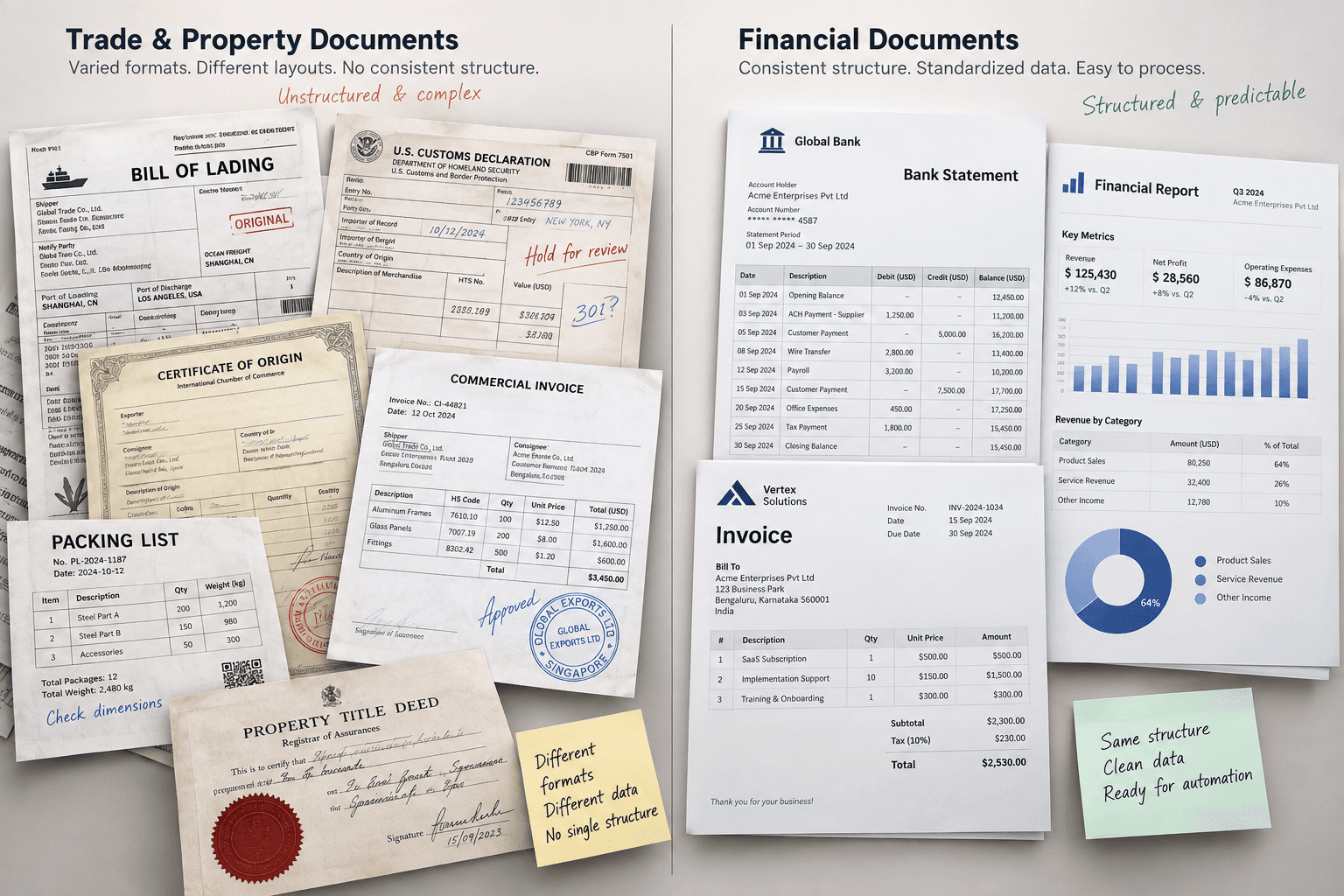
If you work in logistics and freight, customs brokerage, lending and mortgage, or commercial real estate, you already know how varied that paperwork gets. A bill of lading looks nothing like a rate confirmation, and a lease looks nothing like a customs form. Half of it might be handwritten or scanned from a phone in a warehouse.
Docxster reads the clean documents without any setup, and it keeps working when the documents get messy or change shape, so the person who actually handles this paperwork every day can run it without waiting on IT.
"/><stop offset="1" stop-color="rgb(215, 218, 232)"/></linearGradient><linearGradient id="LEQX1KOnE-1379911482-linear-gradient" x1="0.044816823859401445" x2="0.9750557266422923" y1="0.8004246405391185" y2="0.18645931266036703"><stop offset="0" stop-color="rgb(138, 55, 234)"/><stop offset="0.45" stop-color="rgb(90, 23, 208)"/><stop offset="1" stop-color="rgb(59, 22, 187)"/></linearGradient><radialGradient cx="0.4447656895033757" cy="1.0837470666934848" gradient-transform="translate(0.4447656895033757, 1.0837470666934848) scale(1 1) translate(-0.4447656895033757, -1.0837470666934848)" id="CQ2XcmhRG-1379911482-radial-gradient" r="1.2763910894503003"><stop offset="0" stop-color="rgb(140, 18, 250)"/><stop offset="0.2" stop-color="rgb(130, 16, 242)"/><stop offset="0.4" stop-color="rgb(121, 15, 233)"/><stop offset="0.55" stop-color="rgb(109, 13, 223)"/><stop offset="0.7" stop-color="rgb(98, 11, 212)"/><stop offset="0.85" stop-color="rgb(87, 9, 202)"/><stop offset="1" stop-color="rgb(84, 9, 198)"/></radialGradient></defs><g fill="transparent" height="30px" id="reygMTojR" transform="translate(2.08 0.69)" width="28.031047603480157px"><path d="M 0.851 15.665 C 1.221 16.564 2.571 16.455 4.894 16.118 C 7.217 15.78 10.222 14.971 13.256 13.864 C 16.289 12.758 19.107 11.444 21.096 10.209 C 23.085 8.973 24.084 7.916 23.876 7.267 C 22.569 4.436 20.142 2.171 17.118 0.958 C 14.093 -0.255 10.712 -0.318 7.699 0.781 C 4.685 1.88 2.281 4.054 1.001 6.836 C -0.28 9.619 -0.333 12.789 0.851 15.665 Z" fill="rgb(255, 255, 255)" height="16.36432845680271px" id="GLSAG8qzt" transform="translate(4.128 0)" width="23.903168460718923px"/><path d="M 12.384 7.376 C 18.698 4.996 23.406 1.98 22.901 0.638 C 22.395 -0.703 16.867 0.138 10.554 2.518 C 4.24 4.897 -0.468 7.913 0.037 9.255 C 0.543 10.597 6.071 9.755 12.384 7.376 Z" fill="url(%23yLe8DSgGq-1379911482-linear-gradient)" height="9.893507773957008px" id="yLe8DSgGq" transform="translate(5.065 6.59)" width="22.937875223253762px"/><path d="M 3.288 1.794 C 4.992 1.152 6.286 0.399 6.177 0.111 C 6.069 -0.176 4.6 0.112 2.896 0.754 C 1.192 1.396 -0.102 2.15 0.006 2.437 C 0.115 2.724 1.584 2.437 3.288 1.794 Z" fill="url(%23LEQX1KOnE-1379911482-linear-gradient)" height="2.5483774408309996px" id="LEQX1KOnE" transform="translate(13.413 10.186)" width="6.183642999711428px"/><g fill="transparent" height="17.315967574957607px" id="p9C8MCM1J" transform="translate(0 12.684)" width="22.76509698839782px"><path d="M 21.268 0.406 C 20.925 -0.169 19.493 -0.132 17.285 0.509 C 15.077 1.15 12.271 2.344 9.476 3.83 C 6.681 5.317 4.124 6.976 2.36 8.447 C 0.596 9.919 -0.232 11.083 0.056 11.688 C 1.704 14.271 4.361 16.152 7.457 16.927 C 10.554 17.702 13.843 17.309 16.619 15.833 C 19.395 14.356 21.436 11.914 22.305 9.03 C 23.174 6.146 22.802 3.05 21.268 0.406 Z" fill="url(%23CQ2XcmhRG-1379911482-radial-gradient)" height="17.315967604275976px" id="CQ2XcmhRG" transform="translate(0 0)" width="22.765096988397815px"/><g fill="transparent" height="17.3159675749575px" id="nJNpFZaNZ" transform="translate(0 0)" width="22.76509698839782px"><path d="M 21.268 0.406 C 20.925 -0.169 19.493 -0.132 17.285 0.509 C 15.077 1.15 12.271 2.344 9.476 3.83 C 6.681 5.317 4.124 6.976 2.36 8.447 C 0.596 9.919 -0.232 11.083 0.056 11.688 C 1.704 14.271 4.361 16.152 7.457 16.927 C 10.554 17.702 13.843 17.309 16.619 15.833 C 19.395 14.356 21.436 11.914 22.305 9.03 C 23.174 6.146 22.802 3.05 21.268 0.406 Z" fill="transparent" height="17.31596760427593px" id="H6ISFf_GR" stroke-dasharray="" stroke-linecap="butt" stroke-linejoin="miter" stroke-miterlimit="10" stroke-width="2.28" stroke="rgba(0, 0, 0, 0)" transform="translate(0 0)" width="22.765096988397815px"/></g></g></g></svg>)
Super.AI
DocuClipper is built for a narrower, well-defined job: reading financial documents and making sure the numbers reconcile. If your team works entirely with bank statements, brokerage statements, invoices, receipts, checks, and a handful of tax forms, DocuClipper's reconciliation checks and its tuning for specific banks are made exactly for that kind of work.
This shows most clearly in how it handles a bank statement. Every statement gets checked against its own math (opening balance, plus every transaction, should equal the closing balance) before DocuClipper treats it as done. That is a genuinely useful safeguard, and it is the strongest part of what the product does.
The moment your documents step outside finance, though, DocuClipper is not the tool for the job, and its own team says so directly. On our demo call, when we asked whether
DocuClipper could also handle shipment documents like bills of lading, airway bills, and seaway bills, since these often sit alongside bank statements and invoices in the same client folder, the rep told us plainly that DocuClipper was not built for those, because they are not financial documents.
Quick Comparison
Here is the whole comparison in one view, and the sections that follow walk through each row in the context of real work.
Capability | Docxster | DocuClipper |
|---|---|---|
Reads new formats without a template | Yes, core feature | No, tuned to specific financial document types |
Non-financial documents (bills of lading, purchase orders, etc.) | Yes | No, confirmed by their sales team on our demo call |
Handwriting and messy scans | Yes, condition-dependent | Weaker on scans and on regional, credit union, or non-US banks |
Runs without an IT team | Yes, plus concierge for complex workflows | Yes to set up, but no workflow builder |
Auto-transforms data after extraction (currency, business rules) | Yes, inside the workflow | No, confirmed on our demo call. Extraction is the end point |
Stores and labels documents automatically (Docxster Drive) | Yes, sorted by content | No, manual folder tree by client and project |
Connects to accounting and operational systems | SAP, QuickBooks, Zoho, Cargowise, Descartes, and more; custom API for the rest | QuickBooks, Xero, Sage, NetSuite; no logistics or trade connectors |
Handles CBP Form 7501 (US customs entry) | Yes | No customs templates |
Assigns HTS (tariff) codes | Yes | Out of scope |
High-volume standard bank statements (major US banks) | Capable, newer here | Yes, purpose-built, with reconciliation on every statement |
Financial forensics (fraud scoring, flow of funds) | Not a dedicated focus today | Yes, Fraud Detection score and a Flow of Funds diagram |
Compliance certifications | ISO 27001 and GDPR now; SOC 2 and HIPAA in progress | SOC 2 Type II |
Confidence scores on extracted data | Hidden by default, available on request | Exists, but not per-field in the tables we saw; document-level score under Fraud Detection |
Self-serve free trial | Available | Broken for us twice, via Google and via email/password; needed manual setup by the rep |
Chat with your documents using an AI assistant | No, LLM steps inside workflows instead | No |
Where Docxster Competes
Each section below paints a quick scene you'd run into in real work, then shows how each tool handles it.
Reading documents that are not all the same
The scene: A batch of documents comes in. Most are invoices, but one is handwritten, and another turns out to be a delivery note, not an invoice at all.
Docxster
Docxster does not need a template to read a document. This means a layout it has never seen before, or a document type outside its usual mix, still gets processed instead of rejected or flagged as unsupported. Handwritten notes and rough scans are treated as ordinary work, with extraction holding at around 99% accuracy on them.
So when something looks a little different, Docxster keeps working instead of asking you to find another tool for that one document.
Super.AI
DocuClipper covers a solid range of financial document types: bank statements, brokerage statements, invoices, receipts, checks, and a set of tax forms. Within that range, it works well. Step outside it, and the tool stops being useful. On our demo call, we asked directly about shipment paperwork, bills of lading, purchase orders, seaway bills, and airway bills, since these often land in the same folder as financial documents for a business that touches logistics. The rep confirmed DocuClipper was not built for that kind of paperwork, since it falls outside finance.
Even within its own lane, accuracy is not even everywhere. Scanned or photographed statements read less reliably than clean digital ones, and statements from regional banks, credit unions, or banks outside the US are more likely to need manual correction, since DocuClipper's tuning is strongest on the major US banks it has processed the most.
Final Verdict: If your documents are always financial and always come from a handful of familiar banks, DocuClipper's focus works in your favor. If your paperwork is more mixed, even occasionally, Docxster is the steadier choice, because nothing about the document type has to match a pre-built category before the data starts flowing.
Getting the automation to actually finish the job
The scene: An invoice comes in priced in AED, and it needs to reach QuickBooks in USD, without anyone manually converting it first.
Docxster
Docxster does not need a template to read a document. This means a layout it has never seen before, or a document type outside its usual mix, still gets processed instead of rejected or flagged as unsupported. Handwritten notes and rough scans are treated as ordinary work, with extraction holding at around 99% accuracy on them.
So when something looks a little different, Docxster keeps working instead of asking you to find another tool for that one document.
Super.AI
DocuClipper covers a solid range of financial document types: bank statements, brokerage statements, invoices, receipts, checks, and a set of tax forms. Within that range, it works well. Step outside it, and the tool stops being useful. On our demo call, we asked directly about shipment paperwork, bills of lading, purchase orders, seaway bills, and airway bills, since these often land in the same folder as financial documents for a business that touches logistics. The rep confirmed DocuClipper was not built for that kind of paperwork, since it falls outside finance.
Even within its own lane, accuracy is not even everywhere. Scanned or photographed statements read less reliably than clean digital ones, and statements from regional banks, credit unions, or banks outside the US are more likely to need manual correction, since DocuClipper's tuning is strongest on the major US banks it has processed the most.
Final Verdict: If your documents are always financial and always come from a handful of familiar banks, DocuClipper's focus works in your favor. If your paperwork is more mixed, even occasionally, Docxster is the steadier choice, because nothing about the document type has to match a pre-built category before the data starts flowing.
Keeping documents organized so you can find them later
The scene: Six months from now, someone needs to find one specific invoice, and nobody remembers which folder it landed in.
Docxster
As documents come in, Docxster Drive stores and labels them automatically, based on what each document actually contains. A rate confirmation, an invoice, and a lease agreement each end up in the right place without anyone sorting them by hand.
Finding something later works the same way. You can search by what is inside a document, not just its file name, so a container number or a vendor name buried on page two of a PDF is enough to pull up the right file. When you build a workflow later, you can pull these stored documents straight back in, or bring them into Docxster Tables, so the data stays connected to the original document instead of drifting apart from it.
Super.AI
DocuClipper organizes documents in a folder structure you build yourself, typically by client and then by project, like “Bank Statements” or “Investments.” For a bookkeeping firm managing a handful of clients, this is familiar and works fine, since it mirrors how those engagements are already organized on a manual level.
What it does not do is label or sort anything automatically based on what is actually inside a document, and there is no way to search across every client's documents by content. The organization only holds up as well as the folder structure someone sets up and keeps maintaining.
Final Verdict: Docxster gives you one organized home for every document, labeled automatically and searchable by what is inside it. DocuClipper gives you a folder tree that works, as long as someone keeps building and maintaining it by hand.
Getting extracted data into the systems you already use
The scene: The data is extracted and sitting in a spreadsheet, but it still needs to land in the software your team actually works in every day.
Docxster
Docxster connects to a wide set of systems, including SAP, QuickBooks, Zoho, Salesforce, and HubSpot, as well as logistics and customs tools like Cargowise and Descartes. If something is not on that list, a custom API connector covers the gap.
Data moves into the place where the work actually continues, rather than stopping at a spreadsheet, and rather than stopping short of the conversion or formatting a client's books actually need.
Super.AI
DocuClipper connects cleanly to the accounting side of things: QuickBooks Online and Desktop, Xero, Sage, and NetSuite, along with Excel, CSV, and standard accounting file formats. For a firm that works only in bookkeeping and finance, this is a solid, well-built set of connectors that does exactly what it needs to.
There is nothing here for logistics, freight, or trade systems, and there is no step between extraction and export where the data itself can be changed. It can only be moved.
Final Verdict: If your business lives entirely in accounting, DocuClipper's connectors will do the job. If your work touches systems beyond accounting, or if the data needs to change shape before it lands somewhere, Docxster reaches further and does more with the data along the way.
Working with your extracted data, not just viewing it
The scene: The data is out of the document, but someone still needs to sort it, filter it, and check it against something else before it becomes a decision.
Docxster
Docxster Tables work like a real workspace for your data, closer to a spreadsheet than a static report. You can build a table with the field types you actually need: text, numbers, dates, checkboxes, single or multi-select options, long text, hyperlinks, attachments, and links to files stored in Docxster Drive.
Data extracted from your documents flows straight into these tables, and from there you can sort it, filter by confidence to catch anything uncertain, or just ask for what you need in plain language, like showing every invoice over twenty thousand dollars. You can also start a table from scratch with data that never came from a document at all, so a finance or operations team can bring everything into one place without switching tools.
Super.AI
DocuClipper's tables for transactions and invoices are genuinely well designed for their specific job. The bank transactions view lets you filter, bulk-edit, reassign categories, and check everything against the statement's opening and closing balance. The invoice view tracks each bill through stages like Needs Review, Exceptions, Needs Approval, and Approved, with duplicate detection built in, so if the same invoice gets uploaded twice, it gets flagged.
What these tables do not let you do is build something new from scratch the way a spreadsheet does, or bring in data that never came from a document. They stay tied to the extraction they came from.
Final Verdict: DocuClipper's tables do their specific job well, especially for transactions and invoices. Docxster Tables go further, working as an open space you can shape however you need, even with data that has nothing to do with a document.
Filling out customs paperwork like CBP Form 7501
The scene: A shipment comes in, and a customs broker needs to file a CBP Form 7501 using details pulled from the commercial invoice, the packing list, and the bill of lading.
Docxster
Docxster is built with this exact workflow in mind. It reads the underlying trade documents and fills in the 7501 fields directly, so the broker's job turns into reviewing the entry rather than retyping it from scratch.
Super.AI
DocuClipper has no customs templates, because its extraction is built and tuned around financial documents, not trade paperwork. On our demo call, when we asked specifically about customs and shipment documents for a client running a customs brokerage business, the rep confirmed this was outside what DocuClipper handles.
Final Verdict: Customs entry work was never part of what DocuClipper set out to do. It is something Docxster was built to handle directly.
Getting tariff classification right
The scene: An imported product needs the correct Harmonized Tariff Schedule code, and getting it wrong means paying the wrong duty.
Docxster
Docxster reads the product details from your documents and helps assign the correct HTS code as part of the same customs workflow, so classification happens alongside the rest of the entry work instead of in a separate spreadsheet someone maintains on the side.
Super.AI
This sits entirely outside what DocuClipper does. Tariff classification has no place in a toolkit built around bank statements, invoices, and receipts.
Final Verdict: This is another task built specifically for customs work that Docxster covers and DocuClipper does not.
Where DocuClipper Is Stronger
Processing standard bank statements at volume, with reconciliation built in
The scene: A bookkeeping firm gets a stack of monthly bank statements from mainstream US banks, and needs them converted into QuickBooks or Xero fast, with minimal review.
Docxster
Docxster can do this work, but it is newer in this specific area and does not build an automatic reconciliation check into every statement the way DocuClipper does.
Super.AI
This is exactly the job DocuClipper was built for. Every bank statement gets checked automatically: opening balance, plus every transaction, should equal the closing balance, and DocuClipper flags it if the numbers don't line up.
Combine that with the tuning built up over years of processing statements from major US banks, and a Chase or Bank of America statement turns into clean, categorized data quickly. For a bookkeeping firm whose clients bank mostly with major US institutions, this is a fast, dependable path from a PDF statement to finished books.
Final Verdict: For high-volume, standardized bank statement work at mainstream US banks, DocuClipper's reconciliation checks and bank-specific tuning make it the faster, more purpose-built choice.
Docxster
Docxster can do this work, but it is newer in this specific area and does not build an automatic reconciliation check into every statement the way DocuClipper does.
Super.AI
This is exactly the job DocuClipper was built for. Every bank statement gets checked automatically: opening balance, plus every transaction, should equal the closing balance, and DocuClipper flags it if the numbers don't line up.
Combine that with the tuning built up over years of processing statements from major US banks, and a Chase or Bank of America statement turns into clean, categorized data quickly. For a bookkeeping firm whose clients bank mostly with major US institutions, this is a fast, dependable path from a PDF statement to finished books.
Digging into the numbers for fraud, forensics, or missing statements
The scene: A lending or litigation case needs to know whether a bank statement has been altered, and whether any months are missing from the file.
Docxster
This kind of financial forensics is not a dedicated focus for Docxster today.
Super.AI
DocuClipper has built real depth here. Its Fraud Detection tool gives each document an authenticity score. In our review, a genuine statement scored 98%, and the tool showed the underlying signals, like how closely a document's layout matched known authentic formats, that fed into that score.
A separate Flow of Funds view lays income and expenses out as a visual diagram, making it easier to see where money moved between accounts. A Statement Coverage view flags any gaps, like a missing month, in the statements collected for an engagement, before you close it out.
Final Verdict: For forensic accounting, fraud review, or lending due diligence built around bank statements specifically, DocuClipper's tools go further than anything Docxster offers today.
A Note on How Each Uses AI
It is worth being clear about how each tool actually uses AI, rather than making a claim Docxster cannot back up.
Docxster
Docxster calls on AI only at the specific steps in a workflow where something genuinely needs to be interpreted, and nowhere else. This is a deliberate choice. Every AI call has a real cost attached to it, and there is no reason to spend that cost on a step a simpler piece of logic could handle just as well.
The result is a process that stays predictable, with AI, and its cost, pointed only at the parts of the job that actually benefit from it.
Super.AI
DocuClipper's marketing describes its extraction as proprietary, template-free AI. What is actually processing the document, based on DocuClipper's own disclosure about the vendors it works with, is a mix of third-party OCR engines (AWS Textract, Google Cloud Vision, and Microsoft Azure) and language models (Anthropic's Claude and OpenAI's models), combined with tuning DocuClipper has built up for specific banks over time.
That is not automatically a weakness. Building on top of strong, established engines is a reasonable way to build a product, and DocuClipper confirmed on request that customer data is not used to train these models. But it is worth understanding that the extraction engine is not as proprietary as the marketing suggests, and that the bank-specific tuning is also why accuracy is strongest on the banks DocuClipper has processed the most, and weaker on the ones it has not.
We Tested DocuClipper And Here’s What We Found Out
Rather than rely on DocuClipper's marketing pages, we booked a live demo with their sales team. We described a business that spans bookkeeping, customs brokerage, and virtual assistance work, since that reflects the kind of mixed, real-world business many of our own customers run. Here is what we found, including the parts that worked well and the parts that did not.

The product is genuinely easy to learn
The interface is clean, and moving between tabs like Transactions, Categorize, Advanced Analysis, and Fraud Detection did not require much explanation. For a team that only needs to convert bank statements and invoices, the learning curve here is short.
It stops working the moment extraction is done
We asked directly where the automation actually kicked in, since a document sent in by email still needed a manual “Convert Documents” click before anything happened. The answer confirmed what we suspected: DocuClipper extracts and organizes data, but it does not act on that data afterward. We tested this with a specific example, converting an AED invoice into USD before it reaches QuickBooks, and were told that this kind of transformation is not something the platform does. Anything past extraction needs to happen in a separate tool.
It only works on financial documents
When we asked directly about shipment documents like bills of lading, purchase orders, seaway bills, and airway bills, the rep told us plainly that DocuClipper was not built for that kind of paperwork, since it falls outside finance. This was a genuinely honest answer, and it also draws a hard line for any business that needs one platform to handle both its financial and its operational documents.
The self-serve trial did not work
We tried creating a trial account twice: once through Google sign-in, and once with an email and password. Neither attempt worked. We only got access to the platform after the sales rep set it up manually on her end. For anyone trying to evaluate several tools quickly on their own, that is real friction before you even get to see the product.
Confidence scores exist, but only at the document level
When we asked, DocuClipper confirmed that confidence scores are part of how it processes documents, and a document-level authenticity score is visible under Fraud Detection, along with the signals behind that score. What we did not see during the walkthrough was a confidence score attached to each individual field inside the transaction or invoice tables themselves.
Reconciliation is the standout feature
The one thing that clearly stood out during the demo: every bank statement gets checked automatically against its own math before DocuClipper treats it as done. Paired with the Statement Coverage view, which flags any missing months across an engagement, this is a genuinely useful safeguard for a bookkeeping or audit workflow, and it is where DocuClipper's focus on finance really pays off.
Honest Recommendation
Here is how we would guide the decision, in a few plain lines.
Choose Docxster if
Your documents are not all financial. You need one platform that reads a bill of lading, a lease, or a purchase order as reliably as it reads a bank statement.
Your paperwork arrives in many shapes, including handwritten notes and scanned pages, and you need it read without building a template first.
You need the extracted data to actually do something afterward, like a currency conversion or a formatting change, without a manual step happening outside the platform.
You work in logistics and freight, customs brokerage, lending and mortgage, or commercial real estate, and you need customs-specific work like filing CBP Form 7501 or assigning HTS codes handled directly.
You want a business user to own the workflows and get started without leaning on IT, with guided onboarding to help your team stand up its first workflows.
You want your documents stored, labeled, and searchable by what is actually inside them, using Docxster Drive, then pulled back into your workflows whenever you need them.
You want to shape your extracted data in Docxster Tables, and even work with data that never came from a document at all, without leaving the platform.
You want to connect to the systems you already run on, with a broad set of built-in integrations across accounting, ERP, and logistics tools, and if something is not already supported, we are happy to build a custom integration so you are never stuck with only the out-of-the-box options.
Choose DocuClipper if
Your work is entirely financial: bank statements, invoices, receipts, checks, and standard tax forms, with no need to process operational or shipment documents.
You process bank statements from major US banks in volume and want a built-in reconciliation check running on every single one.
You need forensic-level tools, like fraud and authenticity scoring or a visual flow-of-funds view, for lending, audit, or litigation support work.
You are comfortable handling any transformation of your data yourself, outside the platform, before it reaches your accounting software.
See Docxster on Your Own Documents

See Docxster on Your Own Documents
The surest way to know if a tool fits is to hand it the documents that give your team the most trouble, so send through your messiest invoices, a few handwritten notes, or a customs file, and watch what comes back.


