Data Review
Data Review is the half of Review Platform built for information that never came from a scanned file: form submissions, system records, anything already structured before it reached your workflow. Instead of the document-and-highlights layout built for an invoice, you get a clean key-value screen: check a value, fix it if it's wrong, move on.
How it works
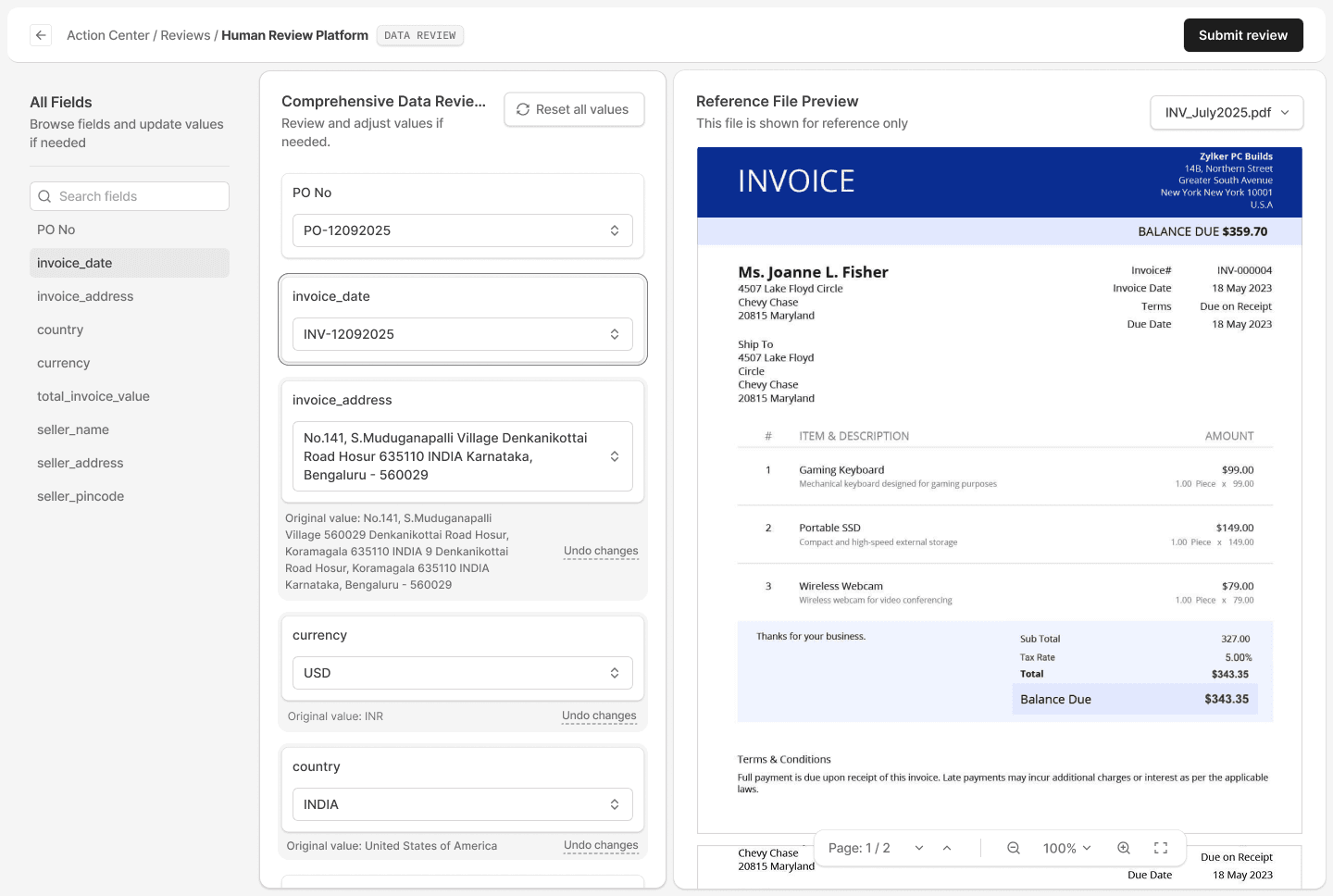
Review Platform has two modes, and which one you get depends on what you're reviewing. Document Review is for physical files like invoices, shipping papers, and certificates. It shows the original file next to the extracted data, with highlights marking where each value came from. Data Review skips the document entirely. There's no viewer and no file loading, just the fields laid out as key-value pairs, each one editable with a dropdown or free text depending on how it's set up. If it helps to have something on hand while checking the fields, you can still attach a reference document to the item; it's just there to refer to, not something you need to open or load to complete the review.
You can undo a single change or reset everything back to where it started. Because there's no file to render, you move through a Data Review item noticeably faster than a Document Review one.
To add it to a workflow, add a Data Review action (it shows up as "Review Data"), give it a Title, and configure the fields you want reviewed as key-value pairs. The Title isn't cosmetic. It shows up in the Action Center listing under the Filename column instead of a generic default, and it sits at the top of the review screen when someone opens the item. A long title truncates or wraps cleanly instead of breaking the layout. Edit the title on the workflow itself, and it carries forward to every new run without you touching anything else.
You can assign a Data Review action to an Admin, a Member, or an Operator. It's not locked to one role.
Where this is useful
Freight and logistics operations
A rate confirmation or carrier booking pulled from a system rather than scanned in doesn't need a document viewer. A dispatcher can confirm the load details on a key-value screen and move on, instead of waiting on a file to load the way a scanned BOL or rate sheet would need.
Customs brokers
Entry data coming from a portal, like HS codes or declared values submitted as system records rather than a scanned commercial invoice, still needs a person to check it before the entry goes out. A key-value screen lets a broker verify those fields directly, without the extra step of a document viewer.
Lending and mortgage
A loan application pulled from a system rather than scanned in still needs a human check before it moves forward. A key-value screen gets a processor through that check faster than a document-style layout ever would.
Manufacturing and procurement
Structured records coming out of an ERP or a supplier portal, like a PO's line items or a vendor's confirmed quantities, fit the same pattern. The data's already clean. It just needs a second set of eyes before it counts as approved.
Turn documents into decisions.
See how Docxster gets you from inbox to insight in minutes, not days. Bring your toughest workflow. We'll show you what it looks like solved.


