Document OCR in Docxster
What is OCR?
OCR stands for Optical Character Recognition. In Docxster, it reads your uploaded documents and automatically pulls out the information you need like invoice numbers, vendor names, dates, line items, totals so you don't have to type it out manually.
Once extracted, data can flow straight into your automation, or go to a team member for a quick review before moving forward.
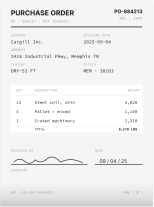
Supported File Types
You can upload any of the following document formats:
• PNG
• JPEG
• GIF
How it works
When you upload a document, Docxster performs two steps automatically:

Step 1 : Read the document
Docxster scans all pages and understands the content and not just the words, but where everything sits on the page.
Step 2 : Extract your data
Using AI, it finds the specific fields defined in your document schema and structures that information for you.
Fully automatic
No field mapping or rule writing required. The whole process happens automatically once a document is uploaded.
Human Review
You can turn on Human Review when setting up your flow. When enabled, the workflow pauses after extraction and opens a review platform
Your team can see the document side by side with the extracted data, check that everything looks right, make corrections, and approve before the flow continues.
With human review enabled:

Upload → Extract → [HUMAN REVIEW] → Continue
The review platform highlights exactly where each piece of data was found in the original document, making it easy to spot anything that needs fixing.
Without human review:
If your documents are consistent and you trust the extraction quality, you can skip human review entirely. Data gets extracted and passed directly to the next step faster and ideal for high-volume processing.
Upload → Extract → Continue
Processing Options
When you add document processing to a flow, you have a few choices:
Option | What it does |
|---|---|
Enable human review | Pauses the flow so your team can check extracted data before it moves on |
Support validation platform | Opens the full review interface with document highlights |
Multiple documents per file | Use this if a single file contains more than one separate document |
HTS code matching | Automatically suggests US tariff codes based on product |
Good to know
15-page limit
Documents are processed up to 15 pages. The current version works best with documents up to 15 pages long. Longer documents may not be fully processed. If you regularly work with longer documents, speak to your Docxster contact about the options available.
Large tables may slow things down
If a document contains a table with hundreds of rows, the review screen may take a moment to load.
All extractions are linked to a schema
Docxster ships with predefined schemas for common document types like invoices, POs, W-9s, BOLs, and more. Use them out of the box, or build a custom schema in the schema builder to match your document. If a field isn't in the schema, it won't be extracted.
Common Use Cases
• Automatically extracting data from supplier invoices
• Processing shipping documents and customs paperwork
• Reading purchase orders and matching them to records
• Pulling line items from receipts or statements for reconciliation
Questions? Contact the Docxster support team for help with setup or specific document types.
Turn documents into decisions.
See how Docxster gets you from inbox to insight in minutes, not days. Bring your toughest workflow. We'll show you what it looks like solved.


