

-
13 min read
The Real Cost of a Wrong HTS Code (and How to Catch It Before CBP Does)
What does a wrong HTS code actually cost? See the penalty tiers under 19 U.S.C. 1592, why the error starts in your documents, and how to catch it before filing.
Last updated:
TL;DR
A wrong HTS code is a legal declaration to CBP under 19 U.S.C. § 1592. Under 19 U.S.C. § 1592 it can count as a violation, and the cost scales from negligence to fraud depending on how it happened and whether duty was lost.
The penalty is the visible cost. The one that recurs is the kickback, where CBP returns the entry and your team rebuilds work it had already finished while the shipment sits.
The code is rarely where the error started, because it comes from vague descriptions and documents that disagree on origin or value.
You can catch most wrong codes between building the entry and transmitting it and this is when you do not even have a penalty on you.
Clean, reconciled data drives the classification instead of a vague description, and the broker reviews and approves the code before it files.
The HTS code you enter on a customs entry sets the duty owed, which makes it part of a legal declaration to CBP rather than a data field you fix later. Under 19 U.S.C. § 1592, a code that misstates the duty can be treated as a violation.
The penalty is not what most brokers end up dealing with. What comes back more often is the customs entry itself, returned for correction, along with the rework and the shipment sitting until it clears.
The code is also not usually where the error started. It comes from the commercial invoice, the packing list, and the bill of lading the entry was built from.
This article covers what a wrong HTS code costs, why it gets through, and where you can catch it before you transmit to CBP.
What happens when an HTS code is wrong
Under 19 U.S.C. § 1484, when you file a customs entry, you are making a legal declaration to CBP. The HTS code entered by a customs broker has to be done with reasonable care, and a wrong one can change the amount of duty owed.
What this error will cost depends on the intent of the broker who filed it. Under 19 U.S.C. § 1592, a wrong HTS code can be treated as a violation in case of negligence, gross negligence, or fraud. Here is what each of these levels means and what they cost:
Culpability level | If duty was lost | If no duty effect |
|---|---|---|
Negligence | Up to 2x the duties, taxes, and fees lost | Up to 20% of dutiable value |
Gross negligence | Up to 4x the duties, taxes, and fees lost | Up to 40% of dutiable value |
Fraud | Up to the domestic value of the goods | Up to the domestic value of the goods |
So the same wrong code can carry very different costs. What decides it is not the mistake by itself, but how it happened and whether it cost the government money.
The operational cost most brokers underestimate
The penalty CBP imposes is the visible cost. What you don't see is the operational drain that comes after CBP rejects the entry.
Most wrong codes don't end in a fine. They end in a kickback, where the entry comes back and has to be fixed and re-transmitted. That is more work on top of any penalty and the delay, so an entry that was already built once gets partly rebuilt. Depending on the entry, that rework could be a few hours or a few days. You don't really know until it lands back on your desk.
At Docxster, one customs broker described it this way in a demo call:
"If you get it done in six hours, transmit, get a kickback for errors, and then you have to do everything all over again, that's another four hours."
These hours never show up on a penalty notice. While the entry is being corrected, the shipment sits and can pick up holds, storage, and demurrage, the importer keeps asking for status, and the team gets pulled off new work to fix old work.
At volume, even a small rejection rate adds up to recurring lost hours, which is often why a growing business feels like it needs another broker.
Why the wrong HTS code gets through in the first place

Most wrong codes don't come from a broker not knowing how to classify. They come from the documents and the workflow feeding the entry. Here are a few of the reasons it happens:
1. The product description is too vague to classify
As a broker, you can't classify what you can't identify. When a shipper's invoice says "spare parts" or "steel parts," that description doesn't tell you what the goods actually are, so you're left either guessing at a code or going back to the shipper for the details you need.
CBP treats these terms as too vague as well. Its published list of unacceptable cargo descriptions includes terms like "parts" and "auto parts," and since October 2024 it has been rejecting filings that use them. When the description is that generic, you are classifying incomplete information, and entries like that are the ones CBP sends back.
2. Every invoice looks different
There is no set template for a commercial invoice. CBP's rules (19 CFR 141.86) tell you what information an invoice has to carry, like the buyer and seller, a detailed description, the quantities, the price, and the country of origin. They do not tell the shipper how to arrange any of it, and they even let required details sit on an attachment instead of the invoice itself.
So when you open two invoices for similar goods, you are not reading the same document twice. The value might sit near the top of one and in a footer on the other. The origin might be its own labeled field on one and a few words inside the product description on the next. You work through each invoice on its own to find where every field is, then move it into the entry by hand.
That is where a lot of your time goes, and on a tight filing deadline, it is also where a wrong number makes its way into the entry.
3. The documents don't align with each other
You are not working from the invoice alone. The bill of lading and the packing list feed the same entry, and they do not always match the invoice or each other on value, country of origin, quantity, or weight.
A lot of that comes down to who prepares each one. The seller writes the invoice, the carrier issues the bill of lading, and the shipper puts together the packing list, usually at different points in the shipment, so a late change to one is enough to put it out of line with the others.
This is why you can pick the correct HTS code and still send a wrong entry. The code fits the goods, but the value or origin attached to it was pulled from a document that disagreed with the rest, and nobody caught the gap before it went out.
How to catch a wrong HTS code before you transmit to CBP
As a customs broker, you already check the HTS codes before you file a customs entry. That is not the problem.
However, most wrong HTS codes can be caught between building the entry and transmitting it, when there is still time to fix them at no cost. This is because the error in the HTS code can originate from the source documents rather than at the classification stage.
During our demo call with Sydney, she described getting paperwork that assigns a steel tariff to goods that are not made of steel:
"Something that requires that isn't made of steel, but they're telling me it needs a steel tariff."
The wrong code was already there before she started the customs entry. This is why the check has to start with the documents.
Here is what that check looks like, and where you can automate parts of it:
1. Pull the entry data straight from the documents
The first step to avoiding entering a wrong HTS code will be to pick entry data directly from the source documents. This is because a lot of errors can start when you re-key an invoice into your customs software. For example,
A total can get mistyped
A country of origin gets copied from the last entry
A line item gets skipped on a long invoice
If you can pull data directly off the commercial invoice, packing list, and bill of lading, you can avoid having a data error. Docxster's automatic extraction handles this step
When you use Docxster, you take the exact values the entry needs, such as value, origin, quantity, and incoterm, from the documents themselves, whether they arrive printed, scanned, or as a PDF, without typing them again.
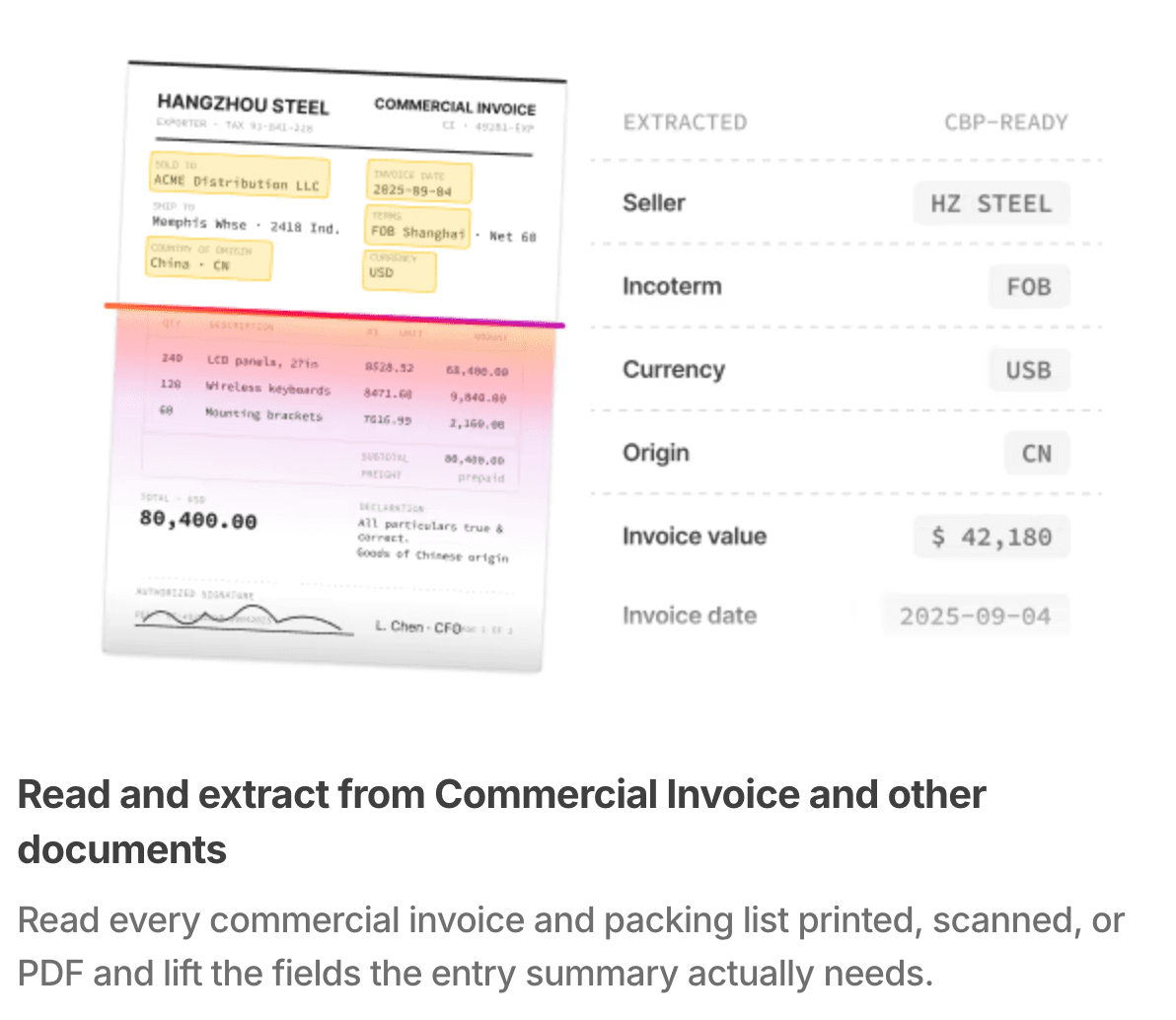
Docxster reads and extracts data directly from the source documents
Now because everything is handled automatically by Docxster the keying errors are gone before you reach HTS classification.
2. Reconcile the documents against each other before you classify
Once the data is pulled from the documents, check it across all documents involved before you assign an HTS code. You should compare the consignee, weight, pieces, and value across the invoice, packing list, bill of lading, and certificate of origin.
In case one number does not match the others, you find it here instead of after transmitting it to CBP.
Docxster runs this comparison automatically using three-way matching, applied to the documents your entry is built from: the commercial invoice, the packing list, and the bill of lading or air waybill.
Say the consignee, piece count, and B/L reference all match across the documents. The country of origin does not, because the commercial invoice shows one country and the certificate of origin shows another.
Your HTS code is still right for the goods. The duty rate on a shipment depends on the day its entry is filed, not the day it ships. That date can land on either side of a tariff change, and the rate changes with it.
July 24, 2026 is a clear case. The Section 122 surcharge that sat on most imports ended that morning, and a new Section 301 rate took its place the same minute. A shipment entered on July 23 carried the old rate. The same goods entered on July 25 carried the new one.
So the code can be right for the goods and the duty still wrong, if you figured it on a rate that had already changed. That is how a client ends up paying duty they no longer owe.
3. Close the missing-information gap without stalling the entry
Sometimes a customs entry is complete except for one field. It might be a missing MID code, or an incoterm nobody filled in. When that happens, someone has to email the shipper and then wait for a reply to get the missing information. The entry sits in the queue for the rest of the day, and often into the next one, over a single missing item.
Docxster takes that back-and-forth off your desk.
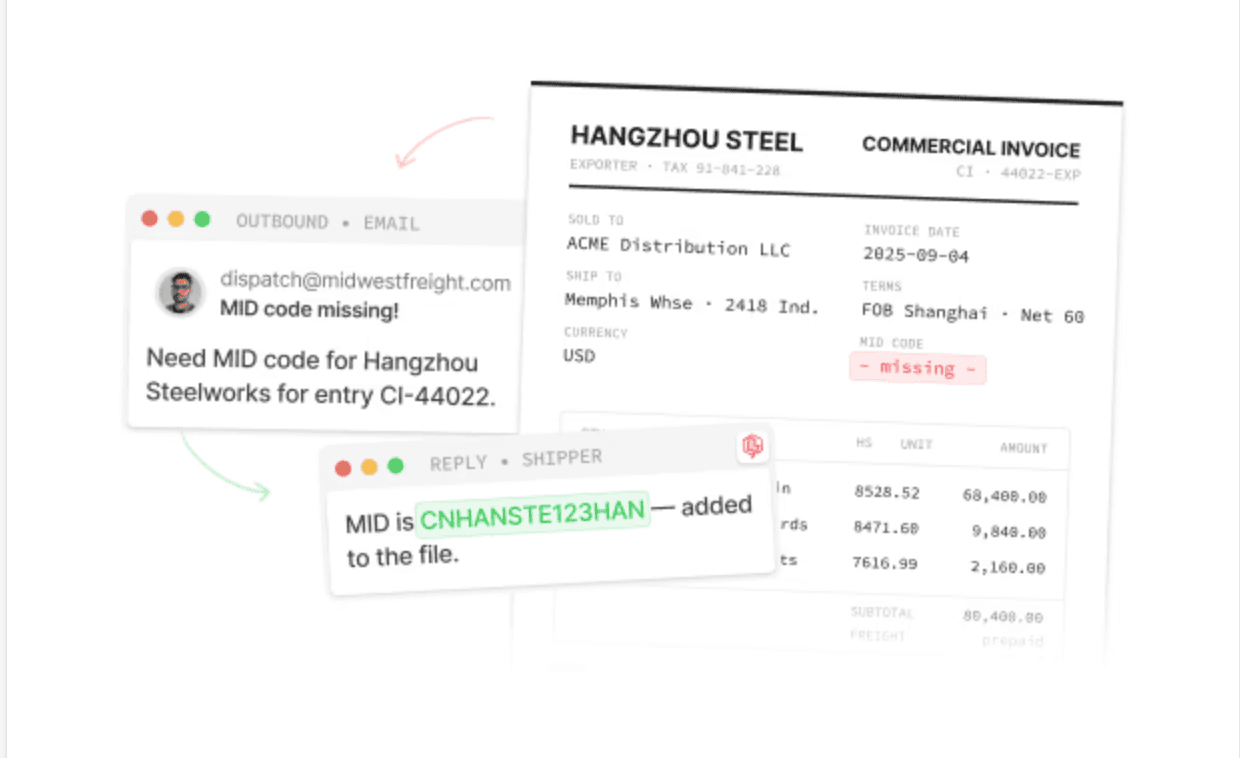
An image showing how Docxster will draft emails and get missing context
When a required field is missing, it drafts the one-question email to the shipper, reads the reply when it comes in, and writes the answer into the entry. So instead of coming back to a thread you still have to chase, you come back to a field that has already been filled.
4. Let the data drive the code, then approve it yourself
By this stage your line data is clean and reconciled, so classification is no longer a lookup you run against a vague description. You are working from the product details, quantities, values, and origin that the documents agree on.
Docxster's HTS classification module takes the product description or a code you already have, along with the country of origin, shipment value, mode of transport, entry date, and date of loading, and returns the classification with its duty rate.
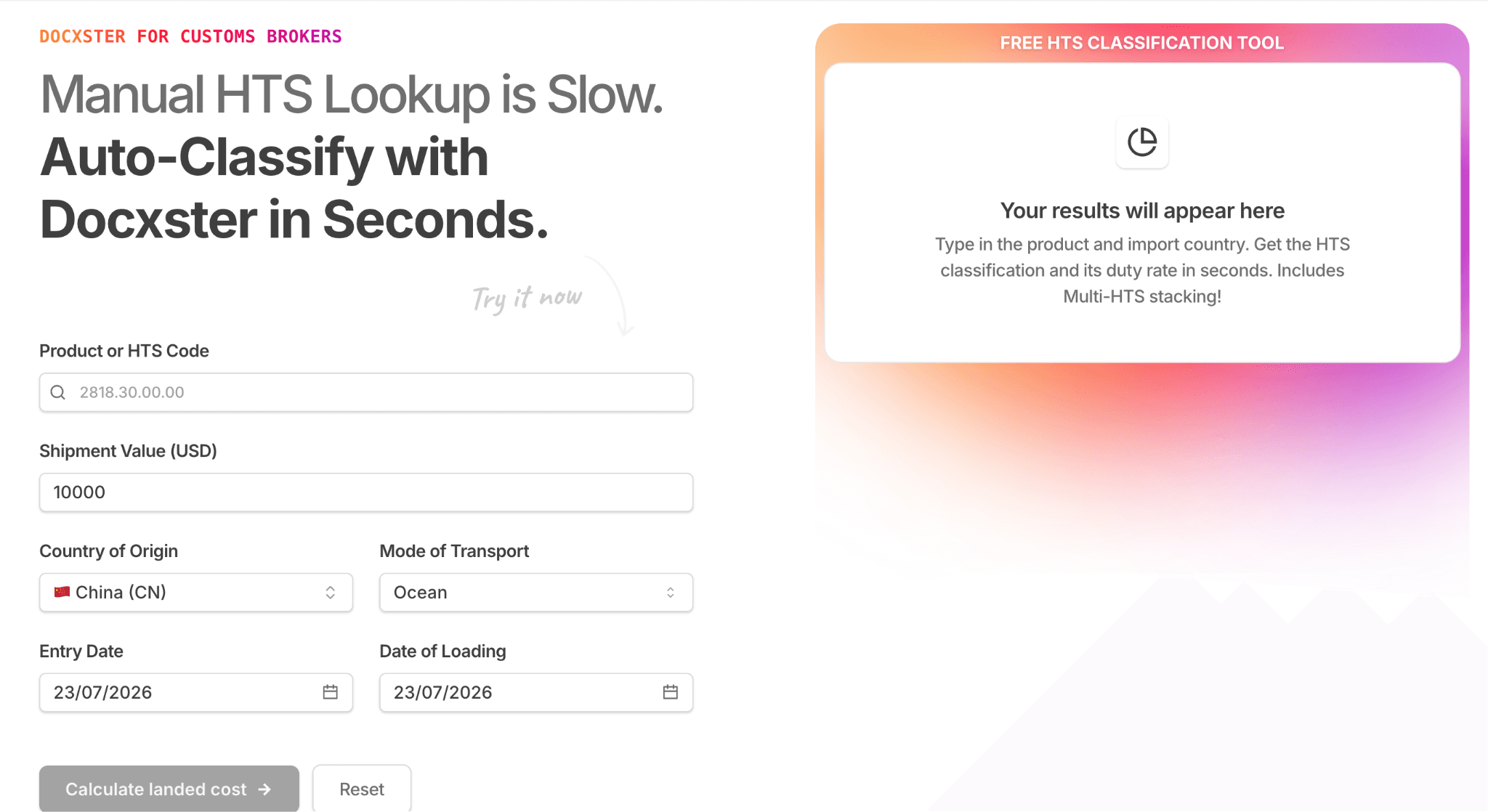
Docxster’s HTS classification module
It accounts for multi-HTS stacking, so you can see where Section 301 or 232 duties land on top of the base rate, which is the part that changes often enough that brokers end up tracking it on their own spreadsheets.
Most brokers already keep a parts library, an Excel or Google Sheet listing the commodities they import often and the code each one carries. Docxster reads that file, so a commodity you have classified before fills in from your own record instead of getting worked out again. Only the items new to the list go through classification.
You then review the result and decide whether the classification is correct for the merchandise you are entering.
Start with one workflow before your next customs filing
A wrong HTS code carries a penalty under 19 U.S.C. § 1592. What you are more likely to deal with is the customs entry coming back for correction while the shipment waits, which costs you hours you had already spent once.
The code is rarely where the error began. It came from the documents the entry was built from, where a product description was too vague to classify or the invoice and the bill of lading did not agree on the country of origin.
So the check has to happen before you transmit, and it has to start with the documents rather than the code. That means taking the entry data from the source files instead of re-keying it, then reconciling those documents against each other so a mismatch surfaces while you can still correct it at no cost.
Pick the workflow where a returned entry costs you the most and validate that one first. Schedule a demo with Docxster to see the check run against your own documents.
FAQs
What is the penalty for wrong HS code?
Under 19 U.S.C. § 1592, negligence can cost up to 2x the duties lost or 20% of the dutiable value, gross negligence up to 4x or 40%, and fraud up to the full domestic value of the goods.
Who is responsible for the correct HTS code?
The importer of record carries the legal responsibility under 19 U.S.C. § 1484, even when a customs broker does the actual classification on their behalf.
What is the difference between tariff code and HTS code?
"Tariff code" is the general term for a product classification number. The HTS code is the specific US version, a 10-digit code built on the global 6-digit HS code with 4 more digits that are unique to the United States.
How to fix the wrong HTS code before customs find it?
Correct and re-transmit the entry before it is accepted, or file a Post Summary Correction if it has already gone through. If you catch it before CBP opens an investigation, a prior disclosure under § 1592 can limit the penalty to interest owed.
Turn documents into decisions.
See how Docxster gets you from inbox to insight in minutes, not days. Bring your toughest workflow — we'll show you what it looks like solved.


