
-
14 min read
How to Validate Freight Invoices Against Rate Confirmations
See How You Can Validate freight invoices against rate confirmations, spot overcharges hiding in the line items, and automate the whole check without code.
Last updated:

TL;DR
A freight invoice should match the commercial terms you agreed to in the rate confirmation. Overcharges rarely show up in the invoice total. They hide in the line items.
You need four documents to validate one invoice with confidence: the rate confirmation, the carrier invoice, the bill of lading (BOL), and your contract or tariff.
The money leaks by charge type: base rate, fuel surcharge, accessorials, weight or class, mileage or zone, and duplicate charges. Each one has its own detection rule and its own proof document.
Checking this by hand takes 5 to 10 minutes per invoice, so most teams sample a few and pay the rest. A no-code workflow lets you check every invoice the same way, every time.
A freight invoice is supposed to match the rate confirmation you agreed to before the load ever moved. When it does not, the difference is usually small enough to slip by, and that is exactly why it costs you money.
Here is how it plays out. A carrier invoice lands in your billing inbox. It is a little higher than you expected, but the linehaul looks right and the total seems reasonable, so nothing trips an alarm. The rate confirmation that proves what you actually agreed to is buried in an email thread or filed somewhere in your transportation management system (TMS). Your coordinator has 60 other invoices to clear today, so this one gets approved and paid.
On its own, that invoice is off by a few dollars. Repeat it across a few hundred loads a month, and the small, quiet overcharges add up to real money. They slip through for one reason: the overcharge almost never shows up in the invoice total. It hides in a single line item, and catching it means comparing the invoice to the rate confirmation line by line, which most teams cannot do on every load.
This is not an edge case. Validating freight invoices against rate confirmations is one of the most common workflows the mid-market logistics teams we work with ask us to automate, and the question behind it is almost always the same: how do I know a carrier did not bill me for something that was never on the rate confirmation?
This guide shows you how to run that check, which documents you need, the overcharge patterns to watch for by charge type, and how to validate every invoice the same way without writing code. (For the wider audit process and how to dispute charges once you catch them, see our guide on how to conduct a freight bill audit.)
Why Overcharges Hide in the Line Items, Not the Total
Most billing teams check the invoice total against a number in their head or a purchase order. The problem is that the total usually adds up. The arithmetic on the invoice is correct. What is wrong is the basis of a charge.
A carrier can apply list rates instead of your negotiated rates, and the invoice still totals correctly. With the average truck costing $2.26 a mile to operate in 2024 (ATRI), carriers manage rates tightly, so an expired rate slips onto a bill more often than you would think. A fuel surcharge can climb two percentage points and still look like a normal fuel charge. Most surcharges are pegged to the U.S. EIA’s weekly national diesel average (EIA), so the real check is whether the invoice used the correct week’s index. An accessorial fee you never agreed to can sit quietly between the linehaul and the total. None of these trip an alarm during a quick scan.
That is why validation has to happen line by line, against the document that set the terms. The rate confirmation is that document. It records what you and the carrier agreed to before the load moved, which makes it the reference point for everything the carrier later bills.
The Four Documents You Need to Validate One Invoice
A line-by-line check only works if you have the evidence on hand. For each shipment, that means four documents:
The rate confirmation sets the agreed charges: base freight, fuel surcharge basis, and any accessorials.
The carrier invoice is what you are checking.
The bill of lading (BOL) records what actually shipped, including declared weight and piece count.
The contract or tariff governs rates and surcharges across all your loads with that carrier.
For detention and similar time-based charges, a proof of delivery (POD) with timestamps becomes the deciding document. Each piece of paper is evidence for a specific kind of dispute. Knowing which document proves which charge is what turns a vague “this looks high” into a claim the carrier cannot argue with.
Example 1 — Rate confirmation 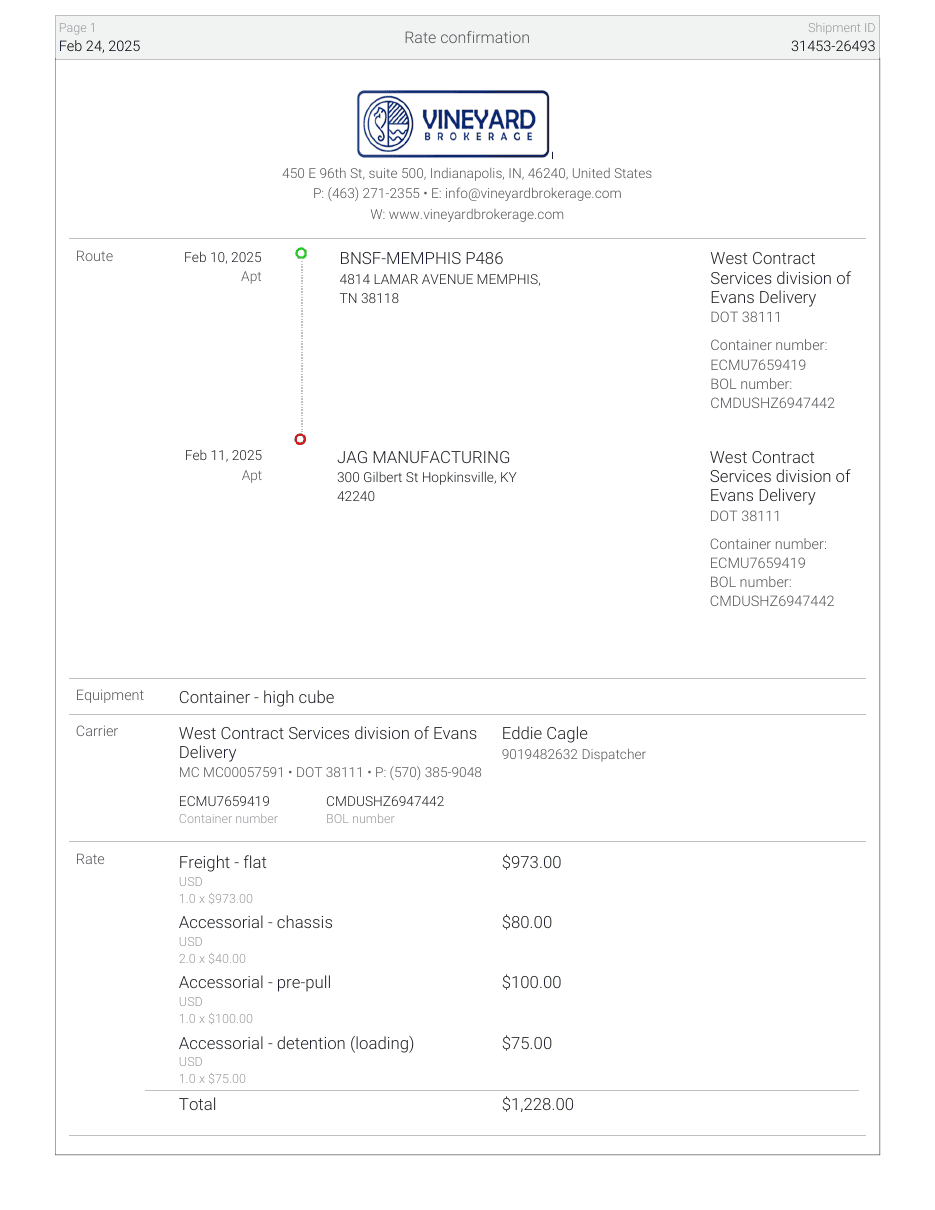 | Example 2 — Carrier invoice 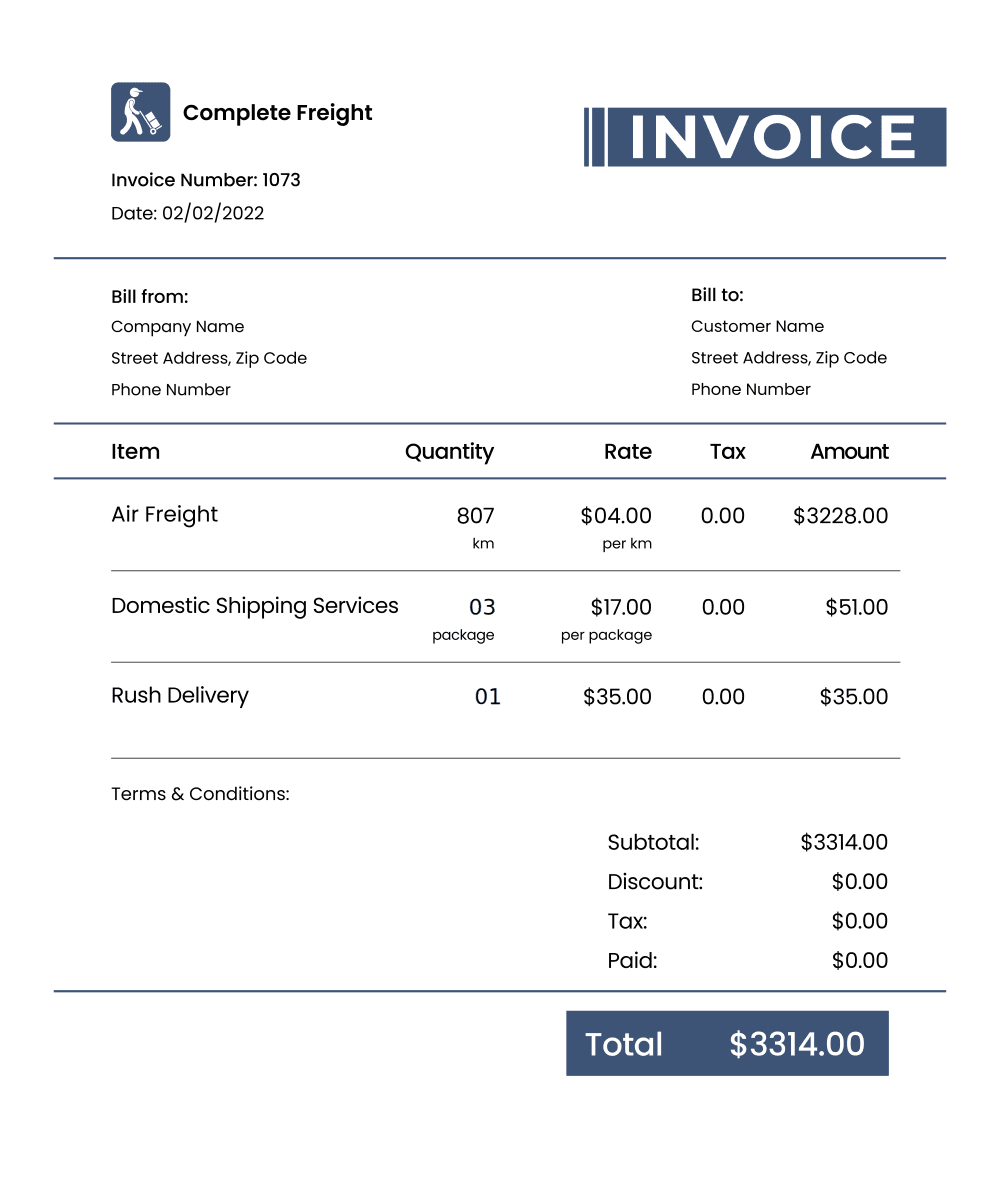 |
Example 3 — Bill of lading (BOL) 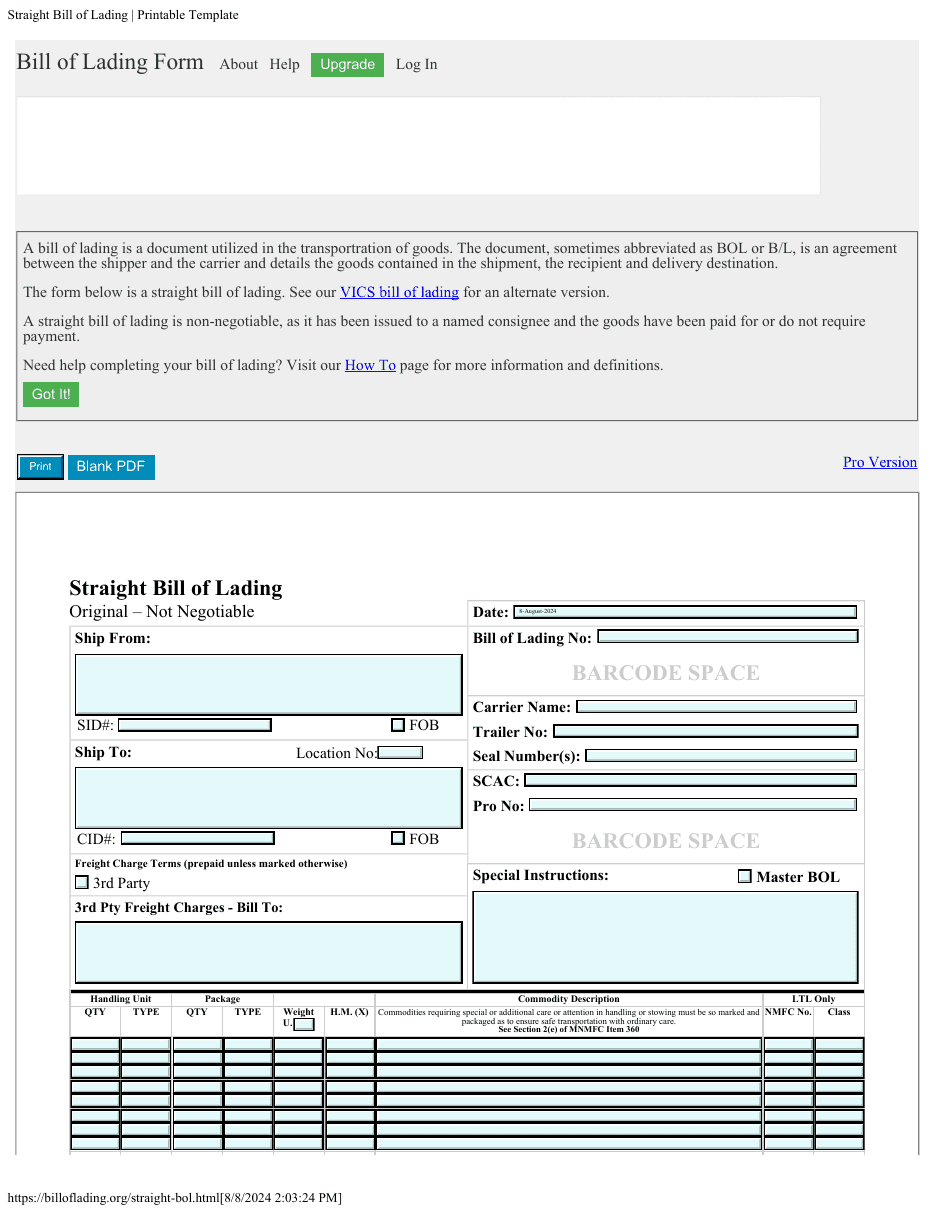 | Example 4 — Contract / tariff  |
Overcharge Patterns by Charge Type (and How to Detect Each)
Overcharges cluster into a handful of repeatable patterns. Here is what each one looks like, the rule that catches it, and the document that proves it.
Charge type | How the overcharge happens | Detection rule | Proof document |
|---|---|---|---|
Base rate / linehaul | Carrier applies list rates instead of your contracted rates, an expired discount tier, or an outdated rate version after a contract update | Match the billed rate to your contract by lane, service level, and weight break, and confirm the rate version in effect on the shipment date. Check the per-mile rate and the miles separately | Rate confirmation + contract |
Fuel surcharge (FSC) | The percentage creeps up after booking, or the wrong index or effective date is applied | Confirm the FSC percentage on the invoice equals the rate confirmation (or the referenced diesel index for that date) | Rate confirmation |
Accessorials | Lumper, liftgate, residential, inside delivery, detention, layover, or truck-order-not-used (TONU) fees appear without agreement or proof | Every accessorial must match a line on the rate confirmation or a timestamped written amendment. Detention is checked against free-time hours, the hourly rate, and check-in timestamps | Rate confirmation + BOL/POD |
Weight / freight class | A reweigh comes in higher, the wrong National Motor Freight Classification (NMFC) class is applied, or a default dimensional divisor is used | Compare billed weight and class to the BOL within an agreed tolerance, and verify the NMFC class against your contract | BOL + contract |
Mileage / zone | The carrier uses a different mileage engine, or a zip code typo pushes the shipment into a higher rate zone | Confirm the mileage source matches the rate confirmation (for example, a specific routing standard), and verify origin and destination zips | Rate confirmation |
Duplicate charges | The same invoice is resubmitted with a suffix or a slightly different reference number | Match against the root pro number or freight bill number plus amount and date, not the invoice number alone | Payment history |
Accessorials deserve special attention, because they are the most common place overcharges hide. A $75 lumper fee here and a $150 detention charge there do not feel like a crisis on a single load. Stacked across hundreds of loads, they are a margin problem.
Detention is a good example: nearly every carrier bills for it (94.5%, ATRI), so it lands on a lot of invoices and it's only valid if a line on your rate confirmation and a timestamped POD back it up. That's exactly the kind of charge that gets approved without proof. Every one of those charges is a line item someone has to prove or contest.
Weight and freight class also deserve a fresh look right now. As of July 19, 2025, the National Motor Freight Classification moved to a density-based system (NMFTA), changing how many commodities are classed. Until your contract and the carrier’s billing both catch up, class-based overcharges are more likely, not less.
Why Manual Matching Breaks Down at Volume
Now hold the method against reality. Validating one invoice properly means pulling four documents and comparing six or more line items. Even a fast coordinator needs 5 to 10 minutes per invoice, and only if the rate confirmation is easy to find. One US logistics operation we worked with handles 100 to 120 carrier invoices a day, with a person hand-sorting multi-page carrier PDFs before anyone can even start checking them against a rate confirmation. The cost adds up: a single invoice runs a median of $5.83 to process, and the slowest teams spend more than $10 each (APQC). Even well-run accounts payable teams still see about one in seven invoices kick out as an exception that needs hands-on work (Ardent Partners, State of ePayables 2025).
So teams do the rational thing under pressure: they sample. They review invoices above a dollar threshold and pay the smaller ones, which is exactly where accessorial errors live. The problem is structural: most teams cannot see line-item detail well enough, fast enough, to check every charge against the rate confirmation.
There is a second trap. Carrier billing systems are automated, so a single pricing-logic error does not hit one load. It repeats on every load in that lane until someone catches it. Spot-checking will miss it for months.
Checking every bill is not an unusual standard. The U.S. General Services Administration audits roughly 12 million transportation invoices a year (GSA). The practice is mainstream; the hard part has always been doing it at volume without a team of people.
How to Validate Freight Invoices Automatically With a No-Code Workflow
The fix is not a faster human. It is a check you build once and run on every invoice. Inside Docxster, you can set this up in a no-code Workflow Builder, with no help from your IT team. Here is the validation we walk through in the video, step by step.
1. Bring both documents in. Every workflow starts with a trigger. For this example we use a simple web form with two upload fields: one for the rate confirmation, one for the freight invoice. In production, you can trigger the same flow from a new email, a shared folder, or documents already sitting in your TMS or enterprise resource planning (ERP) system.
2. Extract the data from each document. Docxster runs optical character recognition (OCR) on both files using a document schema you publish once per document type. Because the extraction is templateless, it reads different carriers’ invoice formats without a separate template for each one, at about 99% accuracy. From the rate confirmation and the invoice, it pulls fields like the pro number, weight, and total charges. When you plan to compare data across two documents, you turn on validation support for each extraction step.
3. Match the fields with validation rules. This is where the check lives. You add a validation step and write one rule per field that matters. In the walkthrough, three rules run: the pro number on the invoice must match the rate confirmation, the weight must match, and the freight charges must match. You can add a rule for any field your schema captures, such as the fuel surcharge percentage or a specific accessorial.
4. Send mismatches to a person. When a rule fails, the invoice does not get paid automatically. It routes to a human-in-the-loop review and an approval step. A logistics coordinator sees exactly which rule failed, with both documents attached, and either approves or rejects. You decide what happens next, so automation never removes your control over a payment.
5. Act on the result. A matched invoice can flow straight into your accounting software or TMS. A mismatch can trigger an email and move into your dispute queue. In the walkthrough, the workflow sends one email for “validated” and another for “not matching,” so the right person always knows the outcome.
Once you publish the workflow, every submission runs the same way. The Runs view shows each step in real time, and the workflow pauses at the human-review step whenever a rule fails. You set the schema up once, and the check covers every invoice after that, not a sample.
What to Do When You Catch a Mismatch
Catching the overcharge is half the job. The other half is the dispute. Write up the discrepancy with the invoice and shipment details, reference the rate confirmation clause or contract rate the invoice violates, and submit it within the carrier’s window. US law sets the outer limits: under 49 U.S.C. § 13710, a shipper generally has 180 days to contest a charge, and under 49 U.S.C. § 14705, a civil action to recover charges must begin within 18 months. Track the dispute until the carrier issues a credit memo or a denial.
The full dispute and recovery process, including short-pay practice and how long you have to contest a bill, is covered in our freight bill audit guide. The point for validation is simple: when your evidence is already matched line by line, the dispute is short and hard to argue with.
Conclusion
Validating freight invoices against rate confirmations is not about distrusting your carriers. It is about making sure billing reflects what both sides agreed to. Done by hand, it is slow enough that most teams check a few invoices and pay the rest. Done as a no-code workflow, the same check runs on every invoice, which means one coordinator can cover the volume that used to need a whole afternoon of spreadsheet work.
If you want to see the validation running on a real invoice, watch the walkthrough above or book a short demo.
FAQs
What is the difference between a rate confirmation and a freight invoice?
A rate confirmation is the agreement between you and the carrier before a load moves. It records the agreed base freight, fuel surcharge basis, and any accessorial terms. The freight invoice is the carrier’s bill after delivery. Validation means checking that the invoice charges match what the rate confirmation set.
How do I validate a freight invoice against a rate confirmation?
Compare the invoice line by line to the rate confirmation: the base rate, the fuel surcharge percentage, each accessorial, the weight, and the mileage. Flag any charge where the billed amount does not match the agreed amount or has no supporting line on the rate confirmation. Keep the bill of lading and contract on hand as backup evidence.
What are the most common freight invoice overcharges?
Accessorial fees that were never agreed to, fuel surcharge percentages that change after booking, base rates billed at list instead of contracted rates, weight or freight-class adjustments, mileage or zone errors, and duplicate invoices submitted under a slightly different reference number.
Which documents do I need to dispute a freight bill?
For most disputes you need four documents: the rate confirmation, the carrier invoice, the bill of lading, and your contract or tariff. For detention and similar time-based charges, a proof of delivery with timestamps is the deciding document.
How long do I have to dispute a carrier invoice?
Your dispute window is set first by your carrier contract, which commonly runs from 30 to 180 days from the invoice date. US law sets outer limits too: under 49 U.S.C. § 13710, a carrier must bill additional charges, and a shipper must contest them, within 180 days; under 49 U.S.C. § 14705, a suit to recover charges must start within 18 months. Your contract controls the day-to-day deadline, so check it — once it closes, carriers usually deny the claim.
Can freight invoice validation be automated without code?
Yes. A no-code workflow can extract the fields from both documents, compare them with validation rules, and route anything that does not match to a person for review. You set it up once, and it runs on every invoice after that.
Turn documents into decisions.
See how Docxster gets you from inbox to insight in minutes, not days. Bring your toughest workflow — we'll show you what it looks like solved.


