
-
AI in Tariff Compliance for Customs Brokers (2026)
See what AI in tariff compliance really does for customs brokers in 2026, from reading messy documents to HTS support, and where the broker still decides.
Last updated:



TL;DR
AI in tariff compliance handles the repetitive work before the entry, like reading documents and pulling the data, while the broker makes the calls.
It does not replace a customs broker, since the reasonable care standard keeps the code and the signed entry with the broker.
Interest is climbing fast, with 40% of organizations now exploring AI for trade management, up from 6% two years ago.
Brokers turn to it for four reasons: document volume, inconsistent descriptions, repetitive data entry, and US tariff volatility.
The main use cases run from intake and extraction to cross-document validation and HTS classification support.
The setup that works keeps a human in the loop, so AI carries the volume and a person confirms the calls.
Starting out, map your document workflow first, then automate one high-volume workflow before adding more.
Have you ever been sold an AI tool that promised to read every document and classify every line for you? However, the first invoice that arrives in a new format is usually where that promise falls apart, since the paperwork that lands on your desk is rarely as clean as the demo.
Most of what AI can actually do for a broker is the repetitive work that comes before the entry, like reading the documents, pulling the data, and checking the figures against each other. However, the judgment still stays with you, since the code and the declaration are yours to sign.
In this article, we break down what tariff AI actually does for a customs broker, like where it saves real time, where it falls short, and how brokers are fitting it into the work they already do.
What is tariff compliance AI
Tariff AI is software that reads your import documents and turns them into structured, filing-ready entry data. The process usually involves:
Extracting fields from commercial invoices, packing lists, and bills of lading
Matching those fields against your prior filings
Suggesting HTS classifications from your own parts library
Attaching a confidence score to its extractions and suggestions
That structured output feeds the rest of the entry-prep workflow, so a reviewer starts from a populated entry instead of a blank one.
Tariff AI is often looked at as software that classifies duties and files entries for you. However, tariff AI is more about the work that comes before that, like reading your import documents and checking the data inside them, which is the part that actually repeats on every shipment and takes up your team's time.
Why customs brokers are turning to AI
In its 2026 Global Trade Report, Thomson Reuters found that 40% of organizations are now exploring AI for trade management, up from just 6% two years ago. Here is why customs brokers are turning to AI:
1. High document volume
A busy brokerage takes in hundreds of documents a week, like commercial invoices, packing lists, and bills of lading, and each one arrives from a different party in its own format. All of it has to be read and keyed before anyone even gets to the customs and tariffs side of the entry, and doing that manually is where a team loses most of its hours.
This is what pushes brokers toward tariff AI, since the software can read each document as it lands and pull the data straight into the entry, which is the same job the newer customs broker software is built to handle. The volume itself does not shrink, but reading and keying it stops being something a person has to grind through one document at a time.
2. Inconsistent product descriptions
Product descriptions are rarely written the same way twice, so one invoice might call an item a men's knit pullover while another lists a cotton jersey top, and since the description is what the HTS code hangs on, a loose one can become a wrong HTS code that changes the customs duties and tariffs on the entry.
We hear this often in our demos, like when one broker told us:
"The biggest challenge customs brokers have is the inconsistency of the documentation. AI is only good when it's consistent. I've been presented with stuff that spits out nonsense and makes things worse. Then a person has to go line by line and review it all. What's the point if my team member has to validate the AI's own validation of the data?"
So AI helps here not by reading faster, but by recognizing these descriptions as the same product even when the words do not match.
3. Repetitive data entry
Once the documents are read, someone still has to key all of it into the entry, and this is the part most brokers would hand off first, since it repeats on every shipment and the time it takes grows with the number of line items, so a short entry might be quick while one with pages of line items can swallow a whole day. That is the kind of work AI suits, like when it uses OCR to lift the data off a document in seconds instead of having a person type it.
We hear this often in our demos, like when one broker told us:
“With [our brokerage], we spend way too much time manually entering. It actually might be the worst out of everything that we do. I'll use [an AI tool] to OCR something for me and it takes very little time."
So AI helps not by replacing the entry, but by filling it from the document so your team only reviews the data, which is the same idea behind filing a 7501 without manual entry.
4. US tariff volatility
Tariff rates change often now, sometimes more than once in a week, and keeping up with those changes has become the hardest part of the job for many brokers.
In its 2026 Global Trade Report, Thomson Reuters found that 72% of trade professionals rank US tariff volatility as their top regulatory challenge, up from 41% a year earlier, with more than half reporting a heavier workload and nearly half reporting more stress. When the rules move that quickly, brokers look for tools that can take the repetitive work off their hands, which is one reason more of them are turning to AI.
Key tariff AI use cases
These are the tasks where brokers are using AI today, from the document arriving to the HTS code going on the entry.
1. Document intake and classification
Documents reach a brokerage from all over, like email attachments, scanned PDFs, and shared drives, and they come in without consistent naming, so the first job is figuring out what each file is. AI reads an incoming document and works out whether it is a commercial invoice, a packing list, or a bill of lading, and sends it to the right place, so your team starts from a sorted set of documents instead of a full inbox.
2. Data extraction from invoices
Once the documents are sorted, AI reads each invoice and pulls the fields the entry needs, like part numbers, quantities, unit values, weights, and country of origin, and turns them into structured data instead of leaving them as text on the page. Your team is not retyping numbers from a PDF, since the data comes across already captured, so a person can go straight to checking it rather than keying it in first.
3. Handling documents without fixed templates
Older extraction tools run on templates, so someone has to map each supplier's layout ahead of time, and the tool breaks as soon as an invoice shows up in a format it has not seen. Templateless AI reads a document by understanding what the fields mean rather than where they sit, so it can handle a new supplier or a changed layout without anyone setting up a template first, which matters for a brokerage that works with a long list of suppliers that each have their own paperwork.
4. Cross-document validation
The same details appear on more than one document, so a quantity on the commercial invoice should match the packing list, and a value should line up with the purchase order. AI runs that three-way match across every document in a shipment and flags where the figures do not agree, so small mistakes get caught early instead of coming back later as a query from the filing platform or from CBP.
5. HTS classification support
AI can suggest an HTS code from your parts library and score how confident it is, but the suggestion is only a starting point. That code sets the US customs tariffs owed on the line, so it still has to be checked before it goes on the entry. We hear this in our demos, like when one customs broker told us:
"A lot of vendors will put the [wrong-country] tariff, and the AI grabs it and treats it as legitimate. The first six digits are the same globally, but the last digits are unique to each country. The AI grabs what it sees, so my people have to verify every single one."
Does AI replace a customs broker?
No, AI does not replace customs brokers, it just takes over the repetitive document and data work that fills up most of the day. That leaves the broker free to spend their time on the parts of the job that actually need a broker.
AI is good at high-volume work, like reading documents as they arrive and pulling the data into the entry. However, it cannot stand behind that work, since the licensed broker is the one who reviews the data and signs the entry under the reasonable care standard.
So the best setup is an AI platform that keeps a human in the loop, like Docxster, where the software handles the volume and the broker keeps the judgment. The extraction and validation do the repetitive work, and your team reviews the data before the entry goes out.
A step-by-step guide to implementing AI in your customs brokerage workflow
Adding AI to your workflow works best one step at a time, so here is a practical order to follow.
Step 1: Map your current document workflow
Before you automate anything, you need a clear picture of how documents move through your brokerage today, like where they come in, who handles them, and where things slow down. So the first step is to write out each stage a shipment's paperwork goes through, from the document arriving to the data reaching your filing software.
That gives you the full picture you need before handing any part of it to AI. Mapping it this way also shows you where the repetitive work sits, so you can start with the parts that will save the most time.
Step 2: Choose one workflow to automate
Trying to automate everything at once rarely goes well, so it is better to pick one workflow that is high in volume and repetitive, like the intake and data entry for a single entry type, and get that running before you add anything else.
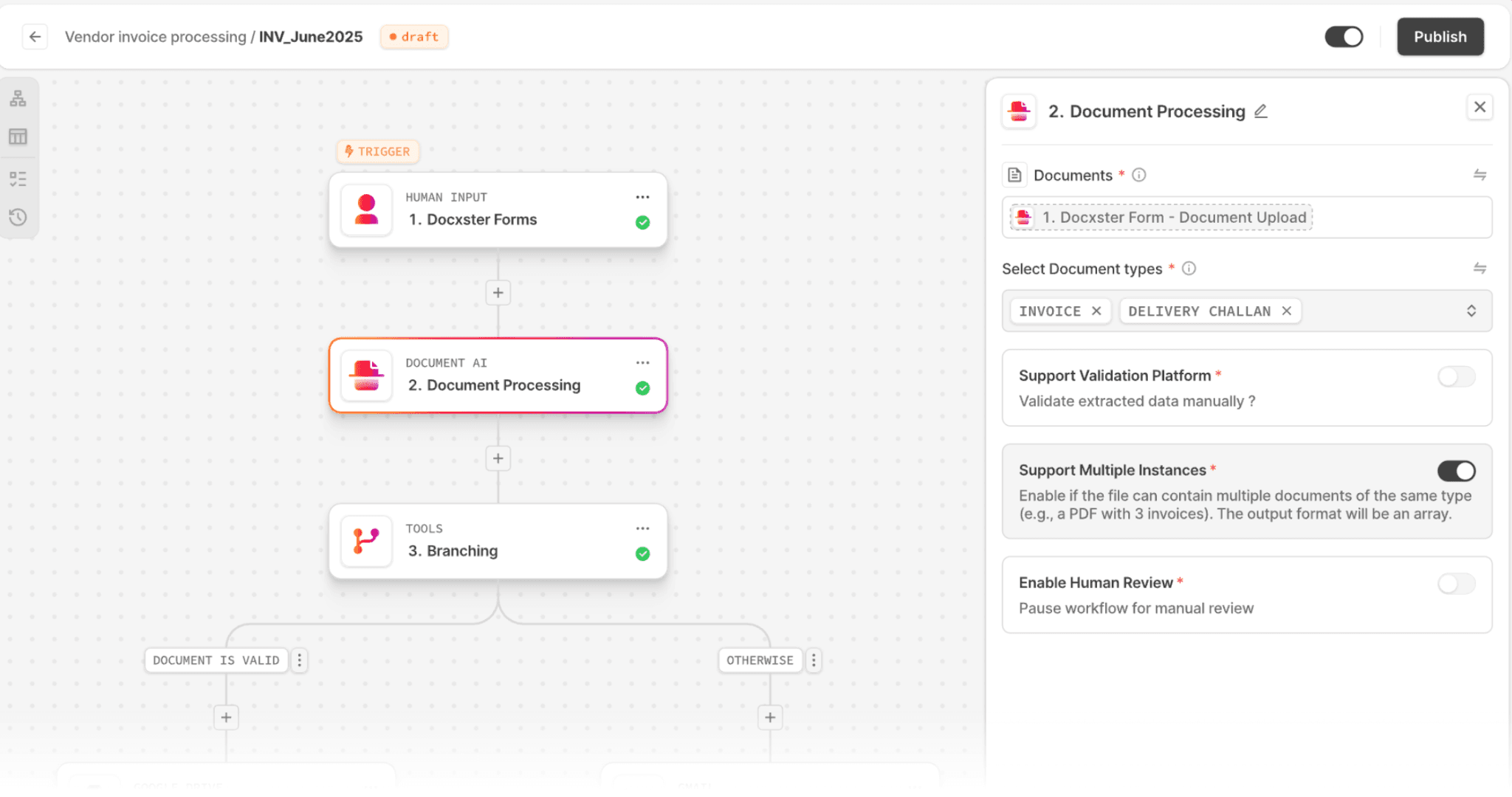
Once you have chosen it, a tool like Docxster's workflow builder lets you set up that one flow from start to finish, so you control where the documents come in and what happens to the data after. Pulling those documents from one place, like a Docxster Drive folder or a shared inbox, gives the workflow consistent inputs to work from.
Step 3: Extract, normalize, and validate the data
With the workflow in place, the tool reads each document and pulls the fields the entry needs, like part numbers, quantities, and values, without anyone setting up a template for each supplier's layout. Line items often come across as messy blocks of text, so Docxster Tables turns them into structured rows your team can actually work with.
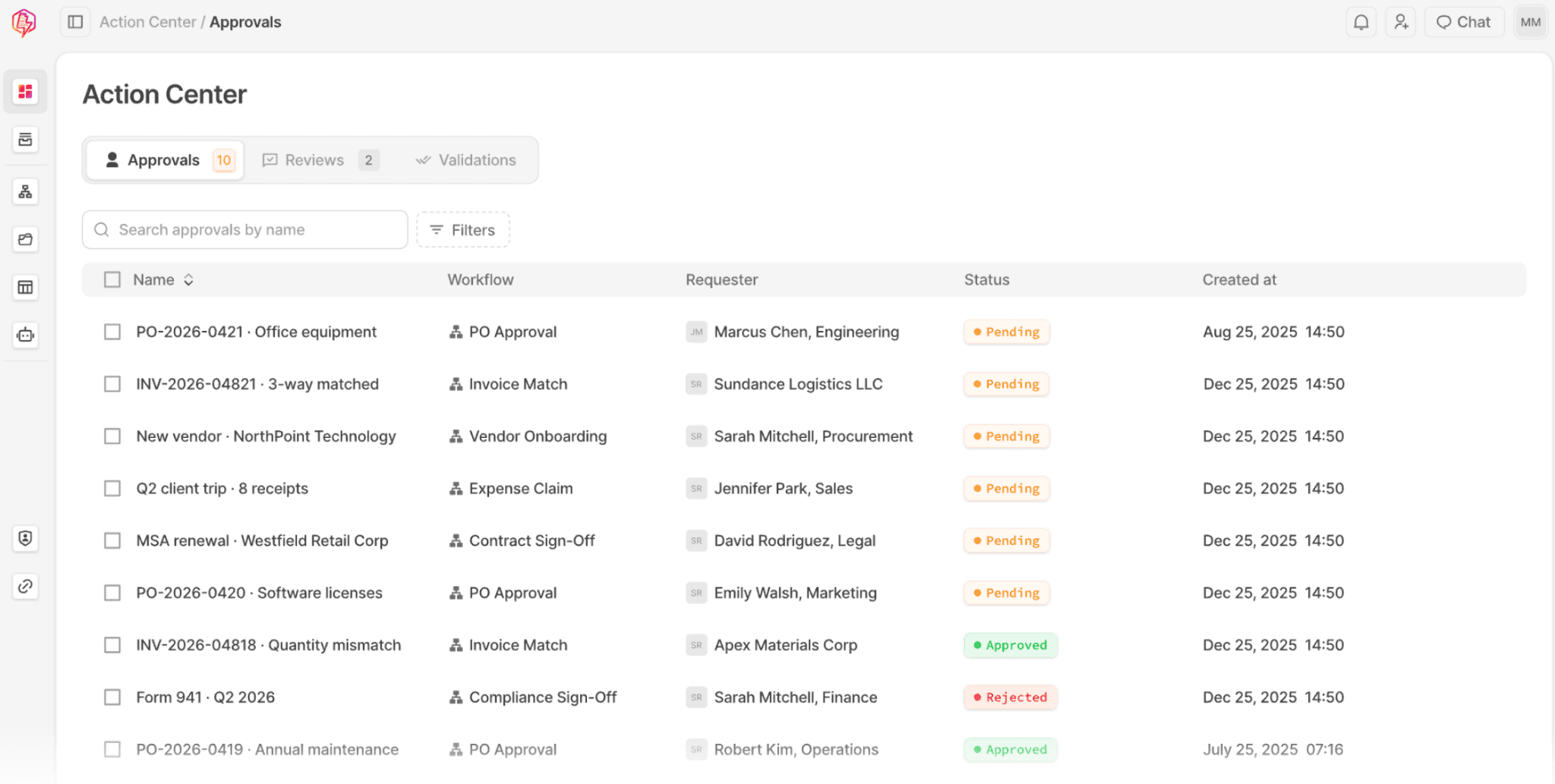
And when a required field is missing, Docxster Forms collects it from the supplier or your team instead of leaving a gap. Once the data is in and complete, Docxster's validation checks compare the fields across every document in the shipment and flag anything that does not line up, so a mistake gets caught before the entry moves forward.
Step 4: Add confidence scoring and keep decisions under broker control
Not everything the AI reads deserves the same level of trust, so the tool puts a confidence score on its output and sends the low-confidence items to a person rather than letting them pass.
This matters most for classification, which is where AI in tariff compliance earns its place. Docxster's HTS classifier suggests a code by leading from your own parts library first and using AI as a backup, then scores how sure it is in each suggestion.
Step 5: Integrate approved data with downstream systems
Once the data has been reviewed and approved, the last step is getting it into the systems you file from, so the work does not stall at the edge of your tool.
Docxster exports the approved data as structured output that your filing software can take in, which means the entry is built from data a person has already checked rather than re-keyed at the end. Keeping the export structure also lets the same clean data feed any other system that needs it, like your record-keeping, without another round of manual entry.
Using AI in your tariff compliance
Most of the errors and most of the hours in tariff compliance do not come from the tariff schedule itself, but from the documents that sit upstream of it, like a new invoice format that has to be read or a missing field that has to be chased down. That upstream work is the part that repeats on every shipment, and it is also the part AI is genuinely good at.
When that work is handled at intake, before the data reaches your filing software, what is left for you is the code classification and the declaration. However, AI does not make that final call, since the reasonable care standard keeps the code and the declaration with the licensed broker.
Docxster is built for that upstream step, so the platform reads the documents, extracts each line, and suggests an HTS code from your own parts library as you build the entry. You still confirm each code, so the final call stays yours.
Book a demo to see it run on your own documents
FAQs
What is AI for customs brokers?
It is software that reads your import documents and turns them into structured entry data, so your team spends less time keying and checking figures. It handles the repetitive document work, while the broker still reviews the data and files the entry.
Can AI replace customs brokers?
No. AI takes over the repetitive document and data work, but the licensed broker is still the one who reviews the data and signs the entry under the reasonable care standard.
Can AI classify products for customs?
AI can suggest an HTS code and score how confident it is, usually by leading from your own parts library. The suggestion is a starting point, since the broker makes the final call on the code that goes on the entry.
What customs documents can AI process?
It can read the documents that come into a brokerage, like commercial invoices, packing lists, and bills of lading, even when each supplier sends them in a different format.
How accurate is AI document extraction?
Accuracy depends on the tool and the document, which is why confidence scoring matters, since it flags the low-confidence fields for a person to check rather than passing everything through.
What should customs brokers automate first?
Start with one high-volume, repetitive workflow, like the intake and data entry for a single entry type, and get that running before adding more.



Turn documents into decisions.
See how Docxster gets you from inbox to insight in minutes, not days. Bring your toughest workflow — we'll show you what it looks like solved.


