-
Customs Brokerage Document Automation: A Complete Guide to Faster Entry Prep
Learn how customs brokerage works and how document automation handles intake, extraction, and validation before you file an entry with CBP.
Last updated:



TL;DR
Freight clears a US port in hours. The entry behind it lags, because most of the work finishes before the filing software is even open.
A customs broker turns shipment documents into an entry CBP will accept and stays responsible for it once filed. The importer of record still carries the legal liability for what gets declared.
The manual work concentrates before filing: line items keyed by hand, kickbacks that force a full redo, shipper invoices too vague to classify, and HTS codes that move as Section 301 and 232 tariffs change.
Document automation reads the incoming documents, checks the fields against each other, and fills the entry for review before you file. It is not a filing system, so it does not transmit to CBP or choose the HTS code.
Freight can clear a US port in a matter of hours, but the paperwork behind it moves much more slowly. Before an entry ever reaches CBP, someone has to read the commercial invoice and key in hundreds of line items by hand.
They also have to check that the details match across every document and go back to the shipper for anything too vague to classify. All of that happens before the filing software is even open, and it is where most of the time goes.
This guide explains what customs brokerage involves and how entry preparation actually runs today, from the documents that arrive to the stages where manual hours go. And then we’ll look at how document automation is changing that work.
What is customs brokerage?
Customs brokerage is the service of clearing imported goods through the U.S. Customs and Border Protection (CBP) so they can legally enter the country.
When a shipment arrives, it has to be declared to CBP and assigned the correct tariff code. CBP releases it once the duties and fees owed on it are paid. Handling this process on the importer's behalf is what a customs broker does.
A customs broker does three things for the importer:
Represents the importer to CBP. This requires a federal license to conduct customs business for other companies.
Prepares and files the entry, which is the set of documents and data CBP requires before it will release a shipment.
Keeps the filing compliant with CBP and other agency rules. The importer of record still carries legal responsibility for what gets declared.
Customs brokers get grouped with freight forwarders, and the two often work on the same shipment. What separates them is what each one is responsible for.
A freight forwarder moves the goods. They book the carrier, sort out the routing, and manage the shipment from origin to destination.
A broker clears the goods. They file the entry with CBP, classify what is in the shipment, and confirm the duties and paperwork are right so it can be released.
💡Also Read: Customs Automation: Why Deployment Speed Beats Features
The role of a customs broker
A customs broker turns a pile of shipment documents into an entry CBP will accept, then stands responsible for it once it is filed. This work breaks into three parts:
1. Classify goods and calculate duties
The broker reads the description on the commercial invoice and matches each item to a code in the Harmonized Tariff Schedule of the United States (HTSUS), and that code determines the duty rate.
For example, goods from China can carry a Section 301 tariff on top, and Section 232 applies to steel, aluminum, and a widening list of products made from them. Brokers raised this constantly in our demo calls.
As one broker put it during a demo call,
“A single entry now pulls in 301s from China... 232 for steel, aluminum, and copper, auto parts, and other things."
2. Prepare and file the entry
Once the goods are classified, the broker assembles the entry summary on CBP Form 7501 and transmits it to CBP. The form sets out what is arriving, who owns it, how it is classified, and how much duty is owed. This form reaches CBP electronically through ABI, the interface into the ACE system.
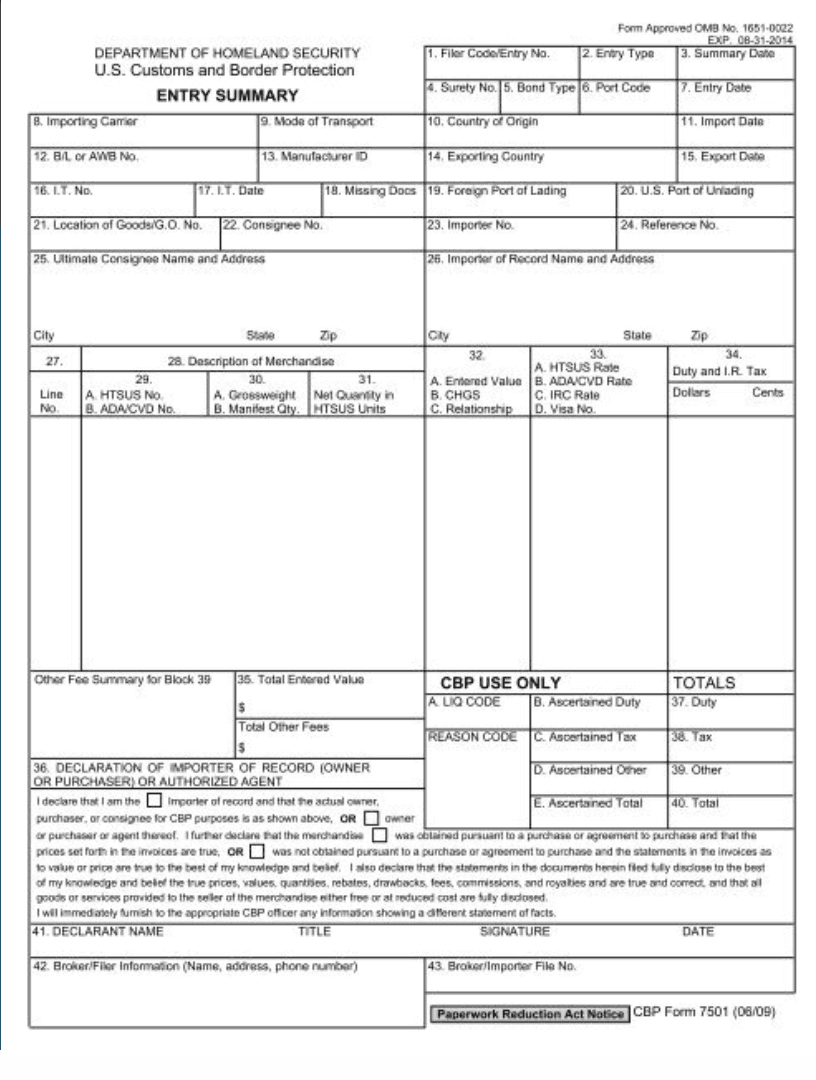
A copy of what the CBP form 7501 looks like
Most people picture this step when they think of customs work, but it sits near the end of the process, after the classification and the numbers behind it are already settled.
3. Carry the compliance load
The broker does not just file and move on. Every entry has to meet a reasonable care standard under CBP rules, which means the broker is responsible for getting the classification, valuation, and supporting documents right. The importer of record still holds the legal liability if something is wrong, but the responsibility of keeping each entry compliant sits with the broker, entry after entry.
Here’s what the customs entry workflow look like today
Here is what the process of customs entry prep looks like in most brokerages today, before any automation is involved:
1. Documents arrive in multiple formats
Every customs entry depends on multiple documents, and they rarely arrive the same way or in the same format.
The commercial invoice, bill of lading, packing list, EDI file, certificate of origin, and ISF data come in by email or fax, as PDFs, scans, and sometimes handwritten notes.
Take the bill of lading, the most standardized document of the set. A December 2024 FIT Alliance survey found that the share of users handling it in both paper and electronic form rose from 28% in 2022 to 42% in 2024. If the most standardized document still reaches over 40% of users in two formats at once, the invoices and packing lists behind an entry are even less consistent.
2. The customs broker reads and extracts the data
Once the documents arrive, someone has to read each one and extract the fields the customs entry needs: part descriptions, values, weights, quantities, and country of origin, keyed in line by line.
The work scales with the size of the invoice, and invoices get large. Brokers in our demo calls described single entries running from 400 to 800 lines, each one read off the document and typed in by hand.
One broker put it directly:
"When you've got to go through an entry with four or 500 lines and add the additional tariffs into each line, depending upon what it is, that takes time."
3. Data gets checked across documents
Once the data is entered, the broker verifies it matches across every document. The totals, weights, quantities, and country of origin on the commercial invoice must be consistent with the bill of lading and the packing list.
A commercial invoice that lists 200 cartons against a packing list that lists 180 is a discrepancy the broker must identify and correct before filing. This verification is done manually, one document compared against the next, on every entry.
4. Clean data goes to the filing platform
Only after the data is verified does it get entered into the filing software. That software is a separate system from wherever the reading and checking happened, so the data has to be moved across from one to the other. From there, the entry is transmitted to CBP through ABI, the interface into the ACE system.
This is the step most people picture as customs work, and it comes last. By the time the broker reaches the filing software, the reading, keying, and cross-checking are already done. The slow part of the job is behind them, upstream of the system they file in.
💡Also Read: Cross-Border Compliance: A Guide to Fixing Document Handoffs
The problem with document work in the industry right now
Across our demo calls, we talked to multiple customs brokers and the same problems came up again and again. Here are the ones that came up most which help you identify the problems with the document work in the customs industry:
1. Manual entry and rework
When every field of a customs entry is keyed by hand, some of them come out wrong. CBP catches the errors when the entry summary is transmitted, and a rejected summary comes straight back to the broker who filed it, still to be corrected before it can clear.
A kickback adds hours onto an entry the broker had already finished. One broker described what that looks like on a large entry: "if you get it done in six hours, transmit, get a kickback for errors, and then you have to do everything all over again, that's another four hours."
The correction that needs to be done runs on a deadline too, because CBP requires a rejected entry summary to be returned in valid status within two working days, so the rework competes with the next day's shipments for the same hours.
2. Vague and incomplete shipper docs
A lot of the delay starts with the paperwork the shipper sends. Invoices come in with fields missing or descriptions too broad to classify, and a line that reads only "parts" gives you nothing to assign a code to. One broker described how little the descriptions usually say:
"The invoices are usually incomplete, or the descriptions are too generic. It will just say steel parts, but what steel part? It could be any of a million things."
Even when you chase that detail down, the answer is not always right. One broker recalled a shipper insisting on a code that did not fit the goods:
"We will get something that isn't made of steel, but they tell me it needs a steel tariff. It's ridiculous."
You cannot file a description that is vague or wrong, so either way the line goes back to the shipper before you can move on.
3. Classification under shifting tariffs
Picking the right HTS code is one of the harder parts of an entry, and it has gotten harder because the tariffs attached to each code keep changing. For a single line you may have to apply the base duty, a Section 301 tariff, and a Section 232 tariff, and those rates change through the year as trade policy changes.
Many brokers end up tracking all of it by hand. One described the spreadsheet she built to keep up:
"You have to pick the right classification, so I built my own spreadsheet to track all the tariffs, because they keep changing. I lost count of how many times I updated it in 2025, and we have already changed it three times in 2026."
This is also the work importers most want to hand off. In the Descartes 2025 benchmark survey, HTS classification was the service brokers were asked for most often, by 51% of respondents. The part of the entry that takes the most work to get right is also the part clients are quickest to send your way.
What does customs brokerage document automation mean?
Customs brokerage document automation is software that handles the document work before a customs entry is filed. It does three things:
Reads the trade documents as they arrive and extracts the fields the entry needs
Checks those fields against each other and flags anything that does not match
Fills in the entry so it is ready for you to review
What customs brokerage document automation doesn’t do is just as important. It is not a filing system, so it does not transmit anything to CBP. It does not choose the HTS code for you either. It prepares the data and flags what needs a closer look, and then you review, classify, and approve.
And it sits upstream of the filing software you already use, rather than replacing it. It passes clean data into that system, so the only thing that changes is the document work that comes before you file.
How document automation will help customs brokerage
1. Extraction removes the keying
Docxster reads each commercial invoice and packing list as it comes in, whether it is printed, scanned, or a PDF, and pulls the fields the entry summary needs. It works without a fixed template, so an invoice from a new shipper does not have to be set up before it can be read.
This is the work most brokers automate first. In the Descartes 2025 survey, 52% named automating processes as one of their two leading tactics for improving margins, and the top performers reached 64%.
Consider an 800-line invoice, which can take a two-person team most of a day. Docxster reads every line and pulls the description, quantity, value, weight, and country of origin into a structured entry, so your team reviews what came out instead of keying it in from scratch.
2. Validation catches mismatches before filing
Once the fields are pulled, Docxster compares them across every document in the shipment and surfaces only the values that disagree. It checks four things in particular:
Consignee, across the invoice, packing list, and bill of lading
Weight, across the packing list and the BOL
Piece and carton counts, across all three
Declared value, against the invoice totals and any certificates
If the invoice lists 200 cartons and the packing list lists 180, that one line is flagged for you. Everything that agrees passes without a second look, so you review the short list of conflicts instead of reading each document against the others by eye.
3. The follow-up loop replaces chasing shippers
An entry stalls on two things: a field left blank, and a document that never arrived. Docxster runs both through a structured form or a Docxster Chat instead of a loose email thread.
For a missing field, the shipper answers in a fixed field and Docxster writes the reply into the entry. For a missing document, it names what the package needs and the importer uploads the file into the same form. You define a complete package once, and Docxster checks every intake against that rule, so nothing sits half-built waiting on a document no one flagged.
If a form does not suit a shipper, Docxster drafts a one-question email instead, still structured enough to file from. The follow-up happens without you, and the answer comes back clean instead of as free text you re-key.
4. Classification leads from your library not an AI model guess
Classification changes most often and carries the most risk, so the tool stays cautious here. Docxster handles a line in one of a few ways:
A line that matches something you have classified before takes its code straight from your record, and no model runs on it.
Docxster saves every code you confirm back to the library, so it covers more each time you file and the whole team works from one record for a given importer.
For an item it has not seen, Docxster suggests an HTSUS code with a confidence score and its precedents, and you confirm it before it stands.
When a line needs more than one number, Docxster stacks the Chapter 99 provisions that apply on the base code and shows why each one belongs.
Lines that share a code and an origin merge into one.
Confirming every line guards against the failure brokers describe, where an AI tool accepts whatever sits on the invoice, including a vendor's tariff number that does not fit the country of origin. Docxster proposes, and the licensed broker decides.
5. Docxster fits between the stack you already have
Docxster sits between the tools you already use instead of replacing any of them. Documents come in the way they always have, by email or a forwarded intake inbox, so shippers do not change how they send anything.
Once the data is validated, it exports into the filing software you already file in, or into your ERP or Excel. If your operation runs on a proprietary TMS, Docxster connects to it through API and webhook support.
💡Also Read: 10 Questions to Ask your Document Automation Vendor
Does automation replace the customs broker?
No. Automation handles the document processing part, while the licensed broker classifies the goods, reviews the entry, and signs off before it is filed. The importer of record remains legally responsible for what gets declared, and none of that responsibility transfers to software.
The broker stays essential because AI reads what is on the invoice and takes it as correct, including a tariff number a vendor typed in for the wrong country.
One customs broker put it plainly in our demo call:
"The AI grabs the American tariff off the invoice and treats it as legitimate. But the first six digits of an HTS code are the same worldwide, and the last four are specific to each country, so my people have to verify every one."
Docxster is built for that reality. Every suggested code comes with a confidence score and the precedents behind it, low-confidence lines and mismatches route to the broker instead of passing through, and each step leaves an audit trail that records who approved what and when.
The real bottleneck sits before the filing software
Your entries clear customs quickly once they are transmitted. The slow part comes before that: reading invoices, keying line items, checking that details match across documents, and chasing what is missing.
Document automation works on that earlier stage. It reads the documents, pulls the fields, flags what does not agree, and transfers the confirmed data into the filing software you already use. You review and approve instead of keying from scratch. The classification and the filing decision stay with you.
Docxster runs this on the workflow you set up, with your own documents and your own rules.
FAQs
1. What documents are needed to clear customs in the US?
The documents usually needed are the commercial invoice, packing list, bill of lading, certificate of origin, entry summary (CBP Form 7501), and ISF data on ocean shipments. The exact set depends on the commodity.
2. Can AI classify HTS codes?
Yes, as a suggestion. AI can read a line and propose a classification. What it cannot do is enter that code into a CBP filing on its own, because that call belongs to the licensed broker. At Docxster the classifier works from your parts library first, then proposes an HTSUS code with a confidence score for the broker to confirm.
3. How accurate is AI for customs classification?
Accuracy depends on how it is used. AI reads what is on the invoice and can carry over a wrong-country tariff or a vague description, so its suggestions are a starting point that a broker verifies, not a final answer.
4. Does AI replace customs brokers?
No, AI does not replace customs brokers. It handles the document work. The licensed broker keeps classification authority and signs off before filing, and the importer of record stays legally responsible.
5. How do customs brokers automate document data entry?
They use automation that reads the invoice, packing list, and BOL and extracts the fields the entry needs, so the team reviews the data instead of keying it.
6. What is the difference between document automation and customs filing software?
Filing software transmits the entry to CBP. Document automation sits upstream, turning incoming documents into clean data before the entry reaches that system.
7. Can automation handle messy or handwritten customs invoices?
Yes. Templateless extraction reads printed or scanned images, spreadsheets, and PDF documents, without a fixed layout, including handwritten notes.
Turn documents into decisions.
See how Docxster gets you from inbox to insight in minutes, not days. Bring your toughest workflow — we'll show you what it looks like solved.


