-
10 Questions to Ask A Document Automation Vendor (2026 Buyer's Guide)
Most vendor demos hide the edge cases. Use this guide to surface whether a document automation platforms would work for you.
Last updated:


TL;DR
Most document automation demos show clean, predictable workflows, but real production environments break on messy documents, new vendor formats, low-quality scans, and multi-channel intake.
Buyers should evaluate vendors around four areas: extraction quality, workflow ownership, trust and validation, and time-to-value.
Strong vendors should support templateless extraction, multi-channel intake, confidence-based review, field-level audit trails, and business-user workflow changes.
A vendor that depends on templates, services tickets, or vague accuracy claims will likely create hidden costs after implementation.
The best test is whether the vendor can prove value on one real workflow within 60 days, using your actual documents and measurable outcomes.
Most document automation evaluations start in the wrong place. You sit through a demo where every document is clean, every workflow runs perfectly, and you walk out confident. Six months later, your team is still cleaning up extraction errors on documents the system has never seen before.
If you're evaluating vendors right now, you probably carry a specific scar: a tool that looked strong in pilot and underdelivered in production. These 10 questions are built from Docxster's State of No-Code Document Automation 2026 survey of 310 finance, operations, and IT leaders across the US, UK, and Canada.
Let’s review them:
Questions about data extraction and document handling
Extraction is where automation breaks first.
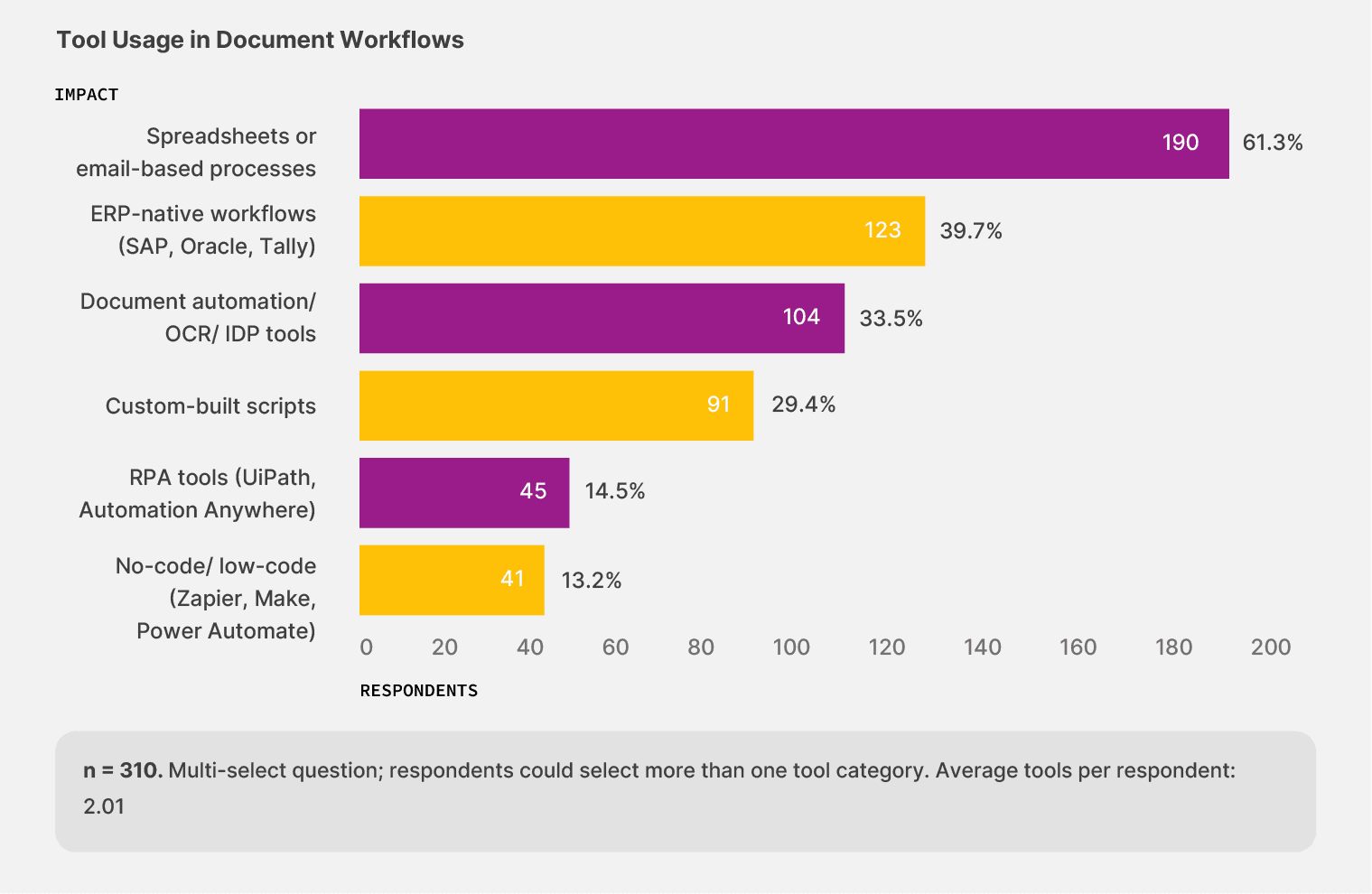
Your team processes documents from dozens—sometimes hundreds—of sources, and every source sends them in its own format. In Docxster's survey, 90.3% of teams haven't reached full automation. Only 13.2% have adopted no-code workflow tools, a category built specifically for documents that change shape from one batch to the next. The vendor who handles the demo set won't necessarily handle the batch that arrives Monday morning.
1. How does your tool handle vendor-format variability and frequent layout changes?
In Docxster's survey, 32.1% of finance teams report frequent layout changes as a top document challenge. That's roughly a third more often than the broader sample.
When a vendor switches invoice formats or a carrier updates its BOL template, tools trained on fixed templates break that same day. Think of it like building a new key for every lock in your building instead of having one key that reads the lock itself. Template-dependent extraction scales the same way: linearly, expensively, and always one format behind.
A good answer describes templateless or AI-powered extraction that reads new layouts on first contact without requiring an IT ticket. A bad answer is "we'll build a template for each new format," which means a support ticket every time a vendor changes anything.
Docxster was built around this problem. Its templateless AI extraction reads new layouts on first contact—your system adapts to the document, not the other way around.
👉 Follow-up: "What happens when a brand-new vendor sends an invoice in a format you've never seen?"
2. How does your tool handle multi-channel intake?
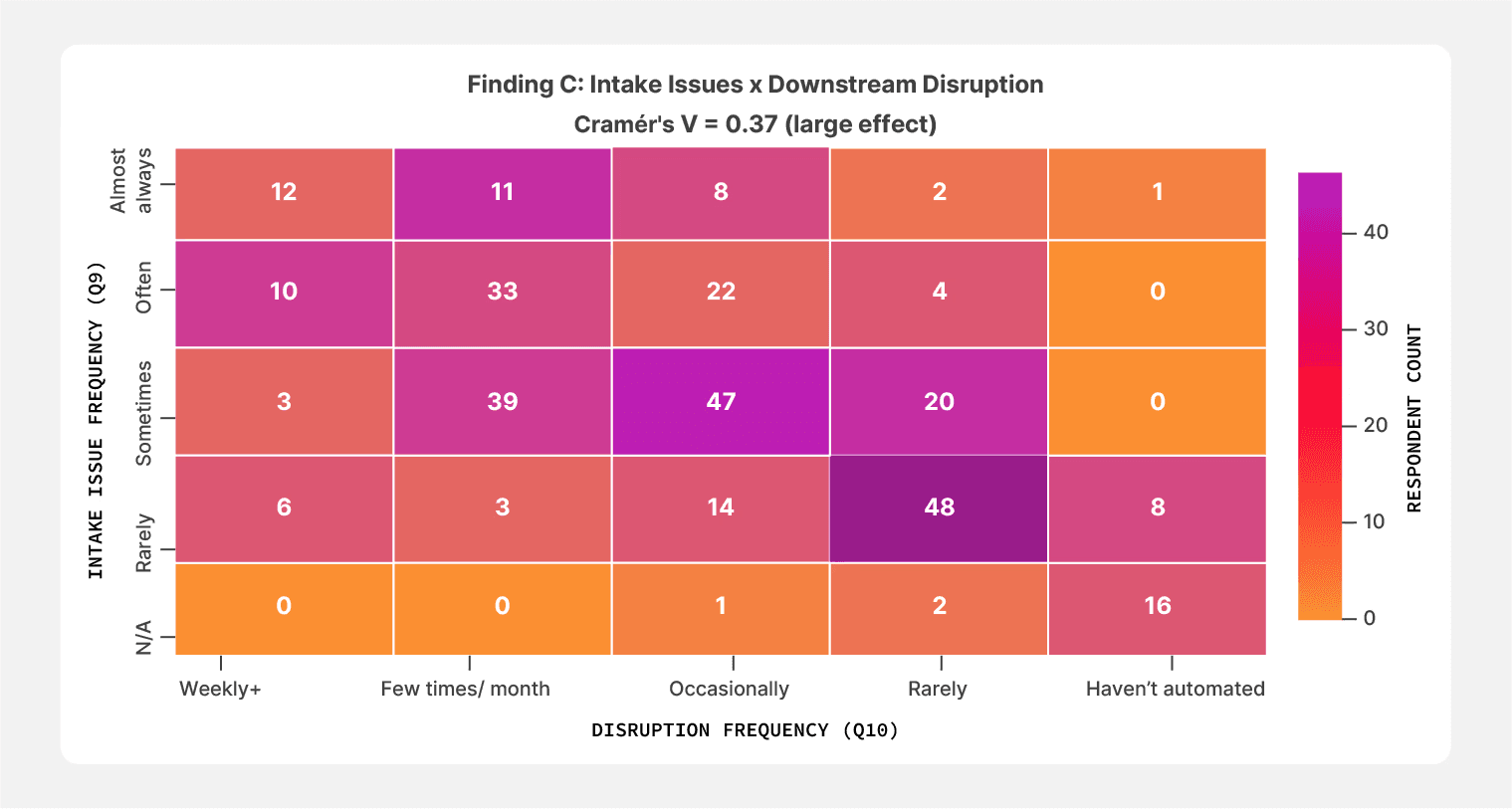
Intake variability showed the strongest correlation with downstream disruption in the entire Docxster 2026 survey.
Teams reporting intake issues "almost always" also report the highest rates of downstream disruption—67.6% of that group experiences document-related workflow issues weekly or a few times a month. Even teams calling intake only a "sometimes" problem absorb the damage: 39 of those 109 respondents face disruptions a few times a month.
Your documents arrive by email, shared drive, carrier portal, WhatsApp, and sometimes paper at the dock. A good answer includes native support for all of these channels feeding into a single extraction layer. A bad answer is "you upload PDFs to our dashboard."
Docxster was built for multi-channel intake from the start. Its data ingestion module pulls documents from email, WhatsApp, ERPs, shared drives, and manual uploads—so the intake problem is solved before extraction even begins.
👉 Follow-up: "Walk me through what happens when a BOL arrives by email versus through a carrier portal."
3. How does your tool handle handwritten or low-quality scans?
Across finance teams, 38.5% report handwritten or low-quality scans as a top challenge—five points above the survey average. In operations, 73.5% of teams sit at partially automated or worse, partly because their documents arrive in the messiest condition of any function.
Lumper receipts scrawled on paper slips. BOLs photographed at a loading dock. Purchase orders from vendors who still fax.
A good answer explains how the system handles handwriting recognition and what happens when extraction confidence drops. Low-confidence results should route to a human reviewer with the source image visible alongside the extracted fields. A bad answer is "OCR catches most of it" without explaining what happens to the rest.
Docxster handles this by flagging low-confidence extractions and routing them into a human-in-the-loop review queue. Your reviewer sees the source image alongside the extracted fields, and nothing moves downstream silently.
👉 Follow-up: "What's the workflow when a lumper receipt arrives as a phone photo of a handwritten slip?"
Score these answers on a 1–5 scale. If the vendor can't walk you through real document variability with specifics, their extraction layer will break on your actual document load within the first quarter.
Questions about ownership and workflow control
You can use a document workflow every day and still have zero power to change it without filing a ticket.
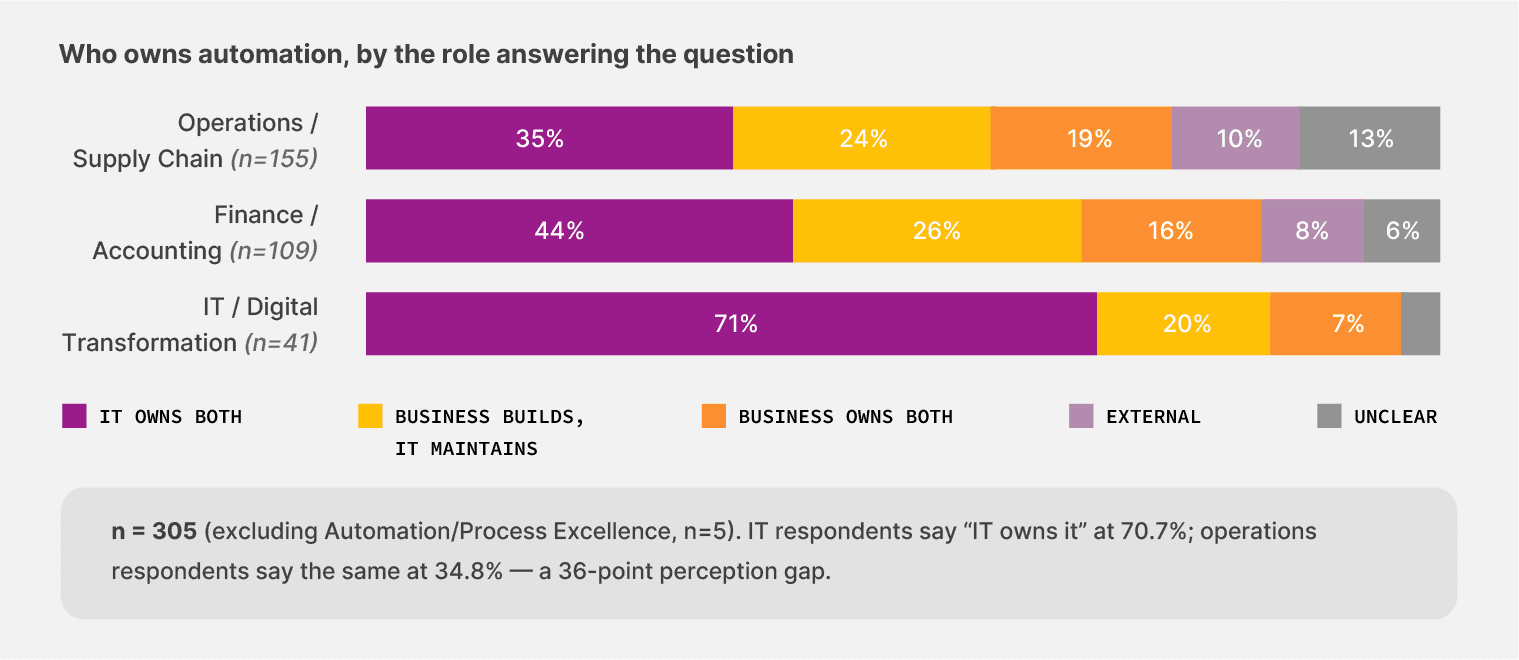
In Docxster's 2026 survey, 67.4% of teams depend on IT to build or maintain their automation, or both. The people who feel the breakage live downstream of the people who can fix it. In practice, it's like routing every plumbing issue in your building through the architect—technically correct, operationally absurd.
4. Can business users adjust workflow rules without filing an IT ticket?
The survey data on this point is hard to argue with.
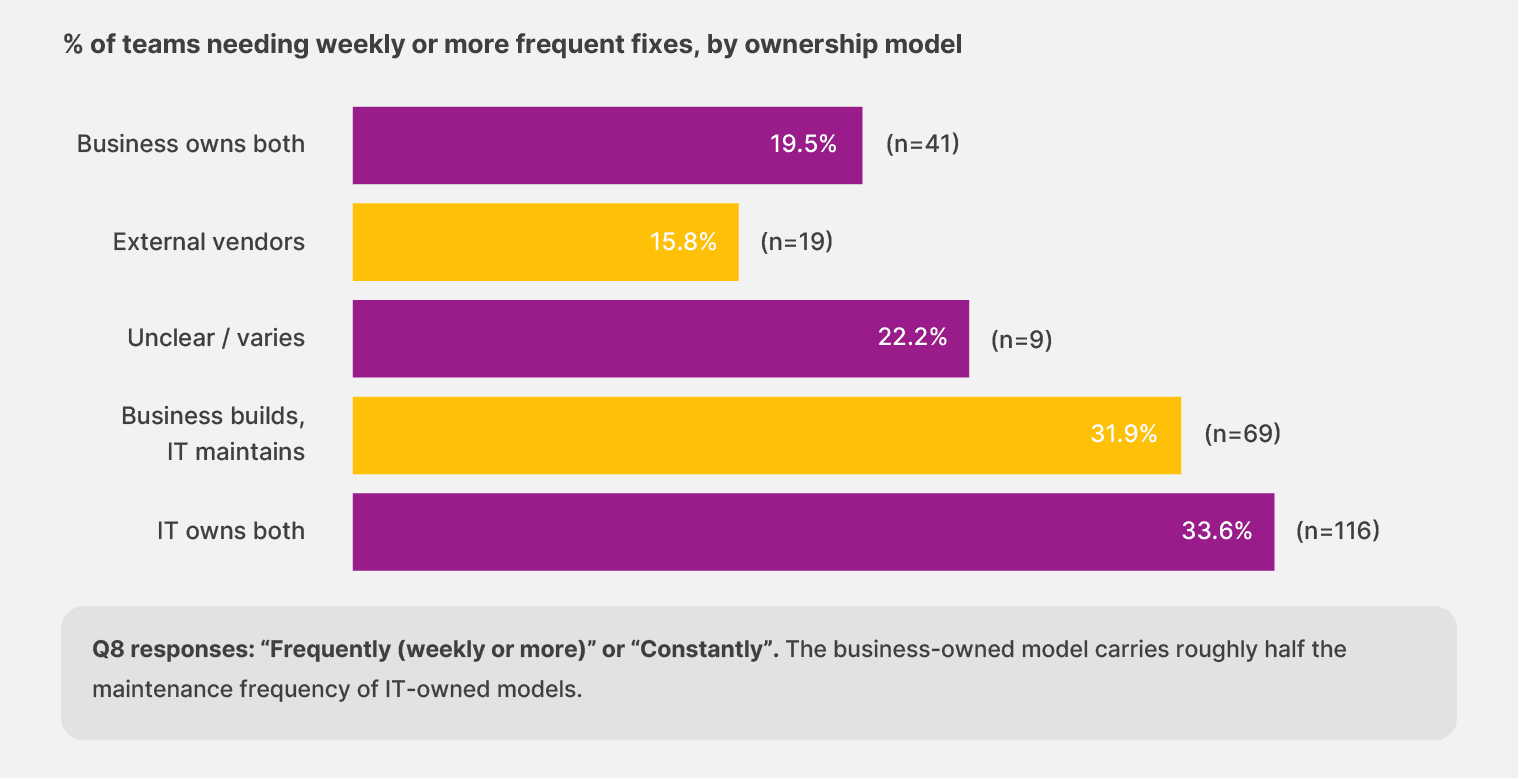
When business users own both the build and maintenance of their document workflows, weekly maintenance rates sit at 16.3%. When IT owns both ends, the rate climbs to 28.9%. Business-owned models carry roughly half the weekly maintenance load because the people closest to the documents catch layout changes and routing issues before they compound.
Among operations teams specifically, 12.9% report that workflow ownership is unclear or varies by workflow—a number that signals structural confusion, not just a personnel issue.
A good answer demonstrates a no-code rule editor that business users can operate, with optional IT-controlled guardrails for security and compliance. A bad answer is "any change goes through our solutions team."
Docxster was designed for exactly this split. Its no-code workflow builder lets your AP supervisors, controllers, and operations leads adjust validation rules and change routing themselves. IT sets the guardrails. The business makes the daily changes.
👉 Follow-up: "Show me how an AP supervisor would add a new validation rule for a specific vendor."
Document automation ROI calculator:
5. How long does it take to add a new document type to the workflow?
In Docxster's survey, 17.9% of teams sit in the danger zone—more than six months to value, or no clear value yet. Across operations teams, 23.9% remain fully unautomated, more than half again as likely as the survey average. A big part of the reason: adding new document types requires IT cycles they can't get.
A good answer is hours to a day for a similar document type, and days for something the system hasn't encountered before. A bad answer is "four to eight weeks, depending on complexity."
Docxster's templateless extraction adapts to new document shapes without multi-week builds or a professional services engagement. You add a new carrier, and the system handles it.
👉 Follow-up: "Walk me through that timeline for a freight bill from a carrier we just signed."
If the answers to both questions depend on the vendor's services team rather than your team, you're looking at a structural cost that compounds every year the tool is live.
Questions about trust, validation, and audit
Most automation buyers expect trust to build naturally with experience. The longer your team runs the tools, the more confidence you should gain in the outputs.
Docxster's no-code document automation survey found the opposite.
Teams running mostly automated setups select an average of 2.28 trust concerns—the highest of any maturity tier. Among teams further along the automation curve, the rate of "previous tools failed to deliver" climbs above 21% and stays there. Experience with automation includes experience with automation that failed, and that memory sharpens scrutiny rather than dulling it.

6. Can I trace any extracted field back to the source document?
Among finance teams, 40.4% name incorrect payments as their top trust concern. Another 34.9% name difficulty tracing or correcting errors.
An audit trail functions like a financial control where every number has a source, and any reviewer can walk backward from the output to the original document. Without one, you're asking your team to trust an answer without being able to show the math.
A good answer describes a complete audit trail from the source document to the extracted value to the downstream system with every field and every change logged. A bad answer is a vague yes without showing you the actual trail in the product.
Docxster provides this end to end. Every extracted field traces back to the source document, every change is logged, and your CFO or external auditor can pull the complete trail for any document at any time.
👉 Follow-up: "Show me how an auditor would pull the complete trail for a single invoice from last quarter."
7. How does your validation queue work?
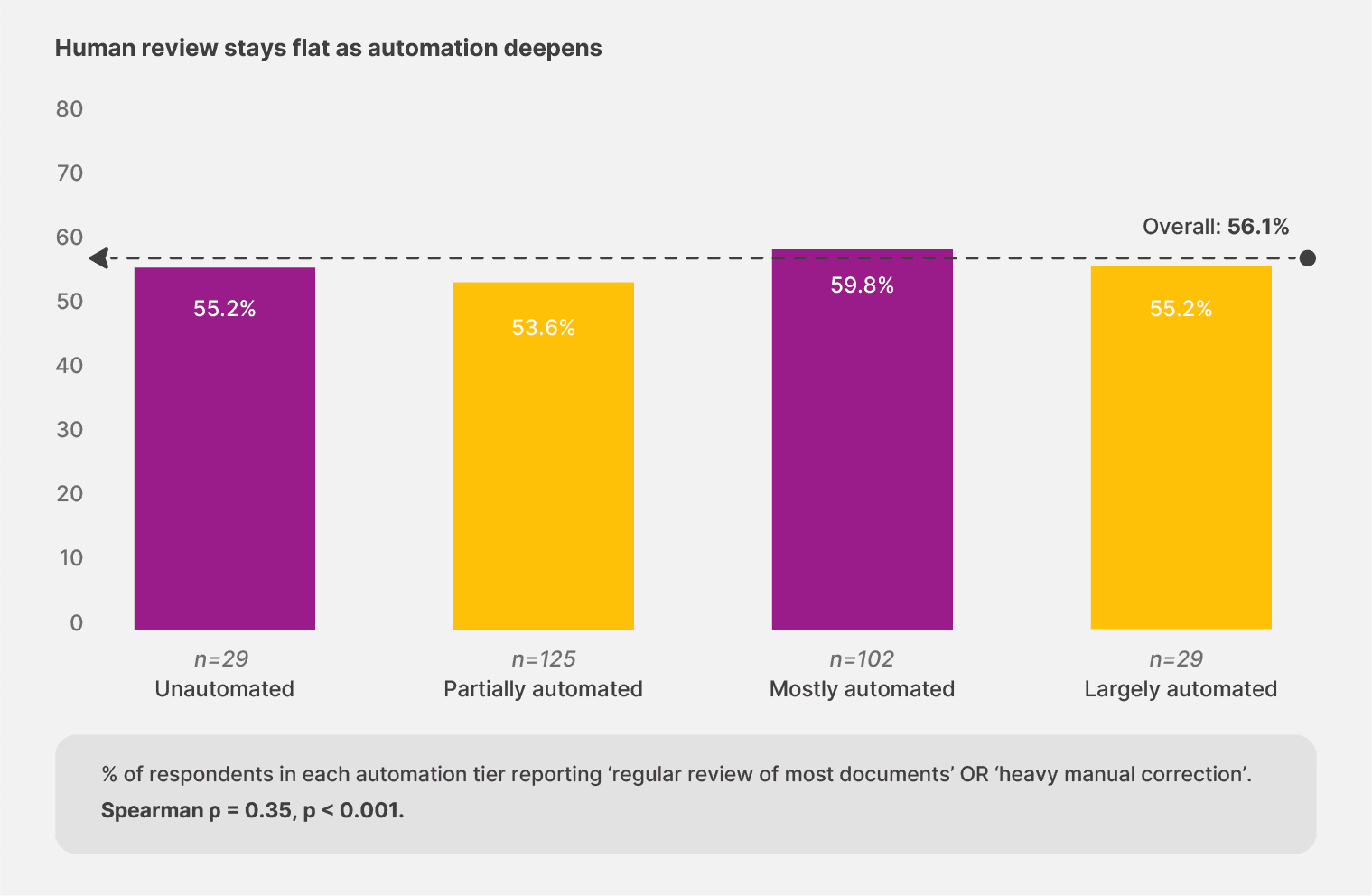
In Docxster's 2026 survey, 56.1% of teams need regular or heavy human review of most documents. That rate barely shifts with maturity:
Teams describing their setup as "largely automated" report regular or heavy review at 55.2%.
The partially automated group sits at 53.6%.
The mostly automated cohort actually runs slightly higher, at 59.8%.
Human review doesn't disappear as you automate more. The real question is whether your tool helps you focus that review where it counts.
Among finance teams, 45.7% have already settled on a spot-check model—light review of a sample rather than every document. That maturity tier is where confidence-based routing creates the most leverage.
Docxster's validations and approvals module routes low-confidence extractions to a review queue where your team sees the source document alongside the extracted fields. Human attention goes to the cases that actually need it.
A good answer includes confidence-flagged routing, configurable sampling rates, business-user review access, and role-based permissions. A bad answer is "we get 99% accuracy so review isn't usually needed." That sidesteps the question and ignores what more than half the market does every day.
👉 Follow-up: "What's the workflow when the confidence score falls in a borderline range—say 70% to 85%?"
Document automation ROI calculator:
8. What happens when extraction fails entirely?
When automation breaks, the fallback matters more than the failure itself.
Among operations teams, 21.3% revert to fully manual handling. And 3.7% report that failures go completely unnoticed until they cause downstream damage—almost double the survey average. Among finance teams, 33.3% say business users manually clean up the data themselves, often pulling senior accountants and controllers away from the work the company pays them more to do.
A good answer puts the source document, the extracted output, the system's best guess, and the routing to the right reviewer all in one interface. A bad answer is "you'll need to re-run it" without explaining what happens next.
Docxster handles this by surfacing failures immediately—source document and extracted fields side by side in the same interface. Your reviewer corrects inline, and the system learns from every correction.
👉 Follow-up: "What's the average resolution time for an extraction failure, and who on my team handles it?"
Score each answer against your own audit and review requirements. If the vendor can't trace a single field back to its source or hand off a failure cleanly, the tool will cost you on year two—in auditor hours, in cleanup labor, and in trust you can't rebuild by adding features.
Questions about onboarding and time-to-value
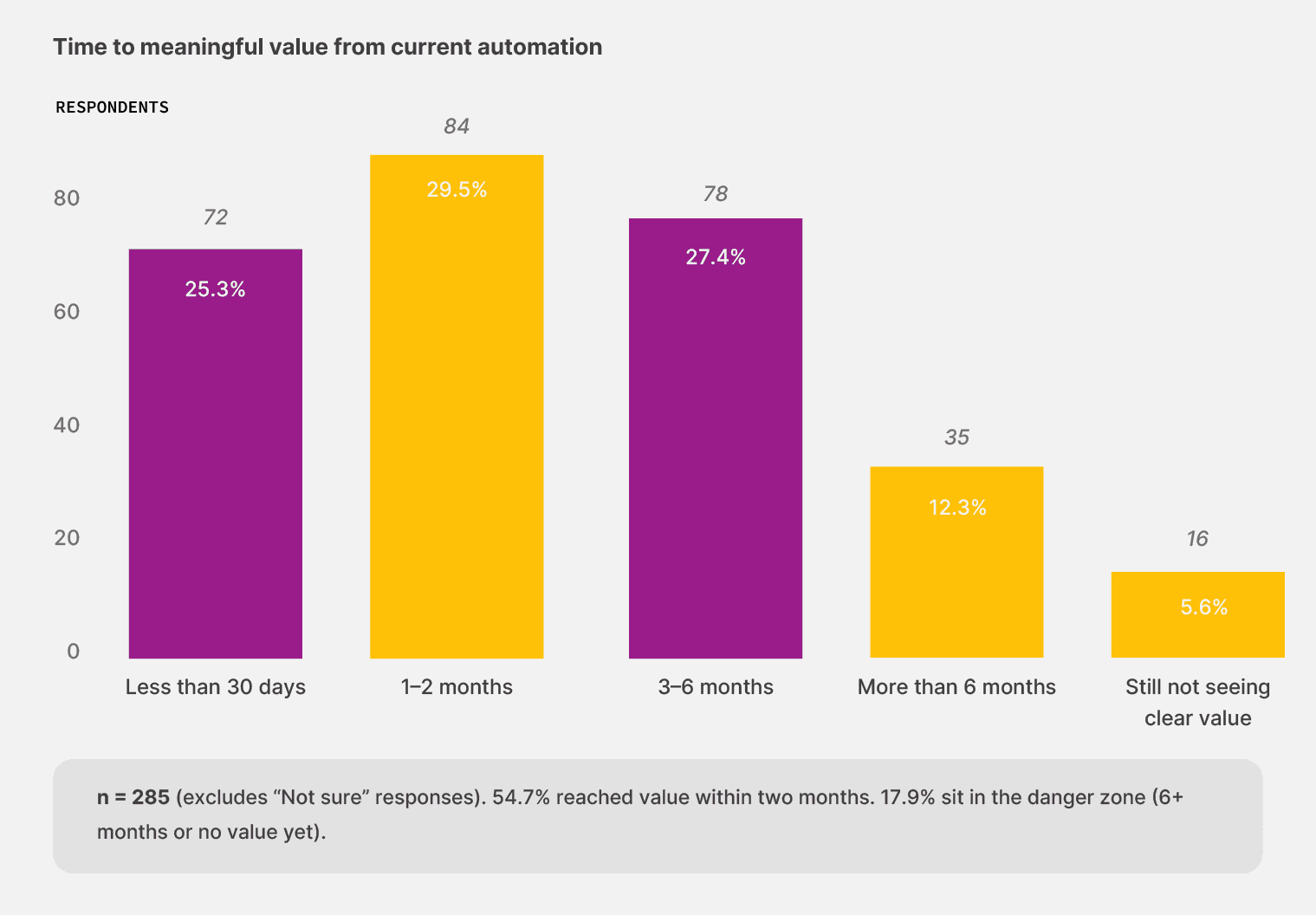
When teams pick the right tool, value tends to arrive quickly. In Docxster's survey, 54.7% of respondents reach meaningful value within two months. But 17.9% sit in the danger zone—more than six months to value, or no clear value yet.
Those two numbers describe a sharp split. These two questions help you figure out which side of it your evaluation is heading toward.
9. Can we start with one workflow and expand from there?
Among operations teams, 57.4% reach value within 60 days when they automate—and they see that value faster than teams further along the maturity curve, because they start from a manual baseline where every hour reclaimed is immediately visible.
Among the 29 unautomated respondents who did automate, 41.4% hit value in under 30 days—a higher proportion than the partially automated cohort. Starting from zero with the right tool gets you results faster than spending a year and a half upgrading a half-built workflow.
A good answer is yes—a single-workflow pilot model with a defined expansion path. A bad answer is "you'll need to map all your workflows up front." If a vendor can't prove value on one workflow, mapping ten won't change the math.
We use the same pilot model at Docxster. You start with a single workflow—typically the highest-volume or messiest document type your team handles—and prove value there before expanding.
Check out our guide on getting started with automation without enterprise resources.
👉 Follow-up: "What's the smallest pilot you've run, and how long until that customer saw measurable value?"
10. How will you prove value in 60 days?
Sixty days is the median time to value across Docxster's survey. Think of it as a stress test for the vendor relationship—the same way you'd pressure-test a new carrier's on-time delivery rate before committing long-haul volume. Any vendor who can't show measurable results on your actual documents inside that window is a vendor whose deal economics depend on lock-in rather than performance.
A good answer includes:
Specific milestones defined before kickoff
Measurable outputs (hours saved on real documents, accuracy rates on your actual vendor formats)
A named contact and weekly check-ins
A bad answer is "we'll do a project kickoff and reassess in six months."
👉 Follow-up: "What customer has done this in 60 days? Can I talk to them?"
Make 60-day proof of value a hard requirement of the deal. Write it into the agreement. If the vendor pushes back, that tells you more about their delivery model than any feature comparison ever will.
Bring this list into your next demo
You now have 10 questions across four capability areas. Take them into your next demo, score each answer on a 1–5 scale, and compare how vendors answer across all four areas.
A vendor who handles extraction well but locks your business users out of workflow changes will create a different kind of bottleneck—one that shows up as maintenance load on your IT team's calendar quarter after quarter. A vendor who onboards fast but can't trace a field to its source will survive the pilot and fail the audit. Look at the full scorecard, not the highlight reel.
If you carry the scar of a prior automation tool that worked in demo and failed in production, this list is your insurance policy against repeating that experience. These questions surface the weaknesses that polished demos are designed to conceal—the edge-case behavior that determines whether a tool holds under the variability your documents actually produce.
If you want to see how Docxster answers each of these questions on your actual documents, schedule a demo.
See how Docxster helps you automate your document workflows
FAQs: Document Automation Buyer's Guide
What questions should you ask a document automation vendor before buying?
You should ask how the vendor handles vendor-format variability, multi-channel intake, poor scans, workflow rule changes, new document types, audit trails, validation queues, extraction failures, pilot scope, and 60-day proof of value. These questions reveal whether the tool can handle real production conditions, not just a polished demo.
Why do document automation tools fail after a successful demo?
Many tools perform well in demos because the documents are clean, consistent, and already known to the system. In production, teams deal with new vendor formats, changing layouts, handwritten notes, phone photos, and documents arriving from many channels, which can expose weaknesses in the extraction layer.
How should a vendor handle changing document layouts?
A strong vendor should use templateless or AI-powered extraction that can read new layouts without requiring a new template every time. A weak answer is that the vendor will build a new template for every format change, because that creates ongoing support tickets and delays.
Why does multi-channel intake matter in document automation?
Documents rarely arrive through one clean upload path. They may come through email, shared drives, ERPs, carrier portals, WhatsApp, or manual uploads, so a strong tool should feed all of those channels into one extraction layer.
Can business users change document automation workflows themselves?
They should be able to. The article argues that business users need no-code control over everyday workflow rules, while IT sets guardrails for security and compliance.
What should happen when extraction confidence is low?
Low-confidence extractions should be routed to a human reviewer with the source document visible alongside the extracted fields. That lets reviewers correct issues in context before bad data moves downstream.
Why is field-level traceability important?
Field-level traceability lets teams connect every extracted value back to the original document. This is especially important for finance teams because incorrect payments and difficulty tracing errors are major trust concerns.
What should happen when document extraction fails entirely?
A good system should surface the failure immediately, show the source document and extracted output in one interface, and route the case to the right reviewer. A bad fallback is simply asking the user to re-run the document or manually rebuild the workflow.
Should document automation start with one workflow or a full rollout?
The article recommends starting with one workflow and expanding from there. A focused pilot lets the vendor prove value on a real document type before the team commits to a broader rollout.
How fast should a document automation vendor prove value?
The article recommends using 60 days as a hard proof-of-value window. A strong vendor should define milestones, measure results on real documents, and show outcomes like hours saved, extraction accuracy, and reduced manual cleanup.
Turn documents into decisions.
See how Docxster gets you from inbox to insight in minutes, not days. Bring your toughest workflow — we'll show you what it looks like solved.


