


-
14 min read
Best Automated Compliance Software for US Customs 2026
Compare 8 compliance software platforms for customs brokers. Find which tool catches entry errors before CBP examination and fits your operation's workflow.
Last updated:

Compliance software has become table stakes for customs brokers. The market offers dozens of AI compliance software platforms, each claiming to catch errors before CBP examination. But most of them solve only one piece of the problem.
Most entry errors happen in your source documents, before filing. A mismatch between your invoice and bill of lading carries into your entry. Document mismatches are what AI compliance tools catch after the fact, not before.
This guide reviews eight of the best automated compliance platforms available to customs brokers in 2026. By the end, you'll know which tool solves the problem that costs your team the most time today.
TL;DR
Most customs entry errors start in source documents, and most compliance tools catch them only after filing.
Docxster checks source documents against each other before entries reach filing software, so your team fixes mismatches early.
Descartes CustomsInfo and Thomson Reuters ONESOURCE support HTS and tariff research, while Oracle GTM and SAP GTS centralize tariff management.
Sayari and Exiger support supplier due diligence and screening, and Descartes QuestaWeb manages FTZ operations.
Pick a tool based on where your entry errors start, since each platform covers a different part of the customs workflow.
What is automated compliance software for US customs?
Automated compliance software checks import data against CBP rules before you file an entry with ACE and after shipment releases. It validates that information matches CBP requirements. Discrepancies surface before post-entry audit.
The software covers HTS classification accuracy. It validates invoices and bills of lading. It checks UFLPA due diligence and FTZ filing rules. Each task varies based on product category, origin country, and declared value.
Entry data must hold up after release because CBP monitors patterns in broker filings. A single misclassification might pass initial review. But a pattern of undervaluation or incorrect HTS codes triggers examination and penalties.
Overview of the best automated compliance software for US customs
Tool | US customs task it covers | Best for |
Docxster | Document validation (invoices, BOLs, packing lists) before filing | Customs brokers and operations teams validating documents before entries reach filing software |
Descartes CustomsInfo | Trade codes and regulatory reference lookups | Organizations researching HTS codes, tariff schedules, and classification decisions |
Thomson Reuters ONESOURCE | Tariff schedules and trade agreement rules of origin | Organizations needing regulatory reference across 210+ countries and trade agreements |
Sayari | Supplier due diligence and trade transaction research | Compliance teams researching supplier ownership and supply chain relationships |
Exiger | Entity screening and sanctions list verification | Organizations screening suppliers and third parties for trade compliance and sanctions risks |
Oracle Global Trade Management | Tariff management and trade agreement screening | Organizations automating tariff qualification and managing duty across imports and exports |
Descartes QuestaWeb | FTZ operations and inventory tracking | Importers and FTZ operators managing duty deferrals and zone compliance |
SAP Global Trade Services | Trade compliance centralization and customs documentation | Organizations standardizing trade processes within SAP environments |
The best automated compliance software for US customs in 2026
1. Docxster
Best for: Customs brokers and operations teams needing to validate invoices, bills of lading, and packing lists before entries reach filing software.
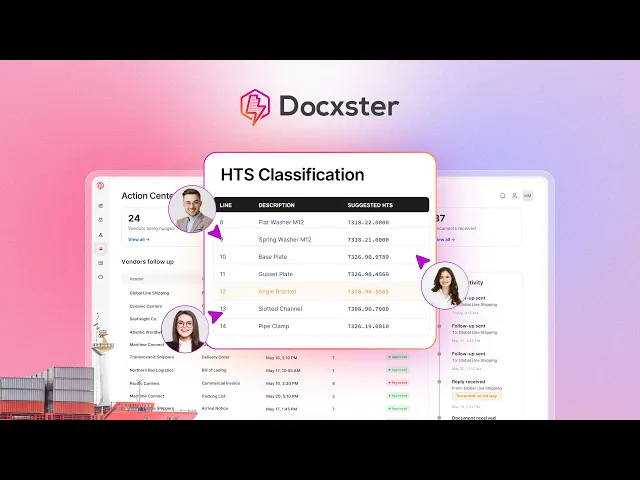
Docxster is an AI-powered document intelligence platform that combines intelligent document processing (IDP), workflow automation, and secure cloud storage. For customs, it works as an AI platform for compliance that sits upstream from filing software and catches document errors before entries reach ACE or your broker. Instead of relying on compliance tools to flag mismatches after filing, Docxster surfaces them before documents enter your customs workflow.
Key features
High-accuracy data extraction: Automatically extracts vendor name, quantities, product descriptions, and declared values from invoices, bills of lading, and packing lists. Handles handwritten notes and low-quality scans without templates.
Validation against your rules: You define rules specific to customs workflows—quantity must match across documents, weight totals must fall within acceptable range, product descriptions must align with HTS codes. When data from one document mismatches another, the platform flags it automatically before filing.
Human-in-the-loop review: Routes problematic documents to your team with flagged fields highlighted. Your broker or compliance officer reviews and corrects data directly in Docxster, creating an audit trail of who reviewed what and when.
Integration with ERPs and filing software: Extracted data flows into your existing systems through APIs. No static files waiting to be re-entered. Data moves straight into customs filing software, spreadsheets, or ERP systems.
Searchable document storage: Docxster Drive stores all processed documents encrypted and indexed. Your team finds documents using vendor name, date, or content search instead of browsing folders.
2. Descartes CustomsInfo

Best for: Organizations that need to look up trade codes and regulatory reference material.
Descartes CustomsInfo operates as a trade content reference tool with access to HS codes, HTS codes, and customs rulings. The platform has provided reference material since 1989. Organizations use it when they need to research specific codes or regulatory information for classification decisions.
CustomsInfo Reference offers online access to code lookups and ECCN locators. CustomsInfo Manager manages item master databases. CustomsInfo Audit checks data integrity. The platform works as a reference resource rather than automated compliance checking.
Key features
Trade code and regulatory lookups: Access HS codes, HTS codes, and customs rulings to research specific classification questions and regulatory requirements.
Reference library: Look up ECCN locators and trade content to support classification decisions across your operations.
Item master management: Use CustomsInfo Manager to maintain and organize your product classification database.
Data integrity audits: CustomsInfo Audit validates the accuracy of your classification data and flags inconsistencies.
3. Thomson Reuters ONESOURCE Global Trade

Best for: Organizations that need access to regulatory trade data and tariff schedules across multiple countries and trade agreements.
Thomson Reuters ONESOURCE Global Trade Content provides a reference library of trade regulations accessible from a central repository. The platform covers tariff schedules, trade agreement rules of origin, import and export controls, and restricted party screening information. Organizations use it to look up regulatory requirements when they need to research trade compliance information across different countries.
The content is updated by a network of trade compliance experts and covers over 210 countries and territories with 450 trade agreement rules of origin. Teams access the information through web interfaces or data extracts to support research and decision-making on trade compliance questions.
Key features
Regulatory content reference: Access tariff schedules, trade agreement rules of origin, and import and export controls across 210+ countries.
Updated by experts: Trade compliance information is maintained by a worldwide network of regulatory experts to keep content current.
Multiple access methods: Reference content through web interface, web services, or extract options for integration with your systems.
Restricted party screening: Look up embargoed countries, sanctioned parties, and restricted products to screen shipments before export.
4. Sayari
Best for: Compliance teams that need to research supplier ownership and business relationships for due diligence purposes.
Sayari provides corporate and trade data that teams use when researching suppliers and business partners. The platform lets you look up ownership information and access trade transaction history. Organizations use it to research supply chain relationships and understand vendor backgrounds before making decisions.
The platform accesses corporate registry filings and global trade data. Teams can upload supplier lists to research them and view company information. Sayari shows trade activity history and connections between companies and individuals. The tool generates reports with source citations when documenting compliance research.
Key features
Supplier research and profiling: Look up company ownership and background information to understand supplier structures.
Trade transaction history: Access trade records to research supplier shipment activity and patterns.
Relationship mapping: Trace connections between companies and individuals in your supply chain.
Source documentation: Generate reports with cited sources when documenting due diligence work.
5. Exiger

Best for: Organizations that need to screen suppliers and third parties against trade compliance and sanctions restrictions.
Exiger is a platform for trade compliance and third-party risk management that uses threat intelligence to research entities across supply chains. The platform helps teams screen suppliers and business partners for sanctions, export controls, and trade compliance risks. Organizations use it to verify information about customers, intermediaries, and suppliers before working with them.
The platform screens entities against watchlists and traces product and company information across trade networks. It maps ownership and relationships to identify connections and potential risks. Exiger generates documentation with source information when compliance screening is completed. The platform has received FedRAMP authorization for security and compliance standards.
Key features
Entity screening and verification: Screen suppliers, customers, and intermediaries against sanctions lists, export controls, and trade compliance restrictions.
Trade network mapping: Research product and company information to trace relationships and ownership across supply chains.
Risk identification: Verify compliance status for entities and identify potential trade or sanctions violations.
Compliance documentation: Generate source-cited reports and case files for screening decisions and regulatory requirements.
6. Oracle Global Trade Management

Best for: Organizations that need to centralize tariff management, trade agreement tracking, and customs documentation across their supply chains.
Oracle Global Trade Management is a cloud-based platform that helps organizations manage cross-border trade processes and ensure compliance with trade regulations. The platform centralizes tariff information, trade agreement rules, and customs requirements so teams can apply consistent processes across shipments. Organizations use it to automate trade compliance tasks and reduce risk when processing imports and exports.
The platform screens shipments for tariff savings opportunities and qualifies them for trade agreements. It manages trade incentive programs such as drawback, bonded warehouses, and foreign trade zones. Teams use it to build customs declarations and track country of origin information. Oracle GTM provides landed cost visibility by calculating total import costs including duties and taxes across your supply chain.
Key features
Tariff and trade agreement management: Screen shipments for tariff savings and qualify them for free trade agreements based on country of origin and bill of lading.
Trade incentive program management: Deploy programs such as drawback, bonded warehouses, and foreign trade zones to manage duty and tax exposure.
Customs declaration preparation: Build customs documentation automatically using invoice and shipment data enriched with trade master data.
Landed cost visibility: Calculate total import costs including transportation, duties, taxes, and fees across your extended supply chain.
7. Descartes QuestaWeb

Best for: Importers and FTZ operators that need to manage duty costs and comply with FTZ regulatory requirements through inventory and filing automation.
Descartes QuestaWeb is a cloud-based platform designed specifically for managing foreign trade zone operations. The software helps importers and FTZ operators automate compliance reporting and CBP filings while tracking inventory movement within the zone. Organizations use it to manage duty deferrals and reduce customs fees through FTZ operations.
The platform centralizes FTZ inventory control and automates routine CBP filings. It enables weekly entry filing to minimize merchandise processing fees and tracks goods that qualify for duty elimination such as exports, scrap, and waste.
Key features
FTZ inventory and reconciliation: Centralize control over goods in the zone and track movement between the zone and U.S. commerce for accurate reporting.
Automated CBP filings: Generate and submit routine customs documents to streamline compliance and reduce manual filing work.
Duty management: Calculate duty deferrals and identify opportunities to eliminate duties on exports, scrap, and production losses.
Fee reduction: File entries weekly to minimize merchandise processing fees and lower customs charges compared to per-shipment filing.
8. SAP Global Trade Services

Best for: Organizations that need to centralize trade compliance data and manage import and export processes within an existing SAP environment.
SAP Global Trade Services is a solution that automates trade compliance processes and manages import and export documentation. The platform centralizes compliance data in a single repository so teams can apply consistent processes to their cross-border trade operations. Organizations use it to reduce customs delays and manage trade documentation.
The platform manages free trade agreements, customs procedures, and preference data for tariff qualification. It integrates with SAP HANA as the primary database and connects to customs authorities and brokers in supported countries. Teams use it to standardize their global trade workflows and maintain audit readiness through centralized compliance records.
Key features
Trade compliance centralization: Store import and export compliance information in a single repository to standardize processes across locations.
Free trade agreement management: Track preference data and rules of origin to qualify shipments for tariff savings.
Customs documentation: Manage customs procedures and automate preparation of declarations and filings.
Customs connection: Connect to customs authorities and customs brokers in supported countries for direct communication and filing.
What to look for in an automated compliance software for US customs
Here's everything you need to look for when choosing compliance automation software:
Current HTS and tariff data: The software should maintain up-to-date Harmonized Tariff Schedule codes and duty rates. CBP classification rules change throughout the year, and outdated data risks misclassification. Verify the vendor updates regularly from primary sources like the International Trade Commission and CBP.
Checks across documents before filing: The tool should validate information across your invoice, bill of lading, packing list, and entry form simultaneously. Mismatches between documents trigger CBP examination. The software should flag inconsistencies in product description, weight, quantity, or value before filing so corrections happen on your side, not in audit.
Supply chain traceability for UFLPA: The software should document product origin and supplier information to demonstrate forced labor compliance. You need to record where goods came from, which suppliers provided components, and whether materials came from Xinjiang. The tool should help you map supplier relationships and identify restricted sources.
Human review and an audit trail: Automated screening catches obvious errors, but a compliance officer needs to review complex entries before filing. The software should include a review step where someone approves or rejects entries and adds notes. The system should log every change and who made it for CBP audits.
Fit with your filing software: The compliance tool should integrate with the customs entry software you use to file with ACE or work with your broker's platform. If data doesn't move cleanly between systems, you create manual steps that slow filings and introduce errors.
Choosing compliance software by where your entry errors start
Compliance tools each handle different parts of the customs workflow, but entry errors start in your source documents. A mismatch between your invoice and bill of lading carries into your entry. Document mismatches are what compliance software catches after the fact, not before.
Docxster stops errors at the document level. The platform validates invoices, bills of lading, and packing lists against each other before filing. When inconsistencies surface, your team fixes them on source documents instead of discovering them in post-entry audit. This means fewer entry rejections and fewer CBP examinations.
By catching errors before they reach compliance screening, you reduce rework and speed up processing. Your compliance software focuses on genuinely complex decisions instead of cleaning up preventable document mistakes.
See how Docxster prevents entry errors before filing
FAQs
What does automated compliance software do for US customs?
Automated compliance software validates entry data against CBP rules before filing and checks documents for inconsistencies that could trigger audits. It flags missing information, misclassifications, and data mismatches so teams can correct them before submission.
Is compliance software the same as customs filing software?
No. Compliance software validates and screens data before filing. Filing software submits entries to ACE. You need compliance software first to catch errors, then filing software to submit clean entries.
Can compliance software classify products under the HTS?
Compliance software references HTS codes and flags classification errors, but it doesn't automatically assign codes. It confirms whether your chosen classification matches product descriptions and tariff rules based on the data you provide.
Which compliance software suits customs brokers?
Docxster works upstream by validating source documents before entries reach your broker. This reduces the errors your broker has to fix and speeds up filing through ACE. Other tools like Descartes CustomsInfo, Oracle GTM, and SAP Global Trade Services integrate with broker platforms for classification and tariff management.


Turn documents into decisions.
See how Docxster gets you from inbox to insight in minutes, not days. Bring your toughest workflow — we'll show you what it looks like solved.


