
Automated Commercial Environment (ACE)
Definition
The Automated Commercial Environment (ACE) is the U.S. government's online system for handling imports and exports. It is run by U.S. Customs and Border Protection (CBP).
Anyone who brings goods into or out of the United States sends their shipment details through ACE. CBP and 47 other government agencies review that data and decide whether the goods can enter. CBP calls it the "Single Window," because it lets you file trade data in one place instead of sending the same paperwork to many agencies.
What ACE Holds
ACE keeps the full record of a shipment crossing the U.S. border. Four things make up most of that record:
The manifest – the list of what a carrier is transporting.
The release request – the ask to let the cargo leave the port.
The entry summary – the form that spells out the duty owed, what the goods are, and how much they are worth.
Agency data – the extra details that other agencies need, like the FDA and the USDA, sent in a shared format so every agency reads it the same way.
All of this reaches ACE through one of two doors: a free website account called the ACE Secure Data Portal, or a direct computer-to-computer link called ABI.
Who Uses ACE
ACE sits at the center of every commercial shipment crossing the U.S. border, so several different people rely on it, each for their own reason:
Customs brokers – file entries on behalf of the importers who hire them.
Importers – can file their own paperwork directly, or use ACE to check their own records.
Carriers and freight forwarders – file the manifest for whatever they are moving, by sea, air, rail, or truck.
Operations and finance staff – at logistics and manufacturing companies usually handle the invoices, bills of lading, and compliance forms that feed into these filings.
How a Shipment Moves Through ACE
A normal import moves through ACE in two steps.
Step 1: Cargo Release
The importer or broker files a release request, asking Customs to let the goods leave the port.
Step 2: Entry Summary
Once the goods are released, the importer has 10 working days to file the entry summary. This form lists the duty owed, the product's classification code, and its value.
ACE checks the filing against the carrier's manifest to make sure the two agree, runs it through the relevant rules, and returns a status. That status usually falls into one of three outcomes:
Released – the goods can move on.
Held for exam – Customs wants to physically inspect the shipment.
Documents required – Customs needs more information before it will decide.
A Real Example
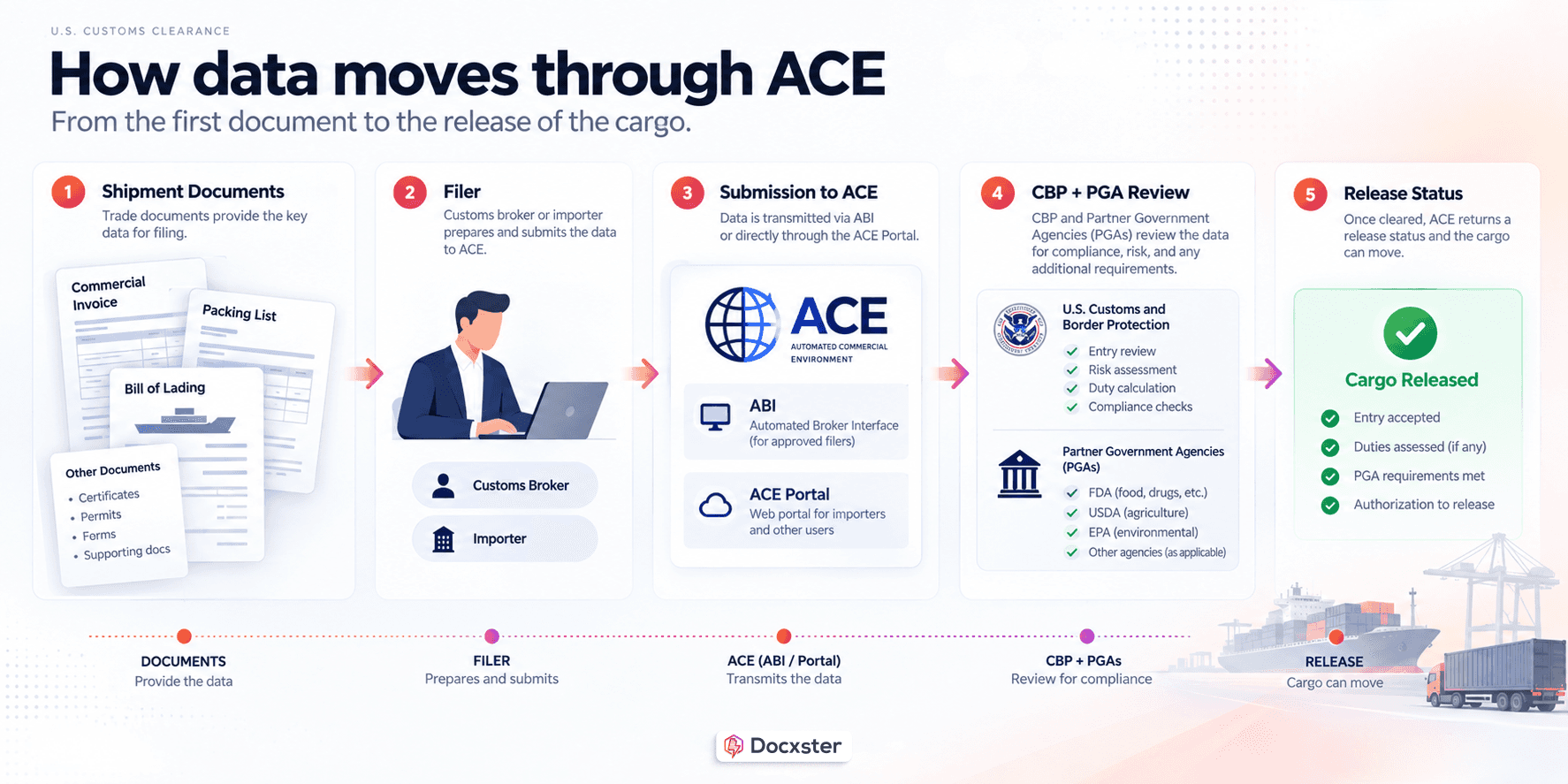
A company in Ohio imports car parts from Germany. Their customs broker gets the commercial invoice and packing list, reads off the values and classification codes, and files the entry through ABI.
ACE checks the entry against the shipping line's manifest, confirms they match, and returns a "released" status, so the container can leave the port. Ten days later, the broker files the entry summary showing the duty owed. The importer pays it through a single monthly bill instead of paying separately on every shipment.
Visual Anatomy
[Image placeholder — Steeve to supply] Annotated diagram of the ACE data flow: documents (invoice, packing list, BOL) connecting to a filer (broker/importer), connecting to ABI or the ACE Portal, connecting to CBP + PGA review, connecting to a release status.
Types and Variations
ACE works a little differently depending on your role and what you're filing. Here are the main ways it splits.
Two Ways to File
There are two doors into ACE, and most companies end up using both.
The ACE Secure Data Portal is a free website account, used for things like truck manifests, moving goods in-bond, and managing an account.
ABI is a direct computer-to-computer link, and it carries the heavier filings like entries and entry summaries. A broker filing a hundred entries a day works through ABI, since typing each one into a website would be far too slow. That same broker might still log into the Portal to pull a report.
Four Kinds of Manifest
Every carrier has to file a manifest, and the kind depends on how the goods travel:
Ocean manifest – filed by carriers moving sea containers.
Air manifest – filed by air carriers.
Rail manifest – filed by rail carriers.
Truck manifest (e-Manifest) – filed by trucking companies before a truck reaches a land border, so Customs already knows what's coming.
A freight forwarder moving a sea container files the ocean version. A trucking company crossing from Canada files the truck e-Manifest.
Different Account Types
An ACE account is built around the role a company plays in trade. A business sets up a main account tied to its tax ID, then adds sub-accounts for each role it plays, such as importer, broker, carrier, or surety.
This matters because a business is often more than one thing at once. A large manufacturer might be an importer on some shipments and act as its own broker on others. The account structure keeps those roles separate.
ACE Versus the System It Replaced
ACE took over from an older system called ACS, the Automated Commercial System, which Customs had used since the 1980s. ACS was switched off in stages, and its last piece was fully retired in November 2023. Today, ACE is the only system there is. If an older guide mentions filing in ACS, that route no longer exists.
ACE Versus ABI
ACE and ABI are sometimes mistaken for competitors, but they are not. ACE is where the data ends up. ABI is one of the roads that gets it there. When a broker "files through ABI," the entry still lands inside ACE. Picture ACE as the building, and ABI as the road leading up to the door.
FAQs
Is ACE mandatory?
Yes. Filing electronic entries, entry summaries, and manifests in ACE is required, not optional. Customs made it mandatory in stages across 2015 and 2016, and ACE is now the only approved electronic system for these filings. The older system it replaced, ACS, was fully shut down in November 2023, so there is no legacy route left to file through instead.
What is the difference between ACE and ABI?
ACE is the system the data goes into. ABI is one way of sending it there. Think of ACE as the destination and ABI as the road that reaches it. Brokers and self-filing importers send entries and entry summaries through ABI, a direct computer-to-computer link. The ACE website handles other jobs, like managing an account and pulling reports, but entry filing itself travels in over ABI.
Do I need a customs broker to use ACE?
No. An importer can file directly by setting up the right ACE account and filing software. In practice, most importers still hire a licensed customs broker, because entries involve classification, valuation, and agency rules that are easy to get wrong and costly to fix. Someone who imports only occasionally, and already uses a broker, often doesn't need their own account at all.
Is ACE free to use?
The ACE website is free. Customs does not charge for access to the system itself. What often costs money is the software around it: brokers and importers who file through ABI usually pay a separate company for the filing tools that connect to ACE. The government platform costs nothing, but the tools most businesses use to file through it are not free.
What is an ACE report?
An ACE report is a record pulled directly from the ACE website, showing a company's own shipment and payment history. Importers and brokers use these reports to check their own filings, catch errors that keep repeating, and spot patterns across entries. An ACE account is required to run them. Many teams use these reports to check their own compliance early, while there's still time to fix a mistake.
Related Blogs

Sep 21, 2026
-
What Is HTS Classification and How to Automate It

Sep 15, 2026
-
Proforma Invoice vs Commercial Invoice: How Brokers Pull Clean Entry Data From Both

Aug 25, 2026
-
A Guide to Filing the CBP Form 7501 Without Manual Entry

Aug 20, 2026
-
The Broker's Guide to ISF Filing: Rules, Deadlines, and Costly Mistakes

Aug 14, 2026
-
The Customs Broker Software That Actually Cuts Manual Data Entry (2026)
Aug 17, 2026
-
The Real Cost of a Wrong HTS Code (and How to Catch It Before CBP Does)

Aug 6, 2026
-
Customs Brokerage Document Automation: A Complete Guide to Faster Entry Prep
Turn documents into decisions.
See how Docxster gets you from inbox to insight in minutes, not days. Bring your toughest workflow — we'll show you what it looks like solved.


