-
A Data-Backed Playbook for Finance Document Automation in 2026
44% of Finance teams say they're mostly automated. So why does the workload persist? A 5-move playbook built from Docxster's 2026 survey of 109 leaders.
Last updated:


TL;DR
Finance teams are already more automated than most, with 44% describing their setup as “mostly automated” and 97.2% having automated some part of document intake.
The main problem is no longer adoption; it is document variability from changing vendor formats, low-quality scans, and inconsistent intake channels.
Finance teams should identify the vendors causing the most extraction failures and use those real documents to test any automation vendor.
The best next step is a focused 60-day AP pilot that proves value on one high-volume workflow before expanding.
Any finance automation tool should offer templateless extraction, confidence-based review, field-level audit trails, no-code workflow changes, and traceability from source document to GL entry.
Finance teams in document-intensive industries have already done what most organizations are still trying to start.
In Docxster’s 2026 State of No-Code Document Automation survey, 44% of the 109 Finance leaders describe their setup as “mostly automated.” And nearly all of them (97.2%) have automated some part of their document intake.
However, the payoff hasn’t matched the investment. This playbook explains why, and gives you five moves to fix it.
For the full Finance segment data, see the State of No-Code Document Automation 2026: Finance Report:
The State of No-Code Document Automation 2026: Finance Report.
Move 1: Score your automation maturity against 109 Finance peers
You’re further along the maturity curve than you probably realize. In Docxster’s 2026 survey:
Finance teams adopted document automation and OCR tools at 39.4%, roughly six points above the 33.5% survey baseline
Only 4.6% say they’re unsure about their tool mix, half the rate of the broader sample
44% describe their setup as “mostly automated,” compared to 33.5% across the full survey
You know what you’re running. You’ve been running it longer than most.

But the maturity advantage comes with a structural catch. The further along the curve you sit, the more cracks in the document layer you see. Think of it like compounding interest running in reverse: every additional automation layer creates more visibility into where the document layer breaks, because the document variability underneath was never what those tools were designed to address.
Three findings in Docxster’s survey prove the point:
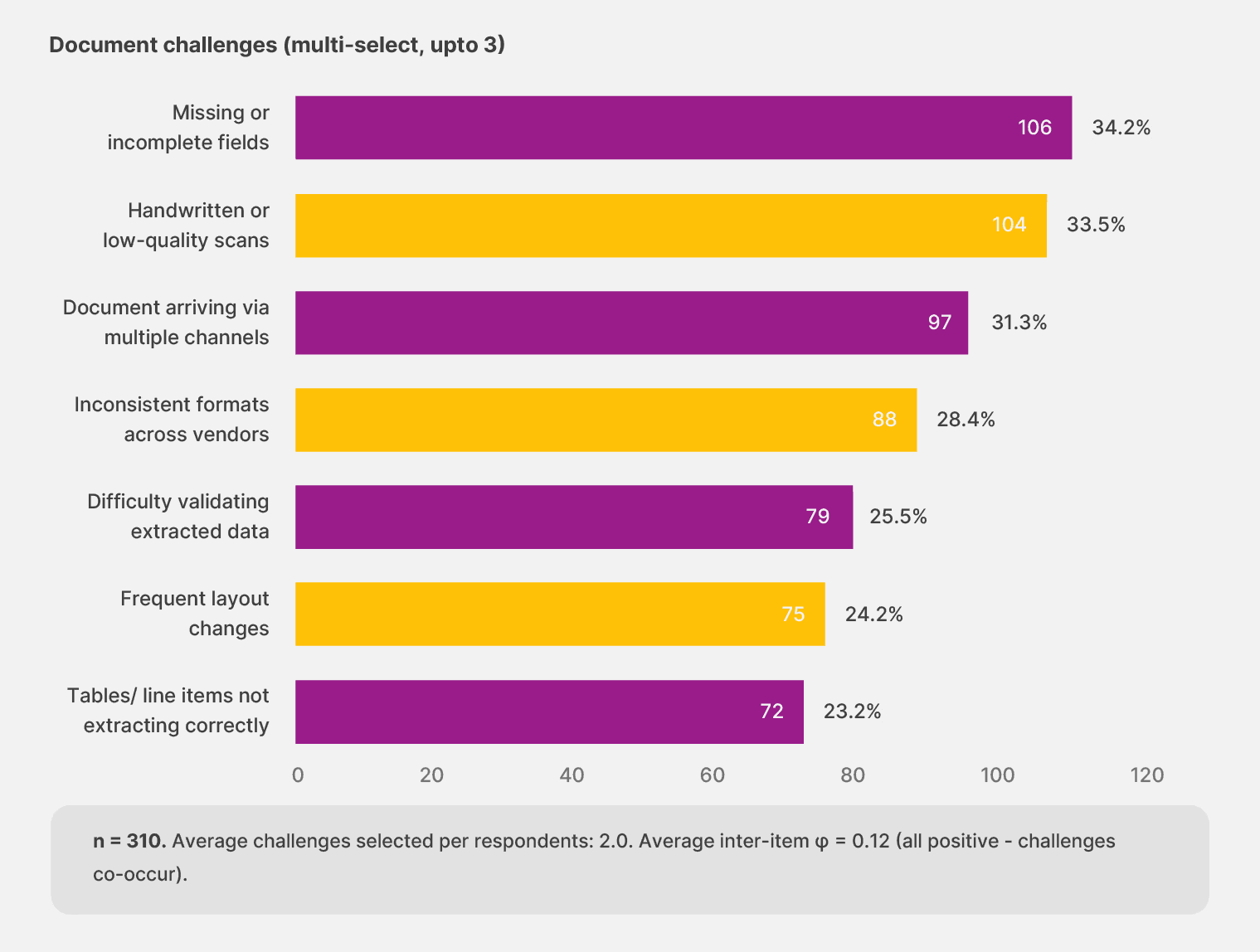
Your intake breaks more often: Among Finance teams, 37.6% report that intake issues hit “often” or “almost always,” compared to 33.3% across the full survey. Another 74.3% experience at least occasional workflow disruptions, compared with 67.4% in the baseline. You’ve automated more of the front door, so you see more of what breaks behind it.
Your vendors are the bottleneck: When a vendor changes an invoice layout or switches PO numbering formats, the extraction layer trained on the old format breaks. In the survey, 32.1% of Finance teams report frequent layout changes disrupting their workflows, roughly 1.3 times the 24.2% baseline. Handwritten or low-quality scans compound the problem, increasing it to 38.5% versus 33.5%. You’ve solved the structural extraction problem (tables and line items failing to extract is actually less of an issue for Finance than the survey average). The wall is the document that arrives in a shape your system hasn’t seen before.
Your best people are doing your worst work: Among Finance teams, 33.3% say business users manually fix the data when automation breaks, compared to 27.4% in the baseline. Finance teams are also five points less likely to get IT support for the fix (24.8% versus 29.8%). The cleanup routes to your AP leads, controllers, and senior accountants. Every hour a controller spends correcting an extraction error is an hour not spent on analysis, close support, or judgment work.
👉 Action step: Score yourself against the DAMI maturity tiers. Most Finance teams in Docxster’s survey cluster are at Level 3 (Mostly Automated). If that’s where you land, the wall in front of you is the document layer. The rest of this playbook walks you through how to get past it.
Move 2: Identify the vendors breaking your extraction
The diagnosis above points to a specific culprit: vendor format variability. This is the move where you turn that diagnosis into a target list.
Template-based extraction reaches its structural limit at scale. A model that requires a template per format turns every vendor layout change into an IT ticket or a manual workaround. If your team processes documents from 200+ vendors, the maintenance cost compounds every quarter, like carrying depreciation on an asset that keeps requiring capital improvements just to hold its value.
In Docxster’s survey, 38.5% of Finance teams process between 5,001 and 50,000 documents per month. At that volume, templateless extraction becomes a structural requirement.
What’s the difference?
Template-based: Vendor changes invoice layout → IT ticket → reconfiguration → testing → production. Timeline: days to weeks.
Templateless: Vendor changes invoice layout → system reads the new format → flags low-confidence fields → your team corrects what needs correcting → system learns. Timeline: same day.
Docxster’s templateless extraction reads new document formats on first contact, without a setup step. When a vendor changes their invoice template, your workflow doesn’t stall while someone rebuilds extraction rules. The system adapts, flags low-confidence fields for review, and learns from the corrections.
Also, the data ingestion (import) module pulls documents from email, WhatsApp, ERPs, and manual uploads into a single pipeline, so the channel a document arrives through no longer becomes another variable to manage.
👉 Action step: Pull your top 10 vendors by invoice volume. For each one, answer two questions:
How many times has their format changed in the last 12 months?
When it changed, how long did it take your team to adjust?
The vendors at the top of both lists are where your extraction cost concentrates. Bring that list to every vendor demo you sit through.
Move 3: Restructure the route of extraction failures
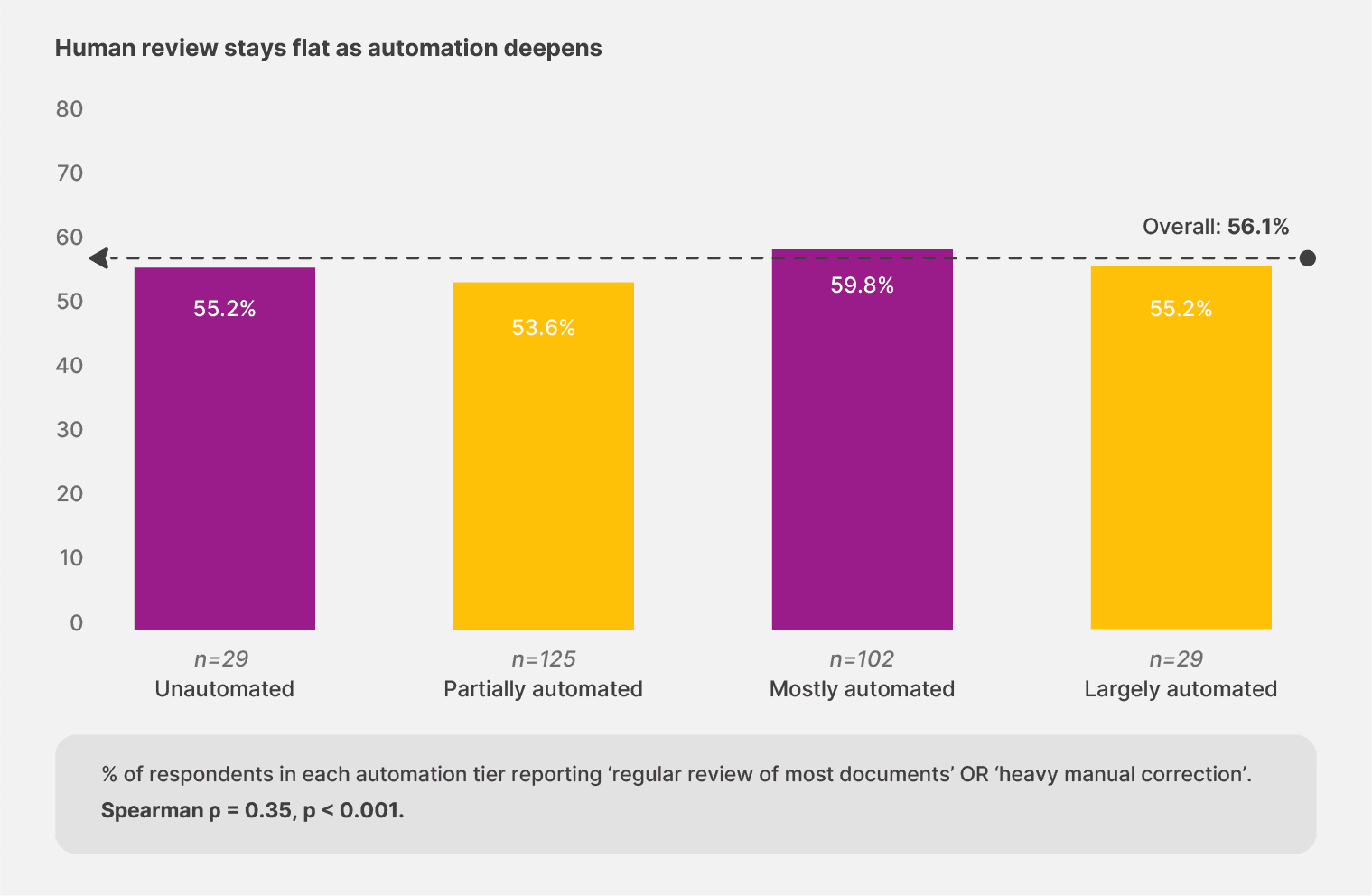
You’d expect human review to drop as automation maturity rises. Docxster’s survey shows the opposite.
Across the full 310-responder sample, teams that describe themselves as “largely automated” still require regular human review at 55.2%. Partially automated teams? 53.6%. The gap is almost nonexistent. Automation maturity reshapes what your people review. The volume of that review stays remarkably flat.
Finance teams have already landed on the right working model. In Docxster’s survey, 45.7% use spot checks, compared to 38.6% in the broader sample. You’ve moved past reviewing every document. Your tooling just hasn’t caught up.
Most extraction platforms offer two modes: review everything, or review nothing. They don’t give you the middle ground where your team samples strategically and lets clean documents pass through untouched.
The fix is confidence-flagged routing. Docxster’s human-in-the-loop validation matches the spot-check model finance teams already prefer:
You set configurable confidence thresholds
The platform routes only low-confidence outputs to a sampling queue
Each review screen puts the source document, extracted value, and the system’s best guess side by side
Clean documents pass through without intervention
Every correction feeds back into the system to sharpen future runs
Your team focuses on the cases that genuinely need human judgment. The system handles the rest.
👉 Action step: Audit where extraction failures currently route in your setup. If the answer is “senior accountants and controllers,” the exception path is the cost. Restructure it so junior reviewers or a confidence-flagged queue carry the first pass. Reserve your most experienced people for the judgment calls that actually require their expertise.
Move 4: Run a 60-day AP pilot before committing
Finance doesn’t do rip-and-replace. And Docxster’s survey confirms it: 45.9% plan incremental improvements over the next 12 months, well above the 41.3% baseline—only 17.4% plan to actively replace their existing tools. You run pilots, validate ROI, and expand from proven results.
Channel that instinct into a structured 60-day test.
AP automation for high-value vendor invoices is the natural starting point. Why AP? Because the cost of getting an invoice wrong is concrete and measurable. A missed early-payment discount or a duplicate payment. AP gives you the tightest feedback loop between automation investment and provable return.
A practical framework:
Day 0: Pick your top high-value vendor invoice types. Set baseline metrics: cycle time, error rate, and hours spent on manual correction.
Day 14: First invoices flowing through the new extraction and validation layer. Compare against baseline.
Day 30: Workflow stable on 80%+ of target invoices with confidence-flagged routing handling the rest.
Day 60: Decision point. Measurable value against your baseline and a clear expansion plan for the next AP workflow.
The common trap is trying to onboard every vendor at once. Land in the top 20% by volume and build from there. Docxster’s no-code workflow builder lets your AP leads configure and adjust rules without filing an IT ticket, so expansion happens at the speed of your business.
👉 Action step: Design your AP pilot before evaluating vendors. Define what success looks like at Day 60 in measurable terms. Then use that definition to pressure-test every demo you sit through.
Move 5: Build your vendor evaluation checklist
Docxster’s 2026 survey reveals a Finance trust profile that should anchor every tool evaluation you run this year. The top concerns are concrete, not abstract:
40.4% name the risk of incorrect payments as their top trust concern (vs. 36.8% baseline)
34.9% name difficulty tracing or correcting errors as #2 (vs. 31.6% baseline)
Compliance ranked lower for Finance (22.0%) than the broader survey (26.8%)
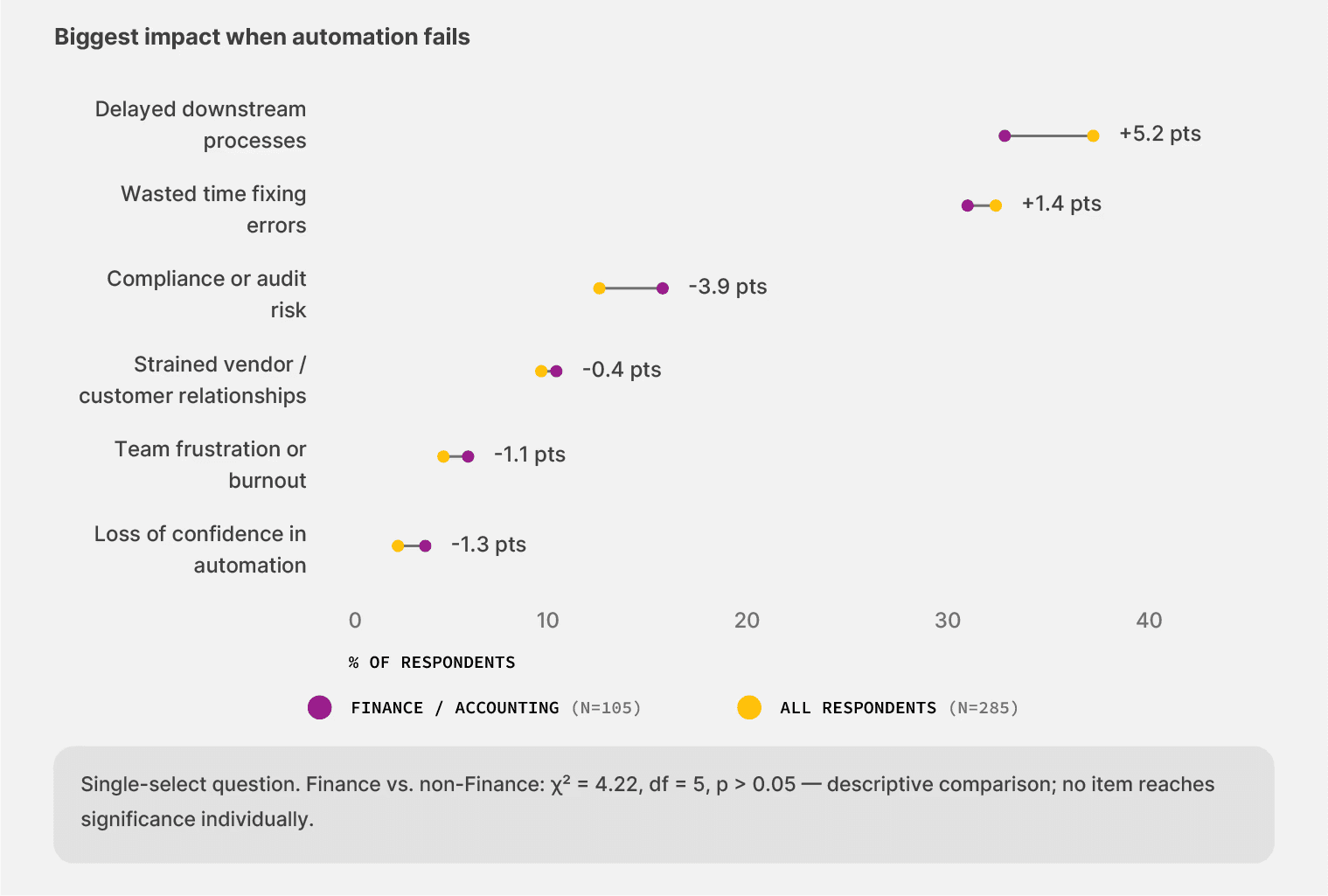
Finance leaders prioritize concrete failure modes (a misrouted payment, an untraceable correction) over regulatory abstractions. Your checklist should follow the same priority order.
Requirements to put in writing before any vendor demo:
Run your real invoices through the system (the messy ones from variable vendors, not the demo set)
Verify accuracy on the dollar amount against your three highest-volume vendor formats
Confirm every extracted field traces from the source document to the GL entry
Require an immutable change log with timestamps and user attribution
Confirm role-based access controls on the audit trail
Require the audit trail to be exportable for external audit review
Test how the system handles a vendor format it hasn’t seen before (the templateless test)
Verify confidence-flagged routing for human review, not all-or-nothing
Confirm no-code workflow adjustments your AP lead can make without IT
👉 Action step: Print this checklist. Bring it to your next vendor demo. Any vendor who can’t trace a single field from the source document to the GL entry should fail your evaluation before the demo finishes.
The compounding works both ways for finance teams
The 109 finance leaders in Docxster’s 2026 survey mapped the terrain. The problem was never adoption. The wall is the document layer itself. And the question that separates platforms built for this reality from the ones that created the ceiling: How does this system behave when a vendor sends a document it hasn’t seen before?
Docxster was built around that question. Templateless extraction that reads new vendor formats on first contact. Human-in-the-loop validation that routes only the exceptions your team needs to see. An audit trail that traces every field from source document to GL entry, built for the CFO who needs to show their work and the auditor who needs to verify it. And a no-code workflow builder that puts your AP leads in control of the rules without filing an IT ticket.
The compounding interest that runs in reverse on your current stack will run in your favor once the document layer adapts to your documents. The next move belongs to you:
Take the DAMI assessment to improve your automation initiatives
Ready to automate your finance team's document workflows?
FAQs: Finance Playbook for Document Automation
What is no-code document automation for finance teams?
No-code document automation lets finance teams automate document-heavy workflows without relying on developers for every rule change. For AP teams, that usually means extracting invoice data, validating fields, routing exceptions, and syncing clean data into downstream systems.
Why do finance teams need no-code document automation?
Finance teams have already automated a lot of document intake, but many still struggle when vendor formats change or documents arrive in messy formats. No-code automation helps AP leads and controllers adjust workflows faster without waiting on IT.
How automated are finance teams today?
According to the article, 44% of Finance leaders describe their setup as “mostly automated,” and 97.2% have automated some part of document intake. That means most finance teams are not starting from zero; they are trying to get past the next layer of automation friction.
Why does finance document automation still break?
It often breaks because the document layer is unpredictable. Vendor invoice layouts change, PO formats vary, scans may be low quality, and documents can arrive through email, WhatsApp, ERPs, or manual uploads.
What is templateless extraction?
Templateless extraction is an AI-based approach that reads new document formats without requiring a separate template for each vendor layout. This matters for finance teams because template-based extraction can turn every vendor format change into a ticket, delay, or manual workaround.
How should finance teams find the vendors causing extraction problems?
The article recommends pulling the top 10 vendors by invoice volume and checking how often each vendor changed formats in the last 12 months. Teams should also measure how long it took to adjust when those changes happened.
What is confidence-flagged routing?
Confidence-flagged routing sends low-confidence extractions to a human review queue while allowing clean documents to pass through automatically. This gives finance teams a middle ground between reviewing every document and trusting every output blindly.
Why should finance teams run a 60-day AP pilot?
A 60-day AP pilot lets finance teams prove value before committing to a broader rollout. The article recommends starting with high-value vendor invoices, setting baseline metrics, and measuring improvements in cycle time, error rate, and manual correction hours.
What should finance teams include in a vendor evaluation checklist?
Finance teams should test real invoices, verify dollar-amount accuracy, confirm traceability from source document to GL entry, require immutable change logs, and check whether AP leads can adjust workflows without IT. They should also test how the system handles a vendor format it has never seen before.
What is the biggest trust concern for finance document automation?
The biggest trust concern is incorrect payments. 40.4% of Finance teams name the risk of incorrect payments as their top concern, followed by difficulty tracing or correcting errors.
Turn documents into decisions.
See how Docxster gets you from inbox to insight in minutes, not days. Bring your toughest workflow — we'll show you what it looks like solved.


