-
How Operations Teams Can Automate Document Workflows in 60 Days
73.5% of Operations teams run on partially automated or manual document processes. This playbook gives you 5 moves to fix it—based on data from 155 Ops leaders.
Last updated:


TL;DR
Operations teams run some of the messiest document workflows in manufacturing and logistics, but they have the least automation in place.
73.5% of Operations leaders describe their document automation setup as partially automated or worse, and 23.9% are still fully unautomated.
The biggest problem is the intake layer: documents arrive through email, portals, EDI, phone photos, manual uploads, and other channels before they ever reach a workflow.
Operations teams should start by mapping intake channels, assigning workflow owners, and piloting one high-volume workflow instead of trying to automate everything at once.
The upside is large: 57.4% of Operations teams that automate see meaningful value within 60 days, and 44.5% may be open to changing tools in the next 12 months.
Operations teams in document-intensive industries run the messiest document load in Docxster’s 2026 State of No-Code Document Automation survey—and have the least tooling to handle it. 73.5% of the 155 Operations leaders describe their setup as partially automated or worse. Nearly a quarter (23.9%) are fully unautomated. Only 4.5% call themselves largely automated.
But the same cohort sees the greatest value when they start (57.4% within 60 days) and reports the highest switching intent of any segment (44.5% persuadable in the next 12 months).
Your starting point is your advantage. This playbook shows you how to use it.
For the full Operations segment data, see the State of No-Code Document Automation 2026: Operations Report:
State of No-Code Document Automation Report 2026: Operations Segment
Move 1: Score your automation maturity against 155 Operations peers
You’re further behind on tooling than you probably realize. But the gap is structural, and it has nothing to do with how well your team runs.
In Docxster’s 2026 survey:
Operations teams adopted document automation and OCR tools at 24.5%, nine points below the 33.5% survey baseline.
RPA sits at 7.7%, about half the 14.5% average.
No-code workflow tools sit at 9.7%, a quarter below the 13.2% average.
1 in 7 Ops respondents (14.2%) can’t name what automation tools their team uses today, the largest awareness gap of any segment.
You’ve been running on spreadsheets, email-based workarounds, and manual processes that “kind of work” because the alternative required IT involvement, which your team didn’t have.
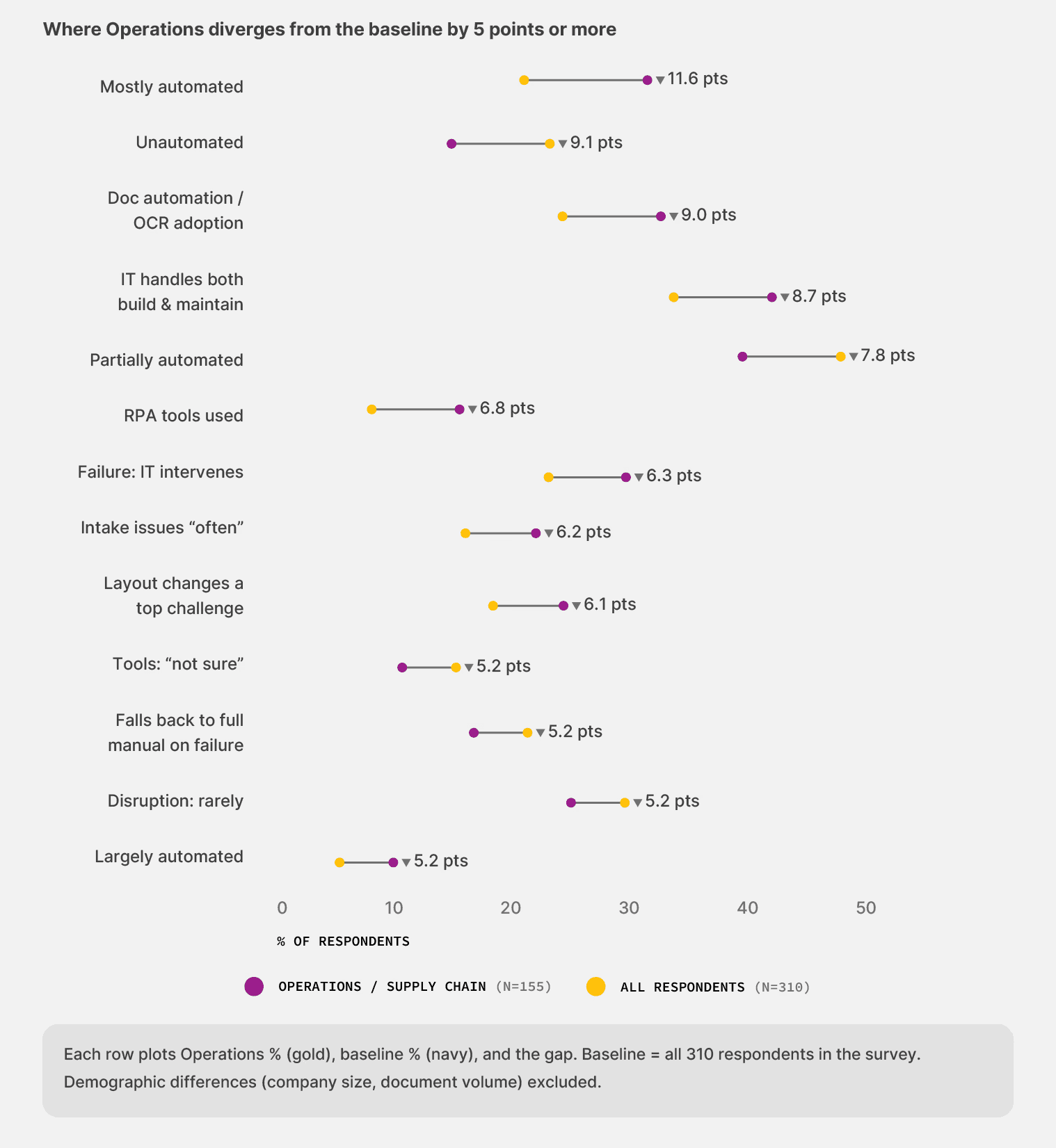
The maturity gap concentrates in the document layer itself. Think of it like running a warehouse with no receiving dock—freight still arrives, your team still processes it, but every shipment gets unloaded by hand through whatever door is closest. The work gets done. The cost stays invisible until volume spikes.
Two findings in Docxster’s survey show where the cost actually sits:
Your intake channels are the leak: The strongest statistical relationship in the entire dataset sits between intake variability and downstream disruption. Among teams reporting intake issues “almost always,” 67.6% also face weekly or near-weekly workflow disruptions. Your documents arrive through email, EDI portals, phone photos, shared inboxes, and manual uploads. Each channel adds a format variable. Each format variable adds a failure mode.
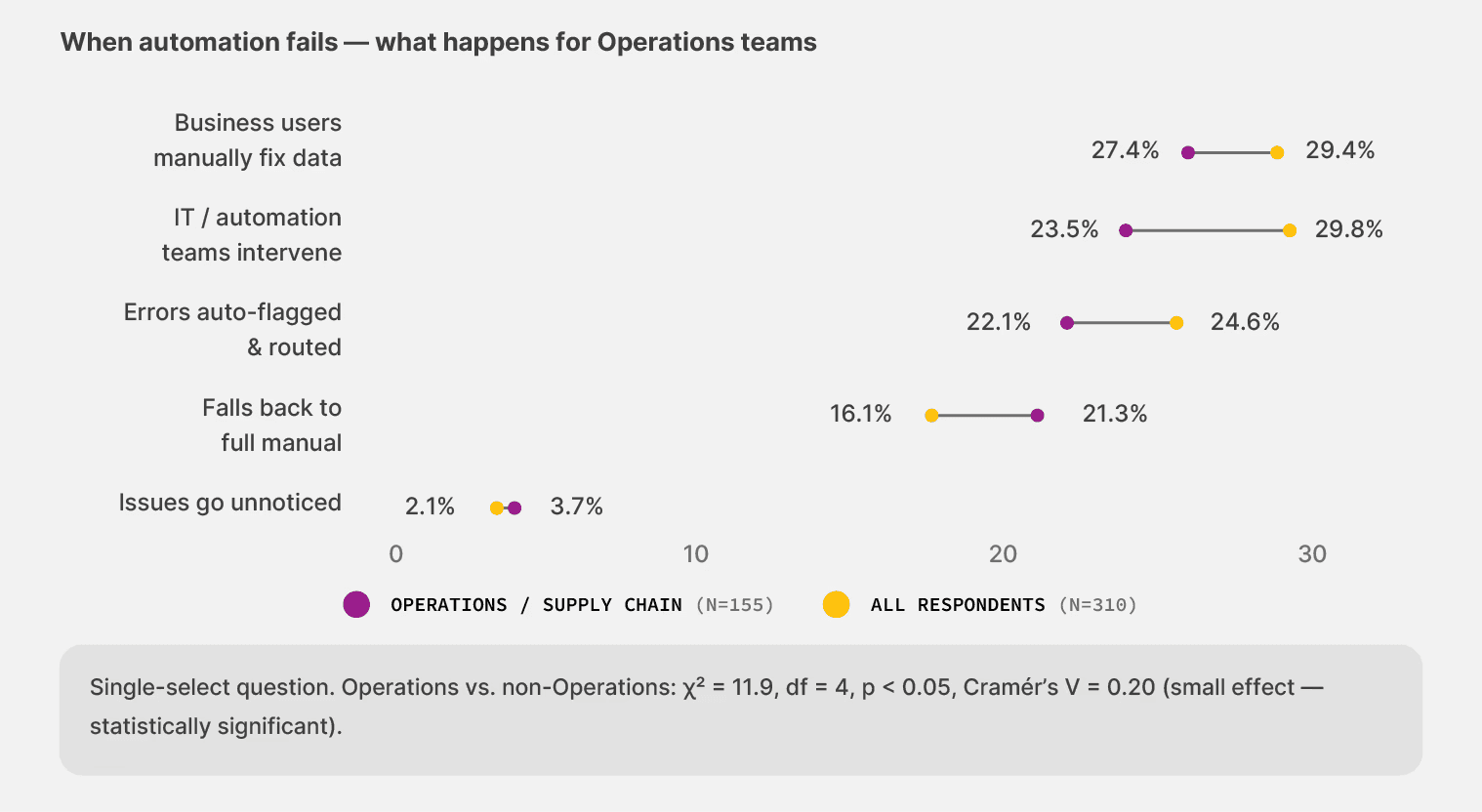
When automation breaks, your team absorbs the hit: 21.3% of Ops teams revert to full manual handling when automation fails, compared to 16.1% across the survey. And 3.7% report failures that go completely unnoticed until they surface as downstream damage—almost double the 2.1% baseline. A missing customs document results in a shipment hold. An unmatched freight bill becomes a carrier dispute. By the time anyone traces it back, the cost has already compounded.
👉 Action step: Score yourself against the DAMI maturity tiers. Most Operations teams in Docxster’s survey cluster are at Level 1 (Unautomated) or Level 2 (Partial). If that’s where you land, the first fix is your intake layer. The rest of this playbook walks you through how to do it.
Move 2: Map the intake channels that break your workflows
The diagnosis above points to a specific starting place: intake. Most Operations teams try to fix downstream workflow logic first—adjust the rules, tune the extraction, add exception handlers. The data says the leverage is upstream.
Operations handles the widest variety of document types in the survey. BOLs from carriers. Freight bills with accessorial codes that change mid-quarter. Customs declarations that shift with each port. Lumper receipts that arrive as photos from the dock. Each document type arrives through a different channel, in a different format, at unpredictable intervals.
The volume compounds the problem:
32.3% of Operations teams process between 5,001 and 50,000 documents per month
19.4% process more than 50,000
At that scale, a receiving dock with five unmarked doors and no sorting system sends chaos downstream, no matter how organized the warehouse is. Your workflows inherit every inconsistency that enters through the front door.
Docxster’s data ingestion module consolidates multi-channel intake into a single pipeline. Documents from email, WhatsApp, ERPs, and manual uploads all land in one place. Its templateless extraction reads new document formats on first contact—you don’t need to build a new OCR template every time a carrier changes its BOL layout. The system adapts, flags low-confidence fields for review, and learns from your team’s corrections.
👉 Action step: Pull a list of every channel your documents currently arrive through. Email, portals, EDI, phone photos, manual uploads, fax. For each one, answer two questions:
Where does that document land in your system?
Who is responsible for getting it into the workflow?
If documents land in more than two systems before reaching a workflow, your intake layer is the leak. Bring that channel map to every vendor demo you sit through.
Move 3: Name a workflow owner for every document type
Ownership is the variable that separates operations teams who sustain automation from those who watch it decay. Most vendor conversations focus on features. Docxster’s 2026 survey shows the predictive factor is simpler: who controls the workflow after it’s built.
The maintenance data tells the story clearly:
IT owns both build and maintenance: 28.9% of teams need weekly or more frequent fixes
Business owns both ends: 16.3% need weekly fixes
Roughly half the maintenance load. The teams closest to the documents catch format changes faster and adjust rules the same week a vendor switches layouts, avoiding the compounding delay of routing every fix through someone else’s queue.
For operations, this finding hits harder than for any other segment. About a third of the Ops cohort works at companies with fewer than 50 employees—well above the 23.5% average in the survey. At that scale, there’s no IT calendar to check. Your AP supervisor or operations lead is already the de facto workflow owner. The question is whether they have tools that match the responsibility.
Right now, the data says they don’t:
14.2% of Ops respondents can’t name their tools (survey average: 9.0%).
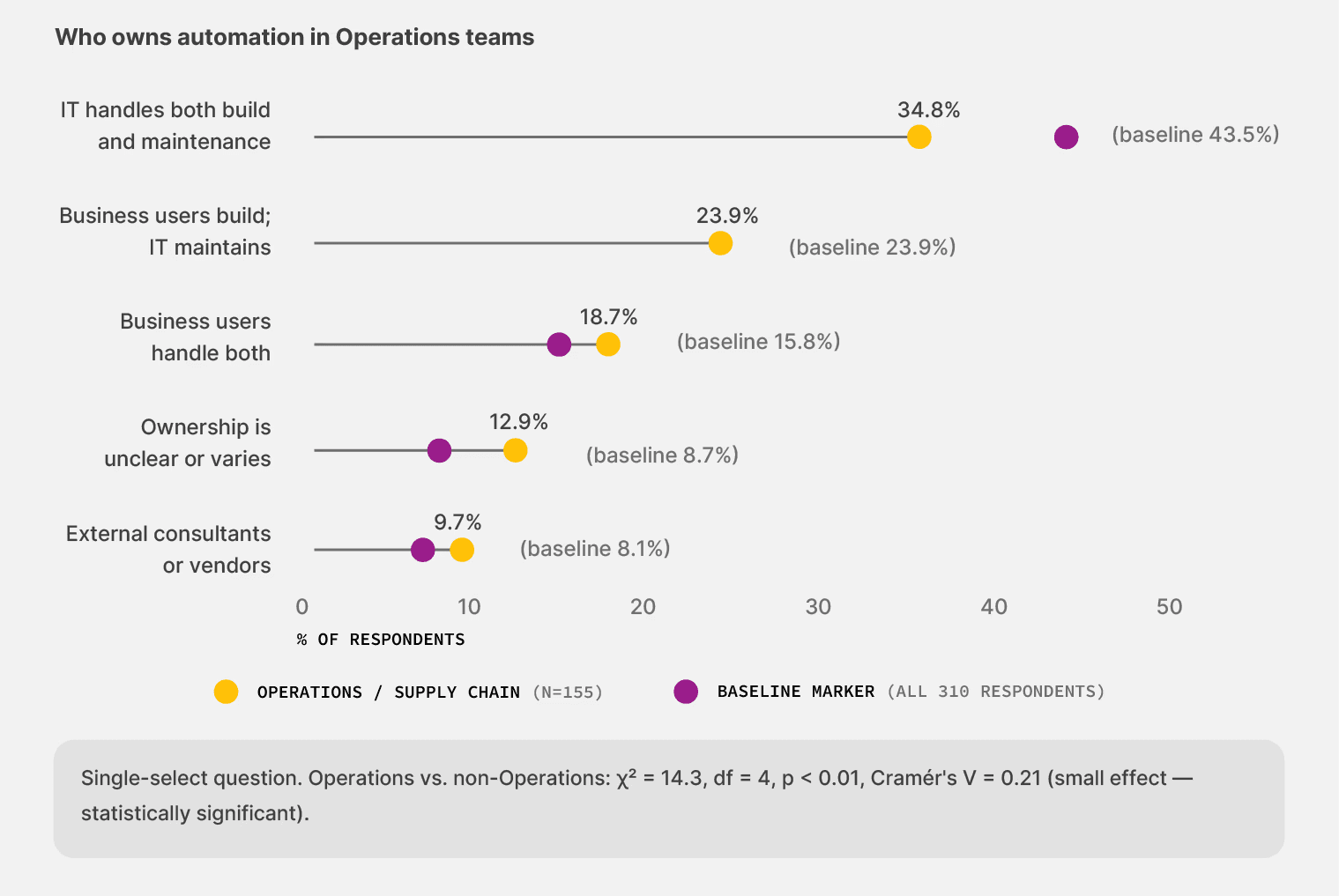
12.9% say ownership is unclear or varies by workflow (survey average: 8.7%).
Only 34.8% have IT fully owning automation (vs. 43.5% baseline)—but the business hasn’t been given tools to own it either.
Routing every workflow change through an IT ticket is like radioing the fleet manager every time a driver needs to change a tire. By the time the fix arrives, the carrier has already switched formats again. The workflow falls back to manual. Your experienced people absorb the work.
Docxster’s no-code workflow builder gives Operations leads direct control over automation rules without having to file an IT ticket. Its human-in-the-loop validation routes low-confidence outputs to a sampling queue, so your team reviews only the documents that genuinely need human judgment—not everything.
👉 Action step: Build a simple table:
Column one: every document type you process (BOLs, freight bills, customs declarations, POs, lumper receipts).
Column two: who owns the workflow for that document type. If the answer for any row is “IT,” “unclear,” or “it depends,” that’s the workflow where automation will stall.
Fix ownership before evaluating tools.
Move 4: Run a 60-day pilot on your worst workflow
Operations teams see value faster than any other segment in Docxster’s survey when they automate. The numbers are consistent:
29.4% reach meaningful value in less than 30 days
27.9% reach it within one to two months
Combined, 57.4% hit a measurable value milestone within 60 days, above the 54.8% survey average
The speed makes sense. A team automating its first freight billing workflow sees an impact immediately because the prior baseline is fully manual. You’re replacing hours of typing and reconciliation with a system that handles most of that work on arrival. The wins are still on the table because nobody has taken them yet.

The trap is trying to automate everything at once. A full-scale rollout across every document type and carrier is a container ship—slow to turn, expensive when it runs aground. The data support starting smaller.
Pick one workflow. Choose the highest-volume, most painful manual process on your team. For most Operations teams in manufacturing and logistics, that’s freight bill processing or BOL handling.
Use this framework:
Day 0: Select the workflow. Set baseline metrics: cycle time, error rate, and hours spent on manual correction.
Day 14: First documents flowing through the new system. You’re watching how it handles your real documents, not a demo dataset.
Day 30: Workflow stable on 80%+ of target documents. The platform flags low-confidence outputs for human review.
Day 60: Decision point. Measurable value against your baseline and a clear expansion plan for the next document type.
Docxster’s onboarding model aligns with this approach. You start with one workflow, prove value on your actual documents, and expand from there. Its no-code workflow builder means your ops lead can adjust rules as edge cases surface—no IT ticket required for every carrier format change.
44.5% of Operations teams in the survey are persuadable in the next 12 months—the largest open pool of any segment. The “not sure yet” cohort (21.3%) overlaps heavily with the 14.2% who can’t name their current tools. They’re not doubting the value. They’re waiting for clarity on what they’re choosing between.
👉 Action step: Design your pilot before evaluating vendors. Define what success looks like at Day 60 in measurable terms—hours saved, errors reduced, cycle time compressed. Then use that definition to pressure-test every demo you sit through.
Move 5: Build your vendor evaluation around how Operations actually fails
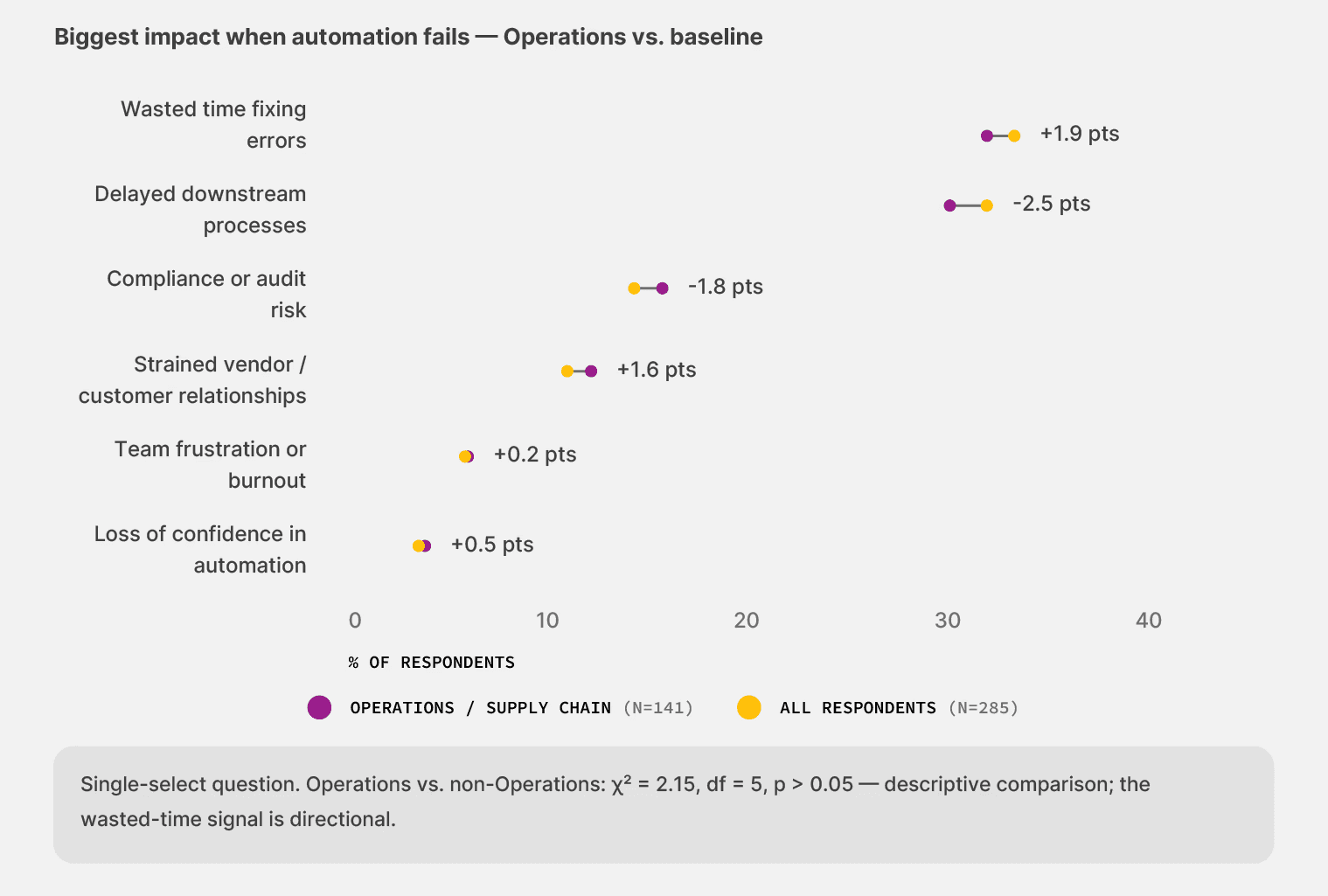
Docxster’s 2026 survey reveals an Operations trust profile that should anchor every tool evaluation you run this year. The top concerns are specific to how your team experiences failure:
33.5% name security as their top trust concern (for Finance, incorrect payments lead)
21.3% fall back to full manual handling when automation breaks (vs. 16.1% baseline)
3.7% report silent failures that go unnoticed until downstream damage (vs. 2.1% baseline)
Only 23.5% get IT intervention during a failure (vs. 29.8% baseline)
Operations failures don’t show up as payment errors or compliance flags. They show up as a dock supervisor staying late, a carrier dispute nobody saw coming, or a customs hold on a shipment that cleared extraction without a flag. Your evaluation checklist should reflect that reality.
Requirements to put in writing before any vendor demo:
Run your real documents through the system—the messy ones from variable carriers, not the demo set
Verify extraction on the document types that actually cause you problems (handwritten POs, multi-format BOLs, lumper receipts)
Confirm how the system handles a document format it hasn’t seen before (the templateless test)
Require confidence-flagged routing, not all-or-nothing review
Verify your ops lead can adjust workflow rules without an IT ticket
Confirm monitoring for silent failures—how does the system surface documents it processed but shouldn’t have?
Require an audit trail from the source document to the extracted value with timestamps.
Test what happens when the system breaks under volume. Who fixes it? How fast?
Docxster’s platform is built around the reality this checklist describes. You get templateless extraction that reads new carrier formats on first contact. Human-in-the-loop validation that routes only the exceptions your team needs to see. A no-code workflow builder that puts your operations lead in control. And an audit trail that traces every field from source document to downstream export.
👉 Action step: Print this checklist. Bring it to your next vendor demo. Any vendor who can’t handle a document format they haven’t seen before should fail your evaluation before the demo finishes.
The wins compound for operations teams once they start
The 155 Operations leaders in Docxster’s 2026 survey mapped the terrain. You run the widest variety of documents, with the least specialized tooling, and the lowest IT support of any segment. That’s the structural disadvantage.
The structural advantage is that you carry the least sunk cost in expensive tooling. Finance teams invested years in OCR layers and ERP integrations that now create switching friction. You don’t carry that weight. The cost of trying something new is comparatively small—and the data shows it pays off fast.
The next move belongs to you:
Take the DAMI assessment to improve your automation initiatives
Ready to automate your operations team's document workflows?
FAQs: Operations Playbook for Document Automation
What is no-code document automation for Operations teams?
No-code document automation lets Operations teams automate document workflows without depending on developers or IT for every rule change. It helps teams process documents like bills of lading, freight bills, customs declarations, purchase orders, and lumper receipts faster and with less manual re-keying.
Why do Operations teams need no-code document automation?
Operations teams handle high document variety across many intake channels, but often have less IT support than Finance or IT teams. No-code automation gives operations leads more control over document workflows, especially when carrier formats change or exceptions need quick handling.
How automated are Operations teams today?
73.5% of Operations leaders describe their setup as partially automated or worse. Nearly a quarter, 23.9%, are fully unautomated, while only 4.5% describe themselves as largely automated.
What is the biggest document automation problem for Operations teams?
The biggest problem is intake variability. Operations documents can arrive through email, EDI portals, phone photos, shared inboxes, ERPs, and manual uploads, and each channel adds another format or process that can break downstream workflows.
What document types should Operations teams automate first?
Operations teams should start with the highest-volume or most painful manual workflow. For many manufacturing and logistics teams, that means freight bill processing, bill of lading handling, customs declarations, purchase orders, or lumper receipts.
Why should Operations teams map intake channels before choosing a vendor?
Mapping intake channels shows where documents actually enter the business and who is responsible for moving them into the workflow. If documents pass through multiple systems before they reach automation, the intake layer is likely where the workflow is leaking.
Who should own document automation workflows in Operations?
The workflow owner should usually be the person closest to the document process, such as an operations lead, AP supervisor, or dispatch manager. The article notes that business-owned workflows have lower weekly maintenance rates than IT-owned workflows, because the people closest to the documents can catch issues faster.
Why should Operations teams run a 60-day pilot?
A 60-day pilot lets Operations teams prove value on one real workflow before expanding. The article recommends setting baseline metrics on Day 0, testing real documents by Day 14, stabilizing most target documents by Day 30, and making an expansion decision by Day 60.
What should Operations teams look for in a document automation vendor?
Operations teams should look for templateless extraction, multi-channel intake, confidence-flagged review, no-code workflow changes, monitoring for silent failures, and audit trails from the source document to the extracted value. They should also test the vendor on messy real documents, not demo-ready samples.
Why are Operations teams well positioned to benefit from automation?
Operations teams often have less sunk cost in legacy automation than Finance teams, which makes switching easier. Because many workflows are still manual or only partially automated, the first successful automation pilot can produce visible gains quickly.
Turn documents into decisions.
See how Docxster gets you from inbox to insight in minutes, not days. Bring your toughest workflow — we'll show you what it looks like solved.


